Freedom251 › AI Business Card Makers
Maigoc (Maigaoxi)
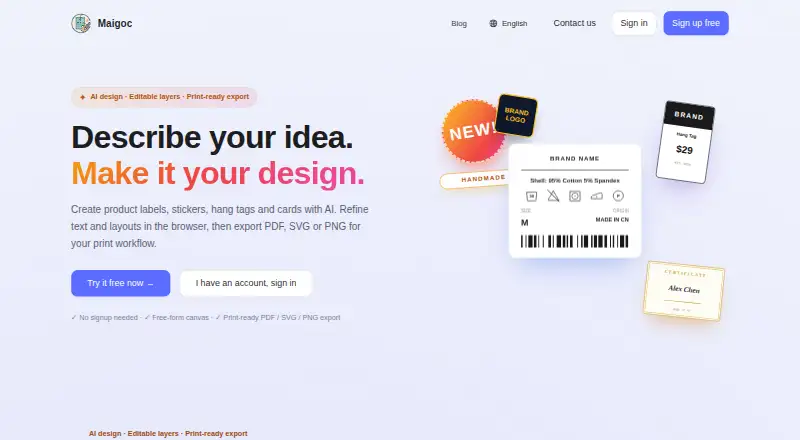
What Maigoc (Maigaoxi) is
Maigoc (Maigaoxi) is a browser-based editor for creating product labels, stickers, hang tags, cards and other print designs. Its AI assistant can draft a design or refine an existing canvas; users can also change copy and layout or adjust selected elements. The free-form canvas lets users move, resize, layer and align text, care symbols, barcodes and QR codes. Listed design types include apparel labels, stickers, hang tags, wedding invitations, business cards, menus, thank-you cards and certificates.
The care-symbol library contains more than 30 symbols for ISO 3758, GB/T 8685 and JIS L 0001, and users can upload their own SVG files. Presets cover wash care, carton, size, SKU and hang tag labels, as well as templates for SHEIN, TEMU and Amazon FBA. Exports are available as PDF, SVG or PNG; the site describes 300 DPI output with millimeter dimensions, 3 mm bleed and crop marks. The editor can be tried without an account, but AI assistance normally requires sign-in. Signing in also enables cloud autosave, syncing across devices and versioned history, and is required to save or export. The Free plan costs nothing, and the site says all templates and cloud storage are free forever.
Who it suits
Maigoc suits people making apparel labels, stickers, hang tags, cards and other print designs without professional design software. It may also suit users who need print-ready exports and editable care symbols, barcodes or QR codes.
What it does well
- Free-form canvas supports moving, resizing, layering and alignment.
- Includes more than 30 care symbols and accepts SVG uploads.
- Exports PDF, SVG and PNG at described 300 DPI.
- Provides presets for labels and templates for SHEIN, TEMU and Amazon FBA.
- Templates and cloud storage are free forever, according to the site.
What to know first
- AI assistance normally requires sign-in.
- Saving and exporting require sign-in.
- The editor is available on the web.
Limits
The editor can be tried without an account, but AI assistance normally requires sign-in. Saving and exporting also require sign-in.
Plans
| Plan | Billed and limits | Price |
|---|---|---|
| Free | All templates and cloud storage are free forever | Free |
As maigoc.com lists them, read 9 Oct 2026. The maker's own page has the final word.
Getting started
- Open the Maigoc website in a browser.
- Try the editor without an account, or sign in for AI assistance.
- Choose a design type or a listed template.
- Edit the canvas by moving, resizing, layering or aligning elements.
- Sign in to save or export as PDF, SVG or PNG.
Verdict
Choose Maigoc if you want a browser-based way to create and refine print designs, with a free plan and PDF, SVG or PNG export. Users who need to save or export must sign in, and AI assistance normally requires an account.
Questions
What does Maigoc cost?
The Free plan costs nothing. The site says all templates and cloud storage are free forever.
Can I try the editor without an account?
Yes. The editor can be tried without an account, while AI assistance normally requires sign-in.
What export formats does Maigoc offer?
Users can export PDF, SVG or PNG. The site describes 300 DPI output with millimeter dimensions, 3 mm bleed and crop marks.
What platforms does Maigoc support?
Maigoc is a web-based editor.
Can I save designs and use cloud features?
Signing in enables cloud autosave, syncing across devices and versioned history. Sign-in is required to save or export.
What kinds of designs can I make?
Listed uses include apparel labels, stickers, hang tags, wedding invitations, business cards, menus, thank-you cards and certificates.
Facts from Maigoc (Maigaoxi)'s own pages
- Account requirements
- The editor can be tried without an account; the site says AI assistance normally requires sign-in and that users sign in to save or export. · maigoc.com, 4 Oct 2026
- AI design
- Users can ask the AI assistant to create a design draft or edit an existing canvas, then refine individual elements. · maigoc.com, 9 Oct 2026
- Barcodes and QR codes
- The editor supports barcode formats including CODE128, CODE39 and EAN13, as well as QR codes. · maigoc.com, 9 Oct 2026
- Canvas
- The editor has a free-form canvas for moving, resizing, layering and aligning elements. · maigoc.com, 9 Oct 2026
- Care symbols
- The library includes more than 30 care symbols covering ISO 3758, GB/T 8685 and JIS L 0001. · maigoc.com, 9 Oct 2026
- Cloud saving
- Signing in enables automatic cloud saving, syncing across devices and versioned history. · maigoc.com, 9 Oct 2026
- Design types
- The listed use cases include apparel labels, stickers, hang tags, wedding invitations, business cards, menus, thank-you cards and certificates. · maigoc.com, 4 Oct 2026
- Editable canvas
- The free-form canvas supports moving, resizing, layering and aligning elements, including text, care symbols, barcodes and QR codes. · maigoc.com, 4 Oct 2026
- Export
- Users can export PDF, SVG or PNG; the site describes 300 DPI output with millimeter dimensions, 3 mm bleed and crop marks. · maigoc.com, 4 Oct 2026
- Exports
- The product offers 300 DPI PDF, SVG and PNG exports with millimeter dimensions, bleed and crop marks. · maigoc.com, 9 Oct 2026
- Intended users
- The maker presents the product for people creating apparel labels, stickers, hang tags, certificates and other print designs without professional design software. · maigoc.com, 9 Oct 2026
- No-account access
- The editor can be tried without an account, while AI assistance normally requires sign-in. · maigoc.com, 9 Oct 2026
- Price claim
- The site says all templates and cloud storage are free forever. · maigoc.com, 4 Oct 2026
- Product
- Maigoc creates product labels, stickers, hang tags and cards in a browser-based editor. · maigoc.com, 9 Oct 2026
- Support
- The site provides a Contact us link. · maigoc.com, 4 Oct 2026
- Templates
- The maker says templates include standards and layouts for SHEIN, TEMU and Amazon FBA labels. · maigoc.com, 9 Oct 2026
- What it does
- Maigoc creates product labels, stickers, hang tags and cards with AI, and lets users refine designs in a browser. · maigoc.com, 4 Oct 2026
Where Maigoc (Maigaoxi) stands on Freedom251
- AI Business Card Makers#12 of 25
- AI Graphic Design Software#15 of 31