Freedom251 › Game Memory Editors
MacCE
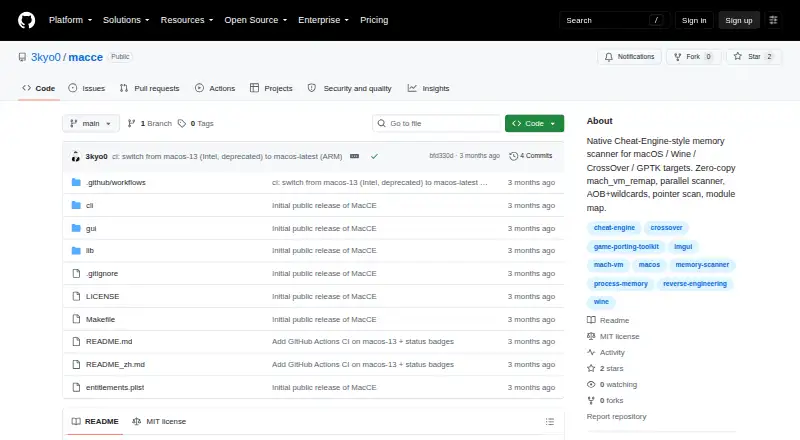
What MacCE is
MacCE is a native memory scanner for macOS programs running through Windows translation layers. It offers both a graphical interface and a command line interface, with targets including Wine, CrossOver, Whisky, Kegworks, PlayOnMac, Apple's Game Porting Toolkit, and custom Wine builds bundled with games.
It can scan numeric values and strings, compare or filter ranges, and start with an unknown value before rescanning for changes, stability, increases, or decreases. String searches support UTF-8 and UTF-16LE. AOB searches use hexadecimal byte patterns and accept ?? wildcards. Pointer scans can follow one to four levels, while module-backed addresses are shown as a module basename and offset. Users can freeze values and refresh watched values periodically.
The MIT-licensed project is free and intended for authorized uses such as examining owned software, offline single-player games, CTF practice, exam targets, and debugging a personal Wine app. The README says attaching to one's own processes does not require sudo or disabling SIP. There are no GitHub releases; the project provides build instructions requiring macOS, Xcode command line tools, and GLFW from Homebrew.
Who it suits
MacCE suits macOS users who need to inspect or debug programs running through supported Windows translation layers, including their own Wine apps. Its stated use cases also include offline single-player games, CTF practice, and exam targets, provided use is authorized.
What it does well
- Offers both a GUI and a command line interface.
- Scans numeric and UTF-8 or UTF-16LE string values.
- AOB searches accept hexadecimal patterns with ?? wildcards.
- Pointer scans cover one to four levels.
- Can freeze values and periodically refresh watched values.
- MIT-licensed and free.
What to know first
- No GitHub releases are available; the README gives build instructions.
- Building requires macOS, Xcode command line tools, and GLFW from Homebrew.
- Authors warn against use on online games or services with anti-cheat or Terms of Service restrictions.
Limits
There are no GitHub releases, so the README provides build instructions instead. The listed build requirements are macOS, Xcode command line tools, and GLFW from Homebrew.
Getting started
- Visit the project's GitHub website.
- Prepare macOS, Xcode command line tools, and GLFW from Homebrew.
- Follow the README's build instructions to build MacCE.
- Use the GUI or command line interface for an authorized target.
Verdict
MacCE is a fit for macOS users who need memory scanning for authorized programs running through Windows translation layers. Its range of scan types and GUI or command line options are useful, but users must build it from the documented requirements because there are no releases. Use should remain within authorized contexts; the authors advise against online games or restricted services.
Questions
Is MacCE free?
Yes. It is free and released under the MIT License.
Which operating system does it support?
MacCE is for macOS programs running through Windows translation layers. The project names Wine, CrossOver, Whisky, Kegworks, PlayOnMac, Apple's Game Porting Toolkit, and custom Wine builds.
Does it have a graphical interface?
Yes. The project documents both a GUI and a command line interface.
Are there downloadable releases?
The GitHub releases page has no releases. The README provides build instructions requiring macOS, Xcode command line tools, and GLFW from Homebrew.
What uses does the project describe?
It names reversing software the user owns, offline single-player games, CTF practice, exam targets, and debugging one's own Wine app. The authors advise against online games or services with anti-cheat or Terms of Service restrictions and say use should be authorized.
Facts from MacCE's own pages
- Authorized use
- The project says to use MacCE only with owned or authorized software or in CTF, research, or educational contexts, and warns against use on online games or services with anti-cheat or terms-of-service restrictions. · github.com, 8 Oct 2026
- Build requirements
- Building requires macOS, Xcode command-line tools, and GLFW installed through Homebrew. · github.com, 8 Oct 2026
- Byte patterns
- AOB scans accept hexadecimal patterns with ?? wildcards. · github.com, 8 Oct 2026
- Distribution
- The GitHub releases page says there are no releases, and the README provides build instructions instead. · github.com, 4 Oct 2026
- Intended users
- The project lists reversing owned software, offline single-player games, CTF practice, exam targets, and debugging one's own Wine app as intended uses. · github.com, 8 Oct 2026
- Interfaces
- The repository documents both a GUI and a command-line interface. · github.com, 8 Oct 2026
- License
- MacCE is distributed under the MIT License. · github.com, 8 Oct 2026
- Permissions
- The project says its binaries use the com.apple.security.cs.debugger entitlement and that attaching to one's own processes does not require sudo or disabling SIP. · github.com, 8 Oct 2026
- Pointers and modules
- It includes a 1–4 level pointer-chain scan and a module map that displays module-relative addresses. · github.com, 8 Oct 2026
- Product
- MacCE is a native Cheat Engine style memory scanner for macOS programs running through Windows translation layers. · github.com, 4 Oct 2026
- Purpose
- MacCE is a native Cheat-Engine-style memory scanner for macOS programs running under Windows translation layers. · github.com, 8 Oct 2026
- Scans
- It supports numeric value scans and rescans, unknown initial scans, and AOB byte patterns with wildcards. · github.com, 4 Oct 2026
- Scan types
- It supports numeric and string scans, comparisons and range filters, unknown initial scans, and rescans for changed, unchanged, increased, or decreased values. · github.com, 8 Oct 2026
- Strings
- String scans support UTF-8 and UTF-16LE. · github.com, 4 Oct 2026
- Target environments
- The README lists Wine, CrossOver, Whisky, Kegworks, PlayOnMac, Apple's Game Porting Toolkit, and game bundled custom Wine builds. · github.com, 4 Oct 2026
- Translation layers
- The project names Wine, CrossOver, Whisky, Kegworks, PlayOnMac, Apple's Game Porting Toolkit, and custom Wine builds as supported target environments. · github.com, 8 Oct 2026
- Usage restriction
- The authors advise against use on online games or services with anti cheat or Terms of Service restrictions and state that use should be authorized. · github.com, 4 Oct 2026
- Watch and lock
- Users can freeze values and periodically refresh watched values. · github.com, 8 Oct 2026
Where MacCE stands on Freedom251
- Game Memory Editors#21 of 23