Freedom251 › ROM Patching Software
Lunar IPS
What Lunar IPS is
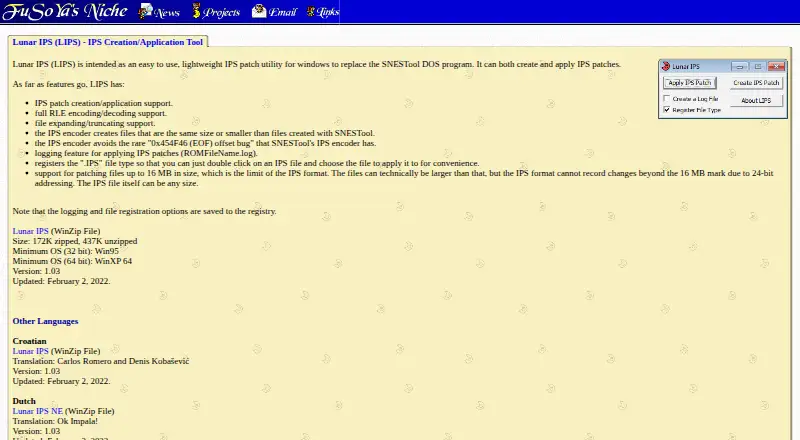
Lunar IPS is a lightweight Windows utility for creating and applying IPS patches, intended as an alternative to the SNESTool DOS program. It supports full RLE encoding and decoding, and can expand or truncate files. Its encoder produces IPS patches no larger than those produced by SNESTool and avoids the rare 0x454F46 EOF offset bug attributed to SNESTool’s encoder. When applying a patch, the utility can create a log named ROMFileName.log. It can also register the .IPS file type in Windows, allowing users to open a patch by double-clicking and select the file to patch. IPS patching supports files up to 16 MB: the format’s 24-bit addressing cannot record changes beyond that limit, although an IPS file itself can be any size. Logging and file-registration settings are stored in the Windows registry. The listed release is version 1.03, updated February 2, 2022. Lunar IPS supports command-line use; its listed minimum systems are Windows 95 (32-bit) and Windows XP 64-bit. The archive is 172K zipped or 437K unzipped, and language versions are listed in Croatian, Dutch, German, Brazilian Portuguese, Spanish, and Swedish.
Who it suits
Lunar IPS suits Windows users who need to create or apply IPS patches, including those looking for RLE encoding and decoding or file expansion and truncation. Its command-line support and optional Windows file association offer different ways to work with patches.
What it does well
- Creates and applies IPS patches.
- Supports full RLE encoding and decoding.
- Expands and truncates files.
- Can generate a log when applying a patch.
- Can register .IPS files for double-click use.
- Command-line support is available.
What to know first
- IPS patching cannot record changes beyond 16 MB.
- The listed platform is Windows.
- The listed archive is 172K zipped and 437K unzipped.
Limits
IPS patches can record changes only for files up to 16 MB because the format uses 24-bit addressing; an IPS file itself can be any size.
Getting started
- Visit the Lunar IPS website.
- Download the archive for Windows.
- Run Lunar IPS on a listed compatible Windows system.
- Optionally enable .IPS file registration to open patches by double-clicking.
- Create or apply an IPS patch, using command-line support if needed.
Verdict
Choose Lunar IPS for Windows-based IPS patch creation and application, with RLE support and file-handling tools. Look elsewhere if your patch needs to record changes beyond 16 MB or you need a platform other than Windows.
Questions
How much does Lunar IPS cost?
Lunar IPS is free, with a free plan.
What does Lunar IPS do?
It creates and applies IPS patches, supports full RLE encoding and decoding, and can expand or truncate files.
Which operating systems are listed?
The listed minimums are Windows 95 for 32-bit and Windows XP 64-bit for 64-bit.
Does Lunar IPS support command-line use?
Yes, command-line support is listed.
What is the IPS patch size limit?
IPS patching supports files up to 16 MB. The format cannot record changes beyond that because it uses 24-bit addressing.
Which languages are listed?
Croatian, Dutch, German, Brazilian Portuguese, Spanish, and Swedish versions are listed.
Facts from Lunar IPS's own pages
- Current listed release
- The page lists version 1.03, updated February 2, 2022. · fusoya.eludevisibility.org, 5 Oct 2026
- Download size
- The listed archive size is 172K zipped and 437K unzipped. · fusoya.eludevisibility.org, 5 Oct 2026
- Encoder behavior
- Its encoder avoids the rare 0x454F46 (EOF) offset bug attributed to SNESTool's IPS encoder. · fusoya.eludevisibility.org, 5 Oct 2026
- Encoder output
- Its IPS encoder creates files the same size as or smaller than files created with SNESTool. · fusoya.eludevisibility.org, 5 Oct 2026
- Encoding
- It supports full RLE encoding and decoding. · fusoya.eludevisibility.org, 5 Oct 2026
- File association
- The utility can register the .IPS file type so users can double-click an IPS file and choose a file to patch. · fusoya.eludevisibility.org, 5 Oct 2026
- File handling
- It supports expanding and truncating files. · fusoya.eludevisibility.org, 5 Oct 2026
- File sizing
- It supports expanding and truncating files. · fusoya.eludevisibility.org, 5 Oct 2026
- Founded
- 2000 · fusoya.eludevisibility.org, 23 Oct 2026
- Logging
- Applying a patch can generate a log named ROMFileName.log. · fusoya.eludevisibility.org, 5 Oct 2026
- Minimum Windows versions
- The listed minimum operating systems are Windows 95 for 32-bit and Windows XP 64-bit for 64-bit. · fusoya.eludevisibility.org, 5 Oct 2026
- Operating system requirements
- The listed minimum operating systems are Windows 95 (32-bit) and Windows XP 64-bit. · fusoya.eludevisibility.org, 5 Oct 2026
- Other languages
- The page lists Croatian, Dutch, German, Brazilian Portuguese, Spanish, and Swedish versions. · fusoya.eludevisibility.org, 5 Oct 2026
- Patch operations
- It can create and apply IPS patches. · fusoya.eludevisibility.org, 5 Oct 2026
- Patch output
- The IPS encoder creates files the same size as or smaller than files created with SNESTool. · fusoya.eludevisibility.org, 5 Oct 2026
- Patch size limit
- IPS patching is supported for files up to 16 MB; the IPS format cannot record changes beyond that mark because it uses 24-bit addressing, though an IPS file itself can be any size. · fusoya.eludevisibility.org, 5 Oct 2026
- Purpose
- Lunar IPS is a lightweight Windows utility intended to replace the SNESTool DOS program. · fusoya.eludevisibility.org, 5 Oct 2026
- Settings storage
- The logging and file registration options are saved to the Windows registry. · fusoya.eludevisibility.org, 5 Oct 2026
- Translations
- The page lists Croatian, Dutch, German, Brazilian Portuguese, Spanish, and Swedish language versions. · fusoya.eludevisibility.org, 5 Oct 2026
- Version and update
- The listed version is 1.03, updated February 2, 2022. · fusoya.eludevisibility.org, 5 Oct 2026
Where Lunar IPS stands on Freedom251
- ROM Patching Software#14 of 20