Freedom251 › Time Billing Software
Logr
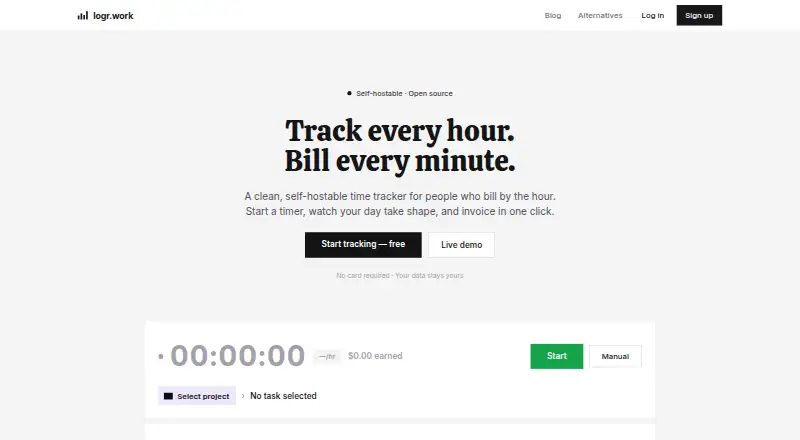
What Logr is
Logr is a time-tracking and invoicing app for freelancers and agencies, available as a hosted web app or for self-hosting. Its one-click timer records a session against a client and project; each can have an hourly rate. A live day timeline updates as time is tracked, while reports can be filtered and shared by client. When work is ready to bill, Logr gathers unbilled sessions into a draft invoice that can be adjusted and shared by public link. Clients can view and download the invoice without creating an account.
The app can import time entries from a Toggl CSV export and match them to existing clients and projects. Its homepage advertises a daily AI recap; self-hosters can add an ANTHROPIC_API_KEY for the assistant. Logr is AGPL-3.0 licensed, and the maker says self-hosting is free. The self-hosting setup uses a Next.js app on Node.js infrastructure connected to PocketBase, with a Docker Compose file for both. The maker describes PocketBase as SQLite-backed, with authentication and per-record API rules. Both listed plans—Self-hosted Logr and Hosted Logr— cost nothing.
Who it suits
Logr suits freelancers and agencies that organize billable work by client and project and want invoicing alongside time tracking. It is also a fit for users who want to self-host an open-source tool or import existing Toggl time entries.
What it does well
- One-click tracking assigns sessions to clients and projects.
- Client and project hourly rates support billable time.
- Draft invoices collect unbilled sessions and can be shared publicly.
- Reports can be filtered and shared per client.
- Imports time entries from Toggl CSV exports.
- Both hosted and self-hosted plans are free.
What to know first
- Self-hosting requires Node.js infrastructure and a PocketBase instance.
- The AI assistant requires an ANTHROPIC_API_KEY for self-hosters.
Plans
| Plan | Billed and limits | Price |
|---|---|---|
| Self-hosted Logr | AGPL-3.0 · Runs on infrastructure you choose | Free |
| Hosted Logr | No paid tier · No feature gating · No seat pricing | Free |
As logr.work lists them, read 9 Oct 2026. The maker's own page has the final word.
Getting started
- Visit https://logr.work/ to access Logr.
- Choose the hosted plan or the self-hosted option.
- For self-hosting, deploy the Next.js app on Node.js infrastructure and connect it to PocketBase; a Docker Compose file is provided.
- Create or select clients and projects, then record sessions against them.
- Import a Toggl CSV export if you want to bring in existing time entries.
Verdict
Choose Logr if you want client-based time tracking, reports, and invoice drafting in a free hosted or self-hosted product. Look elsewhere if you need an approach that does not involve deploying a Next.js app and PocketBase when self-hosting.
Questions
How much does Logr cost?
The Self-hosted Logr and Hosted Logr plans are both listed as free. The hosted plan has no paid tier, feature gating, or seat pricing.
Is Logr open source?
Yes. Logr is licensed under AGPL-3.0, and the maker says it can be self-hosted for free.
Can clients access invoices without a Logr account?
Yes. A public link lets clients view and download a shared invoice without an account.
Can I import time from Toggl?
Yes. Logr imports time entries from a Toggl CSV export and maps them to existing clients and projects.
What does self-hosting require?
The described setup deploys the Next.js app on Node.js infrastructure and connects it to PocketBase. A Docker Compose file is provided for both.
Does Logr include an AI assistant?
The homepage advertises a daily AI recap. Self-hosters can add an ANTHROPIC_API_KEY if they want the assistant.
Facts from Logr's own pages
- AI recap
- The homepage advertises a daily AI recap and says self-hosters can add an ANTHROPIC_API_KEY if they want the AI assistant. · logr.work, 9 Oct 2026
- Audience
- The maker describes Logr as intended for freelancers and agencies, with client and project organization and separate invoices per client. · logr.work, 9 Oct 2026
- Data and security
- The maker says self-hosting with PocketBase gives users control of their data and describes PocketBase as SQLite-backed with authentication and per-record API rules. · logr.work, 9 Oct 2026
- Day timeline
- A live timeline visualizes the day as time is tracked without manual logging. · logr.work, 9 Oct 2026
- Import
- Logr supports importing time entries from a Toggl CSV export and maps entries to existing clients and projects. · logr.work, 9 Oct 2026
- Invoicing
- Logr collects unbilled sessions into a draft invoice that can be adjusted and shared through a public link clients can view and download without an account. · logr.work, 9 Oct 2026
- Navigation
- The dashboard, projects, sessions, clients, invoices, reports, and settings are accessible through a sidebar with client-side navigation and no page reloads. · logr.work, 9 Oct 2026
- Open source
- Logr is licensed under AGPL-3.0, and the maker says it can be self-hosted for free. · logr.work, 9 Oct 2026
- Product
- Logr is an open-source, self-hostable time tracker with built-in invoicing for freelancers and agencies. · logr.work, 9 Oct 2026
- Reports
- Reports can be filtered and shared per client. · logr.work, 9 Oct 2026
- Self-hosting
- The maker describes deploying the Next.js app on Node.js infrastructure and connecting it to a PocketBase instance, with a Docker Compose file for both. · logr.work, 9 Oct 2026
- Time tracking
- Its one-click timer records sessions against a selected client and project, which can each have an hourly rate. · logr.work, 9 Oct 2026
Where Logr stands on Freedom251
- Time Billing Software#14 of 31