Freedom251 › Time Billing Software

Clockoli
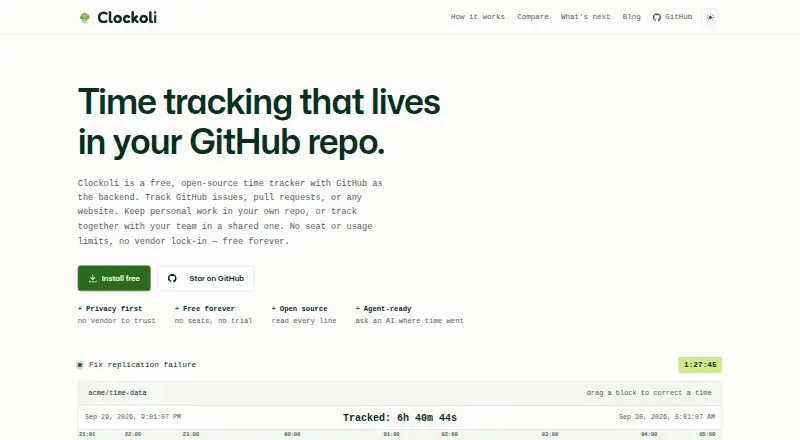
What Clockoli is
Clockoli is a free, open-source time tracker delivered as a Chrome or Chromium extension, with GitHub providing sign-in and storage. It treats GitHub issues, pull requests, and any website URL as tasks. A timer is available in the GitHub header and, on other sites, in a browser-toolbar popup. One timer per account stays synchronized between browsers. For reviewing work, Clockoli offers an editable timeline, daily, weekly, and monthly calendar views, plus search by URL or title. Reports can organize shared-repository time by day, person, source, or task, then export to CSV, JSON, or PDF. The browser can also generate invoices, while hourly rates remain in the browser. Records are saved as plain JSONL files in a GitHub repository and can be read from a clone. The extension communicates directly with GitHub; the site says Clockoli endpoints do not receive tracked URLs, titles, or descriptions. Read access to a shared repository exposes those details and timestamps, but rates remain local. Setup uses GitHub device flow and a private repository. Clockoli is an open beta installed as an unpacked extension, with updates applied through git pull.
Who it suits
Clockoli suits people who already use GitHub and want task-based time capture for issues, pull requests, or web work. It also fits teams needing shared-repository reports, browser invoices, and locally retained hourly rates.
What it does well
- Free forever with no seat or usage limits
- Tracks GitHub issues, pull requests, and website URLs
- Editable timeline and day, week, month calendars
- Exports reports as CSV, JSON, or PDF
- Generates invoices in the browser
- Open-source JSONL records stored in GitHub
What to know first
- Chrome and Chromium only
- No mobile, Firefox, or Safari app
- Open beta requires an unpacked extension
- GitHub limits still apply
Limits
The Clockoli Core plan is free forever with no seat or usage limits, but GitHub limits apply. The extension currently supports Chrome and Chromium only and has no mobile, Firefox, or Safari build.
Plans
| Plan | Billed and limits | Price |
|---|---|---|
| Clockoli Core | Free forever · No seat or usage limits; GitHub limits apply | Free |
As clockoli.com lists them, read 9 Oct 2026. The maker's own page has the final word.
Getting started
- Open the Clockoli website
- Create or choose a private GitHub repository
- Complete GitHub device-flow sign-in
- Install the extension as an unpacked extension
- Run git pull for updates
Verdict
Pick Clockoli if GitHub can be your sign-in, storage, and shared work record. Its broad time views, exports, and in-browser invoicing are included at no charge. Look elsewhere if you need mobile, Firefox, Safari, or a packaged extension rather than an open-beta install.
Questions
How much does Clockoli cost?
Clockoli Core costs nothing, billed free forever. There are no seat or usage limits, subject to GitHub limits.
Which platforms are supported?
Clockoli is an extension for Chrome and Chromium. The site lists no mobile app, Firefox build, or Safari build.
Where is time data stored?
Time records are plain JSONL files in a GitHub repository. GitHub is also used for storage and sign-in.
Can Clockoli create invoices?
Yes. Invoice generation happens in the browser, and hourly rates stay in the browser.
Who can see tracked details?
Anyone with read access to a shared repository can see tracked URLs, titles, timestamps, and descriptions. Hourly rates remain in the browser.
Facts from Clockoli's own pages
- Access and rates
- Anyone with read access to a shared repository can see tracked URLs, titles, timestamps, and descriptions, while hourly rates stay in the browser. · clockoli.com, 9 Oct 2026
- Data format
- Time records are stored as plain JSONL files in a GitHub repository and can be read directly from a clone. · clockoli.com, 9 Oct 2026
- Integrations
- GitHub is the storage and sign-in integration; the site lists Jira, Linear, Asana, Trello, and Zendesk support as proposed future work. · clockoli.com, 9 Oct 2026
- Platform limits
- The site says Clockoli currently supports Chrome and Chromium and has no mobile app, Firefox build, or Safari build. · clockoli.com, 9 Oct 2026
- Privacy
- The extension calls GitHub's API directly, and the site says no Clockoli endpoint receives tracked URLs, titles, or descriptions. · clockoli.com, 9 Oct 2026
- Product
- Clockoli is a free, open-source time tracker that uses GitHub as its backend. · clockoli.com, 9 Oct 2026
- Release status
- Clockoli is described as an open beta installed as an unpacked extension, with updates performed by running git pull. · clockoli.com, 9 Oct 2026
- Reports and invoices
- Reports can group shared repository time by day, person, source, or task, export CSV, JSON, or PDF, and generate invoices in the browser. · clockoli.com, 9 Oct 2026
- Setup
- Setup uses GitHub device flow and a private repository, and the site describes the process as taking about two minutes. · clockoli.com, 9 Oct 2026
- Support
- The maker recommends filing bugs and feature requests as public GitHub issues and provides email for other questions and security reports. · clockoli.com, 9 Oct 2026
- Task tracking
- It tracks GitHub issues, pull requests, and any website URL as a task. · clockoli.com, 9 Oct 2026
- Timer
- A timer appears in the GitHub header and in a browser toolbar popup elsewhere, with one timer per account synced across browsers. · clockoli.com, 9 Oct 2026
- Time views
- It provides an editable timeline, calendar views by day, week, and month, and search by URL or title. · clockoli.com, 9 Oct 2026
Where Clockoli stands on Freedom251
- Time Billing Software#11 of 31