Freedom251 › Email Encryption Software
Lockbin
What Lockbin is
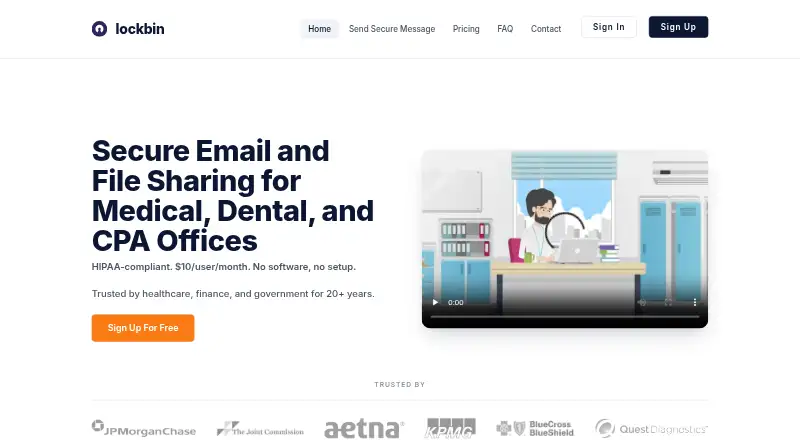
Lockbin is a web application for sending private email messages and files. Senders can give recipients access through a unique URL and password, or use passwordless secure links for known recipients. Messages are protected with TLS in transit and AES-256 encryption at rest; decryption keys are held by the sender and recipient rather than kept in plaintext on Lockbin’s servers. The service runs in Chrome, Firefox, Safari, or Edge without installation. Premium users can create hosted file-drop links or secure forms for incoming files. Lockbin is aimed at medical, dental, accounting, finance, and government organizations handling sensitive information. Its free plan includes one user, 25 MB attachments, and six months of inbox storage; the site also advertises 10 free messages without a credit card. Premium starts at $10/user/mo. Uncollected messages are deleted after six months, and read files not marked for deletion are removed within 24 hours.
Who it suits
Lockbin suits organizations that need to send sensitive messages or files, including medical, dental, CPA, finance, and government teams. Premium file-drop links and forms can also serve people collecting files from senders without accounts.
What it does well
- Free plan includes one user and 25 MB attachments.
- Recipients can verify access with a password.
- Data is encrypted in transit and at rest.
- Premium supports hosted file-drop links and secure forms.
What to know first
- Free plan is limited to 25 MB attachments.
- Outlook and Gmail integrations are not offered.
- Premium starts at $10/user/mo.
Limits
The Free plan is for one user, allows 25 MB attachments, and includes six months of inbox storage. Premium is $10 per user per month and allows up to 20 attachments per message and uploads up to 100 MB; Multi-User Enterprise is $10 per month for unlimited users and uploads up to 1 GB.
Plans
| Plan | Billed and limits | Price |
|---|---|---|
| Premium | monthly · 1 user · up to 20 attachments per message · up to 100MB per upload · no pre-set storage limits · BAA by request | $10 a month |
| Multi-User Enterprise | monthly · Unlimited users · shared address book · admin compliance copies · bulk user import · up to 1GB per upload | $10 a month |
| Free | monthly · 1 user · one file attachment up to 25MB · inbox storage up to 6 months · email support | On request |
As lockbin.com lists them, read 28 Sept 2026. The maker's own page has the final word.
Getting started
- Open the Lockbin website in Chrome, Firefox, Safari, or Edge.
- Choose the Free plan or a paid plan that fits your user and file needs.
- Use the web application to send a message or file.
- For recipient access, provide the unique URL and password, or use an available passwordless secure link for a known recipient.
- For incoming files, use a hosted file-drop link or secure form with Premium.
Overview
Lockbin is a browser-based service for sending private messages and files, best suited to organizations that routinely handle sensitive information. Its strongest case is secure, password-gated delivery without installing software; teams that need a native Gmail or Outlook integration should look elsewhere.
Messages use TLS in transit and FIPS 140-2 verified AES-256 encryption at rest. Lockbin says decryption keys are not stored on its servers in plaintext, and that data is held in the United States in a redundant cloud facility with physical security and access controls. These are meaningful safeguards for sensitive exchanges, though organizations needing a Business Associate Agreement must request one and choose a qualifying paid plan.
Recipients can open messages through a unique URL and password, while known recipients can use passwordless secure links. The service works in Chrome, Firefox, Safari, or Edge on Mac, Windows, or other operating systems, with no download or install required. It works alongside Google Workspace and Microsoft 365, but that is not the same as direct Gmail or Outlook integration.
Key features
- Controlled recipient access: Password protection adds a deliberate access step after delivery; passwordless links for known recipients offer a lower-friction option where appropriate.
- Message and file cleanup: Uncollected messages are destroyed after six months. Read files not marked for deletion are removed within 24 hours, a useful boundary for temporary exchanges rather than long-term file storage.
- File collection: Premium users can create a hosted file-drop link or embed a custom secure form so people can submit files without an account or password. That suits inbound document collection, but the free plan does not include this feature.
- Compliance support: Premium and Enterprise customers can request a signed BAA, and Lockbin commits to breach notification within 60 days. Professional-tier users can contact support by phone through their account; current users can email support for immediate assistance.
- Administration: Enterprise adds shared address books, admin compliance copies, and bulk user import, while admin access controls are available as a product feature.
Pricing
Lockbin uses a freemium model and advertises 10 free messages with no credit card required. The Free plan costs nothing, is billed for one user, and includes a 25 MB attachment limit and six months of inbox storage. It is a sensible way for an individual to try secure delivery, but the small attachment allowance and message offer make it a limited fit for regular organizational use.
Premium costs $10 a month, billed monthly, for one user. It permits up to 20 attachments per message, uploads up to 100MB, has no pre-set storage limits, and offers a BAA by request. For a solo professional sending larger or more frequent files, that is a more practical tier; it still does not provide multi-user administration.
Multi-User Enterprise also costs $10 a month, billed monthly, and includes unlimited users, a shared address book, admin compliance copies, bulk user import, and uploads up to 1GB. Those collaboration and oversight features make it the relevant tier for teams. The stated price is notably the same as Premium despite the broader seat allowance, though organizations should assess the included limits against their own workflow before committing.
Platforms
Lockbin runs in major browsers and supports Linux, macOS, Windows, and web use. The no-install approach is convenient across mixed-device environments, but the absence of direct Gmail and Outlook integration may interrupt teams that expect secure sending inside their existing mail client.
Who it's for
Lockbin is aimed at medical and dental organizations, CPA firms, finance teams, and government organizations handling sensitive information. It is strongest for people who need password-controlled message delivery or a way to collect files securely through a web form. It is less suitable for users whose priority is native email-client integration or for teams that need to retain collected files beyond the stated cleanup windows.
Pros and cons
- Pro: Password-protected access, optional passwordless links for known recipients, and encryption in transit and at rest give senders several layers of control over sensitive exchanges.
- Pro: Browser access across operating systems avoids installation requirements, and paid file-drop links support account-free submissions.
- Pro: The Enterprise tier includes unlimited users and administrative compliance tools at the same stated monthly price as the one-user Premium tier.
- Con: The free plan is capped at 25 MB per attachment and six months of inbox storage, limiting its usefulness for larger or recurring work.
- Con: Direct Gmail and Outlook integrations are absent, which can make Lockbin a less natural fit for teams centered on those clients.
- Con: A BAA is available only on paid plans and by request, so organizations needing that agreement must account for an added purchasing step.
Alternatives
For broader browsing, see Email Encryption Software and File encryption tools.
- DataMotion Secure Email Exchange is worth considering if an enterprise-oriented secure email exchange with Android, iOS, API, and web platforms is a better match; its plan uses custom pricing.
- SecureMyEmail may suit users who want coverage across Windows, macOS, iOS, and Android, with a free plan for one email address.
- Encryptomatic OpenPGP is a Windows option for business or government users who prefer a $29.99 a year single-license subscription.
- gpg4o is a Windows alternative centered on OpenPGP and Microsoft Outlook support.
- Gpg4win is a free Windows alternative.
- Mailvelope may be a better fit for users seeking a browser extension or web-based option, with a Business plan at €3 a month per user for 1–49 users.
- PDF Postman is a Windows alternative for users looking for a single-license option priced at $79.99 a month.
- c.Email is a free extension-based alternative.
Verdict
Choose Lockbin if your priority is password-controlled delivery of sensitive messages, with browser access and paid options for file collection and team administration. Its strongest appeal is the combination of recipient controls and practical file workflows; look elsewhere if direct Gmail or Outlook integration is essential, or if the free attachment cap is too restrictive.
Verdict
Lockbin provides password-protected message access, encrypted storage and transit, and file collection options for paid users. Check the free plan’s attachment limit and the paid tier’s cost against your sending needs.
Questions
Is Lockbin free?
Yes. The Free plan is $0 and covers one user with 25 MB attachments and six months of inbox storage. The site also advertises 10 free messages without a credit card.
How much do the paid plans cost?
Premium is $10 per user per month, billed monthly. Multi-User Enterprise is $10 per month, billed monthly.
Which platforms can I use Lockbin on?
Lockbin lists Linux, macOS, web, and Windows. It runs in Chrome, Firefox, Safari, or Edge without a download or installation.
How do recipients open messages?
Recipients can use a unique URL and password. Passwordless secure links are also available for known recipients.
Does Lockbin integrate with Gmail or Outlook?
Gmail and Outlook integration are listed as unavailable. Lockbin works alongside Google Workspace and Microsoft 365 without a plugin or extension.
Does Lockbin offer a BAA?
A signed Business Associate Agreement is available by request on Premium and Enterprise plans.
Facts from Lockbin's own pages
- Admin access controls
- Yes · lockbin.com, 20 Sept 2026
- Attachment limit
- 100 · lockbin.com, 20 Sept 2026
- Auto deletion
- Uncollected messages are automatically destroyed after six months, and read files not marked for deletion are removed within 24 hours. · lockbin.com, 28 Sept 2026
- Browser access
- Lockbin runs in Chrome, Firefox, Safari, or Edge with nothing to download or install, and works on Mac, Windows, or any operating system. · lockbin.com, 28 Sept 2026
- Encryption
- Messages are protected in transit with TLS and at rest with FIPS 140-2 verified AES-256 encryption. · lockbin.com, 28 Sept 2026
- File drop
- Premium users can create a hosted Lockbin file-drop link or embed a custom secure form so people can send files without an account or password. · lockbin.com, 28 Sept 2026
- Free offer
- The site advertises 10 messages free with no credit card required. · lockbin.com, 28 Sept 2026
- Free plan
- Yes · lockbin.com, 20 Sept 2026
- Gmail integration
- No · lockbin.com, 20 Sept 2026
- HIPAA and BAA
- Lockbin offers a signed Business Associate Agreement on Premium and Enterprise plans by request and commits to breach notification within 60 days. · lockbin.com, 28 Sept 2026
- Hosting
- Lockbin states that all data is stored within the United States and its servers use a fully redundant cloud facility with physical security and access controls. · lockbin.com, 28 Sept 2026
- Integrations
- Lockbin works alongside Google Workspace and Microsoft 365, with no plugin or extension required. · lockbin.com, 28 Sept 2026
- Key management
- Decryption keys are not stored on Lockbin servers in plaintext, and the sender and recipient hold the decryption keys. · lockbin.com, 28 Sept 2026
- Message expiry
- Yes · lockbin.com, 20 Sept 2026
- Outlook integration
- No · lockbin.com, 20 Sept 2026
- Primary users
- Lockbin targets medical, dental, CPA, finance, and government organizations handling sensitive information. · lockbin.com, 28 Sept 2026
- Product
- Lockbin is a web application for sending private email messages and files. · lockbin.com, 28 Sept 2026
- Recipient access
- Recipients can open messages from a unique URL plus password, with passwordless secure links also available for known recipients. · lockbin.com, 28 Sept 2026
- Recipient verification
- password · lockbin.com, 20 Sept 2026
- Secure delivery
- link · lockbin.com, 20 Sept 2026
- Paid from
- 10 · lockbin.com, 20 Sept 2026
- Support
- Current users can email [email protected] for immediate assistance, and professional-tier users can reach support by phone through their account. · lockbin.com, 28 Sept 2026
Where Lockbin stands on Freedom251
- Email Encryption Software#2 of 31
- File encryption tools#7 of 28