Freedom251 › Email Encryption Software

c.Email
by c.Email
What c.Email is
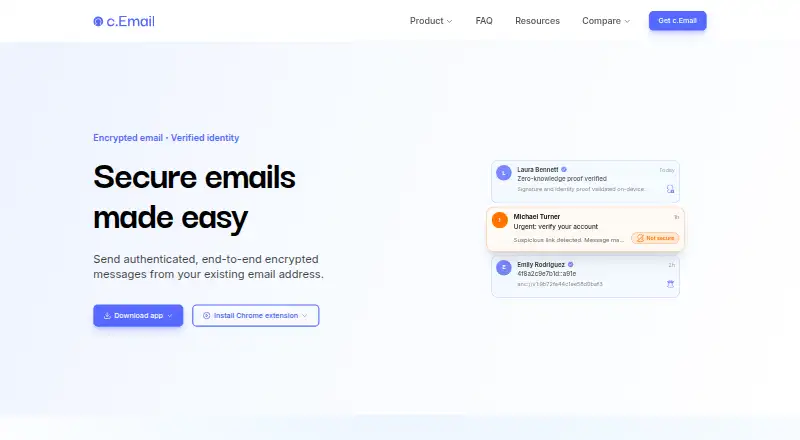
c.Email adds encryption and sender verification to existing Gmail or Outlook addresses, so users can keep their current email address. Its free plan includes unlimited addresses, end-to-end encryption, verified sending, post-quantum security, and For Your Eyes Only emails. Users can choose Not secure, Secure, or For Your Eyes Only settings; the last requires continuous liveness verification from the intended recipient. Setup includes a one-time identity check with an existing ID and liveness check, while identity data remains on the user's device. Messages are encrypted and decrypted on sender and recipient devices rather than stored, encrypted, or decrypted on c.Email servers, subject to a business exception. Its hybrid encryption combines classical and post-quantum cryptography and uses ML-KEM, a standard published by NIST. c.Email is available as an app and browser extension, including Chrome. Premium features and business plans are planned, with prices not listed. The service is provided by Certonymity and built on cDot, a protocol for encrypted identity, email, messaging, and payments.
Who it suits
It suits people who want to add encrypted email and verified sending while continuing to use a Gmail or Outlook address. Recipients using For Your Eyes Only must be able to complete ongoing liveness checks.
What it does well
- Free plan includes unlimited email addresses.
- Works with existing Gmail and Outlook addresses.
- Identity data stays on the user's device.
- Messages are encrypted and decrypted on user devices.
- Offers three email security settings.
What to know first
- Setup requires an ID and liveness check.
- For Your Eyes Only requires continuous recipient liveness checks.
- Premium and business options are planned, not priced.
- Messages have a business exception to the server-handling description.
Plans
| Plan | Billed and limits | Price |
|---|---|---|
| Free | c.Email is free for all users. · Existing email address support · End-to-end encryption · Verified sending | Free |
| Premium | — | On request |
| Business Self-Serve | — | On request |
| Business Plus | — | On request |
As c.email lists them, read 27 Sept 2026. The maker's own page has the final word.
c.Email is an email-security app and browser extension for people who want to protect messages sent from Gmail or Outlook without changing addresses. Its free tier includes encryption and verified sending, but setup requires an identity check and its strongest mode requires ongoing recipient verification.
Overview
c.Email connects to an existing Gmail or Outlook address, so users can keep their current mailbox rather than open a new account. Three security levels—Not secure, Secure and For Your Eyes Only—let senders choose how much protection a message needs. Verified sending uses identity verification and cryptographic proofs to authenticate the sender.
Setup involves a one-time identity check using an existing ID and a liveness check. Identity data stays on the user's device. That keeps the identity data off c.Email's servers, though the check is a substantial extra step for people who want a simple email add-on.
Key features
Encryption on users' devices
Messages are encrypted on the sender's device and decrypted on the recipient's device; c.Email servers do not store, encrypt or decrypt them, with a business-use exception. The hybrid encryption combines classical cryptography with ML-KEM, the post-quantum standard published by NIST. The device-based handling is a strong fit for users who want message contents kept away from the provider, but business customers should account for the stated exception.
For Your Eyes Only
This setting requires continuous liveness verification from the intended recipient. It adds an extra layer of control over who can read a message, but also adds friction at the point of access. It is best reserved for messages where that added check is worth the inconvenience.
Identity and the C-layer
c.Email is built on cDot, a protocol for encrypted identity, email, messaging and payments. Public encryption and verification keys are stored on the C-layer, a distributed blockchain of independent nodes that is under development; anyone can run a node. The protocol's scope is broader than email, but the network remains a developing part of the system.
Pricing
| Plan | Price | What it includes |
|---|---|---|
| Free | free | Encryption, verified sending, post-quantum security, For Your Eyes Only emails and unlimited email addresses, with support for existing email addresses. |
| Premium | Custom pricing | Coming soon; advanced features for individuals. |
| Business Self-Serve | Custom pricing | Coming soon; team and organisation protection with server-hosted encryption. Customers can use their own server or one included in the plan, with efficient compliance with data protection regulations. |
| Business Plus | Custom pricing | Coming soon; customised business protection and enterprise-level secrecy. |
The free plan is unusually complete for individuals: it has no address-count cap and includes the core security features. There is no paid upgrade with a published price to compare yet. Premium may suit individuals seeking advanced features when it arrives; the business tiers target organisations, with Self-Serve offering a choice of hosting and Business Plus aimed at customised protection. Premium features are planned as part of an expanded product suite.
Platforms
c.Email is available as an app and browser extension, including a Chrome extension. It supports Gmail and Outlook addresses, and mobile apps are available. Keeping an existing address makes it less disruptive than switching mailboxes, though use depends on those supported email services.
Who it's for
c.Email suits individuals who want encryption and sender verification on a current Gmail or Outlook address without paying for the core features. It also gives organisations a prospective route to team protection and server-hosted encryption. People who do not want to complete an ID and liveness check, or who need the strongest mode without continuous recipient checks, should look elsewhere.
Pros and cons
- Pros: The free tier includes encryption, verified sending and For Your Eyes Only protection, with unlimited email addresses.
- Pros: Message encryption and decryption happen on sender and recipient devices, and identity data remains on the user's device.
- Cons: Initial setup requires an ID and liveness check, which adds friction before use.
- Cons: For Your Eyes Only requires continuous recipient liveness verification, making it less convenient for routine messages.
- Cons: The business server-handling exception means the device-only model does not apply uniformly to business use.
- Cons: Premium and business plans are coming soon, with custom pricing rather than a published rate.
Alternatives
For a broader starting point, browse Email Encryption Software or File encryption tools.
- FlowCrypt may fit users comparing free extension-based email encryption; its free plan is for fewer than 100 users and has a 5 MB attachment threshold.
- SecureMyEmail is worth considering for people who want support across Windows, macOS, iOS and Android; its free plan covers one email address.
- Lockbin offers a free plan for one user, with a 25 MB attachment limit and six months of inbox storage.
- Mailvelope is another extension and web option for readers comparing email encryption tools.
- DataMotion Secure Email Exchange may suit organisations looking for an enterprise offering with sales-led pricing.
- gpg4o is a Windows option for users seeking OpenPGP encryption with Microsoft Outlook.
- Virtru Email Encryption is a paid alternative with web, desktop and mobile platforms; its Starter plan costs $119 a month, billed annually, for 5 users.
- RMail is another paid email option.
Verdict
Choose c.Email if you want to keep Gmail or Outlook, add sender verification and encryption, and get those core protections without a subscription. Its device-based encryption and unlimited addresses make the free tier compelling; the identity check and continuous liveness requirement are the main reasons to choose a less demanding alternative.
Verdict
c.Email offers a free way to add encryption and sender verification to an existing Gmail or Outlook address. The identity check and continuous verification requirement for its strictest setting are important parts of the setup.
Facts from c.Email's own pages
- Business compliance
- Business Self-Serve includes efficient compliance with data protection regulations. · c.email, 27 Sept 2026
- Business hosting
- Business Self-Serve can use the customer's server or a server included in the plan. · c.email, 27 Sept 2026
- Business teams
- Business plans provide protection for teams and organisations. · c.email, 27 Sept 2026
- cDot framework
- c.Email is built on cDot, a protocol for encrypted identity, email, messaging, and payments. · c.email, 27 Sept 2026
- C-layer network
- Public encryption and verification keys are stored on a distributed blockchain of independent nodes. · c.email, 27 Sept 2026
- C-layer status
- The C-layer is under development, and anyone can run a node. · c.email, 27 Sept 2026
- Company owner
- c.Email is provided by Certonymity. · c.email, 27 Sept 2026
- Encryption method
- c.Email uses end-to-end hybrid public-key encryption combining classical and post-quantum cryptography. · c.email, 27 Sept 2026
- Existing email
- Users keep their current email address and do not need to create a new account. · c.email, 27 Sept 2026
- Eyes Only protection
- For Your Eyes Only emails require continuous liveness verification from the intended recipient. · c.email, 27 Sept 2026
- Email addresses
- The free plan allows unlimited email addresses. · c.email, 27 Sept 2026
- Free features
- The free plan includes encryption, verified sending, post-quantum security, and For Your Eyes Only emails. · c.email, 27 Sept 2026
- Free plan
- Yes · c.email, 20 Sept 2026
- Free pricing
- c.Email is free for all users and will always have a free tier. · c.email, 27 Sept 2026
- Headquarters
- London, United Kingdom · c.email, 23 Sept 2026
- Identity check
- Setup includes a one-time identity check with an existing ID and liveness check. · c.email, 27 Sept 2026
- Email integrations
- c.Email connects with Gmail and Outlook addresses. · c.email, 27 Sept 2026
- On-device data
- Identity data is stored only on the user's device and does not leave it. · c.email, 27 Sept 2026
- Platforms and apps
- c.Email is available as an app and browser extension, including a Chrome extension. · c.email, 27 Sept 2026
- Post-quantum standard
- c.Email uses ML-KEM, the post-quantum standard published by NIST. · c.email, 27 Sept 2026
- Premium status
- Premium features are planned as part of an expanded product suite. · c.email, 27 Sept 2026
- Security levels
- Users can choose Not secure, Secure, or For Your Eyes Only email security. · c.email, 27 Sept 2026
- Server access
- Emails are encrypted and decrypted on devices and are not stored, encrypted, or decrypted on c.Email servers, with a business exception. · c.email, 27 Sept 2026
- Support access
- The site provides a Support link and invites users to get in touch. · c.email, 27 Sept 2026
Where c.Email stands on Freedom251
- Email Encryption Software#3 of 31
- File encryption tools#8 of 28