Freedom251 › AI Security Testing Tools
LLMMap
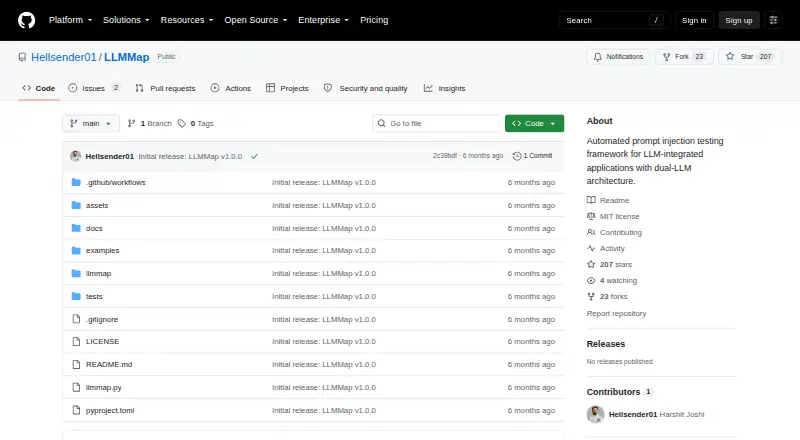
What LLMMap is
LLMMap is a Linux security testing tool for examining LLM-integrated applications for prompt injection. It discovers HTTP injection points, creates targeted prompts, and checks candidate findings for reliability. Its four prompt packs cover 227 prompt injection techniques across 18 attack families. A Generator LLM creates goal-aware prompts, while a Judge evaluates target responses; detection can also use heuristics and optional semantic similarity. Provide a target URL or a Burp Suite request export, marking an injection location with an asterisk. LLMMap supports injection through query parameters, request bodies, headers, cookies, and paths, and lists obfuscation methods such as base64, homoglyphs, leet speak, and language switching. Supported backends are Ollama, OpenAI, Anthropic, and Google; Ollama is the local default and needs no API key. Safe mode is enabled by default and restricts scans to low-risk prompt families. The project lists proxy support for traffic inspection and a dry-run mode that plans a scan without connecting to the target. LLMMap is self-hosted, free, and available under the MIT license. It requires Python 3.11 or later and an LLM backend. The project describes it for authorized security testing of systems you own or are explicitly authorized to test.
Who it suits
LLMMap suits security practitioners who need to assess prompt injection in LLM-integrated applications they own or have written authorization to test. It is intended for Linux and requires Python 3.11 or later plus an LLM backend.
What it does well
- Covers 227 techniques across 18 prompt injection attack families.
- Accepts targets as URLs or Burp Suite request exports.
- Supports injection locations in parameters, bodies, headers, cookies, and paths.
- Ollama is a local backend that needs no API key.
- Dry-run mode plans scans without connecting to the target.
- Free and available under the MIT license.
What to know first
- Linux is the only listed platform.
- Requires Python 3.11 or later and an LLM backend.
- Adaptive TAP and out-of-band detection are inactive in the v1.0.0 scan pipeline.
Limits
LLMMap requires Python 3.11 or later and an LLM backend; cloud backends may require API keys. Adaptive TAP and out-of-band detection are reserved for future versions and inactive in the v1.0.0 scan pipeline.
Plans
| Plan | Billed and limits | Price |
|---|---|---|
| LLMMap | No charge stated; publicly available under the MIT license. · Python >= 3.11 · Requires an LLM backend; Ollama is local, while cloud backends may require API keys | Free |
As github.com lists them, read 4 Oct 2026. The maker's own page has the final word.
Getting started
- Open the LLMMap project on GitHub.
- Prepare a Linux system with Python 3.11 or later.
- Provide a URL or Burp Suite request export and mark the injection location with an asterisk.
- Choose an LLM backend; Ollama is the local default, while cloud backends may require API keys.
- Use dry-run mode to plan a scan without making a network connection to the target.
Verdict
Choose LLMMap if you need a free, self-hosted Linux tool for authorized prompt injection testing with multiple prompt families and backends. Look elsewhere if you need adaptive TAP or out-of-band detection in the v1.0.0 scan pipeline.
Questions
How much does LLMMap cost?
It is free and publicly available under the MIT license.
Which platforms does it support?
Linux is the listed platform, and the tool is self-hosted.
Which LLM backends can it use?
The documented backends are Ollama, OpenAI, Anthropic, and Google. Ollama is the local default and needs no API key.
Can it work with Burp Suite?
It reads Burp Suite request exports natively and lists proxy support for traffic inspection.
What are its scanning limits?
Safe mode starts enabled and restricts scans to low-risk prompt families. Adaptive TAP and out-of-band detection are inactive in the v1.0.0 scan pipeline.
Who should use LLMMap?
The project describes it as a security testing tool for authorized use. Test only systems you own or have explicit written authorization to assess.
Facts from LLMMap's own pages
- Burp Suite
- LLMMap reads Burp Suite request exports natively and lists proxy support for traffic inspection. · github.com, 4 Oct 2026
- Data handling
- Scan workspaces store request metadata, configuration, and timing; sensitive prompt text and response bodies stay in memory and are not written to disk by default. · github.com, 4 Oct 2026
- Detection
- A Generator LLM creates goal-aware prompts and a Judge evaluates target responses; detector signals can include heuristics and optional semantic similarity. · github.com, 4 Oct 2026
- Dry run
- Dry-run mode plans a scan and selects prompts without making network connections to the target. · github.com, 4 Oct 2026
- Injection locations
- It supports injection in query parameters, request bodies, headers, cookies, and paths. · github.com, 4 Oct 2026
- Intended users
- The project describes LLMMap as a security testing tool for authorized use and says to test only systems owned by the user or covered by explicit written authorization. · github.com, 4 Oct 2026
- Notable limits
- The architecture document says adaptive TAP and out-of-band detection modules are reserved for future versions and inactive in the v1.0.0 scan pipeline. · github.com, 4 Oct 2026
- Obfuscation
- Its listed obfuscation methods include base64, homoglyphs, leet speak, and language switching. · github.com, 4 Oct 2026
- Prompt coverage
- It includes 227 prompt injection techniques across 18 attack families in four prompt packs. · github.com, 4 Oct 2026
- Purpose
- LLMMap tests LLM-integrated applications for prompt injection by discovering HTTP injection points, generating targeted prompts, and checking findings for reliability. · github.com, 4 Oct 2026
- Reliability
- Candidate findings are re-tested using Wilson confidence intervals; the documented defaults are five retries and three confirmations. · github.com, 4 Oct 2026
- Request input
- Targets can be supplied as a URL or a Burp Suite request export, with an asterisk marking an injection location. · github.com, 4 Oct 2026
- Safety
- Safe mode is enabled by default and restricts scans to low-risk prompt families, while risky families such as tool abuse and system override are blocked. · github.com, 4 Oct 2026
- Supported LLMs
- The documented backends are Ollama, OpenAI, Anthropic, and Google, with Ollama as the local default that needs no API key. · github.com, 4 Oct 2026
Where LLMMap stands on Freedom251
- AI Security Testing Tools#18 of 29