Freedom251 › Game Streaming Software

LiLy Live
What LiLy Live is
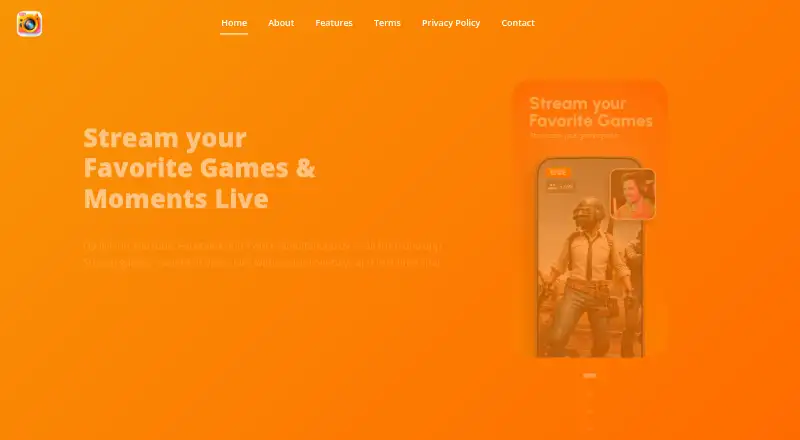
LiLy Live is an Android app for streaming games, live video, or camera and video files from a phone to multiple platforms. Its maker names YouTube, Facebook, and Twitch as destinations for simultaneous streams. For mobile games, the app can capture the screen, add a picture-in-picture facecam, show a live viewer counter, and produce output up to 1080p. A shared chat feed brings messages from YouTube, Facebook, and Twitch together for replies during a broadcast. Camera mode supports front and rear cameras, real-time filters and frames, and overlays with logos, text, images, or stickers. Streams can be portrait or landscape, with resolutions from 240p to 1080p and adaptive bitrate. Custom RTMP destinations are supported, and Restream can extend multistreaming to over 30 platforms. The Free plan costs nothing and includes unlimited streaming time, no watermark, and all features. Streaming needs camera and microphone permissions; saving video needs photo, media, and file access.
Who it suits
It suits Android users who want to stream games, video, or camera content without a PC. The listed audiences include gamers, creators, vloggers, musicians, influencers, and businesses.
What it does well
- Streams simultaneously to YouTube, Facebook, and Twitch
- Game capture includes picture-in-picture facecam
- Unified chat supports replies during streams
- Free plan includes unlimited streaming time
- Supports custom RTMP output up to 1080p
What to know first
- Android is the only listed platform
- No free trial is offered
- Streaming requires camera and microphone permissions
Limits
The Free plan is limited to Android use and requires the listed camera, microphone, and file permissions. Google Play reports possible sharing of device or other IDs with third parties.
Plans
| Plan | Billed and limits | Price |
|---|---|---|
| Free | 100% free · Unlimited streaming time · No watermark · All features available | Free |
As lilylive.app lists them, read 9 Oct 2026. The maker's own page has the final word.
Getting started
- Open the LiLy Live website
- Install the Android app
- Grant camera and microphone permissions for streaming
- Grant photo, media, and file access to save video
- Choose a game, camera, or video source and connect destinations
- Start a free broadcast with the free plan
Verdict
LiLy Live combines mobile streaming, multi-platform chat, and camera overlays in an Android app. Its free plan includes all features, but users should account for the permissions needed to stream and save video.
Questions
What does LiLy Live cost?
The Free plan costs nothing. It includes unlimited streaming time, no watermark, and all features.
Which platforms can receive streams?
The maker names YouTube, Facebook, and Twitch for simultaneous streaming. Custom RTMP destinations and Restream multistreaming to over 30 platforms are also supported.
What video formats and quality are available?
Streams can be portrait or landscape, from 240p to 1080p, with adaptive bitrate.
Does it support game streaming?
Yes. It captures a mobile game screen, supports a picture-in-picture facecam, shows a live viewer counter, and outputs up to 1080p.
What permissions does the app require?
Camera and microphone permissions are needed for streaming. Photo, media, and file access is needed to save video on the device.
Who makes LiLy Live?
The maker is identified in Ho Chi Minh City, Vietnam, and Google Play names developer Từ Vỹ Liêm.
Facts from LiLy Live's own pages
- Additional streaming features
- The Google Play listing describes custom RTMP destinations, portrait or landscape streaming, resolutions from 240p to 1080p, and adaptive bitrate. · play.google.com, 9 Oct 2026
- Camera and overlays
- Camera mode supports front and rear cameras, real-time filters and frames, and overlays with logos, text, images, and stickers. · lilylive.app, 9 Oct 2026
- Game streaming
- The app supports mobile game screen capture, picture-in-picture facecam, a live viewer counter, and high-quality video output. · lilylive.app, 9 Oct 2026
- Headquarters
- Ho Chi Minh City, Vietnam · lilylive.app, 28 Sept 2026
- Intended users
- The Google Play listing describes the app as suitable for gamers, content creators, vloggers, musicians, influencers, and businesses who want to stream without a PC. · play.google.com, 9 Oct 2026
- Maker and location
- The maker site identifies Ho Chi Minh City, Vietnam, and the Google Play listing names developer Từ Vỹ Liêm. · lilylive.app, 9 Oct 2026
- Other integrations
- The Google Play listing says Restream can be used to multistream to over 30 platforms and names Instagram, LinkedIn, and X among possible RTMP destinations. · play.google.com, 9 Oct 2026
- Permissions
- The privacy policy says the app requires camera and microphone permissions for streaming and photo, media, and file access to save video to the device. · lilylive.app, 9 Oct 2026
- Privacy practices
- The privacy policy says information requested by the app is retained on the device, while error logs may include device and usage details collected through third-party products. · lilylive.app, 9 Oct 2026
- Purpose
- LiLy Live is a mobile app for streaming games, live video, and camera or video files to multiple platforms from a phone. · lilylive.app, 9 Oct 2026
- Security and data
- Google Play reports that the app may share device or other IDs with third parties, collects no data, and encrypts data in transit. · play.google.com, 9 Oct 2026
- Support
- The maker lists [email protected] as its contact email. · lilylive.app, 9 Oct 2026
- Supported destinations
- The maker’s site names YouTube, Facebook, and Twitch for simultaneous streaming. · lilylive.app, 9 Oct 2026
- Unified chat
- Messages from YouTube, Facebook, and Twitch appear in one feed, where users can reply during a stream. · lilylive.app, 9 Oct 2026
Where LiLy Live stands on Freedom251
- Game Streaming Software#17 of 44