Freedom251 › AI Mockup Generators
LightX AI Mockup Generator
What LightX AI Mockup Generator is
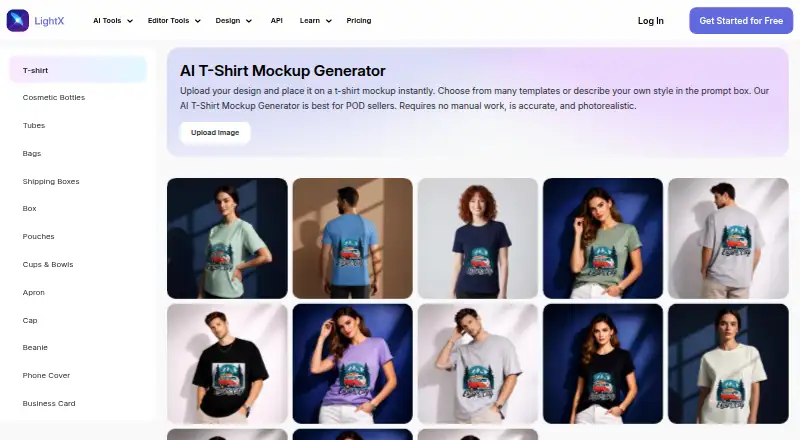
LightX AI Mockup Generator creates T-shirt mockups from uploaded artwork. Users can select a preset scene or describe one with a text prompt, then preview and download the result. It accepts JPG, PNG, or WebP artwork and offers JPG or PNG downloads. Listed garment styles include crew neck, polo, oversized, cropped, long sleeve, tank top, and hoodie. Users can provide separate artwork for the front and back and preview both views. LightX says its rendering includes fabric texture, folds, lighting, shadows, design wrapping, and color accuracy. The maker describes the tool as intended for print-on-demand sellers, clothing brands, and designers. The free Starter plan includes six daily AI credits and up to 1GB of cloud storage; its listed exports are 512px JPG. Pro includes 1,000 monthly AI credits, exports up to 4096px in JPG or PNG, and a seven-day trial. Its listed annual price is ₹4,900. The API documentation includes integration examples for CSS, React, Tailwind, JavaScript, and Python.
Who it suits
The tool suits print-on-demand sellers, clothing brands, and designers who want to preview T-shirt artwork across garment styles and scenes. It is available on the web and mobile platforms.
What it does well
- Accepts JPG, PNG, and WebP artwork.
- Supports separate front and back garment designs.
- Offers preset scenes and text-described scenes.
- Pro lists exports up to 4096px in JPG or PNG.
What to know first
- Starter exports are limited to 512px JPG.
- Starter includes six daily AI credits.
- The listed Pro price is ₹4,900 yearly.
Limits
Starter includes six daily free AI credits and up to 1GB cloud storage, with 512px JPG exports. Pro lists exports up to 4096px in JPG or PNG, 1,000 monthly AI credits, and up to 500 images monthly; it includes a seven-day free trial.
Plans
| Plan | Billed and limits | Price |
|---|---|---|
| Starter | lifetime · 6 daily free AI credits · 1GB cloud storage · Free templates and assets | Free |
| AI Credits | 200 AI Credits · Lifetime validity · Up to 50 images · Up to 3 videos · No watermark | $199, paid once |
| Pro Subscription | Billed ₹4,900 yearly · 1,000 AI credits monthly · Up to 500 images monthly · Up to 10 videos monthly · 7 days free trial | ₹4,900 a year |
As lightxeditor.com lists them, read 3 Oct 2026. The maker's own page has the final word.
Getting started
- Open the T-shirt mockup generator website.
- Upload artwork in JPG, PNG, or WebP format.
- Choose a preset scene or describe one with a text prompt.
- Select a garment style and, if needed, add separate front and back artwork.
- Preview the mockup and download it in JPG or PNG.
- Use the Starter plan or review the paid plan and seven-day trial.
Overview
LightX AI Mockup Generator creates T-shirt previews from uploaded artwork, pairing garment choices with generated or preset scenes. It is most useful for apparel designers and print-on-demand sellers shaping a visual concept; its strongest practical limit is that the free plan’s 512px JPG export is not a substitute for Pro’s larger JPG or PNG output.
LightX says its rendering accounts for fabric texture, folds, lighting, shadows, design wrapping, and color accuracy. Those details are important when assessing whether a graphic reads as part of a garment, though the generator is specifically oriented around T-shirt mockups rather than a general-purpose product catalog.
Key features
- Scene generation: Upload artwork, choose a preset scene, or describe a setting with a text prompt. That gives users a choice between a ready-made direction and a more tailored backdrop.
- Garment options: Supported styles include crew neck, polo, oversized, cropped, long sleeve, tank top, and hoodie. The range helps compare a design across several apparel silhouettes without limiting the workflow to one cut.
- Front and back artwork: Separate designs can be uploaded for each side, then previewed and downloaded. This is useful for apparel concepts whose rear graphic matters as much as the front.
- File handling: Upload JPG, PNG, or WebP artwork and download JPG or PNG. The different input and output formats make it possible to start with WebP while retaining PNG export as a Pro option.
- API integration: LightX API documentation includes examples for CSS, React, Tailwind, JavaScript, and Python, making the service relevant to developers considering integration into those environments. Its virtual try-on API page says inputs are deleted after 24 hours and generated outputs are never saved; it also describes encryption, secure access controls, and continuous monitoring.
Pricing
LightX uses a freemium model, with a free Starter plan, one-time AI Credits, and an annual Pro Subscription. The Starter plan costs nothing, billed lifetime, and includes 6 daily free AI credits, up to 1GB cloud storage, and free templates and assets. Its 512px JPG export ceiling is suited to lightweight previews, but limits its usefulness when larger files or PNG output are needed.
AI Credits cost $199, paid once, billed for 200 AI Credits with lifetime validity. The package allows up to 50 images or 3 videos and removes the watermark. It suits occasional users who want a finite credit bundle rather than a recurring subscription; it does not provide the Pro plan’s monthly credit allocation.
Pro Subscription is $408.33 a year, billed ₹4,900 yearly. It includes 1,000 AI credits monthly, up to 500 images monthly, up to 10 videos monthly, exports up to 4096px in JPG or PNG, and a 7-day free trial. Pro is the practical choice for regular production or higher-resolution output, while the monthly image and video quotas still define the volume. The pricing page directs users to the support team and gives [email protected] for help. LightX identifies Andor Communications Pvt. Ltd. as the app and website service provider.
Platforms
LightX lists Android, iOS, web, and API platforms. Its API examples span CSS, React, Tailwind, JavaScript, and Python, so the product may suit both individual creators and teams considering a software integration.
Who it's for
The maker positions the tool for print-on-demand sellers, streetwear and clothing brands, and designers. Its scene prompts, multiple garment styles, and separate front and back artwork make it a good fit for developing apparel concepts or comparing visual directions. Readers who need commercial-use rights should look elsewhere: commercial use is not included.
Pros and cons
- Pro: Separate front and back uploads support designs that need more than a single-view preview.
- Pro: Scene prompts and preset scenes provide two ways to set the context for a garment mockup.
- Pro: Pro raises exports to 4096px and adds PNG alongside JPG, a meaningful upgrade for users who need larger or more flexible output.
- Con: Starter exports stop at 512px and JPG, making the free tier better for trying concepts than preparing larger deliverables.
- Con: Pro imposes monthly ceilings of 500 images and 10 videos, and commercial use is not included.
Alternatives
For a broader comparison, browse AI Mockup Generators.
- FlexClip is another freemium option with Android, iOS, web, and Windows platforms; its free plan includes 12 online projects and limits each video to 10 minutes.
- Cloudinary is worth considering when an API and extension alongside web access fit better; its free plan includes 3 users per account and 25 monthly credits.
- Mew Design AI Product Mockup Maker offers a web-based free plan with 50 signup credits, 5–7 designs, 100MB storage, and standard downloads.
- Mockey AI has Android and web access, with a free plan offering 1,000+ mockups, JPG files, 3 downloads per day, and personal use.
- Morphic is a web option whose free plan provides up to 20 credits for one user, with limited models and workflows.
- Artboard Studio is available on web and as an extension, with a free plan and paid Lite and lifetime options.
- Dynamic Mockups offers web and API access; its free plan starts with 50 one-time credits, one catalog, three saved templates, and batch export of up to five variations.
- Keter Labs provides API and web access, with a free plan including 30 welcome credits, 5 requests per minute, and 50 requests per day.
Verdict
Choose LightX if you need T-shirt mockups with selectable scenes, multiple garment styles, and distinct front and back artwork, and can work within its export and monthly quotas. The free plan is a sensible way to explore the workflow, but look elsewhere if commercial use is essential or if the Starter export ceiling is too low and Pro’s limits do not suit your volume.
Verdict
LightX offers scene-based T-shirt mockups with separate front and back artwork and a range of garment styles. The free tier has daily credit and export limits; Pro raises the listed export size and includes a seven-day trial.
Questions
Is there a free plan?
Yes. Starter is free and includes six daily AI credits, up to 1GB cloud storage, and free templates and assets.
What does Pro cost?
The pricing note says paid plans start at ₹408.33/mo (annual). Pro is listed at $408.33 a year, billed ₹4,900 yearly.
What file formats can I use?
Artwork uploads can be JPG, PNG, or WebP. Downloads are available in JPG or PNG.
Which platforms are supported?
The listed platforms are Android, iOS, web, and API.
Can I create a mockup with front and back views?
Yes. You can upload separate artwork for each side, preview both views, and download the result.
Is commercial use available?
Commercial use is listed as no.
Facts from LightX AI Mockup Generator's own pages
- API and integrations
- LightX API documentation describes integration examples for CSS, React, Tailwind, JavaScript, and Python. · lightxeditor.com, 3 Oct 2026
- API privacy
- The virtual try-on API page says user inputs are automatically deleted after 24 hours and generated outputs are never saved. · lightxeditor.com, 3 Oct 2026
- API security
- The API page states it uses encryption, secure access controls, and continuous monitoring to safeguard data. · lightxeditor.com, 3 Oct 2026
- Company
- LightX's terms identify Andor Communications Pvt. Ltd. as the provider of the app and website service. · lightxeditor.com, 3 Oct 2026
- Export limits
- The pricing comparison lists Starter exports at 512px and JPG, while Pro lists exports up to 4096px and JPG or PNG. · lightxeditor.com, 3 Oct 2026
- Free tier limits
- The Starter plan includes 6 daily free AI credits and up to 1GB cloud storage. · lightxeditor.com, 3 Oct 2026
- Front and back views
- Users can upload separate artwork for the front and back of a garment, preview both views, and download the result. · lightxeditor.com, 3 Oct 2026
- Garment styles
- The page lists support for styles including crew neck, polo, oversized, cropped, long sleeve, tank top, and hoodie mockups. · lightxeditor.com, 3 Oct 2026
- Input and downloads
- It accepts JPG, PNG, or WebP artwork and offers downloads in JPG or PNG. · lightxeditor.com, 3 Oct 2026
- Intended users
- The maker describes the tool as built for print-on-demand sellers, streetwear and clothing brands, and designers. · lightxeditor.com, 3 Oct 2026
- Mockup generation
- The T-shirt mockup generator takes uploaded artwork and lets users choose from preset scenes or describe a scene with a text prompt. · lightxeditor.com, 3 Oct 2026
- Rendering
- LightX says its mockups render fabric texture, natural folds, lighting, shadows, design wrapping, and color accuracy. · lightxeditor.com, 3 Oct 2026
- Support
- The pricing page directs users to its support team and lists [email protected] for help. · lightxeditor.com, 3 Oct 2026
Where LightX AI Mockup Generator stands on Freedom251
- AI Mockup Generators#8 of 31