Freedom251 › Photo Preset Libraries
Lightroom Presets by peva3
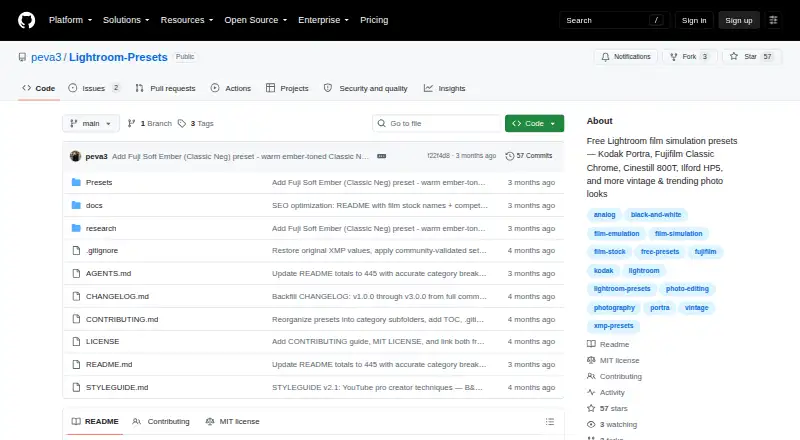
What Lightroom Presets by peva3 is
Lightroom Presets by peva3 is a free downloadable set of XMP presets for Lightroom Classic and Lightroom CC. The collection contains 445 presets in 13 categories, including film-inspired looks such as Kodak Portra, Fujifilm Classic Chrome, Cinestill 800T and Ilford HP5, alongside creative styles and alternative processes. A ZIP download contains the full set. The README provides Develop Presets folder paths for macOS and Windows and instructs users to restart Lightroom after copying the files. Presets can be inspected, modified and shared; the project is listed under the MIT license. The README recommends adjusting white balance and exposure after applying a preset and notes that grain settings were tuned for 24MP images. The project also lists video presets, mobile support and a commercial license. It presents itself as an open-source alternative to commercial preset packs. Users with questions or contributions can open an issue or start a discussion in the repository.
Who it suits
This collection suits Lightroom Classic or Lightroom CC users looking for downloadable film-inspired and creative looks. It may also appeal to users who want to inspect or modify XMP files.
What it does well
- 445 presets across 13 categories.
- Compatible with Lightroom Classic and Lightroom CC.
- Full collection is available as a ZIP download.
- XMP files can be inspected, modified and shared.
- Project is listed under the MIT license.
What to know first
- Installation instructions are provided for macOS and Windows.
- Grain settings were tuned for 24MP images.
- The README recommends adjusting white balance and exposure.
Limits
The listed free plan includes 445 XMP presets. The grain settings were tuned for 24MP images, and the project recommends adjusting white balance and exposure after applying a preset.
Plans
| Plan | Billed and limits | Price |
|---|---|---|
| Free | 445 XMP presets · MIT license · ZIP download | Free |
As github.com lists them, read 15 Oct 2026. The maker's own page has the final word.
Getting started
- Download the ZIP containing all 445 presets from the project website.
- Copy the files to the Develop Presets folder for macOS or Windows, as appropriate.
- Restart Lightroom Classic or Lightroom CC.
- Apply a preset and adjust white balance and exposure as needed.
Overview
Lightroom Presets by peva3 is a downloadable library of XMP looks for Lightroom photo editing. It is best for photographers who want a broad, editable collection without a preset-pack purchase. Its strongest appeal is the combination of 445 presets and an MIT license; expect to adapt the result to each image.
Key features
The collection covers 13 categories, including film-inspired treatments associated with Kodak Portra, Fujifilm Classic Chrome, Cinestill 800T and Ilford HP5, alongside creative styles and alternative processes. That breadth makes it a useful place to explore different directions from one download, though it does not guarantee that any given look will suit a particular photo.
The presets are XMP files for Lightroom Classic and Lightroom CC. The README says they can be inspected, modified and shared, a meaningful advantage for photographers who want to learn from or tailor preset settings rather than rely on a fixed commercial workflow. The MIT license also permits commercial use. The project provides a ZIP containing all 445 presets.
Installation guidance covers copying files into Lightroom's Develop Presets folder on macOS or Windows, then restarting Lightroom. The project also indicates video presets and mobile support, but its installation instructions are focused on desktop Lightroom. After applying a look, the README recommends adjusting white balance and exposure; it also says grain settings were tuned for 24MP images. These caveats matter if consistency across varied lighting or higher-resolution images is a priority.
Pricing
The Free plan costs nothing and includes 445 XMP presets under the MIT license, delivered as a download. With no purchase price, it is an easy way to build a large starting library. The trade-off is that the guidance emphasizes manual adjustment rather than a finished, image-specific result.
Platforms
The project lists macOS and Windows, with support for Lightroom Classic and Lightroom CC. The file-based installation process suits desktop users comfortable copying presets into an application folder; it is less straightforward for someone who expects a fully guided mobile setup.
Who it's for
This is a strong fit for photographers who want to experiment with film-inspired and creative looks, inspect or change XMP settings, and use presets commercially without paying for a pack. It is less compelling for editors who want a tightly curated workflow that minimizes post-application correction, or whose work depends on grain tuned specifically to their image resolution.
Pros and cons
- Pro: 445 presets across 13 categories provide substantial variety in one free download.
- Pro: Editable, shareable XMP files and the MIT license suit users who want to customize presets or use them commercially.
- Pro: Desktop installation directions cover both macOS and Windows.
- Con: White balance and exposure adjustments are recommended after application, so the presets are starting points rather than one-click final edits.
- Con: Grain settings were tuned for 24MP images, which may make them less suitable as-is for other resolutions.
Alternatives
For a wider set of options, browse Photo Preset Libraries.
- Mextures is a paid option with a free plan and an X-Film Overlay Pack at $10 a month; consider it if overlays are the priority.
- VSCO offers a free Starter plan with 15 presets and a Plus plan at $29.99 a year with 200+ presets; choose it if a freemium preset offering across web and mobile platforms is more relevant.
- Greater Than Gatsby sells a Complete Presets Bundle for $249, paid once with 641 Lightroom presets; it may suit buyers seeking a larger paid bundle.
- PresetLove has a bundle of 300+ Lightroom presets and 21 bonus premium presets, with a price not listed; consider it if that bundle structure fits your needs.
- RNI Films is a freemium alternative for photographers considering another film-oriented preset tool.
- Signature Edits sells a Clean & Classic Lightroom Preset Collection for $59, paid once; consider it if you prefer a paid collection.
- Contrastly Lightroom Presets offers a Complete Lightroom Presets Bundle for $99, paid once with 1,450+ Lightroom and ACR presets; it is an option for buyers seeking a much larger paid library.
- Visual Flow sells a B&W Mixer for $110, paid once; consider it if a paid black-and-white preset option is of interest.
Verdict
Choose Lightroom Presets by peva3 if you want a free, commercially usable collection with enough range to explore and XMP files you can adapt. Its main limitation is the need to fine-tune exposure and white balance, so editors seeking a more prescriptive, ready-to-use workflow should compare paid alternatives.
Verdict
Lightroom Presets by peva3 provides a large free collection in editable XMP format, with installation guidance for desktop Lightroom. The README's notes about exposure, white balance and grain settings are worth considering when applying the presets.
Questions
How much does Lightroom Presets by peva3 cost?
The Free plan is listed at 0.00 USD and includes 445 XMP presets.
Which Lightroom versions does it support?
The presets are described as ready for Lightroom Classic and Lightroom CC.
Which operating systems are listed?
The listed platforms are macOS and Windows.
Is the collection open source?
The repository lists the project under the MIT license. Its XMP files can be inspected, modified and shared.
Can the presets be used commercially?
The project facts list a commercial license.
How do I install the presets?
Copy the files into the Develop Presets folder for macOS or Windows, then restart Lightroom.
Facts from Lightroom Presets by peva3's own pages
- Adjustability
- The README says the XMP files can be inspected, modified and shared. · github.com, 4 Oct 2026
- Alternative processes
- The library includes cyanotype, wet plate, daguerreotype, platinum, autochrome, salt print and other historic-process simulations. · github.com, 15 Oct 2026
- API and extensibility
- Emulsion's documented tools can search the imported looks with list_raw_looks and apply them by name with apply_raw_look or apply_raw_preset. · github.com, 15 Oct 2026
- Categories
- The collection is divided into 13 categories, including film, creative, utility, genre, seasonal, geographic, mobile and video groups. · github.com, 15 Oct 2026
- Collection size
- The repository currently describes 445 presets. · github.com, 15 Oct 2026
- Compatibility
- The README says the presets are ready for Lightroom Classic and Lightroom CC. · github.com, 4 Oct 2026
- Contribution and support
- The contribution guide invites users to open an issue or start a discussion with questions. · github.com, 4 Oct 2026
- Contribution workflow
- Contributors are asked to test presets on multiple images, document references and submit changes through pull requests. · github.com, 15 Oct 2026
- Creative looks
- Creative presets cover styles such as VHS, cyberpunk, bleach bypass, cross-processing, teal-and-orange and cinematic looks. · github.com, 15 Oct 2026
- Download
- The project provides a ZIP containing the full preset collection. · github.com, 15 Oct 2026
- Editing guidance
- The README advises adjusting white balance and exposure after applying a preset because the files are starting points. · github.com, 15 Oct 2026
- Film looks
- Named looks include Kodak Portra, Fujifilm Classic Chrome, Cinestill 800T, Ilford HP5 and many other film stocks. · github.com, 15 Oct 2026
- Genre coverage
- Genre presets target wedding, newborn, real-estate, food, product, fashion, sports, concert and astrophotography work. · github.com, 15 Oct 2026
- Independent format support
- Emulsion says imported looks can be translated into colour grading, HSL, curves, black-and-white mixing, grain, sharpening and noise reduction. · github.com, 15 Oct 2026
- Independent integration
- The independent Emulsion project bundles 451 presets from this repository into its own film and creative preset bank. · github.com, 15 Oct 2026
- Independent integration limit
- Emulsion documents that vignette shape details and lens-profile toggles from the presets are not supported by its renderer, and Adobe Vivid is approximated. · github.com, 15 Oct 2026
- Installation
- The README gives Develop Presets folder paths for macOS and Windows and says to restart Lightroom after copying the files. · github.com, 4 Oct 2026
- Installation step
- The instructions require restarting Lightroom after copying the preset files. · github.com, 15 Oct 2026
- Intended users
- The project presents itself as a free, open-source alternative to commercial preset packs such as VSCO, Mastin Labs and RNI Films. · github.com, 4 Oct 2026
- Licence
- The repository is released under the MIT licence. · github.com, 15 Oct 2026
- License
- The repository lists the project under the MIT license. · github.com, 4 Oct 2026
- Lightroom compatibility
- The README says the files are ready for Lightroom Classic and Lightroom CC. · github.com, 15 Oct 2026
- Limit: invalid temperature field
- The same issue identifies an invalid temperature parameter in Brazilian Amazon.xmp that prevented import until the XMP was corrected locally. · github.com, 15 Oct 2026
- Limit: iOS import
- An open issue reports that many presets cannot be imported from an iOS Lightroom device and that only about 30 worked for that reporter. · github.com, 15 Oct 2026
Where Lightroom Presets by peva3 stands on Freedom251
- Photo Preset Libraries#1 of 35