Freedom251 › Digital Painting Software
Light Brush
What Light Brush is
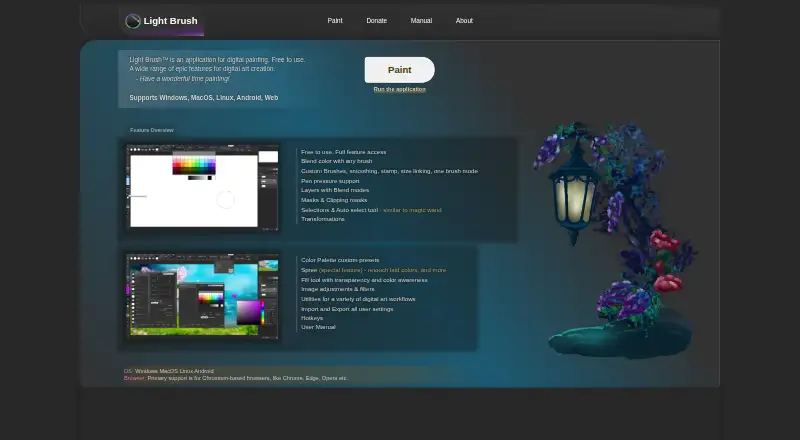
Light Brush is a free digital painting application for Windows, macOS, Linux, Android, and the web. Its painting tools include custom brushes, stroke smoothing, stamps, brush size linking, and color blending with any brush. Pen pressure is supported, with behavior that can vary according to browser, brush settings, and operating system; it may not work on Windows 7 or earlier. For organizing and editing artwork, Light Brush provides layers with blend modes, layer masks, and clipping masks. Selection options include area, lasso, and automatic pixel selection, and users can transform selections and image content. Its Spree feature allows retouching newly drawn or erased content before it is committed to a layer. The manual lists PNG, JPG/JPEG, GIF, BMP, WebP, WebM, and SVG for opening and importing images. Image saving supports PNG and JPG, while LBC is available for projects. Settings and presets are stored in the browser cache and can be moved using import and export features. The About page identifies Dmitriy Burmistrov as the maker and says he began digital painting in 2019. The privacy policy says the service may collect contact details and usage data such as IP address, browser details, pages visited, and visit duration.
Who it suits
Light Brush suits digital painters who want a free application with customizable brushes, pressure support, layers, masks, selection tools, and transformations. It is available on desktop systems, Android, and the web, with image import formats that include PNG, JPEG, GIF, BMP, WebP, WebM, and SVG.
What it does well
- Free to use with full feature access.
- Available on Windows, macOS, Linux, Android, and the web.
- Supports custom brushes, smoothing, stamps, and color blending.
- Includes layers, blend modes, layer masks, and clipping masks.
- Supports area, lasso, and automatic pixel selection.
- Can open or import PNG, JPEG, GIF, BMP, WebP, WebM, and SVG.
What to know first
- Image saving supports PNG and JPG formats.
- Pressure behavior depends on browser, brush settings, and operating system.
- Pressure may not work on Windows 7 or earlier.
- Settings and presets are stored in the browser cache.
Limits
The free plan provides full feature access. Saving an image supports PNG and JPG; LBC is available for projects.
Plans
| Plan | Billed and limits | Price |
|---|---|---|
| Light Brush | Free to use · full feature access | Free |
As light-brush.art lists them, read 8 Oct 2026. The maker's own page has the final word.
Getting started
- Visit the Light Brush website.
- Open Light Brush on Windows, macOS, Linux, Android, or the web.
- Import an image in a supported format, or begin painting with its brush tools.
- Use layers, masks, selections, and transformations to edit artwork.
- Export an image as PNG or JPG, or save a project in LBC format.
- Use the import and export features to migrate settings and presets stored in the browser cache.
Overview
Light Brush is a digital painting app for artists who want configurable brushes and layered editing on web, desktop, or Android. It is best suited to people who want a capable free painting workspace across several operating systems, without paying for access to its features. Its tools cover more than basic sketching, but pressure behavior can vary by setup and finished images can be saved only as PNG or JPG.
Key features
Brush customization, smoothing, stamps, size linking, color blending with any brush, and stroke stabilization give artists several ways to shape marks and manage line quality. Pen pressure is supported, but its behavior depends on the browser, brush settings, and operating system; it may not work on Windows 7 or earlier. That makes Light Brush a less dependable choice for artists whose technique depends on consistent pressure response across devices.
Layer blend modes, layer masks, and clipping masks provide useful control over separate parts of a composition. Area, lasso, and automatic pixel selection tools can select artwork, and transformations apply to both content and selections. Spree adds a retouching stage for newly drawn or erased content before it is committed to a layer, which is useful when a mark needs adjustment before it becomes part of the composition.
The app opens or imports PNG, JPG/JPEG, GIF, BMP, WebP, WebM, and SVG files. Image saving supports PNG and JPG, while LBC is available for projects. Artists can therefore work with a wider range of source formats than they can export as finished images. Settings and presets live in the browser cache; import and export features allow migration, but users should account for that storage model when moving between environments.
Pricing
Light Brush — free. The free plan is free to use and includes full feature access, so there is no paid tier or trial to weigh against its core tools. It fits artists who want to explore brush customization, masks, and selection tools without a subscription. The trade-offs are not a reduced feature set but the app's format and workflow constraints: image exports are PNG and JPG, and settings and presets are stored in the browser cache.
Platforms
Light Brush is available on Windows, macOS, Linux, Android, and the web. That range suits artists who want to work across desktop and mobile environments or use a browser-based option. Pressure behavior still depends partly on the browser and operating system, so broad availability does not guarantee identical pen input everywhere.
Who it's for
Light Brush is a strong fit for artists seeking a free painting app with adjustable brushes, layered edits, masks, selections, and transformations. It is less suitable for workflows that require reliable pressure response across systems or image export in formats other than PNG and JPG. People switching browsers or devices should also consider how browser-cache storage for presets and settings fits their routine.
Pros and cons
- Pros: Full feature access is free, with no subscription or trial requirement.
- Pros: Custom brushes, stabilization, masks, blend modes, and selection tools support a more controlled painting workflow than a basic sketchpad.
- Pros: Web, Android, Windows, macOS, and Linux availability gives users several ways to access the app.
- Cons: Pressure response varies by browser, brush settings, and operating system, and may not work on Windows 7 or earlier.
- Cons: Finished images can be saved only as PNG or JPG, despite support for opening and importing more formats.
- Cons: Settings and presets are stored in the browser cache, making the migration tools relevant for users moving environments.
Alternatives
Drawpile is another free option, with official community servers available free and support for Android, iOS, Linux, macOS, web, Windows, and self-hosted use. Choose it if those server and platform options better match your needs.
ibisPaint offers a free version with unlimited usage time, 64MB of cloud storage, and advertisements, as well as a premium membership. It is worth considering if that free-plan structure suits you better.
Krita is free and open source, with desktop support for Linux, macOS, and Windows. Choose it if you prefer an open-source desktop option.
Pixia is free software for Android, iOS, Linux, and Windows; its free software does not include user support.
Sketchbook has a free mobile application with brushes, layers, guides, rulers, and stroke tools, alongside a Premium Bundle with custom brush creation. It may suit artists focused on those mobile drawing tools.
Tux Paint is free and open source under GPL v2 and can be installed on as many machines as you wish. Choose it if those terms and broad installation rights are a priority.
FireAlpaca is a free option with customizable brushes, layered artwork, animation tools, and CMYK display. Consider it if those specific capabilities matter more to your workflow.
GrafX2 is free software for Linux and Windows under the GNU General Public License version 2.
Browse more options in Digital Painting Software.
Verdict
Choose Light Brush if you want broad platform access to a free painting app with customizable brushes, masks, and layered editing. Its main advantage is full feature access at no cost; its clearest drawbacks are variable pressure behavior and image exports limited to PNG and JPG. Artists who need predictable pressure across setups or different output formats should look elsewhere.
Verdict
Choose Light Brush if you want a free painting app with brush customization, layered editing, masks, and broad platform availability. Its pressure support can vary by environment, and image export is limited to PNG and JPG. Consider how its browser-cache storage for settings and presets fits your workflow.
Questions
Is Light Brush free?
Yes. The Light Brush plan costs nothing and provides full feature access. It does not offer a free trial.
Which platforms does Light Brush support?
It supports Windows, macOS, Linux, Android, and the web.
Can it use pen pressure?
Yes. Pressure behavior depends on the browser, brush settings, and operating system, and may not work on Windows 7 or earlier.
Which image formats can it open or import?
The manual lists PNG, JPG/JPEG, GIF, BMP, WebP, WebM, and SVG.
Which formats can it save?
Image saving supports PNG and JPG. LBC is available for projects.
Who makes Light Brush?
The About page identifies Dmitriy Burmistrov as the maker and says he began digital painting in 2019.
Facts from Light Brush's own pages
- Brushes
- It supports custom brushes, smoothing, stamps, size linking, and color blending with any brush. · light-brush.art, 8 Oct 2026
- Files
- The manual lists PNG, JPG/JPEG, GIF, BMP, WebP, WebM, and SVG as supported image opening and import formats; saving as an image supports PNG and JPG, with LBC available for projects. · light-brush.art, 8 Oct 2026
- Layers and masks
- The app supports layers with blend modes, layer masks, and clipping masks. · light-brush.art, 8 Oct 2026
- Maker
- The About page identifies Dmitriy Burmistrov as the maker and says he began digital painting in 2019; it does not state a founding year or headquarters. · light-brush.art, 8 Oct 2026
- Platforms
- The maker lists Windows, macOS, Linux, Android, and web support, with primary browser support for Chromium-based browsers such as Chrome, Edge, and Opera. · light-brush.art, 8 Oct 2026
- Pressure
- The maker lists pen pressure support; its manual says pressure behavior depends on browser, brush settings, and operating system, and may not work on Windows 7 or earlier. · light-brush.art, 8 Oct 2026
- Privacy
- The privacy policy says the service may collect contact details and usage data, including IP address, browser details, visited pages, and visit duration. · light-brush.art, 8 Oct 2026
- Purpose
- Light Brush is an application for digital painting. · light-brush.art, 8 Oct 2026
- Security
- The privacy policy says the maker uses commercially acceptable means to protect personal data but cannot guarantee absolute security. · light-brush.art, 8 Oct 2026
- Selection and transforms
- It offers area, lasso, and automatic pixel selection tools, plus transformations for content and selections. · light-brush.art, 8 Oct 2026
- Settings storage
- The manual says settings and presets are stored in the browser cache and can be migrated using import and export features. · light-brush.art, 8 Oct 2026
- Spree
- Spree lets users retouch newly drawn or erased content before it is committed to a layer. · light-brush.art, 8 Oct 2026
- Support
- The contact page accepts general inquiries, feedback or requests, and bug reports, and asks bug reporters to include reproduction steps and relevant browser, OS, or device details. · light-brush.art, 8 Oct 2026
Where Light Brush stands on Freedom251
- Digital Painting Software#10 of 46