Freedom251 › AI Lesson Plan Generators
Lesson Planners
What Lesson Planners is
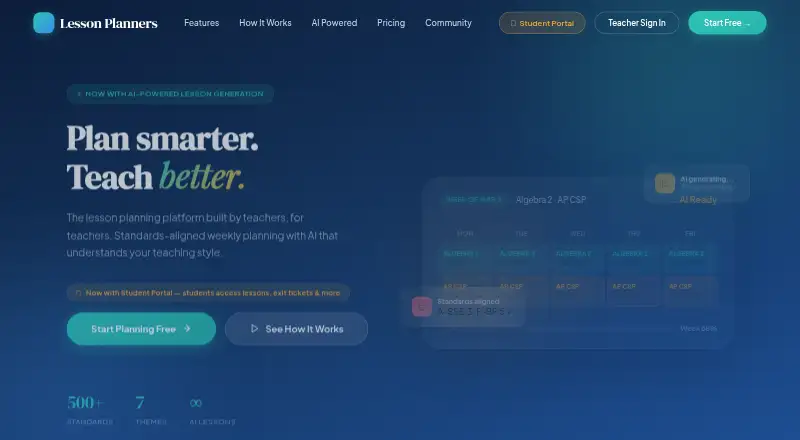
Lesson Planners is a web-based weekly planning platform designed for teachers. Its five-day calendar uses a drag-and-drop grid to arrange classes and move between weeks. Teachers can generate multi-day lesson plans from curriculum topics, with objectives, activities, and materials; teaching-style tags and custom instructions can guide the generated content. The platform includes more than 500 Common Core standards and AI-suggested standards alignment. A curriculum tracker lets teachers upload a pacing guide, mark topics complete, follow progress bars, and generate lessons from the tracker sidebar.
Lessons can have worksheets, rubrics, and other resources attached, and can be exported as PDFs. Listed classroom tools include attendance and behavior tracking, seating charts, exit tickets, and weekly journaling. Students can access lessons and exit tickets through a Student Portal. Starter is a free-forever plan with a weekly calendar view, basic lesson planning, PDF export, a standards library, and a limit of two classes. Pro Teacher adds unlimited classes, AI lesson generation, curriculum tracking, classroom tools, standards auto-alignment, all seven themes, and priority support. School or District includes the Pro features plus an admin dashboard, school calendar management, curriculum templates, usage analytics, onboarding, and training, with custom pricing.
Who it suits
Lesson Planners suits individual teachers who want a weekly calendar and basic planning at no cost, as well as teachers who need AI lesson generation and classroom tools. Its School or District plan is aimed at teams that need administration, school calendar management, templates, analytics, and onboarding.
What it does well
- Five-day drag-and-drop calendar organizes classes across weeks.
- AI can draft multi-day plans with objectives, activities, and materials.
- Includes more than 500 Common Core standards and suggested alignment.
- Curriculum tracker follows pacing-guide topics and progress.
- Lessons support PDF export and attached classroom resources.
What to know first
- Starter is limited to two classes and basic lesson planning.
- AI lesson generation and curriculum tracking are included in Pro Teacher.
- School or District pricing is custom.
Limits
Starter is billed forever and supports up to two classes, basic lesson planning, weekly calendar viewing, PDF export, and the standards library. AI lesson generation, curriculum tracking, and the other listed Pro features are in Pro Teacher, priced at $14.99 a month or $144 per year.
Plans
| Plan | Billed and limits | Price |
|---|---|---|
| Starter | Forever · Weekly calendar view · Up to 2 classes · Basic lesson planning · PDF export · Standards library | Free |
| Pro Teacher | $14.99/mo or $144/year — save 20% · Unlimited classes · AI lesson generation · Curriculum tracker · Attendance & behavior · Seating charts & groups · Standards auto-align · All 7 themes · Priority support | $14.99 a month |
| School / District | Custom · Everything in Pro · Admin dashboard · School calendar management · Curriculum templates · Usage analytics · Onboarding & training | On request |
As lessonplanners.org lists them, read 7 Oct 2026. The maker's own page has the final word.
Getting started
- Visit the Lesson Planners website.
- Choose Starter, Pro Teacher, or contact the site about School or District.
- Set up classes in the weekly calendar.
- Upload a pacing guide to track curriculum topics.
- Create lessons from curriculum topics or the tracker sidebar.
- Export lessons as PDFs or attach worksheets, rubrics, and other resources.
Verdict
Choose Lesson Planners if you want a teacher-focused weekly planner with standards, pacing-guide tracking, and lesson generation. Starter covers basic planning for up to two classes; teachers needing unlimited classes and the full feature set need Pro Teacher, while school teams can consider the custom-priced plan.
Questions
Is there a free plan?
Yes. Starter is free, billed forever, and supports up to two classes.
How much does Pro Teacher cost?
Pro Teacher is $14.99 a month, billed at $14.99/mo or $144/year.
What platforms does Lesson Planners support?
It is a web-based platform.
Does it align lessons to standards?
Yes. It includes 500+ Common Core standards and AI-suggested standards alignment. Pro Teacher includes standards auto-align.
Does it integrate with other services?
The homepage describes roster import and pacing-guide upload but does not name third-party integrations.
What does the School or District plan cost?
Pricing is custom. The plan includes everything in Pro, plus an admin dashboard, school calendar management, curriculum templates, usage analytics, onboarding, and training.
Facts from Lesson Planners's own pages
- AI generation
- AI generates multi-day lesson plans with objectives, activities, and materials from curriculum topics. · lessonplanners.org, 7 Oct 2026
- Calendar
- Its weekly calendar is a five-day drag-and-drop grid for viewing classes and navigating between weeks. · lessonplanners.org, 7 Oct 2026
- Classroom tools
- The site lists attendance and behavior tracking, seating charts, exit tickets, and weekly journaling among its features. · lessonplanners.org, 7 Oct 2026
- Curriculum tracking
- Teachers can upload a pacing guide, check off topics, view progress bars, and generate lessons from the tracker sidebar. · lessonplanners.org, 7 Oct 2026
- Export and attachments
- The product offers PDF export and lets users attach worksheets, rubrics, and other resources to lessons. · lessonplanners.org, 7 Oct 2026
- Integrations
- The official homepage describes roster import and pacing-guide upload, but does not name third-party integrations. · lessonplanners.org, 7 Oct 2026
- Intended users
- The listed plans are aimed at individual teachers exploring the product, teachers needing its full feature set, and school or district teams. · lessonplanners.org, 7 Oct 2026
- Purpose
- Lesson Planners describes itself as a standards-aligned weekly lesson planning platform built by teachers for teachers. · lessonplanners.org, 7 Oct 2026
- Security and compliance
- The official homepage links to Privacy Policy and Terms of Service but does not state specific security or compliance certifications. · lessonplanners.org, 7 Oct 2026
- Standards
- The site says the product includes 500+ Common Core standards and AI-suggested standards alignment. · lessonplanners.org, 7 Oct 2026
- Student portal
- The site says students can access lessons and exit tickets through a Student Portal. · lessonplanners.org, 7 Oct 2026
- Support
- The Pro Teacher plan includes priority support, and the site offers contact, demo, and school partnership links. · lessonplanners.org, 7 Oct 2026
- Teaching style
- Teachers can guide AI output with teaching style tags and custom instructions. · lessonplanners.org, 7 Oct 2026
Where Lesson Planners stands on Freedom251
- AI Lesson Plan Generators#14 of 26