Freedom251 › Bookkeeping Software
Ledger
by Ledger
What Ledger is
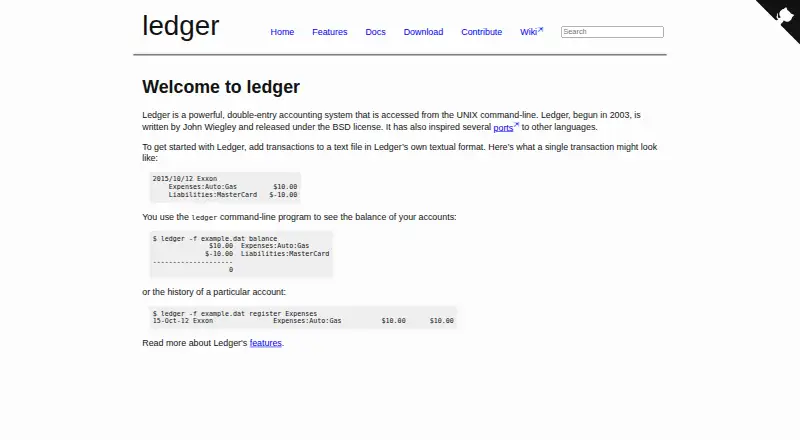
Ledger is a free double-entry accounting system operated from the UNIX command line. Users record transactions in a text file using Ledger's format and maintain those files themselves; the software does not create or modify them. Every entry must balance, or Ledger reports an error and does not generate the requested report. It supports multiple currencies in an account and can convert between them. Commands can produce monthly and average reports, check balances, reconcile accounts and track stock capital gains. Ledger accepts UTF-8 data files, ISO-format dates, and US or European decimal formats. The project is released under the BSD license, with the plan listed as free. Downloads include packages or binaries for GNU/Linux, Windows, Mac OS X and BSD. Documentation links to the Ledger 3 manual, man page, a C++ API and ledger-mode manual. The project points users to an IRC channel and mailing list for questions and discussion, and directs bug reports to its GitHub issue page. It has no graphical interface, so users work through commands and text files.
Who it suits
Ledger suits people comfortable managing a text-based accounting file from the command line. It may fit users who need multi-currency accounts, account reconciliation or reports from balanced entries.
What it does well
- Free plan costs nothing.
- Supports multiple currencies and conversion.
- Commands can reconcile accounts and check balances.
- Accepts UTF-8 and US or European decimal formats.
- Downloads listed for GNU/Linux, Windows, Mac OS X and BSD.
What to know first
- Access is through the UNIX command line.
- No graphical interface is offered.
- Unbalanced entries prevent report generation.
- Users must maintain their own transaction files.
Plans
| Plan | Billed and limits | Price |
|---|---|---|
| Ledger | BSD-licensed command-line accounting software | Free |
As ledger-cli.org lists them, read 9 Oct 2026. The maker's own page has the final word.
Getting started
- Visit the Ledger website.
- Choose a package or binary for Linux, Windows, macOS, or BSD from the download options.
- Record transactions in a text file using Ledger’s format.
- Keep each entry balanced before generating reports.
Overview
Ledger is free, open-source double-entry accounting software for people comfortable working at a UNIX command line. It suits users who want to keep their own accounting records as text files and value strict balancing over a graphical interface. Its reporting and multi-currency support are useful strengths, but the text-based workflow is a poor fit for anyone seeking a conventional accounting app.
Key features
Users record transactions in Ledger’s textual format and keep control of the files: Ledger does not create or modify them. That offers a transparent, user-managed record, but puts responsibility for maintaining the files on the user. Every entry must balance; an error blocks report generation, making accuracy a firm prerequisite rather than something the software smooths over.
Commands can generate monthly and average reports, check balances, reconcile accounts and track stock capital gains. Ledger also supports multiple currencies within an account and can convert between them. UTF-8 data, ISO-format dates and US or European decimal formats broaden its usefulness across locales, though they do not change its command-line nature.
Ledger has no flashy interface and is accessed from the UNIX command line. It offers no bank feeds, invoice creation, receipt capture, inventory tracking or accountant access. Automated reconciliation is supported, but this is not a full-service workflow for businesses that depend on those other functions.
Pricing
Ledger costs nothing. The Ledger plan is free, BSD-licensed command-line accounting software; there is no free trial because the software is already free. With no paid tier, there is no cheaper plan that trades features for price, but users should be prepared to work in the command line and manage their own text files.
Platforms
Ledger supports Linux, macOS and Windows. Its download page also lists packages or binaries for BSD. The command-line interface is central across platforms, so choosing a supported operating system does not provide a graphical workflow.
Who it's for
Ledger is best for individuals or other users who are comfortable with the UNIX command line, want double-entry records in a text format and need reports, reconciliation or multi-currency accounting without a software fee. It is not a strong choice for users who need bank feeds, invoices, receipt capture, inventory tracking or accountant access, or who prefer to manage accounts through a graphical interface.
Pros and cons
- Pro: Free and released under the BSD license, with no paid plan to unlock its accounting features.
- Pro: Text-file records remain under the user's control, and entries must balance before reports can be generated.
- Pro: Reports, reconciliation, stock capital gains tracking and multi-currency conversion cover several substantial bookkeeping needs.
- Con: The UNIX command-line interface rules it out for users who want a conventional graphical app.
- Con: No bank feeds, invoices, receipt capture, inventory tracking or accountant access limits its fit for fuller business workflows.
- Con: An unbalanced entry prevents report generation, so mistakes can interrupt the reporting workflow.
Alternatives
For a different free option that can be installed on a Frappe site, consider Frappe Books; it supports mobile, desktop, web and self-hosted platforms. Beancount is another free, open-source bookkeeping option across Linux, macOS, Windows, web, self-hosted and API platforms. Choose GnuCash for free desktop accounting aimed at personal and small-business use.
hledger is a free-software alternative with no purchase price or monthly fees and support for API, desktop, web and self-hosted platforms. BUSY offers a free web plan for billing and accounting, with multiple companies and financial years. GNUKhata is free and open source, with Linux, Windows, web and self-hosted support. FrontAccounting is free accounting software for web or self-hosted use. LedgerSMB is free, open-source software for self-hosted installation.
Compare more options in General Ledger Software and Bookkeeping Software.
Verdict
Choose Ledger if you want free double-entry accounting built around user-maintained text files and are comfortable with the command line. Its disciplined balancing and reporting tools are compelling for that workflow. Look elsewhere if you need a graphical interface or business features such as invoicing, bank feeds, receipt capture or inventory tracking.
Verdict
Ledger provides command-line double-entry accounting with reports, reconciliation and multi-currency support. Its text-file workflow and strict balance requirement are central considerations before choosing it.
Questions
How much does Ledger cost?
Ledger is free. Its listed plan is free.
Is Ledger open source?
Yes. Ledger is released under the BSD license.
Which platforms does Ledger support?
The listed platforms are Linux, macOS, and Windows. Download options also include BSD.
Does Ledger support multiple currencies?
Yes. It supports multiple currencies in an account and can convert between them.
Does Ledger have a graphical interface?
The site says Ledger has no flashy user interface and is accessed from the UNIX command line.
Who makes Ledger?
Ledger is the maker. The project began in 2003 and was written by John Wiegley.
Facts from Ledger's own pages
- Accountant access
- No · ledger-cli.org, 20 Sept 2026
- API
- The documentation links to Ledger 3 API documentation and describes it as a C++ API. · ledger-cli.org, 9 Oct 2026
- Automated reconciliation
- Yes · ledger-cli.org, 20 Sept 2026
- Balanced entries
- Every entry must balance, and an unbalanced entry causes an error and prevents the report from being generated. · ledger-cli.org, 9 Oct 2026
- Balancing
- Ledger requires entries to balance and reports an error instead of generating a report for an unbalanced entry. · ledger-cli.org, 9 Oct 2026
- Bank feeds
- No · ledger-cli.org, 20 Sept 2026
- Bug reporting
- The maker directs users to report bugs through the GitHub issue page. · ledger-cli.org, 9 Oct 2026
- Bug reports
- The project asks users to report bugs through its GitHub issue page. · ledger-cli.org, 9 Oct 2026
- Currencies
- Ledger supports multiple currencies in an account and can convert between them. · ledger-cli.org, 9 Oct 2026
- Data format
- Users record transactions in a text file using Ledger’s textual format. · ledger-cli.org, 9 Oct 2026
- Data handling
- Ledger does not create or modify users’ data files; users maintain their own text files. · ledger-cli.org, 9 Oct 2026
- Documentation
- The documentation page links to the Ledger 3 manual, man page, API documentation, and ledger-mode manual. · ledger-cli.org, 9 Oct 2026
- Downloads
- The download page lists packages or binaries for GNU/Linux, Windows, Mac OS X, and BSD. · ledger-cli.org, 9 Oct 2026
- Founded
- 2003 · ledger-cli.org, 28 Sept 2026
- Interface limitation
- The site says Ledger has no flashy user interface and is accessed from the UNIX command line. · ledger-cli.org, 9 Oct 2026
- International formats
- Ledger accepts UTF-8 in data files, uses ISO-format dates, and accepts US or European decimal formats. · ledger-cli.org, 9 Oct 2026
- Inventory tracking
- No · ledger-cli.org, 20 Sept 2026
- Invoice creation
- No · ledger-cli.org, 20 Sept 2026
- License
- Ledger is released under the BSD license. · ledger-cli.org, 9 Oct 2026
- Purpose
- Ledger is a double-entry accounting system accessed from the UNIX command line. · ledger-cli.org, 9 Oct 2026
- Receipt capture
- No · ledger-cli.org, 20 Sept 2026
- Reports
- Its commands can generate monthly and average reports, check balances, reconcile accounts, and track stock capital gains. · ledger-cli.org, 9 Oct 2026
- Started and author
- Ledger began in 2003 and is written by John Wiegley. · ledger-cli.org, 9 Oct 2026
- Support
- The project points users to its IRC channel and mailing list for questions and discussions. · ledger-cli.org, 9 Oct 2026
Where Ledger stands on Freedom251
- Bookkeeping Software#25 of 75
- General Ledger Software#9 of 25