Freedom251 › Cohort-Based Course Platforms

Learnify
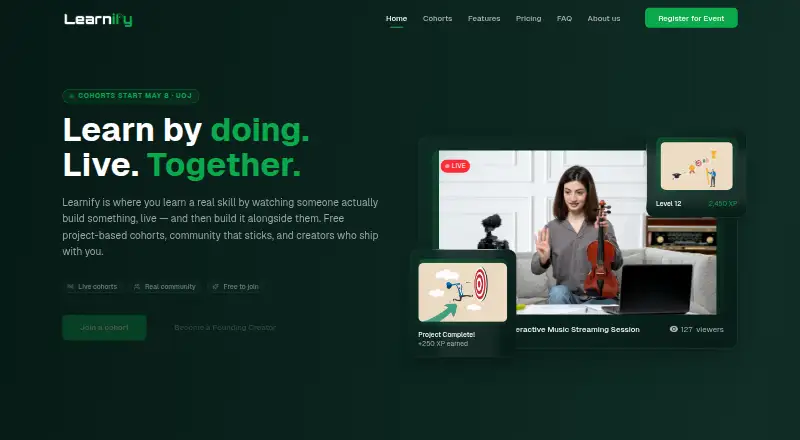
What Learnify is
Learnify is a live learning platform for interactive sessions, project-based tracks, and skill-building. Its AI learning agent can answer questions, explain concepts, and offer personalized guidance as a study companion. Learners can collect points, badges, and achievements through participation, progress, and contributions. Cohort tools include live streaming and chat, a community panel, polls, quizzes, pinned moments, and replay access for subscribers. Learnify says it focuses on real-world skills, including for MENA graduates preparing to enter the job market. It offers web access and is listed for Android and iOS; its descriptions call the mobile app a beta expanding to those platforms. The Community plan includes up to 20 streaming hours monthly; Creator allows 40 hours for $9.99/mo, and Business allows 80 hours for $69.99/mo. Learnify Perks+ costs $2.99/mo and includes ad-free 1080p viewing and one saved stream with 30-day access. The privacy policy says users must be 13 or older, or 15 or older in specific regions.
Who it suits
Learnify suits learners looking for live, cohort-based sessions and project or skill tracks, especially those focused on real-world skills. Its creator and business plans also offer streaming and private-session capacity.
What it does well
- AI agent answers questions and explains concepts.
- Live sessions include chat, polls, and quizzes.
- Learners earn points, badges, and achievements.
- Community plan includes 20 monthly streaming hours.
What to know first
- Mobile app is described as a beta.
- Community plan limits streaming to 20 hours monthly.
- Age eligibility is 13+, or 15+ in some regions.
Limits
Community includes 20 streaming hours per month, 720p quality, and private sessions marked as coming soon. Creator includes 40 monthly streaming hours, 720p quality, and five private sessions per month; Business includes 80 hours, 1080p quality, and 20 private sessions per month.
Plans
| Plan | Billed and limits | Price |
|---|---|---|
| Learnify Perks+ | $2.99/mo; $5.98 50% OFF · 1080p Viewing Quality · Ad-Free Viewing · Save 1 Stream (30-Day Access) · Early Stream Notifications | $2.99 a month |
| Business | $69.99/mo; $139.98 50% OFF · 80 Hours Streaming/Month · 1080p Quality · 20 Private Sessions/Month · Up to 3 Team Seats · Priority Email Support (24hr) | $69.99 a month |
| Creator | $9.99/mo; $19.98 50% OFF · 40 Hours Streaming/Month · 720p Quality · Unlimited Viewers · 5 Private Sessions/Month · Recording (30-Day, 10 hrs storage) · Email Support (48hr) | $9.99 a month |
| Community | $0/mo · 20 Hours Streaming/Month · Donations Only · 720p Quality · Unlimited Viewers · Private Sessions (Coming Soon) | On request |
As learnifyjo.com lists them, read 2 Oct 2026. The maker's own page has the final word.
Getting started
- Open the Learnify website.
- Choose a plan: Community, Learnify Perks+, Creator, or Business.
- Use the web platform or access Learnify through Android or iOS.
- Sign in using Google, GitHub, LinkedIn, Facebook, or X (Twitter).
- Join a live session or cohort and use the available chat, polls, and quizzes.
Overview
Learnify is a live learning platform that combines scheduled cohort sessions, project-based tracks, and an AI study companion. It is best suited to learners who want practical skills and structured participation; its appeal is the blend of live community and guided study, while streaming caps and plan-specific trade-offs call for a close look.
The platform’s focus on real-world skills grew from concern that MENA graduates were entering the job market without adequate preparation. Its learning agent can answer questions, explain concepts, and provide personalized guidance. Points, badges, and achievements reward contributions, progress, and participation, adding an incentive layer without replacing the core learning experience.
Learnify’s live sessions pair streaming and chat with a cohort community panel, polls, quizzes, pinned moments, and replay access for subscribers. That setup favors learning with a group over a purely self-paced course library. Compare Learning Community Platforms or Cohort-Based Course Platforms if community or scheduled group learning is your priority.
Key features
- Live cohort learning: Cohort scheduling and live sessions support structured group study. Chat, polls, quizzes, and a community panel give participants ways to engage during sessions, making Learnify a stronger fit for interactive teaching than solo study.
- AI study companion: The learning agent answers questions, explains concepts, and offers personalized guidance. It can support learners between sessions, though it does not remove the need to assess whether the live format suits your schedule.
- Participation rewards: Points, badges, and achievements recognize contributions and progress. These may encourage regular involvement for learners motivated by visible milestones.
- Session replays: Subscriber replay access can help learners revisit sessions, but the paid plans impose streaming-hour limits and Creator caps recording storage and access duration.
Pricing
Learnify is freemium. The Community plan costs $0/mo and includes 20 streaming hours per month, 720p quality, unlimited viewers, and donations only; private sessions are marked as coming soon. This is the lowest-cost way to participate, but the monthly streaming cap and donation-only model make it less suitable for a creator who needs private sessions or more viewing time.
Learnify Perks+ costs $2.99/mo and focuses on viewing rather than hosting: 1080p quality, ad-free viewing, one saved stream with 30-day access, and early stream notifications. It is the cheapest paid option, but it does not include the creator-oriented streaming and session allowances shown on the other paid plans.
Creator costs $9.99/mo and provides 40 streaming hours per month, 720p quality, unlimited viewers, five private sessions monthly, and recording with 30-day access and 10 hours of storage. It also includes email support with a 48-hour response window. This plan suits a creator running regular sessions who can work within its recording and streaming limits.
Business costs $69.99/mo and raises the allowance to 80 streaming hours monthly, with 1080p quality, 20 private sessions per month, up to three team seats, and priority email support with a 24-hour response window. The higher price is most defensible for teams that need those additional sessions, higher quality, and faster support; the three-seat ceiling may constrain larger teams.
Community has no published price beyond its $0/mo billing, while the paid prices are shown as monthly. Choose based on whether you primarily watch, host sessions, or need team capacity: the cheaper tiers do not simply offer less of the same package, but serve different uses.
Platforms
Learnify is available on Android, iOS, and the web. The homepage describes an iOS mobile experience, while the About page says the mobile app beta is expanding to iOS and Android. That makes mobile access part of the offering, but the beta status is worth considering if a mature mobile app is essential.
Who it's for
Learnify fits learners seeking practical, real-world skills through scheduled group sessions, and educators or creators who want live interaction, community tools, and session replays. Its AI companion and participation rewards add support around that cohort format. It is a weaker fit for people who want only self-paced courses, need streaming beyond the plan caps, or require more than three Business team seats.
Pros and cons
Pros
- Interactive cohort tools: Live chat, polls, quizzes, and a community panel support participation rather than passive viewing.
- AI guidance alongside live teaching: The study companion can explain concepts and answer questions between sessions.
- Distinct viewing and creator options: Perks+ serves viewers, while Creator and Business include private sessions and defined streaming allowances.
- Privacy safeguards: Learnify says it uses TLS/SSL encryption in transit and at rest, does not sell personal information, and gates Google Analytics and Google Ads tracking behind consent where applicable.
Cons
- Monthly streaming caps: Community, Creator, and Business allow 20, 40, and 80 hours respectively, which can limit frequent or extended streaming.
- Creator recording constraints: Recordings have 30-day access and 10 hours of storage, so the plan is not a long-term recording archive.
- Limited Business seats: Up to three team seats may not cover a larger organization.
- Mobile beta: The app is described as expanding in beta, which may not suit readers seeking a settled mobile experience.
Alternatives
For community-first choices, HuddleSpot offers a free web Starter plan with up to 100 members, five spaces or channels, basic analytics, discussions, posts, and private spaces. Choose it when those defined community tools matter more than Learnify’s live cohort and study-companion mix. Fora has free Starter and Pro plans with 200 and 5,000 members respectively, while Enterprise has unlimited members at custom pricing; it may suit a community whose main constraint is member capacity.
OpenCourse offers a free plan with unlimited members and courses, plus a $15/community plan with priority support and advanced features. It is a reasonable alternative when course and member capacity are the deciding factors. Daisie has a free plan and a seven-day trial with full access; consider it if a trial period is central to your choice.
Nas.com is a free option on web, iOS, and Android. GroupApp is freemium across web, iOS, and Android, while LearnHouse Boards is freemium on the web. Maven is a free web option. These may be worth comparing when you want to consider other community or learning platforms.
Verdict
Choose Learnify if practical, cohort-based learning with live interaction and an AI study companion is the priority. Its strongest case is the combination of scheduled sessions, participation tools, and study guidance; its streaming limits, Creator recording cap, and mobile beta make it less compelling for heavy streaming or anyone who needs a fully established mobile experience.
Verdict
Learnify combines live cohort learning with an AI study companion and participation rewards. Compare plan streaming limits and mobile beta status with your needs.
Questions
What does Learnify cost?
Learnify Perks+ is $2.99/mo, Creator is $9.99/mo, and Business is $69.99/mo. The Community plan is billed at $0/mo.
Is there a free plan?
Yes. The Community plan is billed at $0/mo and includes 20 hours of streaming per month.
Which platforms does Learnify support?
Learnify is listed for Android, iOS, and web. Its descriptions say the mobile app beta is expanding to iOS and Android.
What is included in a live cohort session?
The described features include a live stream and chat, a cohort community panel, polls, quizzes, pinned moments, and subscriber replay access.
What is the age eligibility?
The privacy policy says Learnify is for users aged 13 or older, or 15 or older in specific regions.
Facts from Learnify's own pages
- Age eligibility
- The privacy policy says Learnify is for users aged 13 or older, or 15 or older in specific regions. · learnifyjo.com, 2 Oct 2026
- AI learning
- Its AI-powered learning agent is described as a study companion that answers questions, explains concepts, and provides personalized guidance. · learnifyjo.com, 2 Oct 2026
- Audience
- The About page says Learnify began to address MENA graduates entering the job market without adequate preparation, and describes its focus on real-world skills. · learnifyjo.com, 2 Oct 2026
- Founded
- 2024 · learnifyjo.com, 28 Sept 2026
- Gamification
- Learners can earn points, badges, and achievements through contributions, progress, and participation. · learnifyjo.com, 2 Oct 2026
- Integrations and providers
- The privacy policy names Clerk for authentication, Stripe for payments, Vercel for hosting and analytics, BunnyCDN, Neon, Sentry, Typesense, Resend, Inngest, PostHog, and Google Analytics among its service providers. · learnifyjo.com, 2 Oct 2026
- Live cohort features
- The homepage describes an integrated live stream and chat, cohort community panel, polls, quizzes, pinned moments, and subscriber replay access. · learnifyjo.com, 2 Oct 2026
- Mobile
- The homepage describes an iOS mobile experience, and the About page says the mobile app beta is expanding to iOS and Android. · learnifyjo.com, 2 Oct 2026
- Notable limits
- The pricing page lists a 20-hour monthly streaming limit for Community, 40 hours for Creator, and 80 hours for Business. · learnifyjo.com, 2 Oct 2026
- Privacy
- The privacy policy says Learnify does not sell personal information and gates Google Analytics and Google Ads tracking behind consent where applicable. · learnifyjo.com, 2 Oct 2026
- Product
- Learnify presents itself as a live learning platform with interactive sessions, project-based tracks, and skill-building tracks. · learnifyjo.com, 2 Oct 2026
- Security
- The privacy policy says Learnify uses TLS/SSL encryption for data in transit and at rest and managerial and physical safeguards. · learnifyjo.com, 2 Oct 2026
- Social login
- The privacy policy says Learnify offers logins via Google, GitHub, LinkedIn, Facebook, and X (Twitter). · learnifyjo.com, 2 Oct 2026
- Support
- The pricing page lists Community Support for the Community plan, 48-hour email support for Creator, and 24-hour priority email support for Business. · learnifyjo.com, 2 Oct 2026
Where Learnify stands on Freedom251
- Cohort-Based Course Platforms#3 of 22
- Learning Community Platforms#5 of 26