Freedom251 › Online course platforms
Maven
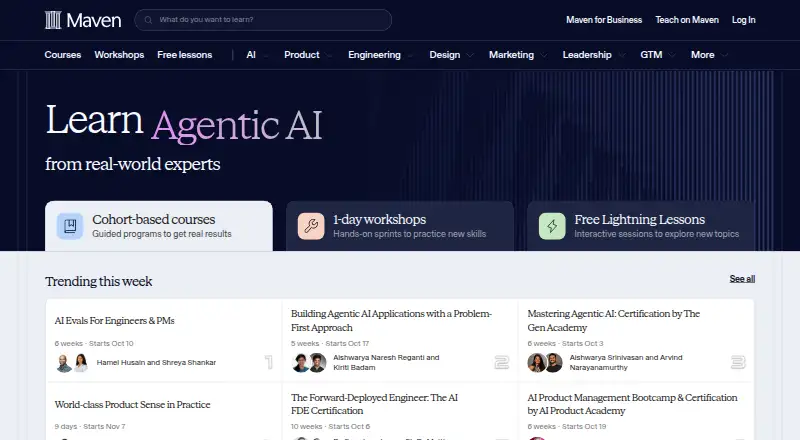
What Maven is
Maven is a web platform for experts and creators who want to teach what they know through cohort-based courses. It also supports one-day workshops and free interactive Lightning Lessons. Cohort courses emphasize active learning through projects and learning with peers, and creators can use formats such as live sessions, pre-recorded videos, readings, templates, and resource links. Maven describes its instructor platform as an all-in-one set of tools for email marketing, landing pages, lead generation, course content, and community. Stripe processes enrollment payments and instructor payouts. For course events, Maven can create Zoom meeting links and share session recordings with students. Lightning Lessons work with Zoom Pro or Business; that tool does not integrate with Google Meet, Teams, or other webinar platforms. Maven is free to use until a student pays. For paid enrollments, Maven keeps 10% and instructors receive 90% minus Stripe fees. Its pricing guidance sets a $200 minimum for any paid offering. Maven handles refund requests and decisions, and its Satisfaction Guarantee allows full refunds up to the halfway point of a course experience. The web platform also serves business learners through Maven for Business, which offers expert-led training for businesses.
Who it suits
Maven suits experts and creators who want to teach through cohort courses, workshops, or Lightning Lessons, with course and audience tools in one platform. Businesses seeking expert-led training can also consider Maven for Business.
What it does well
- Free to use until a student pays.
- Supports cohort courses, workshops, and free Lightning Lessons.
- Includes email marketing, landing pages, and lead generation tools.
- Uses Stripe for enrollment payments and instructor payouts.
- Can create Zoom event links and share recordings.
What to know first
- Maven keeps 10% of paid enrollments, plus Stripe fees apply to instructors.
- Paid offerings have a $200 platform minimum.
- Lightning Lessons do not integrate with Google Meet, Teams, or other webinar platforms.
Limits
Maven is free to use until a student pays. Paid enrollments carry a 10% Maven fee, and instructors keep 90% minus Stripe fees; the platform minimum for paid offerings is $200.
Plans
| Plan | Billed and limits | Price |
|---|---|---|
| Instructor platform | Free to use until a student pays · Maven keeps 10% of each paid enrollment · instructors keep 90% minus Stripe fees | Free |
As maven.com lists them, read 8 Oct 2026. The maker's own page has the final word.
Getting started
- Visit Maven on the web.
- Use the free instructor platform until a student pays.
- Choose a course format such as Classic, Weekend Seminar, or Hybrid.
- Use Stripe to process enrollment payments.
- For Lightning Lessons, connect Zoom Pro or Business.
Maven is a web platform for experts building cohort courses, workshops, and short interactive lessons. It suits instructors who want scheduled, participatory teaching plus audience-building tools in one service. The trade-off is a transaction-based model and a high minimum price for paid courses.
Overview
Maven combines course delivery with landing pages, lead generation, email marketing, content management, and community tools. Its formats include Classic courses, Weekend Seminars, Hybrid programs, live sessions, projects, pre-recorded videos, readings, templates, and resource links. That range supports a designed learning journey rather than a static video library.
One-day workshops provide a shorter live format, while free interactive Lightning Lessons can introduce a topic or audience to an instructor’s approach. Maven also offers Maven for Business, aimed at companies seeking expert-led training.
Key features
Active course formats
Instructors can mix synchronous teaching with projects and supporting materials. This is useful when learners need practice, accountability, and discussion. It is less compelling for creators whose main requirement is simply hosting a large on-demand catalog with minimal live involvement.
Audience and enrollment tools
Landing pages, lead generation, email marketing, content, and community capabilities are grouped with the classroom tools. That reduces the need to assemble separate marketing and course systems, and gives an instructor a clearer path from audience building to enrollment.
Zoom-based events
Maven can create Zoom meeting links for course events and share recordings with students. Lightning Lessons require Zoom Pro or Business for this integration; Google Meet, Microsoft Teams, and other webinar platforms are not supported there. Instructors committed to another video platform should account for that restriction.
Payments and refunds
Stripe processes enrollment payments and instructor payouts. Maven handles refund requests and decisions, and its Satisfaction Guarantee allows a full refund up to the halfway point of a course experience. That policy gives learners a defined exit window but also makes the midpoint an important point in an instructor’s course economics.
Pricing
Instructor platform
free. The platform costs nothing until a student pays. Maven then keeps 10% of each paid enrollment; the instructor keeps 90% minus Stripe fees. There is no subscription charge stated for this plan, but transaction costs reduce the amount earned from every sale.
Maven sets a $200 minimum for any paid offering. The model therefore fits premium cohorts, workshops, and substantial training programs better than inexpensive single lessons or low-cost memberships. Free Lightning Lessons can be used without charging students, while paid products must clear the minimum.
Platforms
Maven is delivered on the web. Its Zoom event workflow is useful for instructors already operating online sessions, but Lightning Lesson integration is limited to Zoom Pro or Business rather than other meeting services.
Who it's for
Maven is for experts and creators who want to earn a living teaching their expertise through cohorts, workshops, or interactive lessons. It is particularly suitable when peer learning, projects, and live instruction are central to the outcome. Businesses can use Maven for Business for expert-led employee training. It is a weaker fit for low-priced products, fully self-paced catalogs, or instructors who need Google Meet, Teams, or another webinar integration for Lightning Lessons.
Pros and cons
Pros
- Active-learning formats: Cohorts, projects, live sessions, and peer learning support instruction that depends on practice and accountability.
- Built-in audience tools: Landing pages, lead generation, email marketing, and community features sit alongside course content.
- Low starting cost: Instructors pay no platform charge until an enrollment occurs, making experimentation with free lessons relatively accessible.
- Operational support: Stripe handles payments, Maven manages refund requests, and Zoom links and recordings can be connected to course events.
Cons
- 10% transaction share: Maven keeps 10% of paid enrollments, and Stripe fees come out of the instructor’s remaining share.
- $200 paid-offering minimum: The required minimum price rules out many low-cost lessons and introductory products.
- Zoom limitation: Lightning Lessons integrate with Zoom Pro or Business but not Google Meet, Teams, or other webinar platforms.
- Web-only access: Instructors and learners who need native mobile apps are not served by the stated platform offering.
Alternatives
For a broader comparison, see Learning Community Platforms, Cohort-Based Course Platforms, Online Course Marketplaces, and Online course platforms.
- GroupApp is a freemium Android, iOS, and web community platform; its free plan supports 100 members, three channels, and 0% transaction fees.
- HuddleSpot offers Android, iOS, and web access, with a free Starter plan for up to 100 members, five spaces or channels, basic analytics, and community discussions.
- Daisie is an iOS and web freemium service with a free annual Standard subscription and a seven-day full-access trial.
- Fora is a web community platform with free Starter and Pro tiers for 200 and 5,000 members respectively.
- LearnHouse Boards provides API, self-hosted, and web options, including a free-forever plan.
- OpenCourse is a web, open-source option with a free plan offering unlimited members and courses.
- Skillspad offers API and web plans, including a free Starter tier with a 10% platform fee and up to 25 products.
- Maxx is a free web creator plan with no subscription or setup fee; it takes a cut when learners buy.
Verdict
Choose Maven if you are an expert or creator selling structured, participatory cohorts, workshops, or interactive lessons and want marketing, community, content, and payment tools together. Its strongest reason to look elsewhere is economic and operational: the 10% share, Stripe fees, $200 minimum, and Zoom-only Lightning Lesson integration make it unsuitable for low-priced products or non-Zoom teaching workflows.
Verdict
Choose Maven if you want to teach through cohorts, workshops, or Lightning Lessons and use its included audience and course tools. The free-to-use model ends when a student pays, when Maven keeps 10% and instructors also pay Stripe fees; paid offerings have a $200 minimum.
Questions
Is Maven free?
The instructor platform is free to use until a student pays. Maven keeps 10% of each paid enrollment, and instructors keep 90% minus Stripe fees.
What kinds of learning does Maven support?
It offers cohort-based courses, one-day workshops, and free interactive Lightning Lessons. Listed course formats include Classic, Weekend Seminar, and Hybrid.
Which payment service does Maven use?
Maven uses Stripe to process enrollment payments and pay instructors.
Does Maven work with Zoom?
Maven can create Zoom meeting links for course events and share session recordings. Lightning Lessons integrate with Zoom Pro or Business.
What is Maven's paid offering minimum?
Maven's pricing guidance sets a $200 platform minimum for any paid offering.
How do refunds work?
Maven handles refund requests and decisions. Its Satisfaction Guarantee allows full refunds up to the halfway point of a course experience.
Facts from Maven's own pages
- Business learners
- Maven for Business offers expert-led training for businesses. · maven.com, 8 Oct 2026
- Course experience
- Maven’s cohort-based courses focus on active learning through hands-on projects and learning with peers. · maven.com, 8 Oct 2026
- Course formats
- Classic; Weekend Seminar; Hybrid; live sessions; projects; pre-recorded videos; readings; templates; resource links · maven.com, 20 Sept 2026
- Customer support
- Maven lists [email protected] as its support contact. · maven.com, 8 Oct 2026
- Email marketing
- Yes · maven.com, 20 Sept 2026
- Free plan
- Yes · maven.com, 20 Sept 2026
- Instructor tools
- Maven describes an all-in-one platform with email marketing, landing pages, lead generation, content, and community tools. · maven.com, 8 Oct 2026
- Integration limit
- Maven’s Lightning Lesson tool integrates with Zoom Pro or Business and does not integrate with Google Meet, Teams, or other webinar platforms. · help.maven.com, 8 Oct 2026
- Intended instructors
- Maven is designed for experts and creators who want to teach what they know and make a living from it. · maven.com, 8 Oct 2026
- Learning format
- Maven offers cohort-based courses, one-day workshops, and free interactive Lightning Lessons. · maven.com, 8 Oct 2026
- Payment options
- stripe · maven.com, 20 Sept 2026
- Payments
- Maven uses Stripe to process enrollment payments and pay instructors. · help.maven.com, 8 Oct 2026
- Pricing limit
- Maven’s pricing guidance states that its platform minimum for any paid offering is $200. · help.maven.com, 8 Oct 2026
- Refund support
- Maven handles refund requests and decisions, and its Satisfaction Guarantee allows full refunds up to the halfway point of a course experience. · help.maven.com, 8 Oct 2026
- Transaction fee
- 10 · maven.com, 20 Sept 2026
- What Maven does
- Maven empowers experts to offer cohort-based courses directly to their audiences. · maven.com, 8 Oct 2026
- Zoom integration
- Maven can create Zoom meeting links for course events and share session recordings with students. · help.maven.com, 8 Oct 2026
Where Maven stands on Freedom251
- Online course platforms#33 of 148
- Online Course Marketplaces#33 of 138
- Learning Community Platforms#7 of 26
- Cohort-Based Course Platforms#7 of 22