Freedom251 › Online course platforms
LearnHouse Boards
What LearnHouse Boards is
LearnHouse Boards is a web-based course platform with a free plan and a broad selection of course formats. Course materials can include text, video, audio, PDF, embeds, quizzes, code playgrounds, AI-generated content, flashcards, scenarios, and H5P. That range gives course creators options for combining written lessons, media, practice activities, and interactive material. Boards supports custom domains, and Stripe is its listed payment option. The transaction fee is 0. A free plan is available, and the platform runs on the web. There is no mobile app. The listed details establish the available formats, custom-domain support, Stripe payments, and free access, but do not describe free-plan quotas or differences between plans. LearnHouse Boards may be relevant to creators who want to assemble varied learning materials in one course and accept payments through Stripe. Its web-only platform availability is a consideration for buyers who want a mobile app. The product page is at https://www.learnhouse.app/boards.
Who it suits
LearnHouse Boards suits course creators who want to combine text, media, quizzes, code exercises, or interactive formats in web-based courses. It may also fit creators who need custom domains and Stripe payments; buyers who need a mobile app should consider its web-only availability.
What it does well
- Free plan is available.
- Supports text, video, audio, and PDF.
- Includes quizzes, code playgrounds, flashcards, scenarios, and H5P.
- Supports custom domains.
- Stripe is listed for payments.
- Transaction fee is 0.
What to know first
- There is no mobile app.
- Stripe is the only listed payment option.
Plans
| Plan | Billed and limits | Price |
|---|---|---|
| Free | 3 courses · 30 members · watermark | Free |
| Pro | flat rate per month · 1,000 members · 10 admin seats · 3,000 AI credits · certifications · playgrounds · Boards · custom domains · versioning · advanced analytics · priority support · API access | $149 a month |
| Standard | flat rate per month · 500 members · 2 admin seats · 1,000 AI credits · unlimited courses · no watermark · 0% payment fees · code · communities · podcasts · analytics · SEO · mobile app planned | $49 a month |
| Enterprise | custom pricing · audit logs · SSO/OIDC · SCORM · RBAC · multi-tenancy · white-label · support SLA · self-hosted option | On request |
As learnhouse.app lists them, read 14 Oct 2026. The maker's own page has the final word.
Getting started
- Open https://www.learnhouse.app/boards.
- Use the web platform and choose the free plan to get started.
- Add course materials using the listed formats, such as text, video, audio, quizzes, or code playgrounds.
- Use Stripe as the listed payment option if you need to accept payments.
- Set up a custom domain if you need one.
Overview
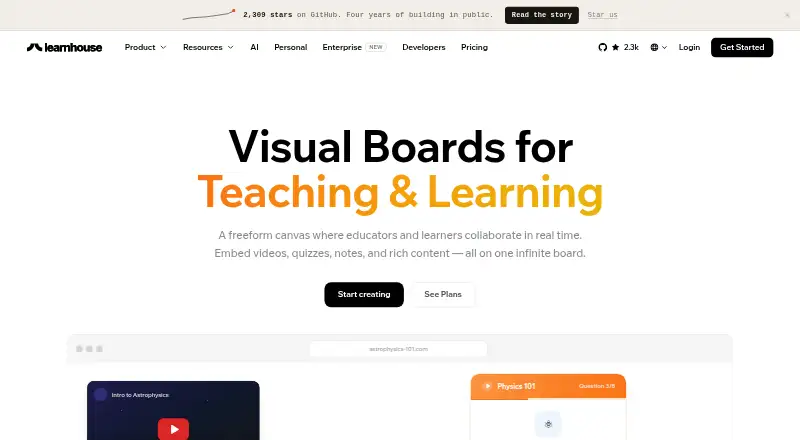
LearnHouse Boards is a collaborative, freeform canvas for educators and learners working together in real time. It is a strong fit for classrooms and study groups that want shared activities and embedded resources; it is less suitable if a native mobile app is essential.
Boards brings discussion, drawing and learning exercises into one workspace, with custom domains and Stripe payments in the wider LearnHouse platform. The important trade-off is plan access: Boards is included with Pro, while Standard does not include it.
Key features
Participants can see cursors and card movements, while notes sync live. Roles and permissions, timers, reactions and live chat give educators ways to guide participation and keep a session moving. These tools suit facilitated group work better than a course that mainly delivers material to individual learners.
The canvas supports sticky notes, freehand drawing, shapes, arrows, quizzes, checklists and other learning activities. Users can describe an interactive block, such as a simulator or quiz, for AI to generate without coding. That combination lets a lesson move between discussion and practice in the same space.
Boards supports text, video, audio, PDF, embeds, quizzes, code playgrounds, AI-generated content, flashcards, scenarios and H5P. It can also embed YouTube, GitHub, Spotify, CodePen, Google Maps, Figma and more than 70 other services. LearnHouse lists 84 integrations and supports URL or iframe embeds plus a REST API, giving teams several ways to connect external resources.
The Boards page says canvases adapt to desktop, tablet and phone screen sizes. That is useful for learners joining from different devices, but it is not a substitute for a native app: LearnHouse has no mobile app. LearnHouse identifies itself as AGPLv3-licensed and self-hostable; it also states that browser-to-server data is encrypted and that access to sensitive areas is restricted by role and organization.
Pricing
| Plan | Price and terms | What it includes |
|---|---|---|
| Free | free; free forever | Free plan; Boards is not included. |
| Standard | Custom pricing; monthly or annual billing available | 200 members and 2 admin seats; Boards is not included. |
| Pro | Custom pricing; monthly or annual billing available | 500 members and 10 admin seats; Boards included. |
| Enterprise | Custom pricing | Audit logs, SSO/OIDC, RBAC, multi-tenancy and a self-hosted option. |
The free plan is the no-cost starting point, but it does not provide Boards. Standard raises the allowance to 200 members and 2 admins, yet still leaves out the central feature reviewed here. Pro is the relevant tier for teams that want Boards, with room for 500 members and 10 admins; its custom pricing means teams should confirm the cost before choosing it. Enterprise is aimed at organizations that need audit logs, identity controls, multi-tenancy or self-hosting, rather than simply a larger canvas.
Platforms
LearnHouse supports web, API and self-hosted use. Boards is described as responsive across desktop, tablet and phone screens, but there is no mobile app. Teams needing a dedicated iOS or Android app should look elsewhere.
Who it's for
Boards makes sense for educators, learners, classrooms and study groups that need live collaboration, structured participation and a mix of learning formats. It is particularly relevant when a team wants course content and group activities in the same environment, or values an open-source, self-hostable platform. It is a weaker fit for solo course delivery, buyers who need Boards on the free or Standard plan, and mobile-first groups that require an app.
Pros and cons
- Pro: Real-time cursors, card movement and synced notes make collaborative work visible as it happens.
- Pro: Drawing, quizzes, checklists, AI-generated blocks and broad embedding options support varied learning activities in one canvas.
- Pro: Self-hosting, AGPLv3 licensing, a REST API and 84 listed integrations give technical teams options for deployment and connection.
- Con: Boards is only included in Pro, whose price is custom; the free and Standard plans do not provide it.
- Con: There is no native mobile app, despite responsive access through phone-sized screens.
Alternatives
For a broader comparison, see Learning Community Platforms and Online course platforms.
GroupApp may suit readers seeking a community platform with mobile apps and a free plan covering up to 100 members, three channels and one admin. HuddleSpot is another option with Android, iOS and web access; its free Starter plan supports up to 100 members and five spaces or channels.
Daisie is an alternative with iOS and web access and a seven-day full-access trial. Fora may suit web-based communities that want a free Starter plan for 200 members or a Pro plan for 5,000 members. Maven is worth considering for instructors: it is free to use until a student pays, then keeps 10% of each paid enrollment, with instructors keeping 90% minus Stripe fees.
OpenCourse is an open-source web option with a free plan that includes unlimited members and courses. Skillspad offers web and API access and may be relevant to creators comparing product sales and platform fees. Maxx is a web-based free creator plan with no subscription or setup fee, taking a cut when learners buy.
Verdict
Choose LearnHouse Boards if you need a collaborative teaching canvas with real-time tools, varied content formats and the flexibility of self-hosting. Its case is strongest for organized learning groups already comfortable with a paid Pro tier. Look elsewhere if Boards must be free or you need a native mobile app.
Verdict
Choose LearnHouse Boards if you want a free web-based course platform with many content formats, custom domains, and Stripe payments. Look elsewhere if a mobile app is essential, since the product has no mobile app.
Questions
Does LearnHouse Boards have a free plan?
Yes. A free plan is available.
Which course formats does it support?
Formats include text, video, audio, PDF, embeds, quizzes, code playgrounds, AI-generated content, flashcards, scenarios, and H5P.
Can I use a custom domain?
Yes. Custom domains are supported.
What payment option is listed?
Stripe is the listed payment option, and the transaction fee is 0.
Is there a mobile app?
No. The platform is available on the web, and there is no mobile app.
What does the free plan include?
A free plan is available, but no plan quotas or included features are given.
Facts from LearnHouse Boards's own pages
- AI blocks
- Users can describe an interactive block, such as a simulator or quiz, for AI to generate without coding. · learnhouse.app, 9 Oct 2026
- AI-generated blocks
- The Board AI can generate interactive simulations, quizzes, calculators and visualizations from a description without coding. · learnhouse.app, 14 Oct 2026
- Analytics
- LearnHouse provides enrollment, completion, quiz-score and engagement analytics. · learnhouse.app, 14 Oct 2026
- Annotation tools
- Boards includes sticky notes, freehand drawing, shapes, arrows and visual effects for annotation. · learnhouse.app, 14 Oct 2026
- API access
- Organization API tokens use the lh_ prefix, are scoped to least-privilege rights and require the Pro plan for dashboard creation. · docs.learnhouse.app, 14 Oct 2026
- API scope
- The REST API documentation lists 339 endpoints covering organizations, users, courses, assignments, payments, analytics, webhooks and headless operations. · docs.learnhouse.app, 14 Oct 2026
- Board activities
- Boards can contain quizzes, checklists and structured course activities that track completion. · learnhouse.app, 14 Oct 2026
- Board content
- Boards support sticky notes, freehand drawing, shapes, arrows, quizzes, checklists, and learning activities. · learnhouse.app, 9 Oct 2026
- Board embeds
- Boards can embed YouTube, GitHub, Spotify, Maps, Figma, Canva, CodePen and more than 70 services. · learnhouse.app, 14 Oct 2026
- Boards canvas
- Boards provides an infinite freeform canvas where educators and learners collaborate live. · learnhouse.app, 14 Oct 2026
- Company size
- LinkedIn lists LearnHouse as a privately held software-development company with 2–10 employees. · linkedin.com, 14 Oct 2026
- Course editor
- The course editor combines text, video, code, quizzes, embeds and file uploads on one page. · learnhouse.app, 14 Oct 2026
- Course formats
- text,video,audio,PDF,embeds,quizzes,code playgrounds,AI-generated content,flashcards,scenarios,H5P · learnhouse.app, 20 Sept 2026
- Custom domain
- Yes · learnhouse.app, 20 Sept 2026
- Documentation depth
- Documentation covers quickstarts, platform features, self-hosting, architecture, contribution guidance, API schemas and live API examples. · docs.learnhouse.app, 14 Oct 2026
- Embeds
- Boards can embed services including YouTube, GitHub, Spotify, CodePen, Google Maps, and Figma, plus 70+ more. · learnhouse.app, 9 Oct 2026
- Free plan
- Yes · learnhouse.app, 20 Sept 2026
- Installation
- Self-host installation uses npx learnhouse@latest setup or platform-specific shell and PowerShell installers that generate Docker and configuration files. · docs.learnhouse.app, 14 Oct 2026
- Integrations
- The product site lists more than 80 integrations including YouTube, Stripe, Figma, Notion, Loom, Slack, Zoom and Dropbox. · learnhouse.app, 14 Oct 2026
- Intended users
- The Boards page describes the product for educators, learners, classrooms, and study groups. · learnhouse.app, 9 Oct 2026
- Languages
- The interface supports 19 languages out of the box. · learnhouse.app, 14 Oct 2026
- Launch date
- Product Hunt records LearnHouse as launched in 2024 and shows a relaunch on May 19, 2026. · producthunt.com, 14 Oct 2026
- License
- The community platform is licensed AGPLv3; enterprise capabilities use a separate Enterprise License. · github.com, 14 Oct 2026
- Limit: limited independent feedback
- Capterra, GetApp, Software Advice, G2 and Product Hunt listings all show zero user reviews or ratings. · getapp.com, 14 Oct 2026
Where LearnHouse Boards stands on Freedom251
- Online course platforms#1 of 148
- Learning Community Platforms#1 of 26