Freedom251 › LinkedIn Automation Software
LeadConnect
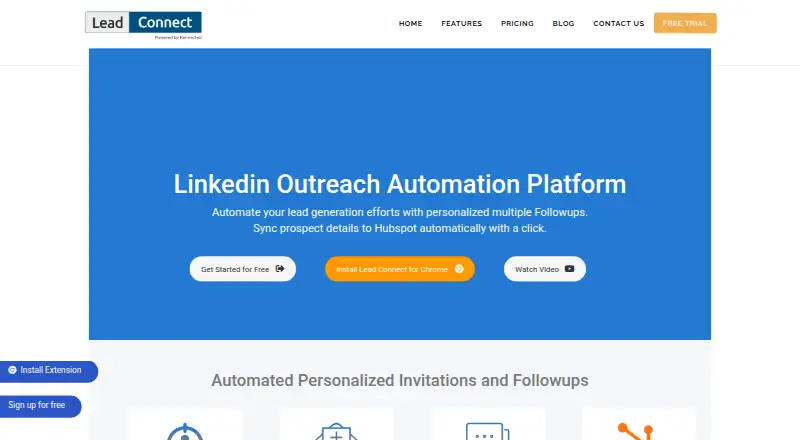
What LeadConnect is
LeadConnect is a LinkedIn outreach tool for finding prospects and sending personalized connection requests and follow-ups. Build an audience from LinkedIn Basic or Sales Navigator searches, or upload a CSV. Messages can use placeholders, and sequences can schedule up to 10 follow-ups, stopping automatically when a prospect replies. LeadConnect tracks responses and invitation acceptance, and can sync prospect details and conversations to HubSpot, including after an invitation is accepted. FindThatLead, Hunter.io, and AnyMailFinder are listed for finding business email addresses; Zapier can pass prospect events to a CRM. A blacklist helps teammates avoid approaching the same person twice. Activity runs in the Chrome extension, which requires Chrome to remain open with LinkedIn logged in in that browser session. Extension data is stored locally and may be lost if the extension is uninstalled; the dashboard is for reporting. The free plan is limited to 2 invites and 6 message credits per day. Paid plans start at $25.95 a month, and a 7-day trial is listed.
Who it suits
LeadConnect suits people and teams running LinkedIn prospecting who want scheduled follow-ups, audience targeting, and CRM connections. It may also fit teams that need a blacklist to coordinate outreach.
What it does well
- Audience from LinkedIn searches or CSV uploads
- Sequences allow up to 10 follow-ups
- Replies stop sequences automatically
- HubSpot sync includes prospect and conversation details
- Blacklist helps prevent duplicate team outreach
What to know first
- Chrome must stay open with LinkedIn logged in
- Uninstalling the extension may lose locally stored data
- Free plan allows 2 invites per day
- Daily invitations may be limited by the LinkedIn account
Limits
The free plan permits up to 2 invites per day, 6 message credits per day and 5 templates. Paid monthly plans raise those limits: Professional allows 30 invites, 90 message credits and 10 templates; Grow allows 60, 180 and 30; Ultimate allows 100, 300 and unlimited templates. LinkedIn account invitation limits may further constrain daily invitations.
Plans
| Plan | Billed and limits | Price |
|---|---|---|
| FREE FOREVER | free forever · up to 2 invites per day · 6 message credits per day · 5 templates | Free |
| PROFESSIONAL | monthly · up to 30 invites per day · 90 message credits per day · 10 templates · HubSpot integration · team blacklist | $25.95 a month |
| GROW | monthly · up to 60 invites per day · 180 message credits per day · 30 templates · HubSpot integration · team blacklist · team sync | $45.95 a month |
| ULTIMATE | monthly · up to 100 invites per day · 300 message credits per day · unlimited templates · HubSpot integration · team blacklist · team sync | $85.95 a month |
As leadconnect.io lists them, read 15 Oct 2026. The maker's own page has the final word.
Getting started
- Open the LeadConnect website.
- Choose the free plan or a paid plan; a 7-day trial is available.
- Use the Chrome extension with Chrome open and LinkedIn logged in in the same browser session.
- Define an audience with a LinkedIn Basic or Sales Navigator search, or upload a CSV.
- Create connection requests and a personalized message sequence.
Overview
LeadConnect is a LinkedIn outreach automation platform for finding prospects and sending personalized follow-ups. It suits individuals and teams who want to organize LinkedIn campaigns around search results or a CSV, with a clear trade-off: its activity depends on an open Chrome session with LinkedIn logged in.
For modest outreach, its free tier offers a way to start, while paid plans raise daily invitation and message-credit caps. The local storage of extension data is a meaningful drawback for anyone who expects the dashboard to preserve campaign records independently.
Key features
LeadConnect builds audiences from LinkedIn Basic or Sales Navigator searches, or from an uploaded CSV. That gives users more than one route to a prospect list, and Sales Navigator support matters for teams already using that search workflow.
Users can personalize connection requests and follow-up messages with placeholders, then schedule up to 10 follow-ups. Sequences stop automatically when a prospect replies, reducing the chance of continuing an automated cadence after a response. Tracking covers prospect responses and invitation acceptance, useful for monitoring basic campaign outcomes.
CRM connections extend the workflow beyond LinkedIn. LeadConnect can sync prospect details and conversation activity to HubSpot, including after an invitation is accepted. Its support guide also describes Zapier events for invitations sent or accepted, responses, withdrawals and follow-ups, which can be sent to a CRM of the user's choice. FindThatLead, Hunter.io and AnyMailFinder are named integrations for finding business email addresses from LinkedIn.
A shared blacklist helps teammates avoid contacting the same person twice. That is a practical coordination aid, though it does not change the product's underlying requirement that campaign activity runs through the extension.
Pricing
LeadConnect has a free plan, three monthly paid tiers and a 7-day trial. The paid plans are billed monthly:
| Plan | Price | Daily limits and templates |
|---|---|---|
| FREE FOREVER | free | Up to 2 invites, 6 message credits and 05 templates |
| PROFESSIONAL | $25.95 a month | Up to 30 invites, 90 message credits and 10 templates |
| GROW | $45.95 a month | Up to 60 invites, 180 message credits and 30 templates |
| ULTIMATE | $85.95 a month | Up to 100 invites, 300 message credits and unlimited templates |
The free plan is a narrow starter option: two invitations and six message credits a day leave little room for sustained prospecting. PROFESSIONAL is the entry paid tier for users who need higher daily capacity; GROW doubles its invitation and message limits and triples templates for larger campaigns. ULTIMATE is for the highest listed volume and removes the template cap, but its 100 daily invitations remain subject to the limit on the connected LinkedIn account.
The 7-day trial gives a short evaluation window. Invitation quotas are not guaranteed solely by the plan: the connected LinkedIn account can constrain the daily number. Connection requests are capped at 30.
Platforms
LeadConnect is offered as an extension and web product, but the split is important. Activity runs in the Chrome extension, and Chrome must remain open with LinkedIn logged in in that same browser session. The dashboard is reporting-only, while extension data is stored locally and may be lost if the extension is uninstalled. This makes LeadConnect a poor fit for users who need an always-on cloud workflow or durable campaign records independent of their browser setup.
Who it's for
LeadConnect is best suited to solo users and small teams running LinkedIn-focused prospecting who can keep the required Chrome session active and want personalized sequences, response tracking and CRM handoffs. The blacklist adds value when teammates share prospect pools. It is less suitable for users who need browser-independent automation or rely on extension data as their sole campaign record.
Pros and cons
Pros
- Audience creation from LinkedIn searches or CSVs offers flexibility in how campaigns begin.
- Personalized messages, up to 10 follow-ups and automatic sequence stops after a reply support more controlled outreach.
- HubSpot sync, Zapier events and named email-finder integrations connect LinkedIn prospecting to adjacent sales workflows.
- A free plan and monthly paid tiers make it possible to start small and scale daily quotas.
Cons
- Campaign activity requires Chrome to stay open with LinkedIn logged in, limiting unattended use.
- Extension data is local and may be lost on uninstall; the dashboard only reports activity.
- The free plan's two daily invitations and six message credits are restrictive for regular outreach.
- LinkedIn account invitation limits can reduce the practical quota even on a paid tier.
- The privacy policy says safeguards are used but does not guarantee the security or privacy of user information.
Alternatives
For a broader shortlist, see LinkedIn Automation Software. Consider Outroh if a web-based freemium option with a free plan is the priority. Choose Linki if platform breadth, self-hosting, or its €20 a month Launch plan—with one concurrent campaign, an AI message writer, automatic reply triage and unlimited seats—better fits your setup. GrowChief is another free option with web, Windows and macOS platforms.
Linked Helper is worth considering for users who prefer a desktop or self-hosted option and want a 14-day trial with full Pro access, no daily caps and no credit card; campaigns pause when the trial ends. LinkedRadar, Relinta, LinkOutreach and OpenOutreach are also alternatives to compare.
Verdict
Choose LeadConnect if LinkedIn is your main prospecting channel and you want personalized sequences, measurable responses and CRM connections at a monthly price that scales with daily volume. Its Chrome-session dependency and locally stored extension data are the clearest reasons to look elsewhere, especially if reliable unattended operation or durable browser-independent records matter more than the outreach features.
Verdict
LeadConnect combines LinkedIn targeting, personalized sequences, tracking, and CRM connections. Consider its Chrome-session requirement and locally stored extension data before choosing it.
Questions
Is there a free plan?
Yes. The FREE FOREVER plan costs nothing and includes up to 2 invites per day, 6 message credits per day and 5 templates.
How much do paid plans cost?
Professional is $25.95 a month, Grow is $45.95 a month, and Ultimate is $85.95 a month. Each is billed monthly.
Is there a free trial?
Yes, LeadConnect lists a 7-day trial.
Which platforms does it support?
LeadConnect is listed for extension and web. Campaign activity runs in the Chrome extension, with Chrome open and LinkedIn logged in in the same browser session.
Can it connect to a CRM?
It can sync prospect details and conversation activity to HubSpot. Zapier can send prospect events to a CRM of your choice.
What does it do with follow-ups?
Sequences can schedule up to 10 follow-ups and stop automatically when a prospect replies.
Facts from LeadConnect's own pages
- Audience targeting
- Users can define audiences with LinkedIn basic search, Sales Navigator or CSV uploads. · leadconnect.io, 15 Oct 2026
- Availability warranty
- The terms disclaim guaranteed continuous availability and say the platform is provided as-is and as-available. · leadconnect.io, 15 Oct 2026
- Company owner
- LeadConnect's terms identify Intricare Technologies as the responsible company in the liability section. · leadconnect.io, 15 Oct 2026
- CRM extensibility
- The Zapier documentation says the webhook can be connected to any CRM supported by Zapier. · support.leadconnect.io, 15 Oct 2026
- Documentation
- The official support center is organized into general guidance, FAQs and getting-started articles for HubSpot, sequences, installation and integrations. · support.leadconnect.io, 15 Oct 2026
- Email-finder integrations
- The site names FindThatLead, Hunter.io and Anymailfinder as integrations for finding business email addresses from LinkedIn. · leadconnect.io, 15 Oct 2026
- Email finders
- The site names FindThatLead, Hunter.io, and AnyMailFinder as integrations for finding business email addresses from LinkedIn. · leadconnect.io, 29 Sept 2026
- Extension data
- The support guide says extension data is stored locally and may be lost if the extension is uninstalled; it describes the dashboard as reporting-only. · support.leadconnect.io, 29 Sept 2026
- Follow-up automation
- The product schedules follow-ups for connected prospects who have not replied. · leadconnect.io, 15 Oct 2026
- HubSpot
- LeadConnect can sync LinkedIn prospect details and conversation activity to HubSpot, including automatically after an invitation is accepted. · leadconnect.io, 29 Sept 2026
- HubSpot integration
- LeadConnect can push LinkedIn prospect details and conversation activity into HubSpot, including automatic syncing after an invitation is accepted. · leadconnect.io, 15 Oct 2026
- Independent reliability criticism
- An independent 2026 review reports silent campaign stops, incorrect geographic targeting, unsent messages and billing continuing after cancellation as user-reported problems. · autoposting.ai, 15 Oct 2026
- Installation
- The product is distributed as a Chrome browser extension rather than a native desktop or mobile application. · leadconnect.io, 15 Oct 2026
- Invitation personalization
- Invitation messages support personalization placeholders and can be sent to up to 100 new invitations in a setup. · leadconnect.io, 15 Oct 2026
- Invite limit
- The pricing page notes daily invitation limits could be constrained by the number of invites allowed on the connected LinkedIn account. · leadconnect.io, 29 Sept 2026
- Licence
- The terms grant users a personal, non-exclusive, revocable and limited licence while retaining intellectual-property ownership for LeadConnect or its licensors. · leadconnect.io, 15 Oct 2026
- Limit: browser dependency
- A Trustpilot reviewer says the tool only runs while the user's computer is on and Chrome is open, limiting background operation and team visibility. · trustpilot.com, 15 Oct 2026
- Limit: duplicate invitations
- A Trustpilot reviewer reported repeated attempts to invite the same people and duplicate counting toward the daily allowance. · trustpilot.com, 15 Oct 2026
- Limit: geographic targeting
- A Capterra review reported that Sales Navigator geography filters sometimes returned connections from unrelated locations. · capterra.com, 15 Oct 2026
- Limit: saved searches
- The official help center lists saved-search support as a known FAQ topic with a workaround, indicating that saved searches are not directly supported. · support.leadconnect.io, 15 Oct 2026
- Limit: support complaints
- Trustpilot and G2 reviews include complaints about difficult setup, poor support responses and an unreliable experience. · trustpilot.com, 15 Oct 2026
- LinkedIn account risk
- The terms warn that using the service on LinkedIn may breach LinkedIn rules and could lead to account restrictions. · leadconnect.io, 15 Oct 2026
- LinkedIn disclaimer
- LeadConnect states that its browser extension is not endorsed or certified by LinkedIn and is supplied at the user's risk. · leadconnect.io, 15 Oct 2026
- Maker headquarters
- Intricare Technologies describes itself as a SaaS and software product company based in Vadodara with offices in the United States and Singapore. · intricaretech.com, 15 Oct 2026
Where LeadConnect stands on Freedom251
- LinkedIn Automation Software#3 of 28