Freedom251 › Photo Management Software

Lap Photo Manager
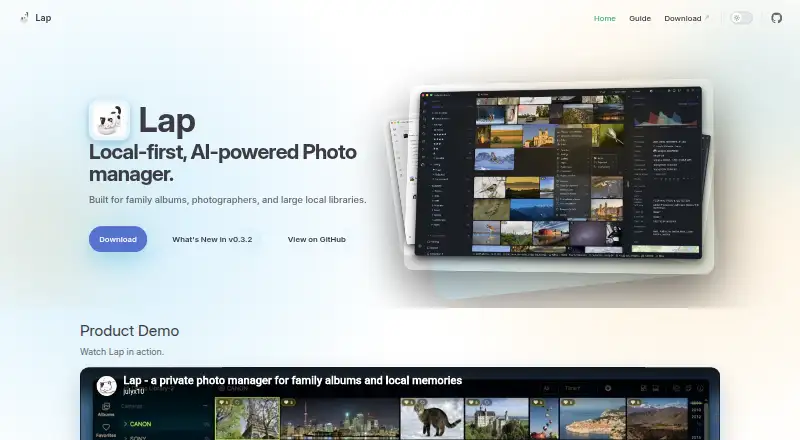
What Lap Photo Manager is
Lap Photo Manager is a free, local-first application for managing family albums, photographer collections, and large libraries kept on a computer. It works with folders you already use and can import files into date-organized folders while retaining filenames and avoiding duplicate content. Search runs on the device, with text queries, similar-image matching, face clustering, and smart tags. Smart Albums, collections, tags, ratings, comments, favorites, culling states, and bulk duplicate cleanup support review and organization. Lap handles Apple Live Photos, supported Google Motion Photos, RAW files, JPEG/HEIC pairs, and more than 20 video formats. An interactive map groups geotagged photos and videos by place and follows the active filters. Editing tools let you crop, rotate, adjust, and save image changes. Optional multilingual search models enable searches in more than 50 languages and require an extra download. Photos and videos are not uploaded to a Lap cloud service by default, while AI search and indexing stay local. Release builds send anonymous app-started and app-exited events with version, platform, and operating system. Lap runs on macOS, Linux, and Windows under GPL-3.0, with DMG, DEB, AppImage, and MSI installers.
Who it suits
Lap suits families, photographers, and anyone managing a large photo or video library stored locally. It is useful for people who want on-device search, folder-based imports, RAW support, map browsing, and local editing across macOS, Linux, or Windows.
What it does well
- On-device text, image, face, and smart-tag search
- Imports existing folders while preserving names and skipping duplicates
- Supports RAW, Live Photos, Motion Photos, and 20-plus video formats
- Map view follows filters for geotagged media
- Built-in crop, rotate, adjustment, and save tools
- Free with no subscription or recurring fee
What to know first
- Organization and AI index data stay in Lap’s local database
- Release builds enable anonymous usage analytics by default
- Some network access is used for updates, downloads, links, and map tiles
- Multilingual search models require an additional download
Plans
| Plan | Billed and limits | Price |
|---|---|---|
| Free | No subscription plan or recurring fee | Free |
As julyx10.github.io lists them, read 8 Oct 2026. The maker's own page has the final word.
Getting started
- Open the Lap website
- Choose a macOS, Linux, or Windows installer for your architecture
- Install the DMG, DEB, AppImage, or MSI package
- Point Lap at existing folders or use date-organized imports
- Download multilingual search models if you need searches in more than 50 languages
Verdict
Choose Lap if you want free desktop photo management with local AI search, broad media support, and folder-based workflows. Look elsewhere if your organization data must move automatically with files between applications or if you do not want default release analytics.
Questions
Is Lap Photo Manager free?
Yes. The Free plan costs 0.00 USD and has no subscription or recurring fee.
Which platforms support Lap?
Lap is available on macOS, Linux, and Windows, with DMG, DEB, AppImage, and MSI downloads.
Does Lap use cloud sync?
No cloud sync is provided. Photos and videos are not uploaded to a Lap cloud service by default, and AI indexing runs locally.
What license does Lap use?
Lap is released under the GPL-3.0 license.
Can Lap search in multiple languages?
Optional multilingual search models support searches in more than 50 languages and require an additional download.
Facts from Lap Photo Manager's own pages
- Analytics
- Release builds enable anonymous Aptabase analytics by default, sending app-started and app-exited events with the Lap version, platform, and operating system. · github.com, 8 Oct 2026
- Editing
- Built-in tools can crop, rotate, adjust, and save image changes. · julyx10.github.io, 8 Oct 2026
- Folder workflow
- Lap works directly with existing folders and supports date-organized imports that preserve filenames and skip duplicate content. · github.com, 8 Oct 2026
- Languages
- Optional multilingual search models support searching in more than 50 languages and are an additional download. · julyx10.github.io, 8 Oct 2026
- License
- Lap is released under the GPL-3.0 license. · julyx10.github.io, 8 Oct 2026
- Local AI search
- Text search, similar-image search, face clustering, and smart tags are processed on-device. · julyx10.github.io, 8 Oct 2026
- Local data limit
- Collections, tags, comments, favorites, ratings, culling states, and AI index data are stored in Lap's local database and do not automatically travel with files to other applications. · github.com, 8 Oct 2026
- Map view
- The interactive map groups geotagged photos and videos by location and follows the current filters. · julyx10.github.io, 8 Oct 2026
- Media support
- Lap supports Apple Live Photos, supported Google Motion Photos, RAW and JPEG/HEIC pairs, and more than 20 video formats. · julyx10.github.io, 8 Oct 2026
- Network use
- Network access may include update checks, GitHub release downloads, external links, and OpenStreetMap map tiles. · github.com, 8 Oct 2026
- Organization
- It supports Smart Albums, collections, tags, ratings, and bulk duplicate cleanup. · julyx10.github.io, 8 Oct 2026
- Platforms and installers
- Lap is available for macOS, Linux, and Windows, with DMG, DEB, AppImage, and MSI downloads listed for the supported architectures. · github.com, 8 Oct 2026
- Privacy
- The privacy policy says photos and videos are not uploaded to a Lap cloud service by default and AI search and related indexing are processed locally. · github.com, 8 Oct 2026
- Product
- Lap is a local-first photo manager for family albums, photographers, and large local libraries. · julyx10.github.io, 8 Oct 2026
Where Lap Photo Manager stands on Freedom251
- Photo Management Software#13 of 37