Freedom251 › Product Label Makers

Label LIVE
What Label LIVE is
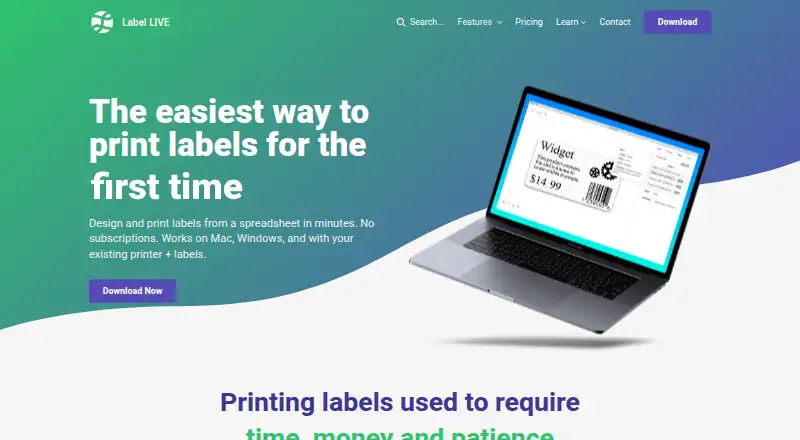
Label LIVE is desktop software for designing and printing labels from spreadsheet data on macOS and Windows. Its drag-and-drop editor adds logos, product names, barcodes, and images. Text can automatically scale to label width, anchor to corners, and remove blank lines. The software works with label rolls or pages and supports thermal, inkjet, laser, color, and desktop printers, including AirPrint and supported USB models from Zebra, DYMO, Brother, Rollo, TSC, and SATO. Shared spreadsheet sources listed include Google Sheets, Dropbox, and OneDrive. A 14-day free trial is available, but there is no free plan. Subscription pricing is $19.99 a month, billed monthly, with all features. One-time licenses cost 47.99 USD for Home, 147.99 USD for Business, and 247.99 USD for Logic. Business adds barcodes, dynamic images, and thermal-transfer printer support. Logic adds script variables, advanced row selection, dynamic hide/show, integration APIs, and batch-import watching. Licenses apply per computer, and a subscription can be active on one computer at a time.
Who it suits
Label LIVE suits individuals and businesses, including retail and engineering users, that print variable-data labels from spreadsheets. It fits users needing barcode support, printer flexibility, or automated label workflows.
What it does well
- Drag-and-drop label editor
- Spreadsheet-driven variable printing
- Supports many printer types and brands
- 14-day free trial
- Advanced scripting in Logic license
What to know first
- No free plan
- Subscription limited to one computer at a time
- Desktop platforms only
- One-time licenses cost up to 247.99 USD
Limits
There is no free plan. The subscription costs $19.99 a month and can be applied to one computer at a time; advanced scripting, selection, visibility, APIs, and batch-import watching require the $247.99 Logic license.
Plans
| Plan | Billed and limits | Price |
|---|---|---|
| Business | one-time · Business use · barcodes · dynamic images · thermal transfer printers · same day support | $147.99, paid once |
| Subscription | per/month · All features included · pay as you go · cancel anytime | $19.99 a month |
| Logic | one-time · Everything in Business · script variables · advanced row selection · dynamic hide/show · integration APIs · watch for batch import | $247.99, paid once |
| Home | one-time · Text, Images and Shapes · spreadsheet data · 40+ printers · unlimited label printing | $47.99, paid once |
As label.live lists them, read 5 Oct 2026. The maker's own page has the final word.
Getting started
- Open the Label LIVE website
- Download the desktop app for macOS or Windows
- Start the 14-day free trial
- Choose a monthly Subscription or one-time Home, Business, or Logic license
- Connect a supported printer and spreadsheet data source
- Create a label with the drag-and-drop editor
- Print to label rolls or label pages
Verdict
Label LIVE combines spreadsheet data, visual label design, and broad printer support for macOS and Windows. Plans range from a 19.99 USD monthly subscription to one-time licenses with progressively more automation features.
Questions
What platforms does Label LIVE support?
Label LIVE runs on macOS and Windows as desktop software.
How much does Label LIVE cost?
The Subscription plan is $19.99 a month. Home costs $47.99 USD once, Business costs $147.99 USD once, and Logic costs $247.99 USD once.
Is there a free plan or trial?
There is no free plan, but a 14-day free trial is available.
Which printers can Label LIVE use?
It supports thermal, color, inkjet, laser, desktop, AirPrint, and supported USB printers, including Zebra, DYMO, Brother, Rollo, TSC, and SATO models.
What does the Logic license add?
Logic includes Business features plus script variables, advanced row selection, dynamic hide or show, integration APIs, and batch-import watching.
How is Label LIVE licensed?
Licenses are per computer, and a subscription can be used on only one computer at a time.
Facts from Label LIVE's own pages
- Advanced features
- The Logic license includes integration APIs, script variables, advanced row selection, dynamic hide/show, and batch import watching. · label.live, 5 Oct 2026
- Design tools
- The software can add logos, product names, barcodes, and images to label designs. · label.live, 5 Oct 2026
- Founded
- 2018 · label.live, 28 Sept 2026
- Headquarters
- Minnesota, USA · label.live, 28 Sept 2026
- Intended users
- The maker describes its pricing as built for individuals and businesses and gives retail and engineering as examples of user fields. · label.live, 5 Oct 2026
- License limit
- Label LIVE is licensed per computer, and a subscription can be applied to only one computer at a time. · label.live, 5 Oct 2026
- Printer support
- Label LIVE supports major printer brands and models across thermal, color, inkjet, and desktop printers. · label.live, 5 Oct 2026
- Printing options
- The maker says the software works with label rolls or label pages and supports thermal, inkjet, and laser printers. · label.live, 5 Oct 2026
- Purpose
- Label LIVE designs and prints labels from spreadsheet data using a drag-and-drop editor. · label.live, 5 Oct 2026
- Security and compliance
- The maker pages reviewed did not state security certifications or compliance claims. · label.live, 5 Oct 2026
- Spreadsheet sources
- The pricing comparison lists shared data sources such as Google Sheets, Dropbox, and OneDrive. · label.live, 5 Oct 2026
- Support
- The maker says support is available every day by email and phone, with same-day support listed for the Business license. · label.live, 5 Oct 2026
- Text formatting
- It automatically scales text to fit label width, anchors text fields to corners, and removes blank lines. · label.live, 5 Oct 2026
- Trial
- The download page offers a 14-day free trial. · label.live, 5 Oct 2026
Where Label LIVE stands on Freedom251
- Product Label Makers#8 of 25
- Label Printing Software#10 of 18
- Barcode Printing Software#12 of 17
- Label Design Software#25 of 32