Freedom251 › Kubernetes Management Platforms

kOps
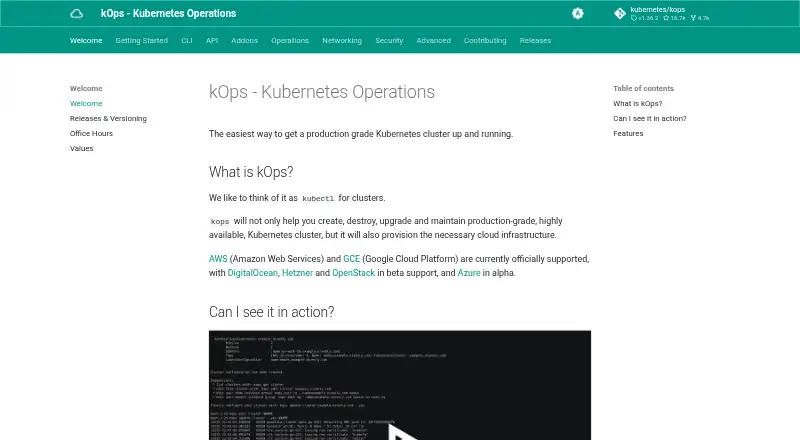
What kOps is
kOps creates, upgrades, maintains, and destroys production-grade, highly available Kubernetes clusters, and provisions the cloud infrastructure they need. It supports AWS and Google Cloud officially; DigitalOcean, Hetzner, and OpenStack are in beta, while Azure is in alpha. Teams configure clusters through a YAML manifest-based API with templating and dry-run modes. Its state synchronization supports dry runs and automatic idempotency, and it can generate Terraform. kOps includes popular CNI networking providers and supports ARM64 architectures. The control plane is customer-managed. kOps runs on Linux, macOS, and Windows, but kubectl is required to install and use it. SSH access to masters and nodes is allowed from any address by default, though no public key is installed by default; SSH sources can be restricted in cluster configuration or with a command option. The security documentation says Pods can access the underlying instance IAM role, whose permission scope is currently broad. kOps is free and open source under Apache-2.0.
Who it suits
kOps suits teams that want to provision and operate their own Kubernetes clusters and control plane across its supported cloud environments. Users should be prepared to install and use kubectl and review the default SSH and IAM arrangements.
What it does well
- Automates highly available cluster provisioning
- Supports YAML manifests, templating, and dry runs
- Can generate Terraform
- Supports ARM64 architectures
What to know first
- kubectl is required for installation and use
- DigitalOcean, Hetzner, and OpenStack are in beta
- Azure support is in alpha
- Pods can access a broadly scoped instance IAM role
Plans
| Plan | Billed and limits | Price |
|---|---|---|
| kOps | No paid plans or price listed on the official pages reviewed | Free |
As kops.sigs.k8s.io lists them, read 8 Oct 2026. The maker's own page has the final word.
Getting started
- Visit https://kops.sigs.k8s.io/ for the project documentation.
- Use Linux, macOS, or Windows.
- Install and use kubectl, which kOps requires.
- Choose a supported cloud environment, noting that AWS and Google Cloud are officially supported; other listed environments have beta or alpha status.
- Use kOps YAML manifests to configure a cluster, with templating or dry-run modes as needed.
kOps is an open-source command-line tool for teams that want to create and operate production-grade, highly available Kubernetes clusters while retaining control of the control plane and cloud infrastructure. It suits engineers comfortable with Kubernetes manifests and cloud IAM more than organizations seeking a hosted, fully managed service.
Its strongest case is repeatable cluster lifecycle automation across several clouds, with Terraform output and idempotent state handling. The trade-off is operational responsibility: installation requires kubectl, and the documented default security posture needs deliberate tightening.
Overview
kOps creates, destroys, upgrades, and maintains highly available Kubernetes clusters, provisioning the infrastructure they require. The control plane is customer-managed, so your team owns its operation and upgrade decisions rather than handing those responsibilities to a vendor.
AWS and Google Cloud are officially supported. DigitalOcean, Hetzner, and OpenStack are in beta, while Azure is in alpha; production commitments should therefore account for that support maturity. The project is licensed under Apache-2.0.
Key features
Lifecycle and state automation
kOps automates provisioning and supports upgrades, destruction, and ongoing maintenance of highly available clusters. Its state synchronization model offers dry runs and automatic idempotency, which helps teams preview changes and rerun workflows without repeatedly applying unintended differences.
Configuration and infrastructure output
A YAML manifest API, templating, and dry-run modes make cluster definitions suitable for version-controlled workflows. kOps can also generate Terraform, giving infrastructure teams a path to review or extend generated infrastructure in an established Terraform process.
Networking and architecture
Popular CNI networking providers are included out of the box, reducing the need to assemble a networking stack from scratch. ARM64 support broadens hardware and cloud-instance choices, although the surrounding provider support still determines where that architecture is practical.
Security and support
SSH access to masters and nodes is allowed from any address by default, and no public key is installed by default. Restrict SSH sources in the cluster configuration or with a command option before exposing a production environment. The security documentation also says every Pod can access the underlying instance IAM role, with a currently broad permission scope; teams using sensitive workloads should design compensating IAM controls.
Maintainers host public office hours for developers and users, and the project directs users to Kubernetes Slack channels for help. This is community-oriented support rather than a contracted response commitment.
Pricing
| Plan | Price | Best for |
|---|---|---|
| kOps | free | Teams adopting the open-source project and paying cloud infrastructure costs directly |
There are no paid plans or free trial. The software itself is free and open source, but provider charges and the labor of running a customer-managed control plane remain part of the total cost.
Platforms
kOps runs on Linux, macOS, and Windows, with kubectl required for installation and use. Supported environments include AWS, GCE, DigitalOcean, Hetzner, OpenStack, and Azure, with the provider maturity distinctions noted above.
Who it's for
Choose kOps if your platform team wants declarative, repeatable Kubernetes provisioning, upgrade management, dry-run workflows, and Terraform generation while keeping infrastructure and control-plane ownership. It is a fit for organizations able to secure SSH and IAM defaults, evaluate beta or alpha providers carefully, and operate Kubernetes themselves.
Look elsewhere if you want a hosted control plane, vendor-managed security posture, or a graphical service that minimizes command-line and cloud-operations work.
Pros and cons
- Pro: Covers creation, upgrades, maintenance, and destruction of highly available clusters in one lifecycle tool.
- Pro: Idempotent state synchronization, dry runs, YAML manifests, and Terraform output support controlled infrastructure workflows.
- Pro: Official AWS and Google Cloud support plus ARM64 compatibility provide meaningful deployment flexibility.
- Con: Customer-managed control planes shift reliability, upgrades, and security work to your team.
- Con: Default SSH exposure and broad Pod access to the instance IAM role require immediate hardening and careful permission design.
- Con: DigitalOcean, Hetzner, and OpenStack are beta, and Azure is alpha, limiting confidence for some production deployments.
Alternatives
Cluster API is another free open-source Kubernetes project when you want an API-driven, self-hosted approach and are prepared for provider components and infrastructure costs to vary by selection.
Kubermatic Kubernetes Platform suits teams wanting an open-source Community Edition or a consumption-priced Enterprise Edition.
vCluster Platform is the better fit for virtual-cluster use cases, with a free tier that allows unlimited virtual clusters within stated CPU/GPU limits and one HA vCluster.
Portainer favors web-based management, offering a no-credit-card, no-time-limit free tier for up to three nodes and a paid Home & Student plan.
Clusternet is a free open-source option for API, Linux, and self-hosted environments.
Karmada is a free open-source Kubernetes management system for API, Linux, and self-hosted deployments.
KubeSphere provides a free Community Edition positioned as an enterprise-grade open-source container platform, including a web interface.
openCenter offers a free, self-supported Community plan for builders and proofs of concept.
Verdict
kOps is a strong choice for Kubernetes platform engineers who want free, declarative cluster lifecycle automation and direct control of cloud infrastructure.
Verdict
kOps provides cluster lifecycle management with a customer-managed control plane and cloud infrastructure provisioning. Check the support status of your provider and review the security defaults before adopting it.
Questions
Is kOps free?
Yes. kOps is listed as free and open source, with a price of $0.
Which cloud providers does kOps support?
AWS and Google Cloud are officially supported. DigitalOcean, Hetzner, and OpenStack are in beta, and Azure is in alpha.
What operating systems does kOps support?
kOps runs on Linux, macOS, and Windows. kubectl is required to install and use it.
Does kOps manage the control plane?
Control plane management is customer-managed.
What license does kOps use?
The kubernetes/kops repository lists the Apache-2.0 license.
What security settings should cluster operators review?
SSH access to masters and nodes is allowed from any address by default, though no public key is installed by default; SSH sources can be restricted. The security documentation also says Pods can access the underlying instance IAM role and describes its permission scope as broad.
Facts from kOps's own pages
- Architecture
- kOps supports ARM64 architectures. · kops.sigs.k8s.io, 8 Oct 2026
- Cloud providers
- AWS and Google Cloud are officially supported; DigitalOcean, Hetzner, and OpenStack are in beta, and Azure is in alpha. · kops.sigs.k8s.io, 8 Oct 2026
- Cluster provisioning
- kOps automates provisioning of highly available Kubernetes clusters. · kops.sigs.k8s.io, 8 Oct 2026
- Configuration
- It provides a YAML manifest based API, templating, and dry run modes for creating manifests. · kops.sigs.k8s.io, 8 Oct 2026
- Infrastructure output
- kOps can generate Terraform. · kops.sigs.k8s.io, 8 Oct 2026
- Installation requirement
- kubectl is required to install and use kOps. · kops.sigs.k8s.io, 8 Oct 2026
- License
- The kubernetes/kops repository lists the Apache-2.0 license. · github.com, 8 Oct 2026
- Networking
- It offers popular CNI networking providers out of the box. · kops.sigs.k8s.io, 8 Oct 2026
- Purpose
- kOps creates, destroys, upgrades, and maintains production grade, highly available Kubernetes clusters and provisions the required cloud infrastructure. · kops.sigs.k8s.io, 8 Oct 2026
- Security: IAM
- The security documentation says all Pods running on a cluster have access to the underlying instance IAM role and that the permission scope is currently quite broad. · kops.sigs.k8s.io, 8 Oct 2026
- Security: SSH
- SSH access to masters and nodes is allowed from any address by default, though no public key is installed by default; SSH sources can be restricted in cluster configuration or with a command option. · kops.sigs.k8s.io, 8 Oct 2026
- State management
- Its state sync model supports dry runs and automatic idempotency. · kops.sigs.k8s.io, 8 Oct 2026
- Support
- kOps maintainers hold public office hours for developers and users, and the project points users to Kubernetes Slack channels for help. · kops.sigs.k8s.io, 8 Oct 2026
Where kOps stands on Freedom251
- Kubernetes Management Platforms#7 of 29