
Konsole
by Konsole
What Konsole is
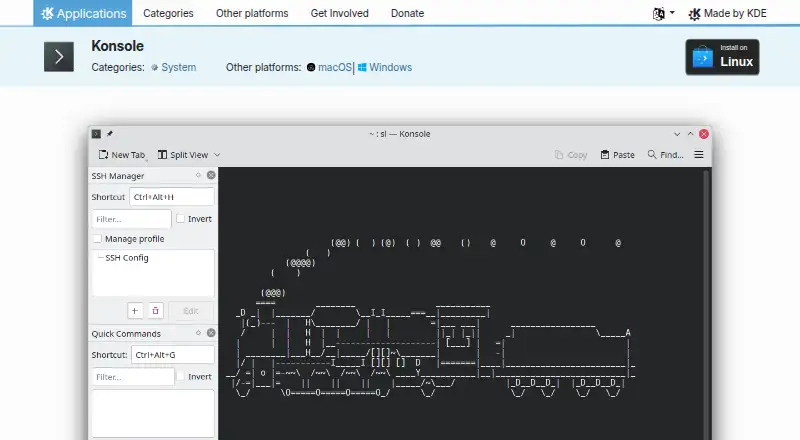
Konsole is a terminal emulator for running a command shell and controlling a computer through a command-line interface. Available for Linux, Windows, and macOS, it supports tabs, multiple profiles, and split views arranged left-to-right or top-to-bottom. Profiles can automate common commands, including SSH connections to another machine. Search, bookmarks, and saving output help manage command-line sessions; scrollback can be saved as a text or HTML file. Activity monitoring can notify users about silence, activity, a shell prompt, or a process finishing. With shell integration enabled, Konsole distinguishes prompts, input, and command output, and provides visual hints for commands that resulted in errors. A D-Bus interface allows control of Konsole windows and sessions. Linux installation is available through application stores, distribution package managers, or Flathub. The Windows and macOS pages link to nightly installers, which are development-branch builds intended for testing. Konsole is free and open source under the GPL-2.0+ license.
Who it suits
Konsole suits people who use a command shell and want to organize sessions with tabs, profiles, or split views. Its monitoring, SSH, and output-saving features may help users managing ongoing command-line work.
What it does well
- Tabs and multiple profiles organize shell sessions.
- Split views can be saved as a layout.
- Supports SSH connections through profiles.
- Can monitor activity and notify users.
- Saves scrollback as text or HTML.
What to know first
- Nightly builds are intended for testing.
- Shell distinctions and error hints require shell integration.
Plans
| Plan | Billed and limits | Price |
|---|---|---|
| Konsole | Free and open-source terminal application | Free |
As konsole.kde.org lists them, read 5 Oct 2026. The maker's own page has the final word.
Getting started
- Visit the Konsole website.
- On Linux, install through Discover or another AppStream store, a distribution package manager or Flathub.
- For Windows or macOS, follow the platform links; nightly installers are available for Windows and macOS ARM and Intel.
- Open a shell session, then use tabs, profiles or split views to organize your work.
Konsole is a focused terminal emulator for running command shells and controlling computers through a text interface. It suits developers, administrators, and other technical users who manage multiple local or SSH sessions. The strongest reason to choose it is disciplined session organization at no software cost; users wanting a graphical workspace or broader productivity features should look elsewhere.
Overview
Konsole concentrates on command-line work rather than adding a surrounding development environment. Tabs and reusable profiles keep shells and environments separated, while profiles can automate recurring commands, including connections to another machine over SSH. That makes repeated operational routines quicker to start and easier to standardize.
The application is free and open source under the GPL-2.0+ license. KDE describes its software as permitting use, study, modification, and redistribution, a useful foundation for both individual use and organizational deployment. KDE is a volunteer community supported in part by donations, rather than a conventional for-profit vendor.
Key features
Session organization
Tabs keep several shells in one window, and multiple profiles let users assign different settings or startup commands to recurring tasks. Split views arrange tabs side by side or one above another, which is practical for comparing output, watching a remote host while issuing commands, or pairing a shell with logs. A tab layout can be saved to a file, so a familiar multi-session arrangement can be recreated instead of rebuilt manually.
Monitoring and shell awareness
Konsole can watch a tab for silence, new activity, a shell prompt, or a process finishing, then display a notification. This is valuable for long-running builds, transfers, and administration jobs where constant visual attention is wasteful. With shell integration enabled, it distinguishes prompts, input, and output and can provide visual hints when a command produces an error. These tools improve awareness, but they remain aids around a text shell rather than a substitute for a graphical task manager.
Search, bookmarks, and saved output
Searching and bookmarks make large scrollback easier to navigate. Scrollback can be saved as a text or HTML file, giving users a durable record of command results for troubleshooting, reporting, or later reference. Output preservation is a meaningful advantage when terminal history would otherwise disappear after a session ends.
Automation and control
Konsole offers a scripting API, and its documented D-Bus interface can control windows and sessions. That gives technically inclined users a route to automate terminal management, although it is most useful to people already comfortable with shell scripting and desktop integration.
Pricing
Konsole costs nothing, with a free plan and no trial requirement. The plan is the application itself, described as a free and open-source terminal application, so there are no paid tiers, seat charges, usage quotas, or renewal terms to weigh. It fits individuals, teams, and institutions that want a terminal they can adopt without subscription budgeting. Users who need vendor-funded premium support or commercial service commitments will need to assess other products.
Platforms
Konsole supports Linux, Windows, and macOS. Linux users can install it through Discover or another AppStream store, a distribution package manager, or Flathub. Windows and macOS pages provide nightly installers, including macOS ARM and Intel builds. Those nightly versions come from the latest development branch and are intended for testing, so production users should favor the platform's regular installation route when possible.
Who it's for
Konsole is a strong match for command-line users who run several shells, connect to remote machines with SSH, repeat setup commands, or monitor jobs that finish after a delay. Linux-focused teams may find its KDE integration and distribution-based installation especially convenient. It is less suitable for people seeking an integrated graphical coding environment, a visual file-management workflow, or tools beyond a text-only terminal.
Pros and cons
Pros
- Reusable profiles and layouts: recurring shell and SSH setups can be launched consistently, while saved split layouts reduce session setup work.
- Useful background monitoring: notifications for silence, activity, prompts, and completed processes help users supervise long jobs without constant screen watching.
- Durable, searchable output: bookmarks, search, and text or HTML scrollback export support troubleshooting and record keeping.
- Open licensing and no cost: GPL-2.0+ licensing and a free plan remove subscription and redistribution barriers.
Cons
- Text-only focus: it does not present itself as a graphical development or general productivity workspace.
- Nightly-build caveat: Windows and macOS nightly installers are testing builds from the development branch, so they are not the safest default for every deployment.
- Advanced automation is technical: scripting and D-Bus control reward users comfortable with command-line and desktop-integration concepts.
Alternatives
Choose Terminal Emulators for a broader directory of comparable tools. Termalin is the better fit when a freemium product with a free trial, SSH and SFTP, encrypted vaults, session recording, and a watch grid is more important than Konsole's straightforward open-source model.
Contour suits users wanting another free terminal for Linux, macOS, and Windows. gitsome is a free, open-source CLI with self-hosted availability. Warp is preferable to readers seeking a freemium terminal with a developer-oriented free tier and Warp Agent CLI access. Alacritty offers a free BSD-licensed terminal for the same three desktop platforms. Hyper is another free cross-platform terminal option. Tabby is a forever-FOSS alternative. WezTerm provides open-source options, including MIT-licensed software, for users who prefer that licensing choice.
Verdict
Choose Konsole if you want a no-cost, open-source terminal that treats tabs, profiles, split layouts, SSH routines, monitoring, and saved output as one coherent workflow. Its main limitation is scope: anyone needing a graphical workspace or a richer productivity layer should choose a broader terminal product instead.
Verdict
Konsole brings session organization, monitoring, and output-saving tools to a command-line interface. Its nightly installers are identified as testing builds, so users should distinguish them from Linux installation options.
Questions
Is Konsole free?
Yes. The listed plan costs nothing, and KDE describes its software as free and open source.
Which operating systems does Konsole support?
Konsole supports Linux, Windows and macOS. The platform pages include nightly installers for Windows and macOS ARM and Intel.
What license does Konsole use?
The KDE Applications page lists Konsole under the GPL-2.0+ license.
Does Konsole support SSH and split panes?
Yes. It supports SSH, and tabs can be split into left-right or top-bottom views.
Can Konsole save output and monitor activity?
Yes. It can save output and scrollback as text or HTML, and monitor silence, activity, shell prompts and process completion.
Who makes Konsole, and where is the maker based?
The maker is Konsole, based in Berlin, Germany. The maker was founded in 1996.
Facts from Konsole's own pages
- Activity monitoring
- Konsole can monitor a tab for silence, activity, a shell prompt, or a process finishing and display notifications. · docs.kde.org, 4 Oct 2026
- Bookmarks and search
- Konsole supports bookmarks and searching. · apps.kde.org, 5 Oct 2026
- Downloads
- The KDE Applications page offers Linux installation through application stores or a distribution package manager, and links to Windows and macOS platform pages. · apps.kde.org, 4 Oct 2026
- Free plan
- Yes · apps.kde.org, 20 Sept 2026
- Funding
- KDE says it is a voluntary community rather than a for-profit company and that KDE e.V. receives donations to fund expenses. · kde.org, 5 Oct 2026
- Headquarters
- Berlin, Germany · konsole.kde.org, 28 Sept 2026
- Integrations
- The handbook documents a D-Bus interface for controlling Konsole windows and sessions. · docs.kde.org, 4 Oct 2026
- Intended users
- The documentation describes Konsole as a text-only command-line interface for users running a command shell. · docs.kde.org, 4 Oct 2026
- KDE software
- KDE says its software is free and open source, with freedoms to use, study, change, and redistribute it free of charge. · kde.org, 5 Oct 2026
- License
- Konsole is listed under the GPL-2.0+ license. · apps.kde.org, 5 Oct 2026
- Linux installation
- The page lists Linux installation through Discover and other AppStream application stores, a distribution package manager, or Flathub. · apps.kde.org, 5 Oct 2026
- Maker
- KDE describes itself as an international community that has built and distributed free, open-source software since 1996. · kde.org, 5 Oct 2026
- Monitoring
- Konsole includes silence and activity monitoring. · apps.kde.org, 5 Oct 2026
- Nightly builds
- Konsole nightly versions are described as intended for testing and generated from the latest development branch. · apps.kde.org, 5 Oct 2026
- Other platforms
- The page lists Windows and macOS as other platforms and provides nightly installers for Windows and macOS ARM and Intel. · apps.kde.org, 5 Oct 2026
- Output
- Konsole can save output. · apps.kde.org, 5 Oct 2026
- Profiles
- Konsole supports multiple profiles. · apps.kde.org, 5 Oct 2026
- Purpose
- Konsole runs a command shell and provides a command-line interface for directly controlling a computer. · apps.kde.org, 5 Oct 2026
- Scripting API
- Yes · apps.kde.org, 20 Sept 2026
- Search and output
- The feature list includes searching and saving output, and the handbook says scrollback can be saved as a text or HTML file. · apps.kde.org, 4 Oct 2026
- Shell integration
- With shell integration enabled, Konsole can distinguish prompts, input, and command output and provide visual hints for commands that resulted in errors. · docs.kde.org, 4 Oct 2026
- Split panes
- Yes · apps.kde.org, 20 Sept 2026
- Split views
- The handbook describes splitting tabs into left-right or top-bottom views and saving a tab layout to a file. · docs.kde.org, 4 Oct 2026
- SSH support
- Yes · apps.kde.org, 20 Sept 2026
Where Konsole stands on Freedom251
- Terminal apps#6 of 41
- Terminal Emulators#9 of 40