
KMail
by KMail
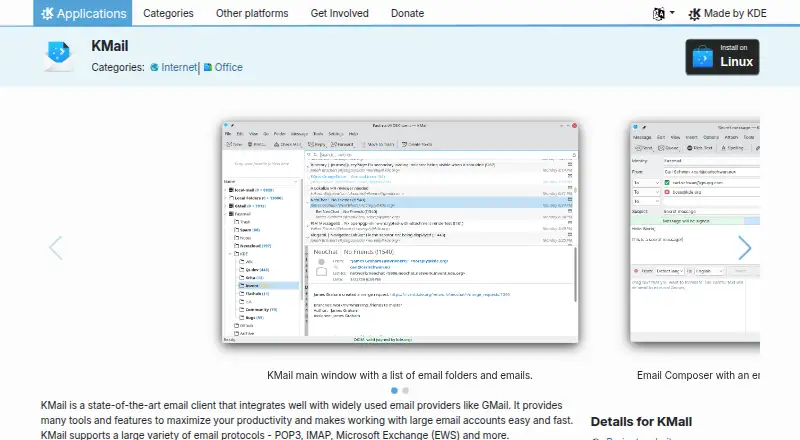
What KMail is
KMail is a free Linux desktop email client and the email component of Kontact, KDE’s personal information manager. It supports POP3, IMAP, Microsoft Exchange (EWS), and other email protocols, and can bring messages into a unified inbox. When mail is synced locally, KMail can continue operating without a network connection. Users can schedule sending and organize messages with filters, local and remote search, tags, and mailing-list management. It also supports push email through IMAP IDLE and server-side filtering through Sieve.
KMail includes OpenPGP and S/MIME end-to-end encryption, as well as SSL/TLS transport encryption. It isolates HTML content to prevent hidden external references and warns about suspicious links in HTML emails. The composer provides templates, text snippets, forgotten-attachment warnings, attachment compression, and image resizing. KMail connects with KOrganizer for meeting invitations and KAddressBook for address completion and related contact details. Optional translation and speech-to-text features use Bergamot and vosk-api and are disabled by default. KMail is listed under the GPL-2.0+ license. KDE provides a handbook, forum, user mailing list, and Libera.Chat channel for help.
Who it suits
KMail suits Linux desktop users who want email, calendar-related tools, and offline access when mail is synced locally. Its encryption, filtering, and contact-book integrations may also suit people who want message organization and security features within the Kontact environment.
What it does well
- Free Linux desktop email client with a unified inbox.
- Supports POP3, IMAP, and Microsoft Exchange (EWS).
- OpenPGP and S/MIME encryption are built in.
- Offline operation is available when email is synced locally.
- Composer includes templates and forgotten-attachment warnings.
What to know first
- Linux is its only listed platform.
- Offline use depends on email being synced locally.
- Optional translation and speech-to-text features are disabled by default.
Plans
| Plan | Billed and limits | Price |
|---|---|---|
| Free | Free and open-source email client · Linux | Free |
As apps.kde.org lists them, read 11 Oct 2026. The maker's own page has the final word.
Getting started
- Visit the KMail product website.
- Use KMail on Linux as a desktop email client.
- Connect using a supported email protocol such as POP3, IMAP, or Microsoft Exchange (EWS).
- Sync email locally if you want to work offline.
- Use the KMail Handbook, KDE forum, user mailing list, or Libera.Chat for help.
Verdict
Choose KMail if you want a free Linux desktop email client with multiple protocols, encryption, offline use for synced mail, and links to KOrganizer and KAddressBook. Its filtering, composer tools, and HTML protections cover a broad set of email tasks. Look elsewhere if you need a platform other than Linux.
Questions
Is KMail free?
Yes. KMail is free and listed under the GPL-2.0+ license.
Which platforms does KMail support?
Linux is its listed platform, and its app coverage is desktop.
Which email protocols does KMail support?
It supports POP3, IMAP, Microsoft Exchange (EWS), and other email protocols.
Can KMail work offline?
Yes, when email is synced locally.
Does KMail offer encryption?
It supports OpenPGP and S/MIME end-to-end encryption, along with SSL/TLS transport encryption.
What help options are available?
KDE lists the KMail Handbook, a forum, a user mailing list, and a Libera.Chat channel.
Facts from KMail's own pages
- AI features
- Optional translation and speech-to-text features use Bergamot and vosk-api, and are disabled by default. · apps.kde.org, 11 Oct 2026
- App coverage
- desktop · apps.kde.org, 21 Sept 2026
- Calendar tools
- Yes · apps.kde.org, 21 Sept 2026
- Email protocols
- It supports POP3, IMAP, Microsoft Exchange (EWS), and other email protocols. · apps.kde.org, 11 Oct 2026
- Encryption
- It supports built-in OpenPGP and S/MIME end-to-end encryption, as well as SSL/TLS transport encryption. · kontact.kde.org, 11 Oct 2026
- Free plan
- Yes · apps.kde.org, 21 Sept 2026
- Headquarters
- Berlin, Germany · apps.kde.org, 28 Sept 2026
- Integrations
- KMail connects with KOrganizer for meeting invitations and KAddressBook for address completion, avatars, and cryptographic preferences. · kontact.kde.org, 11 Oct 2026
- License
- KMail is listed under the GPL-2.0+ license. · apps.kde.org, 11 Oct 2026
- Offline access
- Yes · apps.kde.org, 21 Sept 2026
- Offline use
- KMail can operate without network connectivity when email is synced locally. · kontact.kde.org, 11 Oct 2026
- Organization tools
- It provides filtering, local and remote search, tagging, and mailing-list management. · kontact.kde.org, 11 Oct 2026
- Other standards
- It supports push email through IMAP IDLE and server-side filtering through Sieve. · kontact.kde.org, 11 Oct 2026
- Privacy policy
- KDE says its software generally does not transfer information from users’ devices except after an explicit user action, with some optional automated checks. · kde.org, 11 Oct 2026
- Privacy protections
- KMail isolates HTML content to prevent hidden external references and warns about suspicious links in HTML emails. · kontact.kde.org, 11 Oct 2026
- Productivity features
- The composer includes templates, text snippets, forgotten-attachment warnings, attachment compression, and image resizing. · kontact.kde.org, 11 Oct 2026
- Purpose
- KMail is an email client and the email component of Kontact, KDE’s personal information manager. · kontact.kde.org, 11 Oct 2026
- Scheduled sending
- Yes · apps.kde.org, 21 Sept 2026
- Spam protection
- It can integrate with local spam checkers such as SpamAssassin or Bogofilter. · kontact.kde.org, 11 Oct 2026
- Support
- KDE lists the KMail Handbook, forum, user mailing list, and Libera.Chat channel as help options. · apps.kde.org, 11 Oct 2026
- Unified inbox
- Yes · apps.kde.org, 21 Sept 2026
Where KMail stands on Freedom251
- Email clients#40 of 142