Freedom251 › Audio Mixing Software
KLANG:app
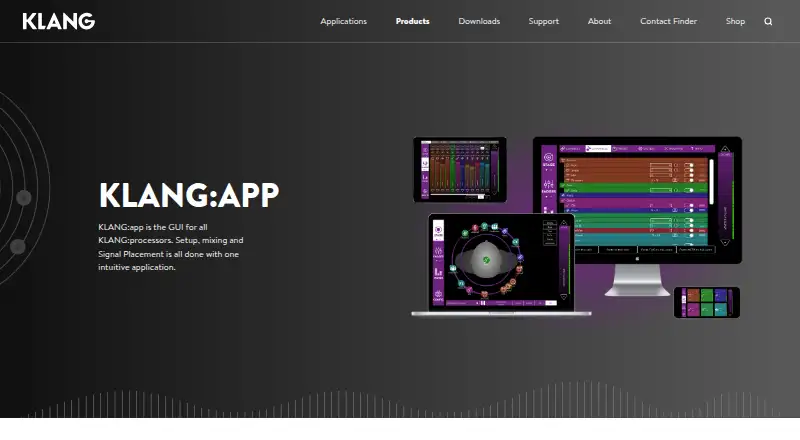
What KLANG:app is
KLANG:app is the graphical control app for KLANG processors, covering processor setup, mixing, and signal placement. It gives each musician control over an individual sound mix and lets users position instruments around the listener, including above or below the head, or use conventional stereo. Controls include faders, panning, system settings, and graphical 3D and i3D orbits. The app connects to KLANG processors over Wi-Fi or LAN and can manage one mix per device or all mixes from a single app. An offline editor and demo mode are included. KLANG:app supports console integration with DiGiCo SD and Quantum consoles, including KLANG mix parameter control and snapshot recall. The maker also documents SSL Live integration with two-way fader, panning, mute, solo, and tone-filter control. Other external control options include Open Sound Control and MIDI MCU and MIDI for Allen & Heath consoles. KLANG:app is free for supported devices, with downloads listed for Android, Mac, Windows ARM, Windows 32-bit, and Windows. It supports Android, iOS, macOS, and Windows. KLANG is headquartered in Aachen, Germany.
Who it suits
KLANG:app is suited to musicians who use KLANG processors and want to configure or control a personal mix from a supported device. It also fits users working with supported DiGiCo or SSL Live console integrations and external control connections.
What it does well
- Free for supported devices.
- Lets each musician control an individual sound mix.
- Supports stereo or spatial placement around the listener.
- Includes an offline editor and demo mode.
- Supports DiGiCo SD and Quantum console integration.
What to know first
- Requires KLANG processors for its mixing controls.
- The free plan is for supported devices and KLANG immersive processors.
- There is no free trial.
Limits
The free KLANG:app plan is for supported devices and controls KLANG immersive processors. The product has no free trial.
Plans
| Plan | Billed and limits | Price |
|---|---|---|
| KLANG:app | Free for supported devices · controls KLANG immersive processors | Free |
As klang.com lists them, read 7 Oct 2026. The maker's own page has the final word.
Getting started
- Download KLANG:app for a supported Android, iOS, macOS, or Windows device.
- Connect the device to a KLANG processor over Wi-Fi or LAN.
- Use the offline editor or demo mode to work without a live processor connection.
- Configure a mix with faders, panning, and spatial positioning.
KLANG:app is a setup and mixing interface for KLANG processors, suited to musicians and audio crews shaping monitor mixes. Its spatial controls and individual mix access make it a focused tool for those systems; its value falls away if you need a mixer independent of KLANG hardware.
Overview
The app covers processor setup, signal placement and mix control. Each musician can adjust an individual sound mix, while an operator can control one mix per device or handle all mixes from one app. That range fits personal monitoring and shared live workflows, though it does not make KLANG:app a general audio production environment.
Key features
Spatial mixing is the central reason to use the app. Instruments can be positioned around the listener, including above or below the head, with a choice of conventional stereo or 3D. Faders, panning, system settings and graphical 3D and i3D orbits let users adjust both mix levels and placement. This is useful when spatial positioning is part of the monitor mix; listeners who only need standard channel balancing have less reason to choose it.
KLANG:app connects to processors over Wi-Fi or LAN. Its offline editor and demo mode allow work in the interface without an active processor connection, but live processor control depends on that connection. Console integration extends control into existing setups: DiGiCo SD and Quantum consoles support KLANG mix parameters and snapshot recall, while the documented SSL Live integration provides bidirectional control of faders, panning, mute, solo and tone filters.
The app also communicates with processors via Open Sound Control and can connect to MIDI MCU and MIDI for Allen & Heath consoles. These options suit crews incorporating KLANG into console workflows; the app remains centered on controlling KLANG mixes rather than replacing a console or a broader audio workstation.
Pricing
KLANG:app costs nothing. The free plan is for supported devices and controls KLANG immersive processors, so it removes an app charge for compatible users while keeping the product tied to KLANG hardware. There is no free trial; the app itself is free.
Platforms
KLANG:app supports Windows, macOS, iOS and Android. The software page offers version 6.0.10 downloads for Android, Mac, Windows ARM, Windows 32-bit and Windows, giving desktop users separate Windows builds as well as mobile options. Surround mixing is supported. The app's stated export formats are WAV, MP3, M4A, XML, .KLANGshow and .kup.
Who it's for
This is a strong fit for musicians who want control over their own KLANG monitor mix and for audio operators managing several mixes or integrating KLANG control with supported consoles. The offline editor and demo mode are useful when preparing or exploring a setup away from a connected processor. Those without KLANG processors should look to software built for their mixing or production needs instead.
Pros and cons
- Pros: Individual mix control gives musicians direct access to their own sound.
- Pros: Stereo and 3D placement, including vertical positioning, support spatial monitor mixes.
- Pros: Wi-Fi and LAN connectivity plus DiGiCo and SSL Live integration support use in processor and console workflows.
- Pros: The app is free for supported devices and includes an offline editor and demo mode.
- Cons: Its control role depends on KLANG processors, which rules it out as a standalone mixing choice.
- Cons: The spatial controls offer limited benefit to users who only need conventional audio mixing.
Alternatives
For broader audio mixing software, start with Audio Mixing Software. L-ISA Studio is another spatial audio option, with a free binaural headphone plan for one seat; pick it if that workflow better matches your setup. For DJ-focused mixing, djay offers a free download with core mixing features, while rekordbox has a free tier for basic music management and DJ features, including 1,000 cloud tracks with owner registration or Hardware Unlock and one synced device. VirtualDJ has a free plan for nonprofessional use without professional equipment, and DJUCED offers a free Standard plan for use with a Hercules controller.
For video editing with an included audio workflow, DaVinci Resolve has a free version for work up to 60 fps and Ultra HD 3840 x 2160. Mixxx is a free, full-version DJ app with no official paid or pro edition, while Elgato Wave Link is free on Windows and macOS and works with any microphone or audio interface.
Verdict
Choose KLANG:app if you use KLANG processors and want musicians to shape individual mixes or an operator to manage spatial monitor mixes and supported console control. The free price and focused 3D tools make it a practical companion for that setup. Look elsewhere if you need mixing software that works independently of KLANG processors.
Verdict
Choose KLANG:app if you use KLANG processors and want an app for setup, spatial mixing, and individual mix control. It is free for supported devices, but its controls are tied to KLANG processors, so it is not a standalone mixing option.
Questions
How much does KLANG:app cost?
KLANG:app is free for supported devices.
Which platforms are supported?
KLANG:app supports Windows, macOS, iOS, and Android.
Does it work without a processor connection?
The app includes an offline editor and demo mode. Processor connectivity uses Wi-Fi or LAN.
Can it control console functions?
It supports DiGiCo SD and Quantum integration, including KLANG mix parameters and snapshot recall. The maker also documents SSL Live integration with bidirectional fader, panning, mute, solo, and tone-filter control.
What external control options are available?
KLANG:app communicates with KLANG processors via Open Sound Control and can connect to MIDI MCU and MIDI for Allen & Heath consoles.
Does KLANG:app include a free trial?
No. The listed plan is free for supported devices, and the product has no free trial.
Facts from KLANG:app's own pages
- Connectivity
- The app connects to KLANG processors over Wi-Fi or LAN. · klang.com, 7 Oct 2026
- Controls
- The app includes faders, panning, system settings, and graphical 3D and i3D orbits. · klang.com, 7 Oct 2026
- DiGiCo integration
- KLANG:app supports console integration with DiGiCo SD and Quantum consoles, including control of KLANG mix parameters and snapshot recall. · klang.com, 7 Oct 2026
- Download versions
- The software page lists KLANG:app 6.0.10 downloads for Android, Mac, Windows ARM, Windows 32-bit, and Windows. · klang.com, 7 Oct 2026
- External control
- KLANG:app communicates with KLANG processors via Open Sound Control and can connect to MIDI MCU and MIDI for Allen & Heath consoles. · klang.com, 7 Oct 2026
- Headquarters
- Aachen, Germany · klang.com, 28 Sept 2026
- Mix control
- Users can control one mix per device or all mixes with one app. · klang.com, 7 Oct 2026
- Offline use
- The app includes an offline editor and demo mode. · klang.com, 7 Oct 2026
- Other console integration
- The maker documents an app-based SSL Live console integration with bidirectional fader, panning, mute, solo, and tone-filter control. · klang.com, 7 Oct 2026
- Personal mixing
- The app gives each musician control over their own individual sound mix. · klang.com, 7 Oct 2026
- Platforms
- KLANG lists the app for iOS, Android, PC, and Mac. · klang.com, 7 Oct 2026
- Purpose
- KLANG:app is the graphical interface for KLANG processors, used for setup, mixing, and signal placement. · klang.com, 7 Oct 2026
- Spatial mixing
- Users can drag instruments around and above or below the listener’s head and choose conventional stereo or 3D. · klang.com, 7 Oct 2026
- Support
- KLANG provides a technical support contact option and publishes manuals, technical specifications, videos, and FAQs. · klang.com, 7 Oct 2026
Where KLANG:app stands on Freedom251
- Audio Mixing Software#2 of 28