Freedom251 › AI Meal Planning Apps

KitchenPocket
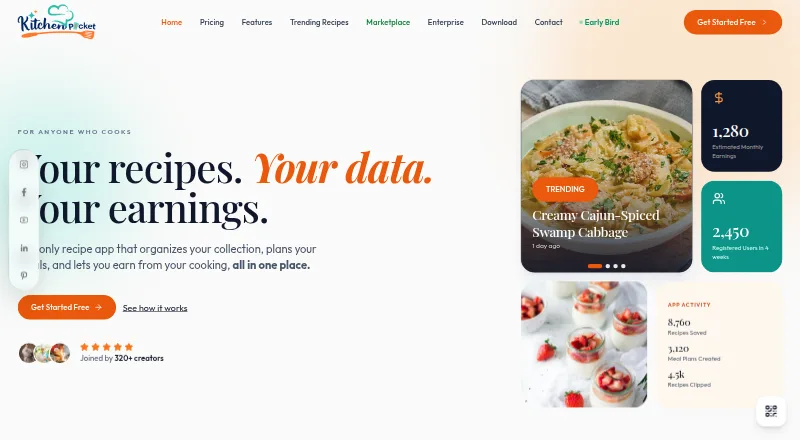
What KitchenPocket is
KitchenPocket is a recipe, meal-planning and creator monetization platform for home cooks, chefs, nutritionists and food creators. Its Cheffy assistant draws on pantry contents, taste profile, dietary goals and schedule to offer cooking advice and meal planning. Nutrition tools calculate macros, allergens and glycemic load, covering 14 allergen categories. Users can import recipes from blogs, videos and social posts with a browser extension or mobile share sheet; imports strip ads, popups and tracking. The weekly planner supports drag-and-drop scheduling, pantry deductions, household size and prep-time needs, and automatic shopping lists. The pantry can scan receipts or barcodes, track expiry and freshness, and suggest recipes using ingredients on hand. Shopping lists can be handed off to Instacart and Amazon Fresh. Cookbook creators keep 85% of earnings and receive weekly Stripe payouts, according to KitchenPocket. The free plan includes recipe clipping and storage for 100 recipes. Premium costs $7.50 per year, billed annually, and includes meal planning, nutrition and storage for 100,000 recipes. Platforms include Android, iOS, macOS, Windows and web.
Who it suits
KitchenPocket suits people who want to organize recipes, plan meals around household needs or monitor nutrition. Its creator features may also suit cookbook creators who want to earn from their work.
What it does well
- Free plan stores 100 recipes
- Imports recipes from blogs, videos and social posts
- Tracks 14 allergen categories
- Shopping lists link to Instacart and Amazon Fresh
- Creators keep 85% of cookbook earnings
What to know first
- Premium costs $7.50 per year, billed annually
- Premium limits recipe generations to 50 per month
- Premium limits image generations to 50 per month
Limits
The free plan includes storage for 100 recipes. Premium lists 50 recipe generations and 50 image generations per month, and enterprise usage is described as high-volume without a stated quota.
Plans
| Plan | Billed and limits | Price |
|---|---|---|
| Freemium | Forever · No credit card · Cookbooks / Recipes · Recipe Clipper · Storage (100 Recipes) | Free |
| Free | Forever · No credit card · Cookbooks/recipes · Recipe Clipper · 25-recipe storage | Free |
| Premium | Billed annually · 100,000 recipes · Shopping lists · Nutrition · Meal planning · 50 Cheffy recipe generations/month · 50 Cheffy image generations/month | $7.50 a month |
| Enterprise | Custom pricing · Custom integrations · White-label solutions · Advanced analytics · Dedicated onboarding and support | On request |
As kitchenpocket.com lists them, read 29 Sept 2026. The maker's own page has the final word.
Getting started
- Visit kitchenpocket.com.
- Choose the web, Android, iOS, macOS, or Windows option, or use the browser extension.
- Start with the free plan, which requires no credit card, or use the free trial.
- Upgrade to Premium for expanded storage, shopping lists, nutrition, and meal planning.
- For enterprise offerings, contact the sales team; a senior solutions engineer is said to respond within one business day.
KitchenPocket is a recipe and meal-planning service that also tracks pantry ingredients and nutrition. It suits home cooks who want those jobs connected, as well as food creators seeking cookbook earnings. Its strongest case is the breadth of the cooking workflow; the free plan’s 100-recipe cap is the clearest reason to upgrade.
Overview
KitchenPocket links recipe capture, pantry tracking, meal planning, nutrition, and shopping lists rather than treating recipes as a standalone collection. Cheffy draws on pantry contents, taste profile, dietary goals, and schedule to offer cooking advice and meal plans. That makes the product a better fit for people coordinating everyday cooking than for someone who only needs a place to save recipes.
Creators have a separate reason to consider it: KitchenPocket says cookbook creators keep 85% of earnings and receive weekly Stripe payouts. The service also offers enterprise APIs and white-label options, so its scope extends beyond household use.
Key features
Recipe capture and cooking help
A browser extension and mobile share sheet import recipes from blogs, videos, and social posts while stripping ads, popups, and tracking. That can make collecting recipes from varied online sources less cluttered. Cheffy combines that library with pantry, taste, dietary, and schedule context; AI recipe generation is also included, though Premium limits it to 50 generations per month.
Planning, pantry, and nutrition
The weekly planner supports drag-and-drop scheduling, accounts for household size and prep time, deducts planned ingredients from the pantry, and creates shopping lists. Its seven-day horizon is suited to a weekly routine, not longer-range meal scheduling. Lists can be handed off to Instacart and Amazon Fresh.
The pantry can scan receipts or barcodes, track freshness and expiry, and suggest recipes for ingredients on hand. Nutrition tools calculate macros, allergens, and glycemic load, track 14 allergen categories, and support dietary filters and nutrition targets. That combination is useful for cooks balancing ingredients and dietary needs, though the feature range matters most if you will maintain pantry and planning data regularly.
Creators and enterprise
Creators receive the stated 85% share and weekly payouts through Stripe. Enterprise offerings include REST and GraphQL APIs, real-time webhooks, connectors for POS, healthcare, and ERP systems, and a white-label SDK. The enterprise page describes SSO, privacy-first architecture, security, and industry-standard compliance and data protection, but names no specific certification.
KitchenPocket says it does not sell user data and allows users to export, transfer, or delete data in Settings → Privacy; account deletion is completed within 30 days. App support requests go through its contact page, while enterprise sales says a senior solutions engineer will respond within one business day.
Pricing
The Freemium plan costs nothing, is billed forever, and requires no credit card. It includes cookbooks, recipes, the recipe clipper, and storage for 100 recipes. That is a workable starting point for a small collection, but not for a long-running recipe archive.
Premium costs $7.50 a year, billed annually. It raises storage to 100,000 recipes and adds shopping lists, nutrition, meal planning, 50 recipe generations per month, and 50 image generations per month. It is the practical choice for regular planners or users who need more recipe capacity; the free plan gives up those listed planning and nutrition features as well as substantial storage. The pricing note also describes the paid entry point as $7.50/mo (annual).
Enterprise has custom pricing tailored to team size. It includes Premium features, custom integrations, high-volume usage, multi-user roles, white-label options, and dedicated support, making it the relevant tier for organizations rather than individual households. KitchenPocket offers a free trial, but no trial length or renewal terms are stated.
Platforms
KitchenPocket lists Android, iOS, macOS, web, Windows, an extension, and an API. The extension and mobile share sheet support recipe importing; the broad platform range suits cooks switching between devices.
Who it's for
KitchenPocket is best for households that want recipe capture, a pantry, nutrition tools, and weekly planning to work together. It is also relevant to cookbook creators who value the stated revenue share and weekly payouts, and to organizations needing APIs or white-label software. It is less compelling for someone who only wants basic food logging or a simple meal-plan generator, or who needs planning beyond a week.
Pros and cons
- Pros: Recipe capture, pantry deductions, shopping lists, and meal planning connect the steps from finding a dish to shopping for it.
- Pros: Nutrition calculations cover macros, glycemic load, and 14 allergen categories, with dietary filters and targets.
- Pros: Premium storage rises from 100 to 100,000 recipes and includes planning and nutrition features.
- Pros: Creator earnings include an 85% share and weekly Stripe payouts.
- Cons: The free plan’s 100-recipe ceiling can constrain anyone building a lasting recipe collection.
- Cons: Meal plans cover at most seven days, limiting longer-horizon planning.
- Cons: Premium’s recipe and image generation quotas are each 50 per month.
Alternatives
For a wider comparison, browse AI Meal Planning Apps.
- AislePrompt is a better fit for someone who wants a free option with no account required for core features, rather than KitchenPocket’s pantry, nutrition, and planning bundle.
- Fitia is worth considering when the priority is basic calorie and macro tracking, food logging, and barcode scanning.
- MealIdeas AI suits someone seeking daily AI meal picks and an initial meal-planning option, rather than KitchenPocket’s broader pantry and recipe workflow.
- MyPlateAI offers three AI meal generations per month on its free plan, so it may suit someone wanting a limited free generation allowance.
- Pantryfy may suit users looking for a pantry-oriented alternative with stated free limits of 50 pantry items and 25 recipes.
- Yumnia is a simpler alternative for creating a meal plan and grocery list on its free plan.
- Samsung Food is another freemium meal-planning option.
- Eat This Much is another freemium option for web and mobile.
Verdict
Choose KitchenPocket if you want a connected cooking system that moves from clipped recipes and pantry inventory to nutrition-aware weekly plans and shopping lists. Its breadth is the main draw, while the free storage cap and seven-day planning window are the clearest constraints. Look elsewhere if you need only a focused tracker or planner, or need to schedule meals further ahead.
Verdict
KitchenPocket combines recipe capture, pantry tracking, nutrition and meal planning, with tools for cookbook creators. The free tier is limited to 100 recipes; Premium adds substantial storage and planning features.
Questions
Is there a free plan?
Yes. The free plan is billed forever, requires no credit card, and includes cookbooks and recipes, the recipe clipper, and storage for 100 recipes.
How much does Premium cost?
The Premium plan is listed at $7.50 a year and billed annually. The pricing note also says paid plans start at $7.50/mo (annual).
What does Premium include?
It includes storage for 100,000 recipes, shopping lists, nutrition, meal planning, and 50 recipe generations and 50 image generations per month.
Which platforms are available?
KitchenPocket lists Android, iOS, macOS, web, and Windows, plus an API and browser extension.
Does it offer enterprise features?
Yes. Enterprise offerings include REST and GraphQL APIs, real-time webhooks, prebuilt connectors for POS, healthcare, and ERP systems, and a white-label SDK. Pricing is tailored to team size.
Can users export or delete their data?
The privacy policy says users can export, transfer, or delete data from Settings → Privacy. Account deletion is completed within 30 days.
Facts from KitchenPocket's own pages
- AI assistant
- Cheffy connects a user's pantry, taste profile, dietary goals, and schedule to provide cooking advice and meal planning. · kitchenpocket.com, 29 Sept 2026
- AI recipe generation
- Its multi-model AI generates structured recipes with steps, tags, dietary labels and ingredient details. · kitchenpocket.com, 14 Oct 2026
- API example
- The enterprise page shows a recipe-analysis endpoint that can return macros, allergens and cost per serving. · kitchenpocket.com, 14 Oct 2026
- App privacy disclosure
- Apple's listing says the developer may link names, email addresses and user content to identity, and may collect phone numbers, photos/videos and device IDs not linked to identity. · apps.apple.com, 14 Oct 2026
- Cheffy AI
- Cheffy connects pantry contents, taste preferences, dietary goals and schedules for cooking advice and meal planning. · kitchenpocket.com, 14 Oct 2026
- Chrome extension capabilities
- The Chrome extension saves recipes from websites, removes advertising clutter and syncs recipes across Chrome, iOS, Android and Windows. · chromewebstore.google.com, 14 Oct 2026
- Company and founder
- The about page names Paramjeet Kaur as the founder and says the platform roadmap began with idea and research in 2024–2025; it does not state a headquarters or founding year. · kitchenpocket.com, 29 Sept 2026
- Company incorporation
- The Company Check records Whizcamp Private Limited as incorporated on 27 July 2021 in Punjab, India, with Jagdip Singh and Paramjeet Kaur as directors. · thecompanycheck.com, 14 Oct 2026
- Company size
- LinkedIn lists Whizcamp as an 11–50-person privately held IT-services company headquartered in SAS Nagar Mohali, Punjab. · linkedin.com, 14 Oct 2026
- Cookbook monetization
- Creators can publish digital cookbooks, premium recipes, meal plans and menus and receive 85% of eligible sales. · kitchenpocket.com, 14 Oct 2026
- Copyright status
- The official site footer carries a 2026 copyright notice and says all rights are reserved; no open-source licence is stated there. · kitchenpocket.com, 14 Oct 2026
- Creator earnings
- KitchenPocket says cookbook creators keep 85% and receive weekly Stripe payouts. · kitchenpocket.com, 29 Sept 2026
- Creator payouts
- Marketplace earnings are credited to a KitchenPocket Wallet, with the features page stating weekly Stripe payouts. · kitchenpocket.com, 14 Oct 2026
- Download requirements
- The download page lists Android 9+, iOS 15+, Windows 11 64-bit, macOS 15.0 or later, Chrome/Edge and Firefox extensions. · kitchenpocket.com, 14 Oct 2026
- Enterprise API
- The enterprise page documents REST and GraphQL APIs, real-time webhooks, prebuilt POS/ERP/patient-management connectors and a white-label SDK. · kitchenpocket.com, 14 Oct 2026
- Enterprise APIs
- Enterprise offerings include REST and GraphQL APIs, real-time webhooks, prebuilt connectors for POS, healthcare, and ERP systems, and a white-label SDK. · kitchenpocket.com, 29 Sept 2026
- Enterprise security claims
- Enterprise materials claim industry-standard compliance and data protection, SSO authentication and privacy-first architecture. · kitchenpocket.com, 14 Oct 2026
- Founder story
- KitchenPocket's about page identifies Paramjeet Kaur as the founder and says the product grew from her experience managing recipes scattered across notebooks, screenshots and social media. · kitchenpocket.com, 14 Oct 2026
- Google Play privacy
- Google Play reports no third-party data sharing, encryption in transit and the ability to request deletion, while listing personal and financial information among potentially collected data. · play.google.com, 14 Oct 2026
- Integrations
- Shopping lists support hand-off to Instacart and Amazon Fresh. · kitchenpocket.com, 29 Sept 2026
- iOS requirements
- The iOS listing requires iOS 15 or later, with iPadOS 15 and macOS 11.5 requirements for those platforms. · apps.apple.com, 14 Oct 2026
- Limit: Android device support
- The Google Play listing says the app is designed exclusively for tablets and is not compatible with smartphones. · play.google.com, 14 Oct 2026
- Limit: enterprise pricing
- Enterprise pricing is custom and requires contacting sales. · kitchenpocket.com, 14 Oct 2026
- Limit: nutrition reliance
- The Android listing warns that nutrition values are estimates and that the app is not medical advice. · play.google.com, 14 Oct 2026
Where KitchenPocket stands on Freedom251
- AI Meal Planning Apps#3 of 30