Freedom251 › Keyboard and Mouse Customization Software
Keymasq
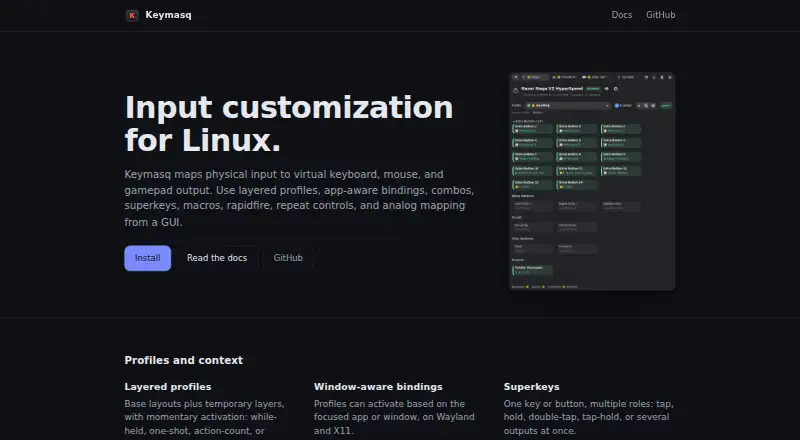
What Keymasq is
Keymasq is a free, MIT-licensed input customization tool for Linux. It remaps keyboard, mouse, and game controller input to virtual keyboard, mouse, and gamepad output. Layered profiles can activate according to the focused app or window, and controls include superkeys, combos, macros, rapidfire, repeat settings, analog mapping, and sensitivity controls. Global combos work on Wayland and X11; listed desktop support includes Hyprland, Niri, KDE Plasma, COSMIC, GNOME, and Sway. GNOME use requires the Keymasq GNOME Shell bridge extension. Installation options cover Arch, Debian, Ubuntu, Linux Mint, Fedora, Bazzite, openSUSE, and NixOS, with an AppImage for SteamOS and other distributions. Configuration is stored as plain TOML for hand editing or scripts. The GUI and command-line interface communicate through a per-user session broker, while only the privileged daemon accesses kernel input devices. Macro recording requires opt-in, and capture features require an explicit Polkit unlock by default. Keymasq is designed for single-user Linux desktops, with optional UID allowlists for multi-user systems. Bug reports and questions go through GitHub issues.
Who it suits
Keymasq suits Linux desktop users who want input remapping with app- or window-specific profiles. Its security documentation describes it as designed for single-user desktops, with optional UID allowlists for multi-user systems.
What it does well
- Free and MIT-licensed.
- Profiles can activate based on the focused app or window.
- Global combos work on Wayland and X11.
- Configuration is plain TOML.
- Macro recording requires user opt-in.
What to know first
- Linux only.
- GNOME integration requires a separate bridge extension.
- Designed for single-user desktops by default.
- Capture features require an explicit Polkit unlock by default.
Plans
| Plan | Billed and limits | Price |
|---|---|---|
| Free (MIT-licensed) | No paid plans or usage limits stated | Free |
As keymasq.tools lists them, read 11 Oct 2026. The maker's own page has the final word.
Getting started
- Open the Keymasq website and choose an installation route for your Linux distribution.
- Install using the listed package or path for Arch, Debian, Ubuntu, Linux Mint, Fedora, Bazzite, openSUSE, or NixOS.
- For SteamOS or another distribution, use the listed AppImage route.
- If using GNOME integration, install the Keymasq GNOME Shell bridge extension.
- Configure profiles and input settings through the GUI, CLI, or plain TOML.
Verdict
Keymasq offers extensive input remapping and profile controls for Linux, with configuration users can edit directly. Check desktop support and the GNOME extension requirement against your setup before installing.
Questions
Is Keymasq free?
Yes. The listed plan is free, and the project is MIT-licensed.
Which operating systems does it support?
Keymasq is for Linux. Installation paths are listed for several distributions, plus an AppImage for SteamOS and other distributions.
Does Keymasq work with Wayland?
Global combos work on Wayland and X11. The project lists Hyprland, Niri, KDE Plasma, COSMIC, GNOME, and Sway support.
Does it support per-app profiles and macros?
Yes. Layered profiles can activate based on the focused app or window, and its input features include macros.
Is Keymasq open source?
Yes. It is MIT-licensed open source.
How can users get help?
The project directs users to GitHub issues to report bugs and ask questions.
Facts from Keymasq's own pages
- Configuration
- Keymasq stores configuration as plain TOML that users can edit by hand or with scripts. · github.com, 11 Oct 2026
- Free plan
- Yes · github.com, 22 Sept 2026
- GNOME requirement
- GNOME integration requires the Keymasq GNOME Shell bridge extension. · keymasq.tools, 11 Oct 2026
- Input features
- Features include superkeys, combos, macros, rapidfire, repeat controls, and analog mapping. · keymasq.tools, 11 Oct 2026
- Installation
- The install guide lists packages or installation paths for Arch, Debian/Ubuntu/Linux Mint, Fedora, Bazzite, openSUSE, NixOS, and an AppImage for SteamOS and other distributions. · keymasq.tools, 11 Oct 2026
- License
- Keymasq is MIT-licensed open source. · keymasq.tools, 11 Oct 2026
- Linux-only
- Keymasq describes itself as an input customization tool for Linux. · keymasq.tools, 11 Oct 2026
- Macro support
- Yes · github.com, 22 Sept 2026
- Per-app profiles
- Yes · github.com, 22 Sept 2026
- Profiles
- Layered profiles can activate based on the focused app or window. · keymasq.tools, 11 Oct 2026
- Recording safeguards
- Macro recording requires user opt-in, and capture features require an explicit Polkit unlock by default. · keymasq.tools, 11 Oct 2026
- Security architecture
- The GUI and CLI communicate through a per-user session broker; only the privileged daemon accesses kernel input devices. · keymasq.tools, 11 Oct 2026
- Support
- The project directs users to GitHub issues to report bugs and ask questions. · github.com, 11 Oct 2026
- Supported operating systems
- linux · github.com, 22 Sept 2026
- Target users
- The security documentation says Keymasq is designed for single-user Linux desktops, with optional UID allowlists for multi-user systems. · keymasq.tools, 11 Oct 2026
- Wayland and X11
- Global combos work on Wayland and X11, and the product lists support for Hyprland, Niri, KDE Plasma, COSMIC, GNOME, and Sway. · keymasq.tools, 11 Oct 2026
- What it does
- Keymasq remaps keyboard, mouse, and game controller input on Linux to virtual keyboard, mouse, and gamepad output. · keymasq.tools, 11 Oct 2026