Freedom251 › Jewelry Design Software
Kerf
What Kerf is
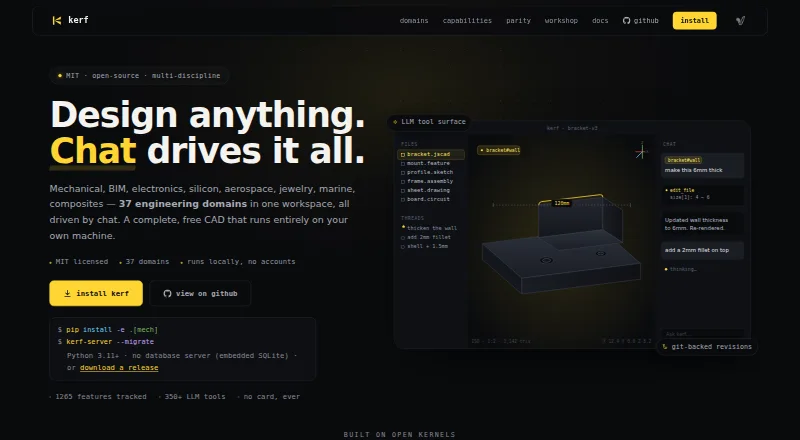
Kerf is a free, open-source CAD workspace that runs locally and uses chat to support work across 37 engineering domains. Users can describe design changes in plain language or use the Python kerf-sdk and JSON-RPC API. Mechanical design tools include constraint-based sketching, parametric feature history, validated B-rep geometry, drawings, and persistent face references. The workspace also includes FEM analysis, topology optimization, SPICE and RF analysis, CAM toolpaths, and G-code output. Listed file outputs range from STEP, STL, and 3MF to IFC4, Gerber, PDF, DXF, BOM CSV, Touchstone, GDS-II, and firmware binaries. Kerf describes workflows for mechanical and electronics engineers, BIM architects, jewelry designers, and other engineering disciplines. It runs without accounts, keeps local Git history, and can use Workshop content offline once that content is pinned. Installation is available from source or Docker, with release archives for macOS arm64, macOS x64, and Linux x64. Source installation requires Python 3.11 or later. The chat workflow can use a bring-your-own LLM; no bundled model is listed.
Who it suits
Kerf suits engineers and designers in disciplines such as mechanical design, electronics, BIM, and jewelry. It is aimed at users comfortable running local software and, for chat workflows, bringing their own LLM.
What it does well
- Covers 37 engineering domains.
- Includes mechanical design, analysis, simulation, and manufacturing tools.
- Supports Python SDK and JSON-RPC workflows.
- Runs locally without accounts and keeps Git history.
- Free and open-source under the MIT license.
What to know first
- Source installation requires Python 3.11 or later.
- Chat workflow requires a bring-your-own LLM.
- No bundled model or paid hosted plan is listed.
Plans
| Plan | Billed and limits | Price |
|---|---|---|
| Free | Free; MIT licensed · Runs locally · no accounts · no billing | Free |
| Kerf | complete CAD workspace · MIT licensed · no account · no cloud billing | Free |
As vulos.org lists them, read 29 Sept 2026. The maker's own page has the final word.
Getting started
- Visit the Kerf project website.
- Choose a source or Docker installation, or use a listed macOS or Linux release archive.
- For source installation, use Python 3.11 or later.
- Supply an LLM for chat-based workflows if you want to use chat.
Overview
Kerf is a local CAD workspace for engineers and designers who want to move between modeling, analysis, and manufacturing rather than hand work off between separate tools. Its breadth is its clearest advantage, while the chat workflow is a poor fit for anyone expecting an AI model to come with the software.
Mechanical and electronics engineers, BIM architects, and jewelry designers are among the audiences its workflows address. Because users can also script the same tool surface, Kerf is especially compelling for technically minded people who value automation and local control over a narrow, turnkey application.
Key features
Modeling through chat or code
Users can describe design changes in plain language or work through the Python kerf-sdk and JSON-RPC API. Sharing one tool surface across these approaches makes Kerf useful for combining interactive design with scripted workflows. But chat depends on a bring-your-own LLM: without a model supplied by the user, it is not a ready-to-go conversational assistant.
CAD, simulation, and production
Mechanical design includes a constraint-based sketcher, parametric feature history, validated B-rep geometry, drawings, and persistent face references. Jewelry workflows include ring sizing, stone setting, photorealistic rendering, and manufacturing export. This makes Kerf relevant to more than general mechanical modeling, though its broad engineering scope may be excessive for someone seeking only a focused jewelry-design package.
Analysis tools span FEM, topology optimization, SPICE simulation, and RF analysis, while manufacturing workflows include CAM toolpaths and G-code output. Listed exports include STEP, STL, 3MF, IFC4, Gerber, PDF, DXF, BOM CSV, Touchstone, GDS-II, firmware binaries, and G-code. That range supports varied disciplines, but prospective users should match their specific workflow to the formats and tools Kerf names.
Local history and sharing
Kerf records file edits in local Git history and runs without accounts. Its Workshop uses an open protocol for signed, content-addressed objects; the site says no central server is needed and pinned content remains usable offline. For people who want local data and account-free sharing, that is a meaningful distinction. The workspace also uses embedded SQLite without a database server.
The listed open kernels and tools include JSCAD, OpenCascade, tscircuit, planegcs, FEniCSx, OpenCAMlib, IfcOpenShell, FreeRouting, and KiCad. Kerf therefore brings together a wide technical surface, rather than presenting itself as a single-purpose CAD application.
Pricing
Free — free (billed Free; MIT licensed). The plan runs locally with no accounts and no billing, making Kerf a practical choice for individuals or teams evaluating an open-source workspace without a subscription commitment. Its cost advantage does not remove the need to supply an LLM for chat; there is no bundled model or paid hosted plan described.
Platforms
Kerf is listed for Linux, macOS, web, API, and self-hosted use. It can be installed from source or Docker, and release archives are listed for macOS arm64, macOS x64, and Linux x64. Source installation requires Python 3.11 or later, so that route is best for users comfortable with the stated runtime requirement.
Who it's for
Kerf is a strong fit for engineers and designers who want one local workspace spanning CAD, simulation, and manufacturing, particularly those willing to use code or provide their own LLM. Its jewelry tools also make it worth considering for designers who need ring sizing or stone setting alongside broader engineering capabilities. It is less suitable for people who want hosted AI chat ready to use or a specialized product that confines itself to one discipline.
Pros and cons
- Pros: A broad combination of parametric CAD, simulation, and manufacturing tools can keep more of an engineering workflow in one workspace.
- Pros: Local operation, file-edit Git history, and account-free Workshop sharing suit users who prioritize control over their data and offline access to pinned content.
- Pros: Python and JSON-RPC access give technically minded users an alternative to describing changes in chat.
- Cons: Chat requires a user-provided LLM, so the conversational workflow is not turnkey.
- Cons: Source installation requires Python 3.11 or later, a consideration for users choosing that setup route.
- Cons: Its coverage of 37 engineering domains may be more scope than users seeking only a focused design tool need.
Alternatives
For a dedicated jewelry-design comparison, browse Jewelry Design Software.
Rhino 3D is a paid option with a free plan and trial, available for Windows and macOS; its Commercial Rhino 8 single concurrent user plan is a permanent license at $995 a month and covers one concurrent user. Choose it if that licensing arrangement and desktop platform fit better than Kerf's local open-source approach.
Autodesk Fusion is freemium for macOS, web, and Windows. Its $57 a month plan, billed annually, includes integrated CAD/CAM, real-time team collaboration, PCB design and electromechanical integration, and drawing automation; it may suit readers who prioritize those named capabilities.
Pencil is a freemium API and web option. Its free plan lasts forever, provides 0 AI credits, limits users to 3 designs, and supports STL downloads and file uploads; Professional costs $39 a month. It is a narrower alternative to consider for a web-oriented jewelry workflow.
ZBrush is a freemium Windows and macOS option. Its iPad free plan includes 28 brushes, while the subscription provides multi-resolution mesh editing; readers focused on that named capability may prefer it.
Diatech Studio is a freemium web alternative.
3Design CAD is a paid option for Windows and macOS.
CounterSketch is a paid Windows and macOS option with a free trial. Its membership costs $349 a year; international price shown as $549/year, and includes tech support, an Online Academy, monthly library updates, and quarterly updates. It may suit readers who value those membership inclusions.
Drakon is a paid web and Windows option with one-time Copilot credit packs, including 5,000 credits for 20.00 EUR and 12,500 credits for 50.00 EUR.
Verdict
Choose Kerf if you want a free, local, open-source workspace that connects CAD with simulation and manufacturing, and are comfortable supplying your own LLM for chat. Look elsewhere if a bundled conversational model or a more focused, ready-made design package matters more than breadth and local control.
Verdict
Kerf brings a wide set of CAD, simulation, and manufacturing tools into a local, open-source workspace. Its chat workflow depends on a user-provided LLM, and source installation has a Python version requirement.
Questions
How much does Kerf cost?
Kerf is free. Its listed Free plan costs nothing, and the software is MIT licensed.
Which platforms does Kerf support?
Listed platforms include API, Linux, macOS, self-hosted, and web. Release archives are listed for macOS arm64, macOS x64, and Linux x64.
Does Kerf require an account or database server?
Kerf runs locally without accounts. Its embedded SQLite setup needs no database server.
Can I use Kerf offline?
The Workshop supports offline use once content is pinned.
What files can Kerf export?
Listed outputs include STEP, STL, 3MF, IFC4, Gerber, G-code, PDF, DXF, BOM CSV, Touchstone, GDS-II, and firmware binaries.
Does Kerf include an LLM for chat?
The chat workflow can use a bring-your-own LLM. A bundled model is not part of the listed plan details.
Facts from Kerf's own pages
- API
- Kerf exposes a JSON-RPC interface at /v1/rpc for automation. · vulos.org, 14 Oct 2026
- BIM and AEC
- BIM features include parametric building elements, MEP families, schedules, IFC round-trip, civil corridors and structural design. · github.com, 14 Oct 2026
- CAD features
- Mechanical design includes a constraint-based sketcher, parametric feature history, validated B-rep geometry, drawings, and persistent face references. · vulos.org, 29 Sept 2026
- Chat and scripting
- Users can describe design changes in plain language or script the same tool surface with the Python kerf-sdk and JSON-RPC API. · vulos.org, 29 Sept 2026
- Chat editing
- An LLM can read and edit project source files through a registry of more than 3,000 purpose-built tools, with changes recorded as reviewable diffs. · github.com, 14 Oct 2026
- Data ownership
- Project revisions and local Git history are stored on the operator's node, and an unconfigured installation does not open network sockets. · github.com, 14 Oct 2026
- Deployment
- Kerf can be installed from source or Docker, and the site lists release archives for macOS arm64, macOS x64, and Linux x64. · vulos.org, 29 Sept 2026
- Desktop builds
- The 0.1.9 release lists one-file desktop binaries for macOS Apple Silicon, Windows x64 and Linux x64. · github.com, 14 Oct 2026
- Documentation
- The documentation site contains getting-started, installation, configuration, architecture, file-format, domain, API, SDK, plugin and deployment sections. · vulos.org, 14 Oct 2026
- Download platforms
- Release assets include macOS Apple Silicon, macOS Intel, Linux x64 and source archives. · github.com, 14 Oct 2026
- Drawings
- Kerf provides multi-sheet technical drawings with GD&T callouts and drawing export. · github.com, 14 Oct 2026
- Electronics
- Electronics functions cover tscircuit JSX, schematic and PCB work, ngspice simulation, RF analysis, autorouting, signal integrity and power integrity. · github.com, 14 Oct 2026
- Engineering domains
- The product advertises 37 engineering domains, including mechanical, electronics, architecture, jewelry, aerospace, marine and textiles. · vulos.org, 14 Oct 2026
- Feature comparison limit
- Kerf's parity matrix says its comparisons measure only how much of Kerf's listed capability set competitors cover, not whether Kerf replaces those products. · vulos.org, 14 Oct 2026
- File outputs
- Listed outputs include STEP, STL, 3MF, IFC4, Gerber, G-code, PDF, DXF, BOM CSV, Touchstone, GDS-II, and firmware binaries. · vulos.org, 29 Sept 2026
- Geometry kernels
- Kerf supports JSCAD, OpenCascade B-rep, analytic NURBS, Catmull-Clark subdivision and SDF/F-rep geometry kernels. · github.com, 14 Oct 2026
- Integrations and kernels
- The site lists JSCAD, OpenCascade, tscircuit, planegcs, FEniCSx, OpenCAMlib, IfcOpenShell, FreeRouting, and KiCad among its open kernels and tools. · vulos.org, 29 Sept 2026
- License
- Kerf's own source code is released under the MIT license. · github.com, 14 Oct 2026
- Limit: desktop feature coverage
- The desktop binaries are lean builds and omit pythonOCC-based B-rep modeling and FEniCSx/dolfinx FEM, which require conda-based installation or Docker. · github.com, 14 Oct 2026
- Limit: development dependency resolution
- The repository states that uv sync currently fails because workspace extras require conda-forge-only packages; its development install helper is the workaround. · github.com, 14 Oct 2026
- Limit: geometry implementation
- The geometry roadmap says the pure-Python B-rep model is not yet wired into production surfacing operations, which still delegate solids and booleans to OCCT. · github.com, 14 Oct 2026
- Limit: unfinished tests
- The repository describes kernel and engineering-domain test tiers as having known failures, with domain tests marked experimental and red. · github.com, 14 Oct 2026
- Limit: Workshop browsing
- Offline browsing of followed Workshop feeds is not implemented; pinned part bytes remain available locally but the catalog requires a reachable feed. · github.com, 14 Oct 2026
- Local data and history
- Kerf keeps local Git history, with revisions recorded for file edits; the site says the app runs locally without accounts. · vulos.org, 29 Sept 2026
Where Kerf stands on Freedom251
- Jewelry Design Software#1 of 21