Kanto Karaoke Player&Recorder
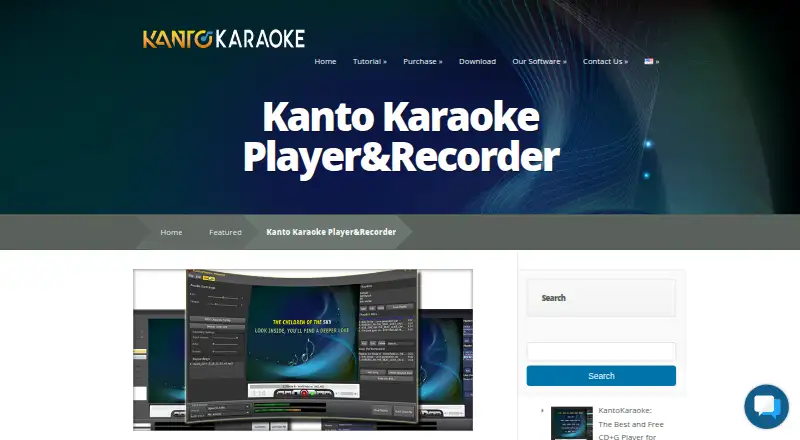
What Kanto Karaoke Player&Recorder is
Kanto Karaoke Player&Recorder is desktop karaoke software for macOS and Windows, aimed at amateur and professional singers. It manages a live song lineup with mixing and crossfading; Live Performance shows the current and upcoming songs, and lets users queue tracks by dragging and dropping. Supported files include MP3, MP3+CDG, WAV+CDG, KFN, MP4, AVI, WMV, KAR, and MIDI. Users can record microphone vocals over a song and adjust microphone and music volume, latency, echo, and reverb. MIDI and KAR files can be converted to MP3, with an option to remove the melody track. For MIDI playback, users can import and change SoundFont files or select an external MIDI driver or device. A built-in browser can play online karaoke songs such as YouTube videos. Dual Display opens lyrics on another monitor or TV while songs are managed on the PC. Free editions have playlist and recording limits; paid licenses start at 49.00 USD once for Standard Personal, which is limited to one PC and non-professional use.
Who it suits
Kanto suits singers and karaoke operators who need lineup management, vocal recording, or lyrics on a second display. Its plans distinguish personal from professional use and include options for Windows and Mac.
What it does well
- Supports a broad range of audio, video, and MIDI formats.
- Live Performance shows current and upcoming songs.
- Records vocals with adjustable audio controls.
- Converts MIDI and KAR files to MP3.
- Dual Display shows lyrics on another screen.
What to know first
- Free playlists are limited to five songs.
- Free recording is limited to one minute.
- Standard Personal is limited to one PC and non-professional use.
- Licenses last three years.
Limits
The free Windows and Mac editions limit playlists to five songs, recording to one minute, and MIDI-to-MP3 conversion to one minute. The Windows free edition also bars professional use; the Standard personal license is limited to one PC and cannot be used professionally.
Plans
| Plan | Billed and limits | Price |
|---|---|---|
| Free Version for Windows | playlist max 5 songs · recording max 1 minute · MIDI-to-MP3 max 1 minute · no professional use | Free |
| Free Version for Mac | playlist max 5 songs · recording max 1 minute · MIDI-to-MP3 max 1 minute | Free |
| Standard Version (Personal) | unlimited playlist songs · 1 PC · 3-year license · no professional use | $49, paid once |
| Full Version Professional for Mac | 1 Mac · 3-year license · unlimited playlists · recording · MIDI-to-MP3 · free updates for 3 years | $59.99, paid once |
| Professional Version | unlimited playlist songs · 3 Windows PCs · 3-year license · professional use · singer rotation list | $69.95, paid once |
As kantokaraoke.com lists them, read 2 Oct 2026. The maker's own page has the final word.
Getting started
- Visit the Kanto Karaoke Player&Recorder website.
- Choose the Windows or Mac edition for your computer.
- Start with the free edition or select a paid license.
- Install the desktop software.
- Load supported karaoke files or use the built-in browser for online karaoke songs.
- Set up the queue and, if needed, connect a second monitor or TV for lyrics.
Kanto Karaoke Player&Recorder is a desktop player, queue manager and vocal recorder for Windows and macOS. It is best suited to singers and karaoke hosts who keep their own files and need operator controls plus a separate lyrics screen. The free editions are useful for brief evaluation, while serious recording or professional operation requires a paid license.
Overview
Kanto handles MP3, MP3+CDG, WAV+CDG, KFN, MP4, AVI, WMV, KAR and MIDI files, making it practical for mixed local libraries. Its Live Performance view keeps the active track and upcoming selections visible, and drag-and-drop queueing reduces interruption between singers. A built-in browser can play online karaoke content such as YouTube videos, although local-file support remains the more clearly defined strength.
For MIDI playback, users can choose an external MIDI driver or device and import or replace SoundFont files. That flexibility matters to musicians who want to shape MIDI output rather than accept a fixed instrument set. The software also converts MIDI and KAR files to MP3 and can remove the melody track during conversion.
Key features
Performance workflow
Dual Display opens lyrics in a second window for a monitor or television while the computer stays available for queue and playback management. This is a sensible arrangement for a home singing station or a small hosted session. The feature improves presentation, but it does not remove the licensing restriction on professional use in the personal edition.
Recording and mixing
Kanto records microphone vocals over the playing song. Microphone and music volume, latency, echo and reverb controls give singers room to correct timing and tailor the vocal effect before saving a take. The controls are more useful than a basic player, but the free editions limit recording to one minute, so meaningful recording work belongs on a paid plan.
Queue and media conversion
Unlimited queues on paid editions make the software more suitable for longer sessions. MIDI-to-MP3 conversion is capped at one minute in both free editions, while paid versions remove that free-tier constraint. Melody removal can help create a less vocal-led backing track, particularly for MIDI or KAR material.
Pricing
Kanto uses a freemium model and offers a free trial. The free editions cost nothing. On Windows, the playlist maximum is five songs, recording is limited to one minute, MIDI-to-MP3 conversion is limited to one minute, and professional use is prohibited. The Mac free edition has the same five-song, one-minute recording and one-minute conversion caps; its plan does not state the Windows professional-use restriction.
Standard Version (Personal) costs $49, paid once for one PC and a three-year license with unlimited playlist songs. It is the economical choice for a personal Windows setup, but it excludes professional use. Full Version Professional for Mac costs $59.99, paid once for one Mac, a three-year license, unlimited playlists, recording, MIDI-to-MP3 conversion and free updates for three years.
Professional Version costs $69.95, paid once and covers three Windows PCs for three years. It adds professional use and a singer rotation list alongside unlimited playlist songs, making it the clearest fit for hosted events or venues using multiple machines. Standard and Professional licenses include guaranteed updates and priority support during their three-year term. Kanto offers a 7-day money-back guarantee under its conditions; service and transaction fees of 10% are non-refundable.
Platforms
Kanto is desktop software for Windows and macOS. Dual-display output requires a second monitor or TV, while MIDI output can use an external driver or device.
Who it's for
Choose Kanto if you maintain a varied karaoke file collection, want drag-and-drop singer rotation, or need vocal recording and MIDI conversion in one desktop application. The Mac Professional plan suits a single performance computer; Windows hosts needing several PCs and explicit professional rights should choose Professional. Casual users who only need occasional playback may find the five-song and one-minute free caps too restrictive for regular sessions.
Pros and cons
- Pro: Broad MP3, video, CDG, KAR and MIDI compatibility helps consolidate mixed libraries.
- Pro: Separate lyrics output keeps the audience screen clear while the operator manages the queue.
- Pro: Vocal effects, latency adjustment and melody removal provide useful control for recording and backing-track preparation.
- Con: Free editions restrict queues and recording/conversion to short limits, making them primarily evaluation versions.
- Con: The 49.00 USD Standard license is personal-only, so professional hosts must pay more.
- Con: Paid licenses last three years rather than providing perpetual license terms.
Alternatives
Browse the Karaoke Software directory for more choices. Pick KaraFun instead if you want Android, iOS or web access and a subscription model; its free tier includes songs and Premium previews, while Premium costs £7.99 a month. Karaoke 5 is preferable for mobile management, though its freeware edition omits synchronization and YouTube downloads. Choose OpenKJ for free, open-source hosting, or Encore Karaoke for an open-source player without an included song library. Karaoke Mugen, Nightingale and Performous are free alternatives with different platform coverage. Smule is the better direction for mobile and web duet participation, with free duet joining and a 19.99 USD monthly VIP pass.
Verdict
Kanto is a strong fit for a singer or host who wants broad local-file support, a managed queue, adjustable vocal recording and lyrics on a second screen. Choose the Professional edition for paid events or multiple Windows PCs; choose Standard only for personal use. Look elsewhere if you need a perpetual license, a genuinely unrestricted free edition or a primarily mobile karaoke service.
Verdict
Kanto combines song queueing, vocal recording, MIDI conversion, and second-screen lyrics. Check the edition limits and license terms: free versions restrict recording and playlist size, while listed paid licenses last three years.
Questions
Is Kanto Karaoke Player&Recorder free?
Yes. Free editions are available for Windows and Mac. Paid plans start at $49.00 USD once for the Standard personal license.
Does Kanto offer a free trial?
Yes, a free trial is listed. The free Windows and Mac editions have playlist, recording, and conversion limits.
Which platforms does Kanto support?
It is available for Windows and macOS.
What does the Standard personal license cost?
It costs $49.00 USD once and covers one PC for a three-year license. It is not for professional use.
Is there a professional license?
Yes. The Professional Version costs $69.95 USD once, covers three Windows PCs for three years, and includes professional use and a singer rotation list.
Can Kanto display lyrics on a TV or second monitor?
Yes. Dual Display opens a second window for lyrics on another monitor or TV while songs are managed on the PC.
Facts from Kanto Karaoke Player&Recorder's own pages
- Dual display
- Dual Display opens a second window for showing karaoke lyrics on another monitor or TV while songs are managed on the PC. · kantokaraoke.com, 2 Oct 2026
- License limits
- Standard and Professional licenses last three years, with updates and priority support guaranteed during that period. · kantokaraoke.com, 2 Oct 2026
- Live performance
- Live Performance shows the current song and the next songs and lets users queue songs by drag and drop. · kantokaraoke.com, 2 Oct 2026
- MIDI conversion
- The software converts MIDI or KAR files to MP3 and can remove the melody track during conversion. · kantokaraoke.com, 2 Oct 2026
- MIDI integration
- The software supports selecting an external MIDI driver or device for MIDI output. · kantokaraoke.com, 2 Oct 2026
- Purpose
- Kanto Karaoke is karaoke software for professional and amateur singers with real-time lineup management, mixing and crossfading. · kantokaraoke.com, 2 Oct 2026
- Recording
- Users can record microphone vocals over a song and adjust microphone volume, latency, music volume, echo and reverb. · kantokaraoke.com, 2 Oct 2026
- Refund policy
- Kanto offers a 7-day money-back guarantee under stated conditions, and service and transaction fees of 10% are non-refundable. · kantokaraoke.com, 2 Oct 2026
- Security notice
- The terms warn users about risks of downloaded software including viruses and data loss and place responsibility for protection and backups on the user. · kantokaraoke.com, 2 Oct 2026
- Soundfonts
- Users can import and change SoundFont files for MIDI playback. · kantokaraoke.com, 2 Oct 2026
- Support
- The maker provides contact support for software information, bug reports and comments and directs users to its FAQ. · kantokaraoke.com, 2 Oct 2026
- Supported media
- The player supports MP3, MP3+CDG, WAV+CDG, KFN, MP4, AVI, WMV, KAR and MIDI files. · kantokaraoke.com, 2 Oct 2026
- Web integration
- A built-in web browser can play online karaoke songs such as YouTube videos. · kantokaraoke.com, 2 Oct 2026
Where Kanto Karaoke Player&Recorder stands on Freedom251
- Karaoke Software#6 of 30