Freedom251 › ISO Creation Software
K3b
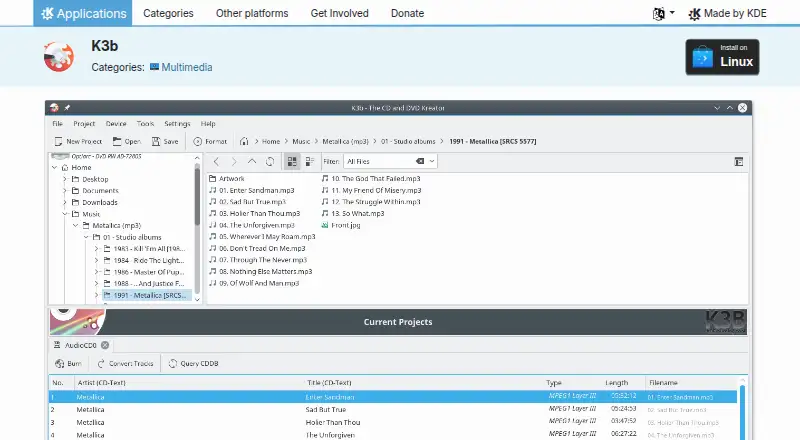
What K3b is
K3b is a free Linux application for burning CDs and DVDs, developed by KDE. Users create projects from the file menu and add data before burning. The Tools menu includes CD copying and DVD formatting. Selecting a CD or DVD drive displays its contents and offers additional actions, including audio CD ripping. K3b supports ISO and CUE image formats. Linux users can install it through an AppStream application store or their distribution’s package manager. KDE provides links to a forum, the #k3b Libera.chat channel, a bug-reporting page and a bug list for support and issue reporting. KDE describes its software as free and open source, generally transferring end-user information only after an explicit user action. The listed Free plan costs nothing, with no free trial listed. The project page lists version 26.08.2, released 2026-10-08. KDE has built and distributed free, open-source software since 1996.
Who it suits
It suits Linux users who need disc-burning, copying, formatting or audio-ripping tools. It is also a fit for users working with ISO or CUE images.
What it does well
- Free Linux CD and DVD burning
- Supports ISO and CUE images
- Includes CD copying and DVD formatting
- Can rip audio CDs
- Provides forum and chat support links
What to know first
- Linux is the listed platform
- No free trial is listed
- Requires optical-drive access for disc actions
Plans
| Plan | Billed and limits | Price |
|---|---|---|
| Free | CD and DVD burning application | Free |
As apps.kde.org lists them, read 9 Oct 2026. The maker's own page has the final word.
Getting started
- Visit the K3b page on the KDE website.
- Install K3b through an AppStream application store or your Linux distribution’s package manager.
- Create a project from the file menu and add data to prepare it for burning.
Verdict
K3b offers a focused set of CD and DVD tools at no charge on Linux. Its usefulness depends on having compatible optical hardware and needing disc-based workflows.
Questions
How much does K3b cost?
K3b has a Free plan listed as free.
Is there a free trial?
No. The listed free offering is a Free plan, and no trial is offered.
Which platforms does K3b support?
K3b is listed for Linux.
What disc and image formats does it support?
K3b burns CDs and DVDs and supports ISO and CUE image formats.
Who makes K3b?
KDE makes K3b. KDE describes itself as an international community that has built and distributed free, open-source software since 1996.
Where can users get help?
The K3b page links to a KDE forum and the #k3b channel on Libera.chat. It also links to a bug reporting page and a bug list.
Facts from K3b's own pages
- Drive actions
- Clicking a CD or DVD drive icon shows its contents and offers further actions, such as ripping audio CDs. · apps.kde.org, 9 Oct 2026
- Founded
- 1996 · apps.kde.org, 28 Sept 2026
- Installation
- K3b can be installed on Linux through AppStream application stores or a distribution’s package manager. · apps.kde.org, 9 Oct 2026
- Issue reporting
- The K3b page links to a bug reporting page and a bug list. · apps.kde.org, 9 Oct 2026
- Latest release
- The page lists version 26.08.2, released 2026-10-08. · apps.kde.org, 9 Oct 2026
- Maker
- KDE is an international community that has built and distributed free, open-source software since 1996. · kde.org, 9 Oct 2026
- Privacy
- KDE’s software privacy policy says its software generally transfers end-user information only after an explicit user action. · kde.org, 9 Oct 2026
- Projects
- Users create projects from the file menu and fill them with data to burn. · apps.kde.org, 9 Oct 2026
- Purpose
- K3b is a feature-rich, easy-to-handle CD burning application. · apps.kde.org, 9 Oct 2026
- Software cost
- KDE says its software is Free Software and can in most cases be downloaded and installed free of charge. · kde.org, 9 Oct 2026
- Support
- The K3b page links to a KDE forum and the #k3b channel on Libera.chat for help. · apps.kde.org, 9 Oct 2026
- Tools
- The Tools menu offers tools such as CD copying and DVD formatting. · apps.kde.org, 9 Oct 2026
Where K3b stands on Freedom251
- ISO Creation Software#19 of 33