
Javatari
What Javatari is
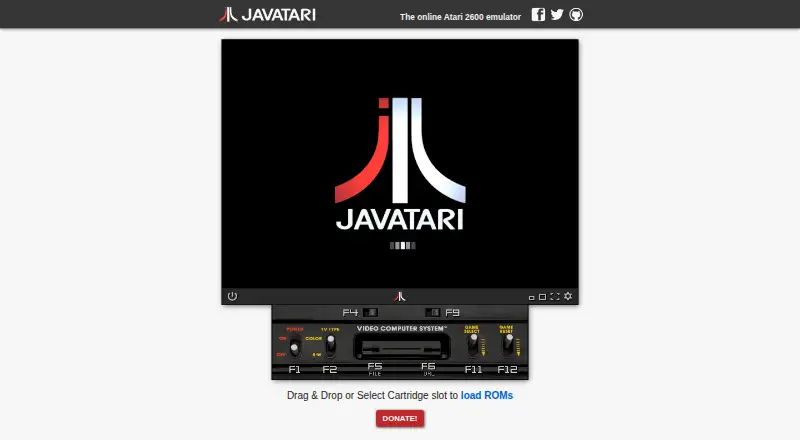
Javatari is a free Atari 2600 emulator that runs in a web browser. Its official site lets users load cartridges in the browser, with ROMs available from local storage, iCloud, Google Drive, Dropbox, or web links. It runs in Chrome, Firefox, and Safari, and can be installed as a WebApp on iOS, Android, or desktop for offline use. Players can save and share savestates, adjust speed, pause, or advance frame by frame. A resizable display, fullscreen mode, screen capture, and debug modes are also available. Controls include customizable joysticks, joykeys, and touch controllers, with haptic feedback on mobile. NetPlay connects multiple users to the same virtual console over the internet, though it does not work on Apple iOS because required WebRTC technologies are unavailable there. Its JavaScript API supports ROM loading and console control; games can also be embedded in webpages or launched with a link.
Who it suits
Javatari suits people who want to play Atari 2600 games in a browser or on an iOS or Android device. Its API and embedding options may also suit developers adding games to webpages.
What it does well
- Free plan with online access
- Runs in Chrome, Firefox, and Safari
- Can be installed for offline use
- Savestates can be exported and shared
- Customizable mobile controls include haptic feedback
What to know first
- NetPlay does not work on Apple iOS
- NetPlay performance depends on network quality
Plans
| Plan | Billed and limits | Price |
|---|---|---|
| Free | Atari 2600 emulator · online access | Free |
As javatari.org lists them, read 1 Oct 2026. The maker's own page has the final word.
Getting started
- Open https://javatari.org/ in a supported browser.
- Load a cartridge from local storage, iCloud, Google Drive, Dropbox, or a web link.
- Install Javatari as a WebApp on iOS, Android, or desktop for offline use.
Overview
Javatari brings Atari 2600 emulation to a browser, with options to install it for offline use and to share a console session online. It is best suited to players with their own ROMs who want flexibility across devices, and to developers building web pages around Atari games. Its broad browser and mobile support is compelling, but iOS users lose the multiplayer feature that most distinguishes it from a solo emulator.
Key features
ROMs can be opened from local storage, iCloud, Google Drive, Dropbox, or a web link. That range makes it practical to use a game library stored in different places; it does not make Javatari a source of games. Savestates can be exported and shared, a useful way to preserve a point in a game or pass progress along.
Players can remap customizable joysticks, joykeys, and touch controls, with haptic feedback on mobile. Adjustable speed, pause, and frame-by-frame advance support more deliberate play, while screen capture, debug modes, a resizable screen, and fullscreen round out the display tools. The combination suits casual play as well as closer examination of game behavior.
NetPlay lets multiple users connect to and control one virtual console over the internet. It uses peer-to-peer networking with STUN for NAT and router traversal, but session quality depends on the network. More importantly, NetPlay does not work on Apple iOS because the required WebRTC technologies are unavailable there; iOS remains an option for solo play, not shared sessions.
A JavaScript API can load ROMs and control the console. Games can also be embedded in webpages or launched through a single link to a Javatari page, which gives developers a direct route to incorporating play into a web project without changing the emulator's core purpose.
Pricing
Javatari is free: its Free plan costs nothing and includes the Atari 2600 emulator with online access. There are no paid tiers or published usage quotas to weigh against that offer. The trade-off is scope rather than price: this is Atari 2600 emulation, not a broader Atari system collection.
Platforms
The emulator runs in web browsers and is tested in Chrome, Firefox, and Safari. It supports iOS and Android, including iPhone and iPad, and can be installed as a WebApp on iOS, Android, or desktop for offline use. The offline option is valuable when a connection is unavailable, though it does not remove the iOS restriction on NetPlay. The project also provides an API and can be self-hosted.
The repository identifies the software as licensed under AGPL-3.0, and the official site credits Paulo A. Peccin as its creator.
Who it's for
Javatari is a strong choice for Atari 2600 players who want browser access, offline installation, flexible ROM sources, and portable savestates without paying. It is also a good fit for developers who want to embed an emulator or control one through JavaScript. Choose something else if you need NetPlay on an Apple device or want to emulate other Atari systems.
Pros and cons
- Pro: Browser access plus installable offline use covers connected and disconnected play on desktop and mobile.
- Pro: ROM loading from several storage services and exportable savestates give players practical control over games and progress.
- Pro: Customizable controls, playback adjustments, and web embedding serve both players and developers.
- Con: NetPlay is unavailable on Apple iOS, limiting shared play for iPhone and iPad users.
- Con: NetPlay quality depends on network conditions, so online sessions may be less consistent than solo emulation.
- Con: The supported console is the Atari 2600, so users seeking other Atari systems need a different emulator.
Alternatives
For a broader alternative starting point, browse the Atari Emulators list. Choose Virtual Jaguar if you want a free emulator core across Android, iOS, Linux, macOS, web, and Windows and are prepared to use a libretro frontend such as RetroArch. Atari800 is a free option for Android, Linux, macOS, and Windows, with source code available under GPL version 2. BigPEmu has a free emulator download, with Windows x64/ARM64 and Linux x64/ARM64 builds listed; its pricing model is freemium.
EMU7800 is a free, non-commercial option for Atari 2600 and 7800 emulation on Linux, macOS, and Windows. Pick kat5200 instead if Atari 5200 and 8-bit computer emulation is the priority; it is free on Android, Linux, macOS, and Windows. Stella is another free Atari 2600 VCS emulator, for Linux, macOS, and Windows, with voluntary donations.
Teller is a free open-source universal secret manager for developers, rather than an Atari emulator. z26 is a free, open-source Atari 2600 emulator for Linux, macOS, and Windows under GNU General Public License Version 2.
Verdict
Choose Javatari if you want a free Atari 2600 emulator that moves easily between browser and offline use, while giving players and web developers unusually flexible controls and sharing options. Look elsewhere if Apple iOS NetPlay is essential or your games require an Atari system beyond the 2600.
Verdict
Javatari combines browser-based Atari 2600 play with offline installation, flexible controls, and savestate sharing. Apple iOS users should note that NetPlay is unavailable there.
Questions
Is Javatari free?
Yes. Its Free plan is listed as free and includes an Atari 2600 emulator with online access.
Which platforms does it support?
Javatari supports web, iOS, and Android. It can also be installed as a WebApp on desktop and run offline.
Can I use NetPlay on an iPhone or iPad?
No. NetPlay does not work on Apple iOS because the required WebRTC technologies are unavailable there.
Can I use it offline?
Yes. Install it as a WebApp on iOS, Android, or desktop to run it offline.
What license does Javatari use, and who created it?
The project repository identifies Javatari as licensed under AGPL-3.0. The official site credits Paulo A. Peccin as its creator.
Can I load ROMs from cloud storage?
Yes. ROMs can be opened from iCloud, Google Drive, Dropbox, local storage, or web links.
Facts from Javatari's own pages
- Browser support
- The emulator runs in browsers and is tested in Chrome, Firefox, and Safari. · github.com, 1 Oct 2026
- Browser technology
- It is a cross-platform HTML5/JavaScript emulator that runs in browsers tested with Chrome, Firefox and Safari. · github.com, 1 Oct 2026
- Controls
- Javatari offers customizable joysticks, joykeys, and touch controllers, plus haptic feedback on mobile. · github.com, 1 Oct 2026
- Creator
- The official site credits Paulo A. Peccin as the creator. · javatari.org, 1 Oct 2026
- Developer API
- A JavaScript API is provided for loading ROMs and controlling the console. · github.com, 1 Oct 2026
- Display tools
- It includes screen capture, debug modes, a resizable screen and fullscreen mode. · github.com, 1 Oct 2026
- Embedding
- Games can be embedded in webpages or launched with a single link to a Javatari page. · github.com, 1 Oct 2026
- File sources
- ROMs can be opened from local storage, iCloud, Google Drive, Dropbox, or web links. · github.com, 1 Oct 2026
- JavaScript API
- A JavaScript API is available for loading ROMs and controlling the console. · github.com, 1 Oct 2026
- License
- The project is licensed under the GNU Affero General Public License version 3. · github.com, 1 Oct 2026
- Maker
- Javatari was created by Paulo A. Peccin. · javatari.org, 1 Oct 2026
- Mobile support
- Javatari supports iOS and Android devices, including iPhone and iPad. · github.com, 1 Oct 2026
- NetPlay
- NetPlay lets multiple users connect to and control the same virtual Atari console over the internet. · github.com, 1 Oct 2026
- NetPlay limit
- NetPlay does not work on Apple iOS because the required WebRTC technologies are unavailable there. · github.com, 1 Oct 2026
- NetPlay limitation
- NetPlay does not work on Apple iOS because the required WebRTC technologies are unavailable there. · github.com, 1 Oct 2026
- NetPlay networking
- NetPlay uses a specialized peer-to-peer protocol with STUN for NAT and router traversal, and performance depends on network quality. · github.com, 1 Oct 2026
- Offline use
- It can be installed as a WebApp on iOS, Android, or desktop and run offline. · github.com, 1 Oct 2026
- Online use
- The official site provides an online Atari 2600 emulator with cartridge loading in the browser. · javatari.org, 1 Oct 2026
- Playback controls
- The emulator provides adjustable speed, pause and frame-by-frame advance. · github.com, 1 Oct 2026
- Product
- Javatari is a cross-platform Atari 2600 emulator designed for the Web. · github.com, 1 Oct 2026
- Save states
- The emulator supports savestates and lets users export and share savestate files. · github.com, 1 Oct 2026
- Touch controls
- Mobile touch controls are customizable and include haptic feedback. · github.com, 1 Oct 2026
- What it does
- Javatari is an online Atari 2600 emulator. · javatari.org, 1 Oct 2026
Where Javatari stands on Freedom251
- Atari Emulators#8 of 25