Freedom251 › Application Deployment Software

Inno Setup
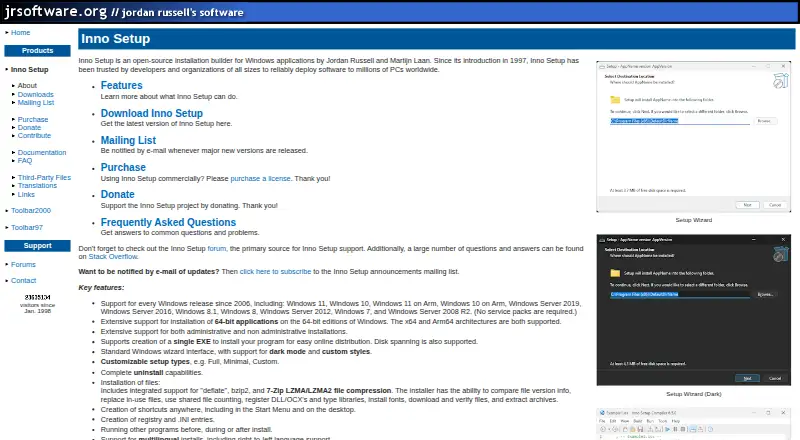
What Inno Setup is
Inno Setup is an open-source builder for Windows application installers, introduced in 1997 by Jordan Russell and Martijn Laan. It can create a single EXE for online distribution or split an installer across disks. Installer features include file compression, version comparisons, replacing files in use, registering DLLs and type libraries, downloading and verifying files, and extracting archives. A preprocessor supports compile-time customization, while an optional Pascal scripting engine can customize installation and uninstallation at runtime. Installers can be password-protected, encrypted, and digitally signed; uninstallers can also be signed. The software supports x64 and Arm64 applications on 64-bit Windows editions, and Windows releases since 2006, including Windows 10, Windows 11, and listed Windows Server editions. Its download page offers 32-bit and 64-bit editions, each able to build 32-bit or 64-bit installers. The maker says it works offline and sends no data for updates, license checks, statistics, or other purposes. The forum is the primary support source.
Who it suits
It suits Windows developers who need to build configurable EXE installers, including through command-line packaging or CI/CD workflows. Commercial users should also consider its per-user licensing and forum-based support.
What it does well
- Builds single-EXE or disk-spanned installers
- Supports x64 and Arm64 applications on 64-bit Windows
- Offers encryption, password protection, and digital signing
- Works offline and sends no listed usage data
- Includes a preprocessor and optional Pascal scripting
What to know first
- Targets Windows only
- The primary support source is its forum
- Commercial users are asked to purchase a license
Limits
The free plan is available as open-source software. Commercial licenses are assigned to a specified number of users, although each assigned user may use the software on multiple computers where they are the primary user.
Plans
| Plan | Billed and limits | Price |
|---|---|---|
| Enterprise | Single payment; perpetual license with two years of updates; extended update periods available · Unlimited users | On request |
| Single User | Single payment; perpetual license with two years of updates · 1 user | On request |
| Team | Single payment; perpetual license with two years of updates · 2–5 users | On request |
As jrsoftware.org lists them, read 9 Oct 2026. The maker's own page has the final word.
Getting started
- Open the Inno Setup website
- Download the 32-bit or 64-bit edition
- Choose the edition matching your Windows environment
- Configure files, compression, signing, and installation behavior
- Build an EXE installer through the interface or command line
Verdict
Inno Setup offers extensive Windows installer customization, including scripting and security options. Its offline operation and EXE output may suit Windows packaging needs, while commercial users should check licensing requirements.
Questions
Is Inno Setup free?
Its pricing model is free, and the pricing note identifies it as open source. Commercial users are requested to purchase a license.
Which platforms does it support?
Inno Setup targets Windows and supports Windows releases since 2006, including Windows 10, Windows 11, and listed Windows Server editions.
What installer format does it create?
It creates EXE installers, including a single EXE for online distribution, and also supports disk spanning.
Does it support automated packaging?
Yes. Command-line packaging, silent installation, auto-update support, and CI/CD integration are listed.
Can installers be secured?
Installers can be password-protected, encrypted, and digitally signed. Digital signing also applies to uninstalls.
How is support provided?
The Inno Setup forum is identified as the primary product-support source. Commercial licenses add no software support beyond the free forum support.
Facts from Inno Setup's own pages
- Architectures
- It supports x64 and Arm64 applications on 64-bit Windows editions. · jrsoftware.org, 9 Oct 2026
- Commercial licensing
- The maker requests that commercial users purchase a license; the commercial licenses are perpetual and require one payment. · jrsoftware.org, 9 Oct 2026
- Customization
- It includes a preprocessor for compile-time customization and an optional Pascal scripting engine for runtime installation and uninstallation customization. · jrsoftware.org, 9 Oct 2026
- Distribution
- The download page provides Inno Setup 7 in 32-bit and 64-bit editions, and says both editions can build 32-bit or 64-bit installers. · jrsoftware.org, 9 Oct 2026
- Founded
- 1997 · jrsoftware.org, 28 Sept 2026
- History
- Inno Setup was introduced in 1997 and is by Jordan Russell and Martijn Laan. · jrsoftware.org, 9 Oct 2026
- Installer creation
- It can create a single EXE installer for online distribution and also supports disk spanning. · jrsoftware.org, 9 Oct 2026
- Install features
- It supports file compression, version comparisons, replacing in-use files, registering DLLs and type libraries, downloading and verifying files, and extracting archives. · jrsoftware.org, 9 Oct 2026
- Integrations
- The site says Inno Setup is used by Microsoft Visual Studio Code, Git for Windows, and Embarcadero Delphi. · jrsoftware.org, 9 Oct 2026
- License limits
- A commercial license is assigned to a specified number of users, and each assigned user may use the software on multiple computers where they are the primary user. · jrsoftware.org, 9 Oct 2026
- Privacy
- The licensing page says Inno Setup works fully offline and sends no data for updates, license checks, statistics, or other purposes. · jrsoftware.org, 9 Oct 2026
- Product
- Inno Setup is an open-source installation builder for Windows applications. · jrsoftware.org, 9 Oct 2026
- Security
- It supports password-protected and encrypted installs as well as digitally signed installs and uninstalls. · jrsoftware.org, 9 Oct 2026
- Support
- The Inno Setup forum is identified as the primary source of product support, and commercial licenses add no software support beyond the free forum support. · jrsoftware.org, 9 Oct 2026
- Windows support
- The product supports Windows releases since 2006, including Windows 11, Windows 10, and Windows Server editions listed on its site. · jrsoftware.org, 9 Oct 2026
Where Inno Setup stands on Freedom251
- Application Deployment Software#20 of 44
- Software Packaging Tools#16 of 29