Freedom251 › Time-Series Databases

InfluxDB
What InfluxDB is
InfluxDB 3 is a time series database and platform for high-frequency data marked with timestamps. It supports SQL and InfluxQL queries, with a built-in Python processing engine, and accepts data through line protocol, HTTP API, client libraries, Telegraf, and the influxdb3 CLI. Data is stored as compressed Parquet files in object storage with S3 API compatibility. More than 400 Telegraf plugins and official libraries for Python, JavaScript, Go, Java, and C# connect it to data sources. InfluxDB 3 is available as open-source single-node Core, self-managed Enterprise, managed Cloud Dedicated and Cloud Serverless, and AWS-managed Amazon Timestream for InfluxDB. InfluxData describes it for industrial operations, observability, and AI applications that use real-time data. Core is intended for development, prototyping, and edge deployments, but lacks high availability and enterprise security. Cloud Serverless has a free option with service quotas and no high availability; paid usage is variable. The self-managed Enterprise trial lasts 30 days by default.
Who it suits
InfluxDB 3 suits teams handling timestamped data for industrial operations, observability, or AI applications. Core is aimed at local development, prototyping, and edge use; deployment choices also include managed and enterprise offerings.
What it does well
- Supports SQL and InfluxQL, plus a Python processing engine.
- Offers line protocol, HTTP API, Telegraf, and client libraries.
- Cloud Serverless includes a free option and $250 free credit.
- Multiple deployment models are available.
What to know first
- Core is single-node and has no high availability.
- Cloud Serverless has service quotas and no high availability.
- Cloud Serverless charges vary by usage.
- Enterprise and Cloud Dedicated include pricing not listed.
Limits
Core is a single-node option without high availability or enterprise security. Cloud Serverless has service quotas and no high availability; its free option includes $250 in free credit. The self-managed Enterprise trial is 30 days by default.
Plans
| Plan | Billed and limits | Price |
|---|---|---|
| Cloud Serverless - Data In | Pay for what you use · Usage-based pricing · Multi-tenant managed cloud | Free |
| Cloud Serverless - Query Count | Pay for what you use · Usage-based pricing | $0.01 a month |
| Cloud Serverless - Storage | Pay for what you use · Usage-based pricing | Free |
| Cloud Serverless - Data Out | Pay for what you use · Usage-based pricing | $0.09 a month |
| Cloud Serverless | Start for free, then usage-based · Multi-tenant · Service quotas apply · No HA · $250 free credit | Free |
| InfluxDB 3 Core | Free Forever · Self-managed · Linux, Mac, Docker · No HA · No enterprise security · Community support only | Free |
| Amazon Timestream for InfluxDB | AWS consumption pricing; billed to your AWS account · Fully managed on AWS · Native IAM and VPC integration · High availability included | On request |
| InfluxDB 3 Enterprise | Custom pricing, based on CPU configuration · Self-managed · Unlimited scale, no service quotas · High availability and read replicas · 30-day free trial | On request |
The first 8 of 10 plans, as influxdata.com lists them, read 22 Sept 2026. The maker's own page has the final word. Every plan
Getting started
- Visit the InfluxDB product website.
- Choose a deployment: Core, Enterprise, Cloud Serverless, Cloud Dedicated, or Amazon Timestream for InfluxDB.
- For self-managed Enterprise, start the 30-day free trial.
- Connect a data source using line protocol, HTTP API, a client library, Telegraf, or the influxdb3 CLI.
- Select SQL or InfluxQL for queries.
Overview
InfluxDB 3 is a time-series database for high-frequency data organized by timestamp. It suits teams handling live operational, observability, or AI data, especially those that want a choice of managed and self-managed deployments. Its breadth is a strength, but availability, security, support, and cost depend on the edition.
InfluxDB offers SQL and InfluxQL, retention policies, and horizontal scaling. Browse related options in Time-Series Databases, IoT Analytics Software, OLAP Software, Columnar Databases, Metrics Monitoring Tools, and Database Software.
Key features
Ingestion, queries, and storage
Data can enter through line protocol, HTTP API, client libraries, Telegraf, or the influxdb3 CLI. More than 400 pre-built Telegraf plugins and official Python, JavaScript, Go, Java, and C# libraries give teams several integration routes. Native SQL complements InfluxQL, and a built-in Python processing engine adds a processing option within the platform.
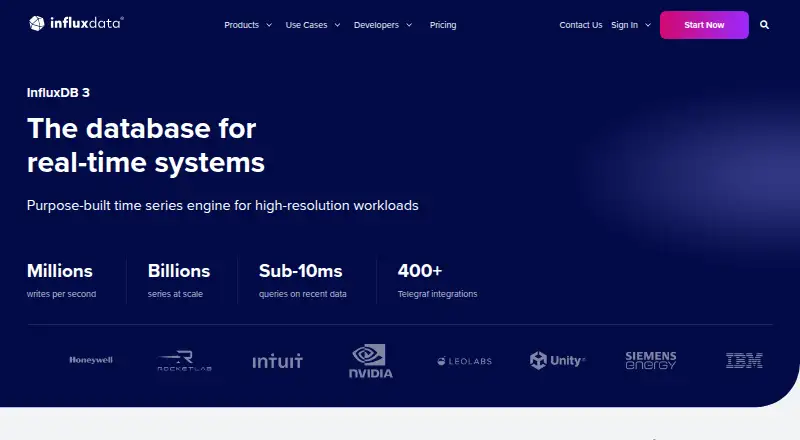
InfluxDB stores data in compressed Parquet files in object storage with S3 API compatibility. InfluxData states that InfluxDB 3 supports millions of writes per second, billions of series without cardinality limits, and queries under 10 milliseconds. These capabilities make it a candidate for high-volume time-series workloads, though actual performance will depend on the deployment and workload.
Security and support
InfluxData says its products are ISO 27001, ISO 27018, and SOC 2 certified, with end-to-end encryption and granular access controls across managed and self-managed InfluxDB 3 products. Enterprise adds SAML/SSO and OAuth. Cloud Dedicated offers SAML/SSO and private networking as paid add-ons, so buyers needing those controls should account for the extra cost.
Core has community support. Enterprise and Cloud Dedicated include a technical support SLA, making them the clearer fit for teams that need contracted technical support.
Pricing
Free and usage-based choices
InfluxDB uses a freemium model, with a free plan, paid usage, and a 30-day trial. InfluxDB 3 Core is a single-node option with no published price. It is intended for local development, prototyping, and edge deployments, but lacks high availability and enterprise security.
Cloud Serverless starts free, then charges by usage. The free plan includes $250 in free credit and has service quotas; it is multi-tenant and has no high availability. The usage-based rates are $0.0025 per MB written, $0.012 per 100 query executions, $0.002 per GB-hour, and $0.09 per GB transferred out, with no minimum commitment. The listed Cloud Serverless line items are Data In at no cost, Query Count at $0.01 a month, Storage at no cost, and Data Out at $0.09 a month, each billed pay for what you use. Because the service is metered and quotas apply, the free entry point is best for bounded workloads, not a guarantee of a fixed monthly bill.
Managed and self-managed paid deployments
Cloud Dedicated is a single-tenant managed service with custom pricing. It suits teams seeking managed hosting and isolation, but its price is not a fixed public rate; SAML/SSO and private networking are add-ons.
InfluxDB 3 Enterprise is self-managed with custom pricing based on CPU configuration. It offers unlimited scale, no service quotas, high availability, and read replicas, alongside a 30-day free trial by default; InfluxData says it can help extend the trial. This is the more capable self-managed choice for teams that need HA or replicas, but entails a custom-priced Enterprise deployment.
Amazon Timestream for InfluxDB is fully managed on AWS, integrates with native IAM and VPC, and includes high availability. It is billed at AWS consumption pricing to the AWS account, so it fits teams already choosing AWS-managed operation rather than buyers seeking a separately stated fixed subscription price.
Platforms
InfluxDB supports API, Linux, macOS, Windows, web, and self-hosted deployment. That coverage spans client integration, common desktop and server environments, and hosted use, while the deployment model still determines whether the service is single-node, managed, or self-managed.
Who it's for
InfluxDB is aimed at teams collecting timestamped data for industrial operations, observability platforms, or AI applications that need real-time data. Core is appropriate for development, prototyping, or edge use where a single node and community support are acceptable. Teams requiring high availability should consider Enterprise or Amazon Timestream; teams wanting managed single-tenant hosting can consider Cloud Dedicated. Cloud Serverless suits usage-based managed adoption where its quotas and lack of HA are acceptable.
Pros and cons
- Multiple ingestion paths: Telegraf plugins, client libraries, APIs, line protocol, and a CLI support varied collection setups.
- Flexible querying: SQL, InfluxQL, and built-in Python processing serve different query and processing needs.
- Several deployment models: Users can choose open-source single-node Core, self-managed Enterprise, managed InfluxDB, or AWS-managed Timestream.
- Availability varies sharply: Core and Cloud Serverless do not provide high availability, so they are poor fits where failover is required.
- Costs can be hard to forecast: Serverless charges depend on writes, queries, storage, and data transfer, while Dedicated and Enterprise use custom pricing.
- Core is deliberately limited: Its single node, lack of enterprise security, and community-only support constrain production use requiring those capabilities.
Alternatives
Choose LinDB if you want a free, Apache 2.0 option. Prometheus is a free, Apache 2.0 open-source monitoring and alerting toolkit, making it the alternative to consider when that toolkit focus fits better.
QuestDB offers a free Apache 2.0 self-managed single-instance edition with community support; consider it if that deployment and support model suits your needs. TDengine is worth comparing if an open-source TSDB with clustering capabilities under the AGPL license is a better fit.
VictoriaMetrics offers open-source single-node and cluster versions, a useful comparison if you prefer those choices. DolphinDB has a free Community Edition capped at two nodes, two CPU cores and 8 GB RAM per node; consider it if those bounds work for your deployment.
Grafana k6 is a performance-testing alternative with a free tier limited to 500 virtual user hours per month, rather than a like-for-like database choice. GreptimeDB offers a managed Enterprise plan from $290 a month, which may suit readers comparing managed options with a published starting price.
Verdict
Choose InfluxDB 3 if you need a time-series platform with multiple ingestion and query routes and want to select among open-source, self-managed, and managed deployments. Its broad deployment range is the main reason to choose it; the main reason to look elsewhere is that the least-cost entry choices, Core and Cloud Serverless, lack high availability, while stronger enterprise options carry custom pricing or AWS consumption charges.
Verdict
InfluxDB 3 combines multiple ingestion and query options with self-managed, managed, and open-source deployment choices. Compare the deployment limits and usage-based charges carefully, since Core and Cloud Serverless do not provide high availability.
Questions
Is there a free InfluxDB plan?
InfluxDB 3 Core is open source, and Cloud Serverless offers a free option with service quotas, no high availability, and $250 in free credit.
What does Cloud Serverless cost?
It starts free and then uses usage-based pricing. Listed rates include $0.0025 per MB written, $0.012 per 100 query executions, $0.002 per GB-hour, and $0.09 per GB transferred out.
Which query languages does InfluxDB support?
InfluxDB 3 supports native SQL and InfluxQL. It also includes a built-in Python processing engine.
Can I run InfluxDB myself?
Yes. InfluxDB 3 Core is an open-source single-node deployment, and Enterprise is self-managed. Managed options include Cloud Serverless, Cloud Dedicated, and Amazon Timestream for InfluxDB.
What are the limits of Core?
Core is single-node, without high availability or enterprise security, and is community supported. It is intended for local development, prototyping, and edge deployments.
What trial and support are available?
The self-managed Enterprise trial is 30 days by default, and InfluxData says it can help extend it. Enterprise and Cloud Dedicated include a technical support SLA; Core is community supported.
Facts from InfluxDB's own pages
- Company
- InfluxData says it was founded in 2012. · influxdata.com, 29 Sept 2026
- Core limits
- InfluxDB 3 Core is a single-node option without high availability or enterprise security, intended for local development, prototyping, and edge deployments. · influxdata.com, 29 Sept 2026
- Deployments
- InfluxDB 3 is offered as self-managed Enterprise, managed single-tenant Cloud Dedicated, managed multi-tenant Cloud Serverless, AWS-managed Amazon Timestream for InfluxDB, and open-source single-node Core. · influxdata.com, 29 Sept 2026
- Enterprise security
- InfluxDB 3 Enterprise offers SAML/SSO and OAuth; Cloud Dedicated offers SAML/SSO as an add-on and private networking as an add-on. · influxdata.com, 29 Sept 2026
- Free plan
- Yes · influxdata.com, 22 Sept 2026
- Integrations
- InfluxDB connects to data sources through 400+ pre-built Telegraf plugins and has official client libraries including Python, JavaScript, Go, Java, and C#. · influxdata.com, 29 Sept 2026
- Performance
- InfluxDB 3 supports millions of writes per second, billions of series with no cardinality limits, and sub-10ms query response times. · influxdata.com, 29 Sept 2026
- Purpose
- InfluxDB 3 is a time series database and platform built for high-frequency, timestamped data. · influxdata.com, 29 Sept 2026
- Querying
- InfluxDB 3 supports native SQL alongside InfluxQL and includes a built-in Python processing engine. · influxdata.com, 29 Sept 2026
- Security
- InfluxData states that it is ISO 27001, ISO 27018, and SOC 2 certified, and that end-to-end encryption and granular access controls are available across managed and self-managed InfluxDB 3 products. · influxdata.com, 29 Sept 2026
- SQL support
- Yes · influxdata.com, 22 Sept 2026
- Storage
- InfluxDB 3 stores data as compressed Parquet files in object storage with S3 API compatibility. · influxdata.com, 29 Sept 2026
- Support
- InfluxDB 3 Core is community supported, while Enterprise and Cloud Dedicated include a technical support SLA. · influxdata.com, 29 Sept 2026
- Trial
- The self-managed Enterprise trial is 30 days by default, and InfluxData says it can help extend the trial. · influxdata.com, 29 Sept 2026
- Use cases
- InfluxData describes InfluxDB as supporting industrial operations, observability platforms, and AI applications that need real-time data. · influxdata.com, 29 Sept 2026
Where InfluxDB stands on Freedom251
- Time-Series Databases#9 of 36
- IoT Analytics Software#6 of 24
- Metrics Monitoring Tools#10 of 37
- Analytics Data#10 of 30
- Database Software#25 of 74
- OLAP Software#13 of 32
- Columnar Databases#13 of 27