Freedom251 › Panorama Stitching Software

Hugin
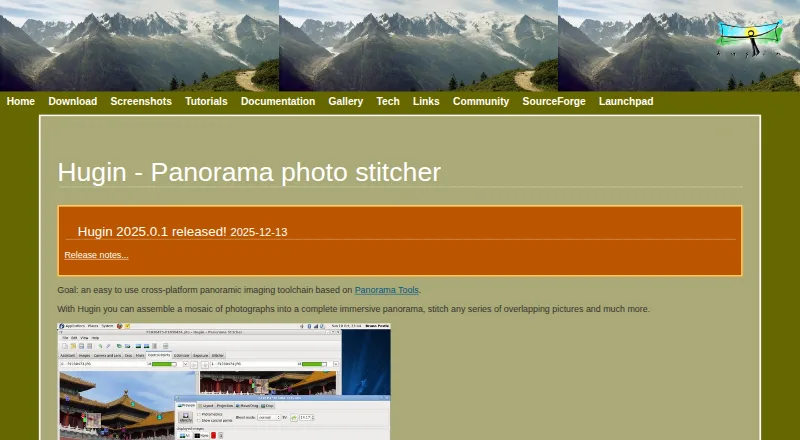
What Hugin is
Hugin is a free, open-source toolchain for making panoramas from overlapping photographs. Its automated Assistant can assemble multi-row pictures, and control points can be used to correct perspective. Tutorials also cover lens calibration, blend masks, and exposure fusion. Hugin uses Enblend to smooth seams between images and Enfuse to combine bracketed exposures. The listed capabilities include RAW input, HDR or exposure blending, control-point editing, and batch stitching. Hugin runs on Linux, macOS, and Windows. The download page offers a 64-bit Windows installer; 32-bit Windows support is limited to Hugin 2017.0. The listed Mac bundle is for macOS 10.9 and newer, but does not run on newer arm64 Macs. Linux users are directed to distribution package managers, and Flatpak and AppImage builds are also listed. The project points users to its manual, tutorials, FAQs, and the PanoTools wiki for documentation. Discussion is directed to the hugin-ptx mailing list, while bug reports go through Launchpad. Hugin is free to use, modify, and share.
Who it suits
Hugin suits desktop users and science or research users who need to stitch photographs or correct panorama perspective. It is available for Linux, macOS, and Windows, subject to the listed platform limits.
What it does well
- Free to use, modify, and share.
- Automated Assistant handles multi-row photos.
- Supports RAW input and exposure blending.
- Includes control-point editing and batch stitching.
- Documentation includes tutorials, FAQs, and a manual.
What to know first
- 32-bit Windows support stops at Hugin 2017.0.
- Listed Mac bundle does not run on newer arm64 Macs.
- Builds are not guaranteed for every platform.
Plans
| Plan | Billed and limits | Price |
|---|---|---|
| Hugin | Free to use, modify and share · open source | Free |
As hugin.sourceforge.io lists them, read 29 Sept 2026. The maker's own page has the final word.
Getting started
- Visit the Hugin website.
- Choose the download route for your platform: Windows installer, Mac bundle, or Linux package manager, Flatpak, or AppImage.
- On Windows, use the 64-bit installer; 32-bit support ends at Hugin 2017.0.
- On macOS, check that the listed bundle suits your system; it is for macOS 10.9 and newer and does not run on newer arm64 Macs.
- Consult the Hugin Manual, tutorials, FAQs, or PanoTools wiki for guidance.
Hugin is desktop software for stitching photographs into panoramas and correcting images. It is best suited to photographers and research users who want a free, open-source workflow with room to refine alignment and exposure.
Its breadth makes it more capable than a stitching-only tool, but older Windows support and the Mac bundle’s limits on newer Apple hardware narrow its fit.
Overview
Hugin brings panorama assembly together with photo-correction tasks, including lens calibration, perspective correction and blend masks. That range can serve users who want to prepare and combine images in one workflow, though control-point editing means it is a better match for people willing to refine results rather than leave every decision to automation.
The software is open source and free to use, modify and share. That makes it a practical option for individuals or teams who value both zero-cost access and the freedom to adapt the software. Organizations that require a stated security certification or compliance standard should look elsewhere.
Key features
Stitching and image correction
Hugin’s tutorials cover using its automated Assistant to stitch multi-row photos, as well as correcting perspective with control points. It supports RAW input and both panorama types. The combination gives photographers flexibility across source material and panorama workflows, while control-point editing offers a way to address perspective when automatic assembly alone is not enough.
Blending and exposure
Hugin uses Enblend for seam blending and Enfuse to fuse bracketed exposures. Its tutorials also cover exposure fusion. These tools extend the workflow beyond aligning images, making Hugin worth considering for users combining shots with different exposures; those who only need basic panorama assembly may not need this breadth.
Documentation and community
The project points users to a manual, tutorials, FAQs and the PanoTools wiki. Discussion takes place on the hugin-ptx mailing list, and bug reports go through Launchpad. That gives users several routes to learn and seek help, though support is community-based rather than a stated commercial support service.
Pricing
Hugin costs nothing. The free plan includes the open-source software, with permission to use, modify and share it; there is no separate paid tier or free-trial period to weigh. It is a strong fit for users who want the full stated workflow without a license fee, but the project does not guarantee that source builds will work on every platform.
Platforms
Hugin supports Linux, macOS and Windows, but the practical download options differ. Windows users can get a 64-bit installer; 32-bit Windows support stops at Hugin 2017.0. The Mac bundle targets macOS 10.9 and newer but does not run on newer arm64 Macs, a significant limitation for users with those systems. Linux users can install through distribution package managers or use Flatpak and AppImage builds. The project makes reasonable efforts to support released source builds on many platforms, but does not guarantee builds for all of them.
Who it's for
Hugin suits desktop users, photographers and science or research users who need panorama stitching alongside perspective, lens or exposure correction. It is particularly appealing where open-source licensing and the ability to modify or share the software matter. It is a weaker choice for people on newer arm64 Macs, 32-bit Windows systems that need current support, or organizations that require a specified security or compliance standard.
Pros and cons
- Pros: Free, open-source licensing permits use, modification and sharing, making it suitable for users who want control without a license cost.
- Pros: Stitching, control-point correction, RAW input and exposure blending cover more of the panorama workflow than assembly alone.
- Pros: Linux users have package-manager, Flatpak and AppImage routes to installation.
- Cons: The Mac bundle does not run on newer arm64 Macs, ruling it out for users on that hardware.
- Cons: 32-bit Windows support ends with Hugin 2017.0, so it is not a current option for users who must stay on that architecture.
- Cons: Builds are not guaranteed on every platform, and the official pages state no security certification or compliance standard.
Alternatives
Panorama Stitching Software is a useful next stop for readers comparing tools in the same category. Choose PhotoPad instead if you want a freemium app spanning mobile, web, extension and desktop platforms; its Pro and Home annual plans have no published prices. OpenPano is another free option for Linux, macOS and Windows, with no stated pricing or usage limits. Xpano offers the same listed platform range as a free option with no stated price or usage limits. MikuMikuDance is a freemium alternative for iOS and Android users. Panoweaver is a paid alternative with a free trial and support for Android, iOS, macOS and Windows. Capture One is a paid option for readers seeking desktop RAW conversion, tethering and advanced desktop editing tools; its Pro Subscription price is not published. Luminar Neo offers paid plans covering desktop or all-platform use, with one-time-payment terms and device limits. ON1 Portrait AI has a free trial and paid options for macOS and Windows.
Verdict
Choose Hugin if you want a free, modifiable panorama workflow that can handle stitching, perspective correction and exposure blending across Linux, Windows or compatible Macs. Its strongest reason to choose is the combination of breadth and open-source licensing at no cost. Look elsewhere if you use a newer arm64 Mac, need supported 32-bit Windows, or require a stated security standard.
Verdict
Hugin offers a free panorama workflow with stitching, correction, and exposure tools across three desktop platforms. Check the stated Windows and Mac limits before choosing a download.
Questions
How much does Hugin cost?
The listed plan is free. Hugin is free to use, modify, and share.
Is there a free trial?
No. Hugin is offered as free software rather than a trial.
Which platforms does Hugin support?
Hugin runs on Linux, macOS, and Windows. The project lists Linux package managers, Flatpak and AppImage builds, a Windows installer, and a Mac bundle.
Does Hugin support RAW input and exposure blending?
Yes. RAW input and HDR or exposure blending are listed capabilities. The project describes using Enfuse for exposure fusion of bracketed stacks.
Is Hugin open source?
Yes. The download page describes Hugin as open-source software that is free to use, modify, and share.
Where can users get help or report bugs?
The project points users to the hugin-ptx mailing list for discussion and Launchpad for bug reports.
Facts from Hugin's own pages
- Blending tools
- The project says Hugin uses Enblend for seam blending and Enfuse for exposure fusion of bracketed stacks. · hugin.sourceforge.io, 29 Sept 2026
- Builds and maintenance
- The project says it makes reasonable efforts to ensure released source builds on many platforms but cannot guarantee builds for every platform. · hugin.sourceforge.io, 29 Sept 2026
- Documentation
- The documentation page points users to the Hugin Manual, tutorials, FAQs and the PanoTools wiki. · hugin.sourceforge.io, 29 Sept 2026
- Intended audience
- SourceForge lists the intended audience as desktop end users, other audiences, and science or research users. · sourceforge.net, 29 Sept 2026
- Licensing
- The download page describes Hugin as open-source software that is free to use, modify and share. · hugin.sourceforge.io, 29 Sept 2026
- Linux support
- The download page directs Linux users to distribution package managers and also lists Flatpak and AppImage builds. · hugin.sourceforge.io, 29 Sept 2026
- macOS support
- The download page lists a Mac bundle for macOS 10.9 and newer, and says that version does not run on newer arm64 Macs. · hugin.sourceforge.io, 29 Sept 2026
- Panorama workflows
- Its tutorials cover stitching multi-row photos with the automated Assistant and correcting perspective with control points. · hugin.sourceforge.io, 29 Sept 2026
- Photo correction
- The tutorials describe using Hugin for lens calibration, perspective correction, blend masks and exposure fusion. · hugin.sourceforge.io, 29 Sept 2026
- Purpose
- Hugin is a cross-platform panoramic imaging toolchain that assembles photographs into immersive panoramas and stitches overlapping pictures. · hugin.sourceforge.io, 29 Sept 2026
- Security information
- The official pages opened describe downloads, documentation and community support but do not state a security certification or compliance standard. · hugin.sourceforge.io, 29 Sept 2026
- Support
- The project directs users to its hugin-ptx mailing list for discussion and to Launchpad to report bugs. · hugin.sourceforge.io, 29 Sept 2026
- Windows support
- The download page offers a 64-bit Windows installer and says 32-bit Windows is supported only through Hugin 2017.0. · hugin.sourceforge.io, 29 Sept 2026
Where Hugin stands on Freedom251
- Panorama Stitching Software#4 of 23