Freedom251 › Candidate Screening Software
HireJoy
What HireJoy is
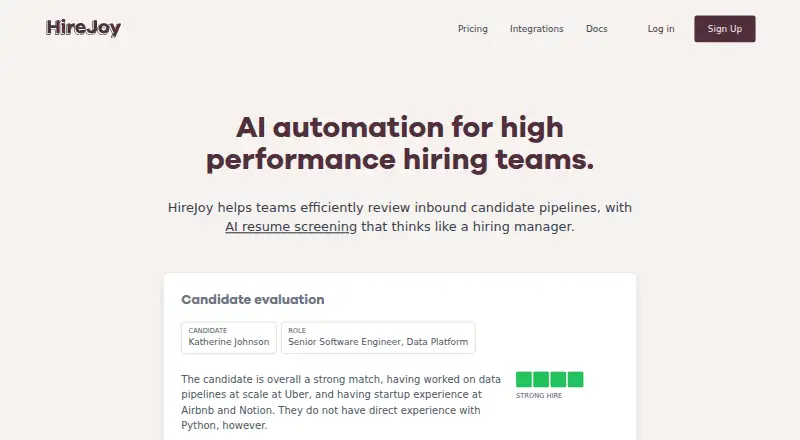
HireJoy provides AI resume screening for teams reviewing incoming job applicants. Teams can define evaluation criteria for each role in plain language, and candidate evaluations include reasoning and context about candidates’ past companies. When screening is enabled for a job, HireJoy evaluates new applicants automatically and posts a score in the application. Users can also upload and evaluate dozens of resumes at once.
The service integrates with Ashby, Lever, and Greenhouse, returning candidate reviews to the ATS. Its Chrome extension supports candidate review directly from LinkedIn, alongside the web product. The Ashby integration setup is described as taking 10 minutes, after which reviews are sent automatically to Ashby. Pay as you go costs $0.10, paid once and allows up to 500 candidates per month. Team costs $100 a month and includes 1,000 credits, ATS integration, bulk uploads, and priority support with a 24-hour response time. Enterprise pricing is a fixed price based on estimated candidate volume. There is no free plan, but a free trial is offered.
Who it suits
HireJoy suits hiring teams that want to screen inbound applications against role-specific criteria and return reviews to an ATS. It may also fit teams reviewing resumes in bulk or from LinkedIn.
What it does well
- Evaluation criteria can be set in plain language.
- Automatically scores new applicants when screening is enabled.
- Integrates with Ashby, Lever, and Greenhouse.
- Free trial is offered.
- Team includes priority support with a 24-hour response time.
What to know first
- No free plan.
- Pay as you go is limited to 500 candidates per month.
- Personal information may be transferred outside the user's jurisdiction.
- Enterprise pricing is based on candidate volume and not listed.
Limits
Pay as you go costs $0.10, paid once and covers up to 500 candidates per month. Team costs $100 a month and includes 1,000 credits; Enterprise has unlimited candidates at a fixed price based on estimated candidate volume.
Plans
| Plan | Billed and limits | Price |
|---|---|---|
| Pay as you go | Up to 500 candidates/month · Bulk resume upload | $0.10, paid once |
| Team | 1000 credits · ATS integration · Bulk resume upload · Priority support with 24 hour response time | $100 a month |
| Enterprise | Fixed price based on estimated candidate volume · Unlimited candidates · ATS integration · Bulk resume upload · Custom integrations · Dedicated account manager | On request |
As hirejoy.com lists them, read 4 Oct 2026. The maker's own page has the final word.
Getting started
- Open https://www.hirejoy.com/.
- Start the free trial or choose a paid plan.
- Use the web product or Chrome extension.
- Connect Ashby, Lever, or Greenhouse to return reviews to your ATS.
- Set plain-language evaluation criteria for a job and enable screening, or upload resumes in bulk.
Verdict
HireJoy combines automatic applicant scoring, custom criteria, bulk resume evaluation, and ATS integrations. Before choosing it, consider its candidate limits, plan pricing, and stated handling of personal information.
Questions
What does HireJoy cost?
Pay as you go costs $0.10, paid once. Team costs $100 a month, while Enterprise uses a fixed price based on estimated candidate volume.
Does HireJoy have a free plan or trial?
It has no free plan, but a free trial is offered.
Which platforms does HireJoy support?
HireJoy is available on web and as a Chrome extension.
Which ATS integrations are available?
HireJoy integrates with Ashby, Lever, and Greenhouse, and sends candidate reviews back to the ATS.
What support does Team include?
Team includes priority support with a stated 24-hour response time. Enterprise includes dedicated support and a dedicated account manager.
What does the privacy policy say about personal information?
It says personal information may be transferred outside the user's jurisdiction and that reasonable steps will be used to protect it in line with the policy. For EEA residents, it describes rights including access, correction, deletion, objection, restriction, portability, and withdrawal of consent.
Facts from HireJoy's own pages
- ATS integrations
- HireJoy integrates with Ashby, Lever, and Greenhouse, and returns candidate reviews to the ATS. · hirejoy.com, 4 Oct 2026
- Automated screening
- Once screening is enabled for a job, HireJoy automatically evaluates new applicants and posts a score in the application. · hirejoy.com, 4 Oct 2026
- Bulk resumes
- Users can upload and evaluate dozens of resumes at once. · hirejoy.com, 4 Oct 2026
- Chrome extension
- The Chrome extension supports reviewing candidates directly from LinkedIn. · hirejoy.com, 4 Oct 2026
- Custom criteria
- Teams can customize evaluation criteria for each job using plain language. · hirejoy.com, 4 Oct 2026
- Enterprise support
- The Enterprise plan includes dedicated support and a dedicated account manager. · hirejoy.com, 4 Oct 2026
- Evaluation reasoning
- HireJoy provides candidate evaluations with reasoning and can retrieve context about candidates’ past companies. · hirejoy.com, 4 Oct 2026
- Privacy
- The privacy policy says personal information may be transferred outside the user's jurisdiction and that the company will use reasonable steps to protect it in line with the policy. · hirejoy.com, 4 Oct 2026
- Privacy rights
- For EEA residents, the policy describes rights including access, correction, deletion, objection, restriction, data portability, and withdrawal of consent. · hirejoy.com, 4 Oct 2026
- Product
- HireJoy provides AI resume screening to help teams review inbound candidate pipelines. · hirejoy.com, 4 Oct 2026
- Setup
- The Ashby integration page says setup takes 10 minutes and then sends AI candidate reviews automatically to Ashby. · hirejoy.com, 4 Oct 2026
- Team support
- The Team plan includes priority support with a stated 24 hour response time. · hirejoy.com, 4 Oct 2026
- Usage limit
- The Pay as you go plan lists a limit of up to 500 candidates per month. · hirejoy.com, 4 Oct 2026
Where HireJoy stands on Freedom251
- Candidate Screening Software#12 of 36