Freedom251 › Game Mod Managers

HFW Mod Manager
What HFW Mod Manager is
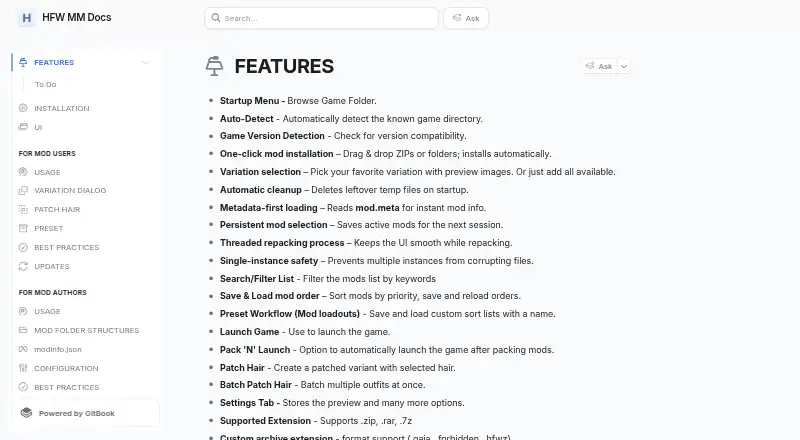
HFW Mod Manager is a free graphical utility for organizing and packing mods for supported Decima-engine games. The listed games are Horizon Forbidden West, Death Stranding 2, and Horizon Zero Dawn Remastered, which is marked as a work in progress. Users can add mod folders or ZIP files by dragging them in, choose variations, view previews with metadata, and pack enabled mods. Named presets save mod lists, and packing follows their order, so a later item can override an earlier one. The manager can recognize a known game directory and check compatibility with the game version. It accepts .zip, .rar, .7z, .gaia, .forbidden, and .hfwz archives. Additional tools include hair patching, batch hair patching, and experimental face-shading fixes for custom face meshes. Its Cauldron tab offers asset export, streaming-file building, and animation conversion, with some functions requiring HFW Tools or DS2 Tools. The app is built natively for Windows. On Linux, it must be added to Steam as a non-Steam game and run with Proton 10.0-4 or newer. Windows users extract it and launch HFW_MM.exe; it is not installed locally.
Who it suits
This manager suits players organizing mods for the listed Decima-engine games, especially those who want to save presets or manage variations. Linux users need to be comfortable launching it through Steam with Proton.
What it does well
- Supports named mod-list presets
- Shows variation previews alongside metadata
- Can check game-version compatibility
- Includes hair patching and batch patching
- Supports several listed archive formats
What to know first
- Horizon Zero Dawn Remastered is marked work in progress
- Linux use requires Steam and Proton 10.0-4 or newer
- Some Cauldron tools require separate utilities
- Windows setup is portable rather than locally installed
Plans
| Plan | Billed and limits | Price |
|---|---|---|
| HFW Mod Manager | Downloadable mod manager for supported Decima-engine games | Free |
As hfw-mm.gitbook.io lists them, read 12 Oct 2026. The maker's own page has the final word.
Getting started
- Visit the HFW Mod Manager documentation website.
- On Windows, extract the ZIP into its own folder and launch HFW_MM.exe.
- On Linux, add the manager to Steam as a non-Steam game and run it with Proton 10.0-4 or newer.
- Add mod folders or ZIP files, then select variations and pack enabled mods.
- Install HFW Tools or DS2 Tools if needed for particular Cauldron functions.
Verdict
HFW Mod Manager provides mod packing, ordering, and extra utilities for its listed games. Check the work-in-progress status and platform setup requirements before relying on it for a particular game or system.
Questions
How much does HFW Mod Manager cost?
It is free and open source.
Which games are supported?
The listed games are Horizon Forbidden West and Death Stranding 2. Horizon Zero Dawn Remastered is listed as a work in progress.
Does it run on Windows and Linux?
It is built natively for Windows. Linux use requires adding it to Steam as a non-Steam game and running it with Proton 10.0-4 or newer.
Does it install locally on Windows?
No local installation is used. Extract the ZIP into its own folder and launch HFW_MM.exe.
What archive formats can it use?
The listed formats are .zip, .rar, .7z, .gaia, .forbidden, and .hfwz.
Do all Cauldron features work on their own?
Some Cauldron functions require HFW Tools or DS2 Tools.
Facts from HFW Mod Manager's own pages
- Additional utilities
- The Cauldron tab provides asset export, streaming-file building, and animation conversion, with some features requiring HFW Tools or DS2 Tools. · nexusmods.com, 12 Oct 2026
- Archive formats
- The listed supported archive formats are .zip, .rar, .7z, .gaia, .forbidden, and .hfwz. · nexusmods.com, 12 Oct 2026
- Game detection
- It can automatically detect a known game directory and check game-version compatibility. · hfw-mm.gitbook.io, 12 Oct 2026
- Install mods
- Users can add mod folders or ZIP files by drag and drop, then select variations and pack enabled mods. · hfw-mm.gitbook.io, 12 Oct 2026
- Loadouts and order
- The manager can save named mod-list presets and pack mods in list order, with later entries able to override earlier ones. · hfw-mm.gitbook.io, 12 Oct 2026
- Mod profiles
- Yes · hfw-mm.gitbook.io, 22 Sept 2026
- Mod source access
- manual import · hfw-mm.gitbook.io, 22 Sept 2026
- Patch tools
- Features include hair patching, batch hair patching, and experimental face-shading fixes for custom face meshes. · hfw-mm.gitbook.io, 12 Oct 2026
- Portable setup
- On Windows, users extract the ZIP into its own folder and launch HFW_MM.exe; the manager is not installed locally. · hfw-mm.gitbook.io, 12 Oct 2026
- Purpose
- HFW Mod Manager simplifies managing and packing mods for supported Decima-engine games through a graphical interface. · nexusmods.com, 12 Oct 2026
- Restore files
- The Restore Files action clears package/ar, removes installed mods, and restores backups of streaming_graph.core and streaming_links.stream. · hfw-mm.gitbook.io, 12 Oct 2026
- Security status
- The Nexus Mods listing labels the file's virus scan status “Safe to use.” · nexusmods.com, 12 Oct 2026
- Support
- The listing directs users to its Discord server for quicker support. · nexusmods.com, 12 Oct 2026
- Supported games
- The page lists Horizon Forbidden West, Death Stranding 2, and Horizon Zero Dawn Remastered as supported games, with Horizon Zero Dawn Remastered marked W.I.P. · nexusmods.com, 12 Oct 2026
- Supported platforms
- multi-platform · hfw-mm.gitbook.io, 22 Sept 2026
- Variation previews
- Users can choose mod variations and view visual previews alongside metadata. · hfw-mm.gitbook.io, 12 Oct 2026
- Windows and Linux
- The app is built natively for Windows; Linux use requires adding it to Steam as a non-Steam game and running it with Proton 10.0-4 or newer. · hfw-mm.gitbook.io, 12 Oct 2026
Where HFW Mod Manager stands on Freedom251
- Game Mod Managers#9 of 79
- Mod managers#17 of 78