G3M
What G3M is
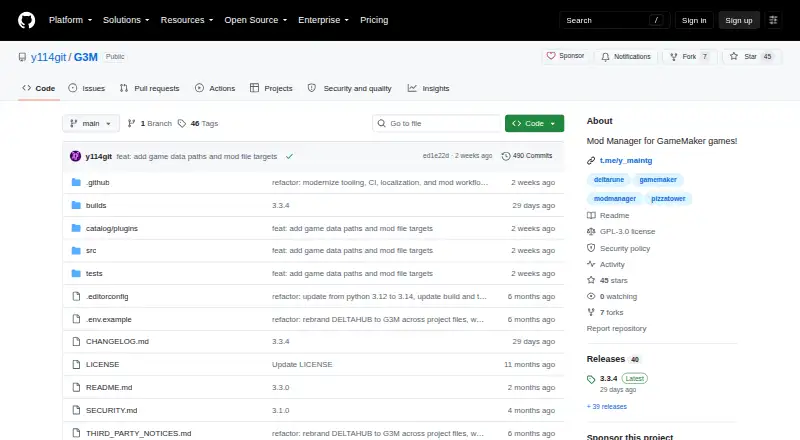
G3M is a free, GPL-3.0 desktop manager for browsing, installing, organizing, and launching GameMaker mods. Its built-in game entries include DELTARUNE, DELTARUNE Demo, UNDERTALE, UNDERTALE Yellow, Pizza Tower, Sugary Spire, and FRICKBEARS3; users can add custom games through the in-app Game Manager. It browses supported GameBanana games and accepts installs from GameBanana, external URLs, local archives, and one-click links.
Users can maintain multiple library profiles with separate active mod selections and settings. G3M can combine patches, file replacements, and archive contents in its Mod Editor, and can create and apply patches, merge patch sets, compare files, export diff reports, and convert supported formats. Games can launch directly or through Steam where available; Linux users can use PortProton for compatible Windows games. Its Catalog includes plugins and themes, including tools for DELTARUNE saves and custom save folders. Downloads are available for Windows, Linux, and macOS on x86_64 and ARM64 computers. The normal launch mode restores game files after the game closes. Security fixes are best-effort for the main branch and latest release; older releases are unsupported.
Who it suits
G3M suits players who want to manage mods and profiles for supported GameMaker games on Windows, Linux, or macOS. It may also suit users who want to edit or convert supported mods.
What it does well
- Supports GameBanana, URLs, local archives, and one-click installs.
- Profiles keep mod selections and settings separate.
- Includes patching, file comparison, and diff reports.
- Available for Windows, Linux, and macOS.
What to know first
- Security fixes do not cover older releases.
- Linux use of PortProton is for compatible Windows games.
- Only listed built-in games are included by default.
Limits
G3M is free under GPL-3.0, and no plan quota is stated. Security fixes are best-effort for the main branch and latest release; older releases are unsupported.
Plans
| Plan | Billed and limits | Price |
|---|---|---|
| G3M | GPL-3.0 desktop application | Free |
As github.com lists them, read 12 Oct 2026. The maker's own page has the final word.
Getting started
- Visit the G3M GitHub website.
- Choose the release download for Windows, Linux, or macOS and your computer architecture.
- Copy the downloaded application into place.
- Open G3M and browse supported GameBanana games or add a custom game in Game Manager.
- Install mods from GameBanana, an external URL, a local archive, or a one-click link.
- Create a library profile and select mods before launching a supported game.
G3M is a free, open-source desktop manager built specifically for GameMaker mods. It is the strongest fit for players and creators working with supported GameMaker titles who want profiles, patch construction, and flexible installation in one place. Choose it for that focused workflow; look elsewhere if you need a broad, engine-agnostic mod catalogue.
Overview
G3M combines mod discovery, installation, organisation, editing, and game launching in a single application. Its built-in entries cover DELTARUNE, DELTARUNE Demo, UNDERTALE, UNDERTALE Yellow, Pizza Tower, Sugary Spire, and FRICKBEARS3. The in-app Game Manager can add custom GameMaker games, extending the catalogue beyond those entries without changing the software’s specialist focus.
Integration with GameBanana supports browsing for supported games, while installation also accepts GameBanana items, external URLs, local archives, and one-click install links. That mix works well for users who move between a public mod hub and files obtained directly from creators.
Key features
Profiles and conflict handling
Users can create multiple library profiles, each with its own active mod selections and profile-scoped settings. Separate profiles are practical for different playthroughs, testing combinations, or keeping one setup for another household user. Conflict detection identifies overlapping changes, helping users investigate incompatibilities before launch; it does not decide which competing change should win.
Editing and patching
The Mod Editor combines patches, file replacements, and archive contents, then exports the result as a shareable mod. Built-in tools create and apply patches, merge patch sets, compare files, export diff reports, and convert mods between supported formats. This is a meaningful advantage for mod authors and curators who need repeatable file work. Players who only install finished mods may find much of this capability unnecessary.
Launching, plugins, and presentation
Games can launch directly or through Steam where available. On Linux, PortProton can be used for compatible Windows games. Normal launch mode restores game files after the game closes, a useful safeguard when mods alter originals. The Catalog adds plugins and themes, including DR Save Manager for DELTARUNE saves and Custom Saves Folders for choosing save locations. Installed or imported themes and language packs for English, Russian, Spanish, Korean, Japanese, Simplified Chinese, and Traditional Chinese make the interface adaptable.
Pricing
G3M — free. This is a GPL-3.0 desktop application with no free trial because the software is free and open source. There are no paid tiers, seat counts, renewal terms, or usage quotas to weigh. The trade-off is scope rather than price: value depends on whether your games fit the GameMaker-focused workflow.
Platforms
G3M runs on Linux, macOS, and Windows. Release downloads target x86_64 and ARM64 computers. Supported games can use Steam launching where available, and Linux users have the additional PortProton route for compatible Windows titles.
Who it's for
G3M suits GameMaker players who manage several mod combinations, creators who build or convert patches, and households that need separate profiles. It is also a sensible choice for users who obtain mods through more than one channel or want save-management plugins. It is less appropriate as a general manager for games built on unrelated engines, or for someone seeking a universal catalogue rather than a focused GameMaker tool.
Pros and cons
- Pros: Profiles isolate active selections and settings, making alternate setups safer to maintain.
- Pros: Patch creation, merging, comparison, diff reports, and format conversion support genuine mod-authoring work.
- Pros: GameBanana, URLs, archives, and one-click links cover varied installation sources.
- Pros: Windows, Linux, and macOS releases include both x86_64 and ARM64 builds.
- Cons: The built-in game catalogue is concentrated on a small set of GameMaker titles.
- Cons: Advanced editing tools add little for users who only install ready-made mods.
- Cons: Security fixes are best-effort for the main branch and latest release; older releases are unsupported.
Alternatives
Browse Game Mod Managers for a wider comparison. Choose Mod Organizer 2 instead if you need a free, open-source Windows manager for Windows 10 1809 or Windows 11, noting that Windows Store and Game Pass versions are unsupported. Limo is a free, open-source Linux alternative. Modrinth is better when a freemium, multi-platform service with web access and creator-support features suits you. CurseForge is a web-based choice for Minecraft mods and modpacks. Vortex offers a free, open-source Windows manager tied to Nexus Mods. Modrix is a free, open-source option spanning browser extension, Linux, macOS, and Windows. FlairX Mod Manager is a free Windows-only alternative. HFW Mod Manager targets supported Decima-engine games on Linux and Windows.
Verdict
G3M is a strong recommendation for GameMaker mod users who want profile separation and creator-grade patching alongside discovery and launching. Its free GPL-3.0 model removes licensing friction, and its cross-platform builds broaden access. Look elsewhere when your library is mostly non-GameMaker games, when you want a broad general-purpose ecosystem, or when maintaining an unsupported older release would be a concern.
Verdict
G3M brings mod discovery, profile management, editing, and launching into one desktop application. Users should note the supported-game scope and the limited security-fix coverage for older releases.
Questions
How much does G3M cost?
The G3M plan is free. G3M is distributed under GPL-3.0.
Which computers can run G3M?
Release downloads are available for Windows, Linux, and macOS on x86_64 and ARM64 computers.
Which games are included?
Built-in entries cover DELTARUNE, DELTARUNE Demo, UNDERTALE, UNDERTALE Yellow, Pizza Tower, Sugary Spire, and FRICKBEARS3. Users can add custom GameMaker games through Game Manager.
Where can mods come from?
G3M browses supported GameBanana games and supports installs from GameBanana, external URLs, local archives, and one-click install links.
Can it launch games through Steam?
Supported games can launch directly or through Steam where available. Linux users can use PortProton for compatible Windows games.
What security support does the project provide?
Security fixes are best-effort for the main branch and latest release; older releases are unsupported. The security policy requests private vulnerability reports, preferably through GitHub Security Advisories.
Facts from G3M's own pages
- Catalog
- The Catalog offers plugins and themes, including plugins for managing DELTARUNE saves and choosing custom save folders. · github.com, 11 Oct 2026
- Conflict detection
- Yes · raw.githubusercontent.com, 20 Sept 2026
- Custom games
- Users can add custom GameMaker games through the in-app Game Manager. · github.com, 11 Oct 2026
- Deployment method
- copy · raw.githubusercontent.com, 20 Sept 2026
- Download platforms
- Release downloads are available for Windows, Linux, and macOS on x86_64 and ARM64 computers. · github.com, 12 Oct 2026
- Game file handling
- The normal launch mode restores game files after the game closes. · g3m.gitbook.io, 12 Oct 2026
- Game launch
- Supported games can launch directly or through Steam where available, and Linux users can use PortProton for compatible Windows games. · github.com, 11 Oct 2026
- Integrations
- G3M integrates with GameBanana and can launch supported games through Steam where available; Linux users can use PortProton for compatible Windows games. · github.com, 12 Oct 2026
- License
- The application is distributed under GPL-3.0. · g3m.gitbook.io, 12 Oct 2026
- Mod discovery
- The app browses supported GameBanana games and can install mods from GameBanana, external URLs, local archives, or one-click install links. · github.com, 12 Oct 2026
- Mod editing
- The Mod Editor combines patches, file replacements, and archive contents, and supports exporting mods to share. · github.com, 12 Oct 2026
- Mod profiles
- Yes · raw.githubusercontent.com, 20 Sept 2026
- Mod source access
- built-in · raw.githubusercontent.com, 20 Sept 2026
- Mod tools
- G3M can create and apply patches, merge patch sets, compare files, export diff reports, and convert mods between supported formats. · github.com, 11 Oct 2026
- Patching tools
- Built-in tools create and apply patches, merge patch sets, compare files, and export diff reports. · github.com, 12 Oct 2026
- Platforms
- Release packages are available for Windows, Linux, and macOS on x86_64 and ARM64 computers. · g3m.gitbook.io, 11 Oct 2026
- Plugins
- The Catalog offers plugins including DR Save Manager for DELTARUNE saves and Custom Saves Folders for selecting save locations. · github.com, 12 Oct 2026
- Profiles
- Users can create multiple library profiles with separate active mod selections and profile-scoped settings. · github.com, 12 Oct 2026
- Purpose
- G3M is a desktop manager for GameMaker mods that can browse, install, organize, and launch supported games with mods. · github.com, 11 Oct 2026
- Security support
- Security fixes are provided on a best-effort basis for the main branch and latest release; older releases are unsupported. · github.com, 11 Oct 2026
- Support
- The project links to community help on Discord and Telegram. · g3m.gitbook.io, 12 Oct 2026
- Supported games
- Built-in game entries cover DELTARUNE, DELTARUNE Demo, UNDERTALE, UNDERTALE Yellow, Pizza Tower, Sugary Spire, and FRICKBEARS3, and users can add custom games. · github.com, 12 Oct 2026
- Supported platforms
- multi-platform · raw.githubusercontent.com, 20 Sept 2026
- Themes and languages
- G3M supports installed or imported themes and ships with English, Russian, Spanish, Korean, Japanese, Simplified Chinese, and Traditional Chinese language packs. · github.com, 12 Oct 2026
Where G3M stands on Freedom251
- Mod managers#5 of 78
- Game Mod Managers#6 of 79