Freedom251 › Game Map Generators
Heightmap Level Generator
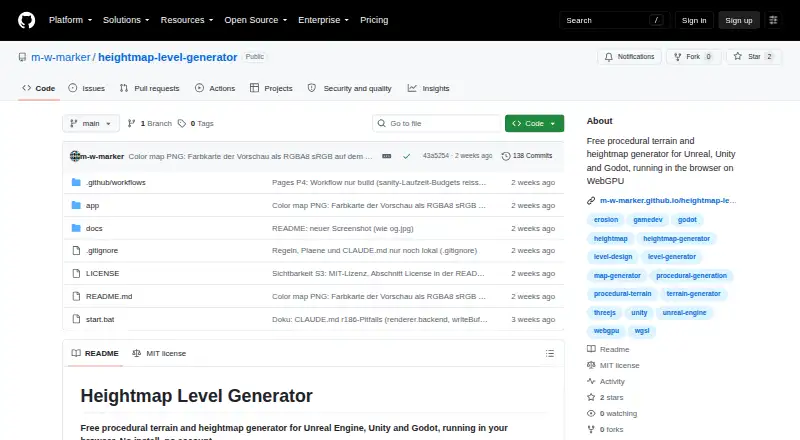
What Heightmap Level Generator is
Heightmap Level Generator is a free browser tool for making procedural terrain and heightmaps for Unreal Engine, Unity, and Godot. It uses WebGPU compute shaders and WGSL to generate 16-bit terrain with cliffs, hills, mountains, erosion, rivers, lakes, and a raised border. It can also build connected roads, towns, map exits, road grades, and embankments near water. Four biome options are available: temperate, steppe, desert, and snow world. Settings can be adjusted live, with 12 seeds available for comparison; users can preview a 2D map or 3D mesh and walk through terrain in first person. Exports include engine-specific formats, Web or three.js, heightmaps, splatmaps, masks, water levels, color maps, layout JSON, glTF meshes, and metadata. Road, town, and water masks and layout files can support PCG, Houdini, or custom placement scripts. Users can share URL links, save and load JSON, undo and redo, and use presets. The online version requires WebGPU; local operation uses Node.js and a WebGPU-capable browser. The MIT-licensed project allows commercial use of exported assets.
Who it suits
This tool suits game developers and terrain creators working with Unreal Engine, Unity, Godot, or web formats. It is also relevant to users who need terrain masks or layout data for procedural placement workflows.
What it does well
- Generates 16-bit terrain with varied land and water features.
- Offers four biome choices.
- Exports to Unreal, Unity, Godot Terrain3D, and three.js.
- Supports seed comparison and first-person terrain previews.
- MIT license permits commercial use of exported assets.
What to know first
- Online use requires WebGPU.
- Local use requires Node.js and a WebGPU-capable browser.
Limits
The tool is free. Its online version requires WebGPU; local use requires Node.js and a WebGPU-capable browser.
Plans
| Plan | Billed and limits | Price |
|---|---|---|
| Free | browser-based generator · no install · no account | Free |
As github.com lists them, read 15 Oct 2026. The maker's own page has the final word.
Getting started
- Visit https://github.com/m-w-marker/heightmap-level-generator.
- Open the online version in a WebGPU-capable browser, such as a current desktop Chrome or Edge browser.
- For local use, install Node.js and use a WebGPU-capable browser.
- On Windows, run the project's start.bat script to run setup.
- Adjust terrain settings, compare seeds, and export in a supported format.
Heightmap Level Generator is a free procedural terrain and map-layout tool for creators working in Unreal Engine, Unity or Godot. It suits developers who want to shape and inspect terrain before exporting it into an engine or custom pipeline. The trade-off is a WebGPU requirement for both browser and local use.
Overview
The generator combines landforms with roads, towns and water features, making it useful for building an initial map layout as well as terrain data. Live adjustments, seed comparisons and 2D and 3D previews help creators assess alternatives before export; first-person traversal adds a way to inspect terrain at ground level. This is a focused fit for game-world production, not a general-purpose terrain package with a broad range of named biomes.
Key features
Terrain and layouts
WebGPU compute shaders and WGSL generate 16-bit heightmaps with cliffs, hills, mountains, erosion, rivers, lakes and a raised border ring. Road generation includes connected networks, grades, map exits and embankments around water, alongside towns. Four biome choices—temperate, steppe, desert and snow world—offer distinct starting points, but projects requiring other biome types may need another workflow.
Iteration and export
Creators can adjust settings live, compare 12 seeds, preview a 2D map and 3D mesh, and walk through the result in first person. Exports cover Unreal landscape, Unity terrain, Godot Terrain3D and web or three.js formats. Depending on the pipeline, files can include 16-bit PNG or RAW heightmaps, splatmaps, masks, water levels, color maps, layout JSON, glTF meshes and metadata JSON. Road, town and water masks plus layout JSON are intended for PCG, Houdini and custom placement scripts, giving the tool a useful bridge into downstream workflows.
URL sharing, JSON save and load, undo and redo, and built-in presets support iteration and collaboration. Seed control and custom assets are also supported.
Pricing
The Free plan costs nothing and requires no installation or account. It includes the generator without a stated usage quota or export restriction. The project is MIT licensed, and exported assets can be used, modified and shipped commercially without conditions, making it suitable for commercial projects as well as personal work.
Platforms
The online version runs in a WebGPU-capable browser, such as a current desktop Chrome or Edge. Local use requires Node.js and a WebGPU-capable browser; the Windows start.bat script runs setup. That combination makes it less convenient on systems without WebGPU support, and local use adds a setup requirement absent from the browser route.
Who it's for
Choose it if you need procedural terrain, map-layout elements and engine-ready exports without a software charge, especially when masks and layout data will feed a custom placement pipeline. It is a weaker fit if your machine cannot run WebGPU or your project depends on biome choices beyond its four options.
Pros and cons
- Pro: Multiple engine exports and a wide range of supporting files suit both direct import and custom pipelines.
- Pro: Road, town and water generation extends the tool beyond heightmap creation.
- Pro: MIT licensing permits commercial use, modification and shipping of exported assets without conditions.
- Con: WebGPU is required for browser and local use, limiting compatibility.
- Con: Four named biomes may not cover projects with more specific biome requirements.
Alternatives
World Machine is worth considering if you need a terrain tool available on Linux, macOS or Windows and are prepared to weigh its plan limits and paid option; its Basic plan caps output at 1025 × 1025 pixels, while Indie costs $119 a month.
SimpleXTerrain is a free, open-source Godot 4 .NET terrain generation addon for projects centered on that engine. Voxel Plugin is an alternative if voxel tooling is the priority; its free plan includes commercial use and full source access but excludes Voxel Graphs and access to Voxel Plugin 2 previews.
Gaea may suit Windows users seeking a terrain-focused alternative: its Community Edition is limited to a 1,024 × 1,024 single build and non-commercial use, while its Indie plan costs $99 a month. L3DT offers a free Standard Edition for heightfield and texture maps up to 2049 × 2049 pixels, and a 90-day Professional trial.
MapMagic 2 is a free option for macOS and Windows with core asset and map generators; its Biomes and Functions add-on costs 45.00 USD once and requires an existing MapMagic 2 installation. Ymir is a free GPL-3.0 option for Linux and Windows. 3D Dungeon Generator is a browser-based free tool for dungeon maps, with presets from 16×16 up to custom 60×60 dimensions and GLB export.
Browse more tools in Game Map Generators.
Verdict
Heightmap Level Generator is a strong choice for developers who want procedural terrain, roads and towns alongside flexible engine and pipeline exports at no cost. Its commercial-use terms add practical appeal. Choose another tool if WebGPU is unavailable on your system or the four biome options are too narrow for your project.
Verdict
Heightmap Level Generator combines terrain generation, live previews, and multiple export types in a free tool. Its browser route depends on WebGPU, and local use adds a Node.js requirement.
Questions
How much does Heightmap Level Generator cost?
It is free, with a listed price of $0.
Which engines can it export to?
Exports include Unreal Engine, Unity, Godot Terrain3D, and three.js formats.
What browser does the online version require?
It requires WebGPU, such as in a current desktop Chrome or Edge browser.
Can I run it locally?
Yes. Local use requires Node.js and a WebGPU-capable browser; the Windows start.bat script runs setup.
Is it open source?
The project is MIT licensed.
Can I use exported assets commercially?
Yes. The license facts say exports can be used, changed, and shipped commercially, and exported assets belong to the user without conditions.
Facts from Heightmap Level Generator's own pages
- API and SDK
- The published material documents no network API or SDK; extensibility is through source code and exported files. · github.com, 15 Oct 2026
- Automation integration
- Road, town and water masks plus layout JSON are intended for PCG, Houdini and custom placement scripts. · github.com, 15 Oct 2026
- Auxiliary exports
- Exports include splatmaps, slope, normal, curvature and flow masks, road/town/water masks, water-level and color-map PNGs, layout JSON and metadata JSON. · github.com, 15 Oct 2026
- Biomes
- The generator provides temperate, steppe, desert and snow biomes. · github.com, 15 Oct 2026
- Browser requirements
- The hosted tool requires WebGPU and lists desktop Chrome or Edge 113+, Safari 26+ and Firefox 141+ on Windows. · m-w-marker.github.io, 15 Oct 2026
- Documentation depth
- The README documents parameters, export dimensions, coordinate conventions, mask encodings, layout fields and the generation pipeline. · github.com, 15 Oct 2026
- Editing workflow
- It supports live parameter changes, undo/redo, presets, JSON save/load and shareable URLs containing settings. · github.com, 15 Oct 2026
- Engine exports
- Exports include Unreal landscape, Unity terrain, Godot Terrain3D and Web or three.js formats. · github.com, 1 Oct 2026
- Export files
- Exports can include 16-bit PNG or RAW heightmaps, splatmaps, masks, water levels, color maps, layout JSON, glTF meshes and metadata JSON. · github.com, 1 Oct 2026
- Export ownership
- The README says exported heightmaps, masks, layouts and meshes belong to the user without conditions. · github.com, 15 Oct 2026
- Godot and web export
- Godot Terrain3D receives a 16-bit heightmap and web or three.js workflows receive a glTF mesh. · github.com, 15 Oct 2026
- GPU generation
- Terrain is generated with WebGPU compute shaders written in WGSL while controls are adjusted. · github.com, 15 Oct 2026
- Independent description
- The GitHub topic listing describes it as a free procedural terrain and heightmap generator for Unreal, Unity and Godot running in a WebGPU browser. · github.com, 15 Oct 2026
- Independent directory listing
- GitHub's erosion topic page lists Heightmap Level Generator among seven JavaScript repositories matching that topic. · github.com, 15 Oct 2026
- Independent metadata
- That GitHub topic page labels the repository JavaScript and shows it updated on September 13, 2026. · github.com, 15 Oct 2026
- Independent topic tags
- GitHub's topic listing associates the repository with WebGPU, procedural generation, terrain generation, Unity, Godot, Unreal Engine, erosion and WGSL tags. · github.com, 15 Oct 2026
- Interactive editing
- Users can adjust settings live, compare 12 seeds, preview a 2D map and 3D mesh, and walk through the terrain in first person. · github.com, 1 Oct 2026
- Licence
- The source is released under the MIT License, including permission to use it commercially. · github.com, 15 Oct 2026
- License and ownership
- The project is MIT licensed, exports can be used, changed and shipped commercially, and exported assets belong to the user without conditions. · github.com, 1 Oct 2026
- Limit: hardware compatibility
- Use depends on a browser and graphics stack that expose WebGPU, so unsupported browsers or GPUs cannot run the hosted generator. · m-w-marker.github.io, 15 Oct 2026
- Limit: mobile availability
- The product pages document desktop browser support and do not list iOS or Android applications. · m-w-marker.github.io, 15 Oct 2026
- Limit: service model
- The project publishes no paid tiers, hosted account system, support SLA, security certification or compliance program. · github.com, 15 Oct 2026
- Local installation
- Local use requires Node.js, a WebGPU-capable browser, npm install and npm run dev from the app directory. · github.com, 15 Oct 2026
- Local use
- The project can run locally with Node.js and a WebGPU-capable browser, and its Windows start.bat script runs the setup. · github.com, 1 Oct 2026
Where Heightmap Level Generator stands on Freedom251
- Game Map Generators#1 of 27