Freedom251 › Game Map Generators
Ymir
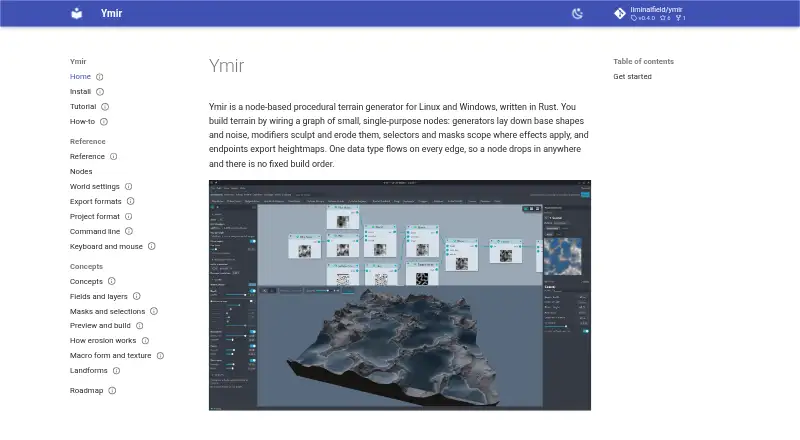
What Ymir is
Ymir is a free, node-based procedural terrain generator for Linux and Windows. Its graph combines generators, modifiers, selectors, masks and export nodes, with a single data type passed along each connection. Available operations include noise and shape generation, terrain sculpting and filters, plus thermal, hydraulic and stream erosion. Erosion nodes can take a mask and produce flow, wear and deposition layers for later shaping or texturing. Heightmaps export as 16-bit grayscale PNG, raw 16-bit R16 or 32-bit float EXR. The headless ymir-cli can build saved projects and export results; erosion runs on the GPU when available and otherwise falls back to the CPU. Projects are readable JSON files with a .ymir extension, and reusable node networks can be saved as .ymirsub subgraphs. The editor requires a GPU with working Vulkan drivers on Linux, or Vulkan or DX12 drivers on Windows. Windows binaries are unsigned and prompt a first-run SmartScreen warning. Ymir is GPL-3.0 free software; the maker says a guided start-to-finish tutorial and task-focused guides are planned as workflows settle.
Who it suits
Ymir may suit terrain artists and technical users who want a node-based workflow and exportable heightmaps. Its command-line tool and project format may also fit users who want to build or reuse saved terrain graphs.
What it does well
- Exports PNG, R16 and OpenEXR heightmaps.
- Erosion can produce flow, wear and deposition layers.
- CLI can build projects and export results.
- Reusable node networks can be saved as subgraphs.
What to know first
- Editor requires a working Vulkan-capable GPU on Linux.
- Windows requires Vulkan or DX12 drivers.
- Windows binaries trigger a first-run SmartScreen warning.
- Guided tutorial and how-to guides are still forthcoming.
Limits
Ymir is listed as free software at no cost, with no free-trial period. The editor requires the stated graphics drivers; the maker says a guided start-to-finish tutorial is still coming.
Plans
| Plan | Billed and limits | Price |
|---|---|---|
| Ymir | GPL-3.0 free software | Free |
As liminalfield.github.io lists them, read 30 Sept 2026. The maker's own page has the final word.
Getting started
- Open the Ymir website.
- Choose the Linux or Windows release for your system.
- Make sure the required Vulkan or DX12 drivers are available for the editor.
- Create a project and save it as a .ymir file.
- Build and export the saved project with ymir-cli.
Verdict
Ymir brings procedural terrain generation, erosion tools and command-line exports into a node-based workflow. Check the GPU requirements and Windows warning before installing, and note that the maker describes more tutorial material as forthcoming.
Questions
How much does Ymir cost?
The listed Ymir plan is free. Ymir is GPL-3.0 free software.
Which operating systems does Ymir support?
Ymir is available for Linux and Windows.
What formats can Ymir export?
It exports heightmaps as 16-bit grayscale PNG, raw 16-bit R16 or 32-bit float EXR. Unreal Engine is also listed as an export target.
Does Ymir require a GPU?
The editor requires working Vulkan drivers on Linux, or Vulkan or DX12 drivers on Windows. Erosion uses the GPU when available and otherwise falls back to the CPU.
What file formats does Ymir use for projects?
Projects use readable JSON in .ymir files. Reusable node networks can be saved as .ymirsub subgraphs.
Facts from Ymir's own pages
- Command line
- The headless ymir-cli can build saved projects and export results; erosion uses the GPU when available and otherwise falls back to the CPU. · liminalfield.github.io, 30 Sept 2026
- Documentation status
- The maker says a guided start-to-finish tutorial is coming and task-focused how-to guides will be added as workflows settle. · liminalfield.github.io, 30 Sept 2026
- Erosion
- Erosion nodes can read a mask and write flow, wear and deposition layers for later texturing or shaping. · liminalfield.github.io, 30 Sept 2026
- Exports
- Ymir exports heightmaps as 16-bit grayscale PNG, raw 16-bit R16 or 32-bit float EXR. · liminalfield.github.io, 30 Sept 2026
- GPU requirement
- The editor requires a GPU with working Vulkan drivers on Linux or Vulkan or DX12 drivers on Windows. · liminalfield.github.io, 30 Sept 2026
- Integrity
- Linux releases include a SHA256SUMS file covering every release asset. · liminalfield.github.io, 30 Sept 2026
- License
- Ymir is free software under the GPL-3.0. · liminalfield.github.io, 30 Sept 2026
- Platforms
- Ymir runs on x86_64 Linux with Wayland or X11 and Windows 10 or later. · liminalfield.github.io, 30 Sept 2026
- Project files
- Projects use readable JSON in .ymir files, and reusable node networks can be saved as .ymirsub subgraphs. · liminalfield.github.io, 30 Sept 2026
- Purpose
- Ymir is a node-based procedural terrain generator written in Rust. · liminalfield.github.io, 30 Sept 2026
- Support
- The maker directs users whose Linux builds fail on missing system libraries to open an issue with the error, distribution and Vulkan driver details. · liminalfield.github.io, 30 Sept 2026
- Terrain features
- The node reference includes noise and shape generators, terrain sculpting and filters, and thermal, hydraulic and stream erosion nodes. · liminalfield.github.io, 30 Sept 2026
- Windows signing
- The distributed Windows binaries are unsigned and trigger a first-run SmartScreen warning. · liminalfield.github.io, 30 Sept 2026
- Workflow
- Its graph uses generators, modifiers, selectors, masks and export nodes, with one data type flowing along every edge. · liminalfield.github.io, 30 Sept 2026
Where Ymir stands on Freedom251
- Game Map Generators#15 of 27