Freedom251 › Disk Health Monitoring Software

HDDlife
What HDDlife is
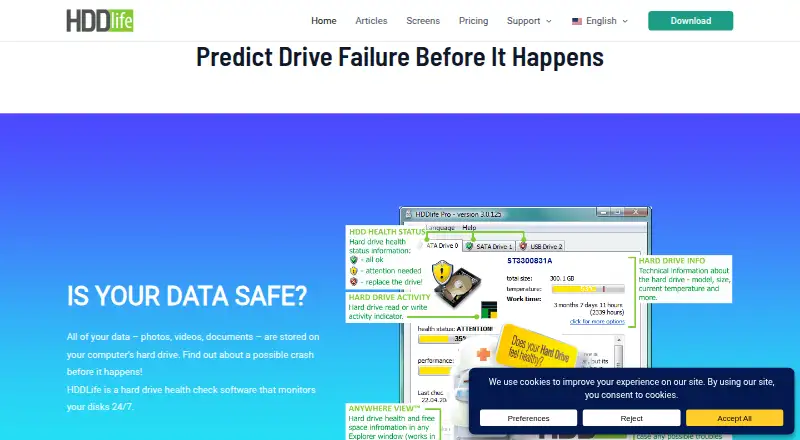
HDDlife monitors the health of hard disk drives and SATA SSDs on Windows and warns about potential problems. It analyzes more than 20 S.M.A.R.T. parameters and presents the results in an understandable form. Users can view drive health, temperature, available space, resources, power-on time, and estimated remaining life. HDDlife also offers controls for disk noise and performance, including silent mode and reduced power consumption. The maker says regular users can use all program functions without administrator rights.
The software supports S.M.A.R.T. monitoring, SSD wear tracking, temperature alerts, failure warnings, and remote monitoring. Some USB drive controllers do not support the S.M.A.R.T. commands HDDlife needs, so it may not be able to report those drives’ health. NVMe and M.2 drives are not supported. Its fully functional trial lasts 14 days. Paid plans are one-time purchases: Professional costs $19, paid once for one PC, Notebook costs $25, paid once for one laptop, Bundle costs $35, paid once for one PC and one laptop, and Family costs $65, paid once for five PCs. Purchases include one year of updates, with optional renewal at a 50% discount. BinarySense Ltd. was founded in 2005.
Who it suits
HDDlife suits Windows users who want health, temperature, and remaining-life information for hard disk drives or SATA SSDs. Its plans cover an individual PC or laptop, a PC and laptop bundle, or five PCs.
What it does well
- Analyzes more than 20 S.M.A.R.T. parameters.
- Shows temperature, free space, power-on time, and estimated remaining life.
- Includes silent mode and reduced power consumption controls.
- Regular users can access all functions without administrator rights.
- The 14-day trial includes all program features.
What to know first
- Only available for Windows.
- NVMe and M.2 drives are unsupported.
- Some USB controllers do not pass through required S.M.A.R.T. commands.
- Professional covers one PC.
Limits
The cheapest paid plan, Professional, costs $19, paid once and covers one PC. Purchases include one year of updates; newer builds work as the free version after the update subscription ends. HDDlife does not support NVMe or M.2 drives, and some USB controllers prevent health reporting.
Plans
| Plan | Billed and limits | Price |
|---|---|---|
| Professional | Pay once; one year of free updates, optional renewal at 50% discount · 1 PC · JustNow lifetime calculation · AnyWhereView · detailed S.M.A.R.T. attributes · multilingual interface · priority email support | $19, paid once |
| Notebook | Pay once; one year of free updates, optional renewal at 50% discount · 1 laptop · JustNow lifetime calculation · AnyWhereView · detailed S.M.A.R.T. attributes · multilingual interface · priority email support · laptop specificity | $25, paid once |
| Bundle | Pay once; one year of free updates, optional renewal at 50% discount · 1 PC and 1 laptop · JustNow lifetime calculation · AnyWhereView · detailed S.M.A.R.T. attributes · multilingual interface · priority email support · laptop specificity | $35, paid once |
| Family | Pay once; one year of free updates, optional renewal at 50% discount; page shows $99 crossed out · 5 PCs · JustNow lifetime calculation · AnyWhereView · detailed S.M.A.R.T. attributes · multilingual interface · multiple-PC use · priority email support | $65, paid once |
As hddlife.com lists them, read 15 Oct 2026. The maker's own page has the final word.
Getting started
- Visit the HDDlife website.
- Choose the 14-day trial or a paid plan.
- Install HDDlife on a Windows PC or laptop.
- Use the program to view drive health and S.M.A.R.T. information.
Verdict
Choose HDDlife if you use Windows with hard disk drives or SATA SSDs and want drive health alerts and status details. Look elsewhere if you need NVMe or M.2 support, or if your USB drive controller does not provide the required S.M.A.R.T. commands.
Questions
How much does HDDlife cost?
Professional costs $19, paid once for one PC. Notebook is $25, paid once, Bundle is $35, paid once, and Family is $65, paid once.
Is there a free plan or trial?
A free plan is available, and the fully functional trial lasts 14 days.
Which drives and platforms does HDDlife support?
HDDlife runs on Windows and supports hard disk drives and SATA SSDs. NVMe and M.2 drives are not supported.
How many computers does each paid plan cover?
Professional covers one PC; Notebook covers one laptop; Bundle covers one PC and one laptop; Family covers five PCs.
How long are updates included?
A purchase includes one year of updates, with optional renewal at a 50% discount. After the update subscription ends, the purchased version remains functional while newer builds work as the free version.
Who makes HDDlife?
BinarySense Ltd. makes HDDlife and was founded in 2005.
Facts from HDDlife's own pages
- Administrator rights
- The maker says HDDlife does not require administrator permissions and that regular users can use all functions. · hddlife.com, 15 Oct 2026
- Alert actions
- Softpedia reports that temperature and free-space alerts can trigger sound, email, LAN messages, sleep, hibernation or shutdown. · softpedia.com, 15 Oct 2026
- Commercial licensing
- The maker calls HDDlife Pro a commercial program, while Softpedia categorizes its unregistered distribution as a 15-day trial; no open-source licence is stated. · hddlife.com, 15 Oct 2026
- Company history
- BinarySense Ltd. says it was founded in 2005 by specialists who had worked on similar utilities. · hddlife.com, 7 Oct 2026
- Company location
- The Russian company page identifies the legal operator as ООО «БинариСенс» and gives Belgorod as the associated location in its footer. · hddlife.ru, 15 Oct 2026
- Documentation
- The official help center is a version-4 help file with a usage-tips link and an email address for reporting errors. · hddlife.com, 15 Oct 2026
- Drive information
- It displays drive health, temperature, resources, free space, power-on time, and estimated remaining life. · hddlife.com, 7 Oct 2026
- Drive metrics
- The interface shows health, temperature, resource level and free space for drives. · hddlife.com, 15 Oct 2026
- Failure warnings
- It warns users when S.M.A.R.T. data indicates a developing drive problem so they can back up or replace the disk. · hddlife.com, 15 Oct 2026
- Founded
- 2005 · hddlife.com, 28 Sept 2026
- Limit: ageing independent review
- Softpedia's listed build is version 4.2.208 updated September 2, 2022, so that independent review does not establish current Windows-version compatibility. · softpedia.com, 15 Oct 2026
- Limit: compatibility
- The official FAQ warns that hardware compatibility problems can prevent access to drive data and recommends testing the 14-day trial before purchase. · hddlife.com, 15 Oct 2026
- Limit: disputed readings
- A SoftPortal reviewer complained that HDDlife reported a new Seagate drive at 30% health while other utilities reported it as fully healthy. · softportal.com, 15 Oct 2026
- Limit: privacy concern
- A SoftPortal reviewer alleged that the program behaved like a trojan and collected data, without providing supporting technical evidence. · softportal.com, 15 Oct 2026
- Maker history
- BinarySense Ltd. says it was founded in 2005 by specialists who had previously built similar disk utilities. · hddlife.com, 15 Oct 2026
- No administrator rights
- The maker says regular users can use all program functions without administrator rights. · hddlife.com, 7 Oct 2026
- Noise and performance
- Users can adjust disk noise against performance and enable a quieter operating mode. · hddlife.com, 15 Oct 2026
- Payment security
- The maker says online orders use secure transaction processing and are handled through services such as PayPro or 2Checkout. · hddlife.com, 7 Oct 2026
- Performance controls
- It lets users adjust disk noise and performance, including a silent mode and reduced power consumption. · hddlife.com, 7 Oct 2026
- Power consumption
- The maker says reducing disk power consumption can lower electricity costs, especially across multiple computers. · hddlife.com, 15 Oct 2026
- Power-on time
- HDDlife displays the actual accumulated operating time of a disk, including disks it did not previously monitor. · hddlife.com, 15 Oct 2026
- Praise: lightweight operation
- Softpedia's editorial review says HDDlife uses minimal CPU and RAM, responds well and did not hang, crash or show error dialogs during its test. · softpedia.com, 15 Oct 2026
- Praise: monitoring coverage
- SoftPortal highlights health percentage, temperature, free space, operating time, background checks and remote alerts as useful functions. · softportal.com, 15 Oct 2026
- Privacy
- The support page says an email address submitted there is used only to reply and is not added to a mailing list. · hddlife.com, 7 Oct 2026
Where HDDlife stands on Freedom251
- Disk Health Monitoring Software#14 of 30