Freedom251 › Brand Management Software
Guidelines
What Guidelines is
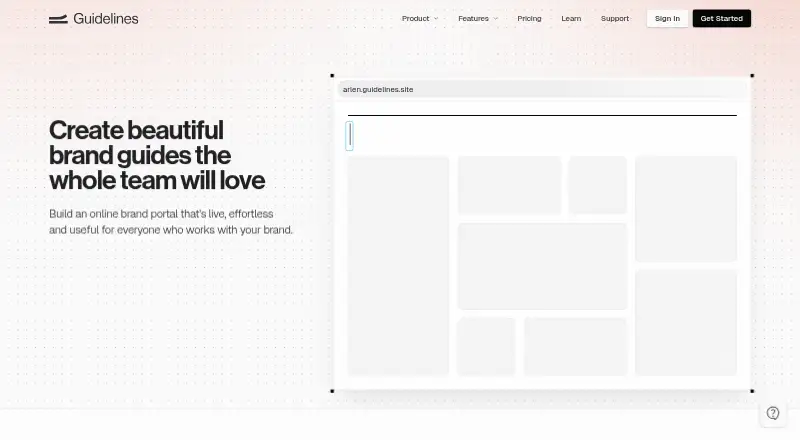
Guidelines is an online platform for building and publishing interactive brand guides for teams. A guide can keep logos, colors, typography, icons, and downloadable files together in a searchable location. Teams can invite collaborators to design and manage their guidelines. Quick Start uses uploaded logos, chosen colors, and fonts to make an initial draft. Guides can be shared publicly, protected by a password, or limited through account-based authentication. Listed integrations include Figma, Adobe Creative Cloud, Sketch, Tailwind, CSS Variables, ChatGPT, Claude, Claude Code, Cursor, and Okta. Its ChatGPT connector uses MCP and OAuth; the support page says it can read brand data but cannot write to it. The Free plan costs nothing and allows one public guide, one editor, seven published pages, and 100MB of storage. Studio is $15 a month, billed per editor per month; Enterprise is $40 a month, also billed per editor per month. Enterprise includes SSO, and additional fees may apply per monthly active SSO user. Guidelines is web-based.
Who it suits
Guidelines suits studios and in-house teams that need to organize brand materials and collaborate on guidelines. Enterprise is described for large agencies and brands.
What it does well
- Searchable guides collect key brand assets.
- Quick Start creates a first guide draft.
- Teams can invite collaborators to edit.
- Guides support public, password, or account-based access.
- Integrations include Figma, Adobe Creative Cloud, and Okta.
What to know first
- Free plan allows one public guide and one editor.
- Free plan limits guides to seven published pages.
- Studio and Enterprise are billed per editor per month.
- Additional monthly active SSO user fees may apply.
Limits
The Free plan includes one public guide, one editor, seven published pages, and 100MB of asset storage. Unlimited guides, brands, and pages and 1GB of storage per brand are included with Studio, which costs $15 a month per editor.
Plans
| Plan | Billed and limits | Price |
|---|---|---|
| Free | One public guide · one editor · 100MB asset storage · seven published pages · unlimited guide visitors · basic integrations | Free |
| Studio | per editor per month · Unlimited guides, brands, and pages · 1GB asset storage per brand · collaborative editing · password or account-protected guides · custom domains · AI integrations | $15 a month |
| Enterprise | per editor per month · Everything in Studio · custom storage limits · SSO · version history · translations and localization · automatic access by domain · additional SSO fees may apply per monthly active SSO user | $40 a month |
As guidelines.site lists them, read 7 Oct 2026. The maker's own page has the final word.
Getting started
- Open the Guidelines website in a web browser.
- Choose the Free plan or a paid plan: Studio is $15 a month per editor, and Enterprise is $40 a month per editor.
- Upload logos, select colors, and choose fonts to use Quick Start for an initial guide draft.
- Invite collaborators to design and manage the guidelines.
- Share the guide publicly, with password protection, or through account-based authentication.
Guidelines is a web platform for turning a team’s visual identity into an interactive, searchable brand portal. It is best suited to in-house brand teams, design studios, and agencies that need several people to maintain guidance and controlled sharing for others. Its quick-start workflow and broad integration list make setup practical, but the free tier is too constrained for a sizeable brand library.
Overview
The service gathers logos, color specifications, typefaces, icons, and downloadable resources into interactive guides. That gives contributors a single place to find approved material and gives brand owners an editorial surface for explaining how assets should be used. Quick Start builds an initial draft from uploaded logos, chosen colors, and fonts, reducing the work required before a guide can be shared.
Guides support public access, password protection, or account-based authentication. Teams can therefore publish an open reference site, restrict a client or partner portal, or require authenticated access for internal material. The platform is web-only, so it fits organizations that want browser access rather than a desktop application.
Key features
Centralized brand publishing
Asset, guideline, and template management are combined with a brand-portal model. This is more useful than a bare storage folder when the goal is to explain rules as well as distribute files. Searchable organization should also reduce repeated requests for approved logos, colors, or fonts.
Collaboration and integrations
Multiple collaborators can design and maintain guides together. Integrations cover Figma, Adobe Creative Cloud, Sketch, Tailwind, CSS Variables, ChatGPT, Claude, Claude Code, Cursor, and Okta, giving teams links to both design workflows and development tooling. The ChatGPT connector uses MCP and OAuth and reads brand data without write access, a sensible boundary for teams that want assistance without allowing automated changes.
Sharing and security
HTTPS/SSL applies to all guides. SSO is included with Enterprise, while lower tiers provide password- or account-protected sharing. The access choices are useful for distributing guidance beyond the editing team, although advanced identity administration is reserved for the top plan.
Pricing
Free
The Free plan costs nothing and includes one public guide, one editor, seven published pages, 100MB of asset storage, unlimited guide visitors, and basic integrations. It is a reasonable way for an individual or small project to publish a compact reference, but the single-editor cap prevents genuine team maintenance and seven pages can force a growing system into a narrow structure.
Studio
Studio costs $15 per editor per month. It removes the main structural limits with unlimited guides, brands, and pages, provides 1GB of storage per brand, and adds collaborative editing, password- or account-protected guides, custom domains, and AI integrations. Studios and in-house teams get the clearest upgrade path here; cost rises with every editor, so occasional contributors should be limited carefully.
Enterprise
Enterprise costs $40 per editor per month and includes everything in Studio, plus custom storage limits, SSO, version history, translations and localization, and automatic access by domain. Additional SSO fees may apply per monthly active SSO user. Large agencies and brands that need centralized identity, historical recovery, or localized portals have a reason to pay for it; smaller teams are unlikely to need those controls.
Platforms
Guidelines runs on the web. Its listed integrations connect the web workspace with design, code, AI, and identity tools, but the product itself does not offer a separate desktop or mobile platform.
Who it's for
Choose Guidelines for a team formalizing a visual system and publishing it to employees, clients, partners, or the public. Studio fits collaborative brand groups that need multiple guides and custom domains. Enterprise is aimed at large agencies and brands requiring SSO, domain-based access, version history, or localization. A solo user with a short guide can use Free, while organizations wanting only unstructured file storage should look elsewhere.
Pros and cons
Pros
- Quick Start drafting: uploaded logos, selected colors, and fonts become a first guide draft, shortening initial setup.
- Flexible audience controls: public, password-protected, and account-authenticated sharing cover different distribution needs.
- Collaborative publishing: paid Studio editing supports teams rather than a single document owner.
- Wide integration range: design, development, AI, and identity connections can fit an existing production stack.
Cons
- Small free allowance: one editor, one public guide, seven pages, and 100MB storage limit serious adoption.
- Per-editor billing: Studio and Enterprise costs scale with each editor, which can become significant for broad contributor groups.
- Advanced identity controls are gated: SSO and automatic domain access require Enterprise, with possible extra SSO-user fees.
Alternatives
BrandHalo is worth considering if you want an API and web product with a free Brand Agent and Connectors tier, or a 139.00 AUD-per-month Essentials plan.
BrandKity suits users prioritizing API access, 500MB of free storage, and a 9.00 USD-per-month Starter plan.
BrandPatrol is an option for teams interested in brand-twin checks and a free tier with one workspace and five Checker single checks per month.
Brandy is better when unlimited free editors and a simple 100MB, one-brand-space allowance matter more than Guidelines’ page publishing.
Brink offers web-based workspace and brand-free tiers for teams comparing lightweight portal arrangements.
Brand Context Protocol is a free, open standard for readers seeking a protocol rather than a managed publishing service.
Lingo is the alternative to examine when an API-first system and a 30-day free trial are priorities.
Marq may fit teams wanting web publishing with a free one-user plan and a 12.00 USD-per-month Pro tier.
For a broader shortlist, see Brand Management Software.
Verdict
Guidelines is a strong choice for teams that need a polished, collaborative brand portal with fast initial drafting and controlled external access. Studio is the practical starting point for most working teams, while Enterprise earns its price when identity, history, and localization are operational requirements. Look elsewhere if you need many free editors, a desktop client, or a low-cost solution for a large asset library.
Verdict
Guidelines brings brand assets, collaborative editing, and multiple guide access options into a web platform. The Free plan has limits on editors, pages, and storage, while paid plans expand capacity and access controls.
Questions
Is Guidelines free?
Yes. The Free plan costs nothing and includes one public guide, one editor, seven published pages, and 100MB of asset storage.
How much do the paid plans cost?
Studio costs $15 a month per editor. Enterprise costs $40 a month per editor; additional SSO fees may apply per monthly active SSO user.
What platforms does Guidelines support?
Guidelines is available on the web.
Which integrations are listed?
Integrations include Figma, Adobe Creative Cloud, Sketch, Tailwind, CSS Variables, ChatGPT, Claude, Claude Code, Cursor, and Okta.
Who makes Guidelines?
The site identifies the maker as The Guidelines Company and lists ABN 56 666 563 257.
What does Enterprise add?
Enterprise includes custom storage limits, SSO, version history, translations and localization, and automatic access by domain.
Facts from Guidelines's own pages
- Access controls
- Guides can be shared publicly, with password protection, or through account-based authentication. · guidelines.site, 7 Oct 2026
- Brand assets
- Guides can bring together logos, colors, typography, icons, and downloadable files in one searchable place. · guidelines.site, 7 Oct 2026
- ChatGPT connector
- The ChatGPT connector uses MCP and OAuth, and the support page says it reads brand data without write access. · guidelines.site, 7 Oct 2026
- Collaborative editing
- The platform lets teams invite collaborators to design and manage brand guidelines together. · guidelines.site, 7 Oct 2026
- Company identity
- The site identifies the maker as The Guidelines Company and lists ABN 56 666 563 257. · guidelines.site, 7 Oct 2026
- Enterprise security
- The pricing comparison lists HTTPS/SSL for all guides and SSO authentication as security features, with SSO included in Enterprise. · guidelines.site, 7 Oct 2026
- Free plan limit
- The Free plan includes one public guide, one editor, seven published pages, and 100MB of asset storage. · guidelines.site, 7 Oct 2026
- Integrations
- Listed integrations include Figma, Adobe Creative Cloud, Sketch, Tailwind, CSS Variables, ChatGPT, Claude, Claude Code, Cursor, and Okta. · guidelines.site, 7 Oct 2026
- Intended users
- The pricing page describes Studio for studios or in-house teams and Enterprise for large agencies and brands. · guidelines.site, 7 Oct 2026
- Quick start
- Quick Start turns uploaded logos, selected colors, and fonts into a first draft of interactive brand guidelines. · guidelines.site, 7 Oct 2026
- Support
- Guidelines offers support by message and email, and says message replies usually arrive within a few hours or sooner if the team is available. · guidelines.site, 7 Oct 2026
- What it does
- Guidelines is an online brand publishing platform for creating interactive brand guides for teams. · guidelines.site, 7 Oct 2026
Where Guidelines stands on Freedom251
- Brand Management Software#10 of 48