Freedom251 › Business Rules Management Software

GoRules BRMS
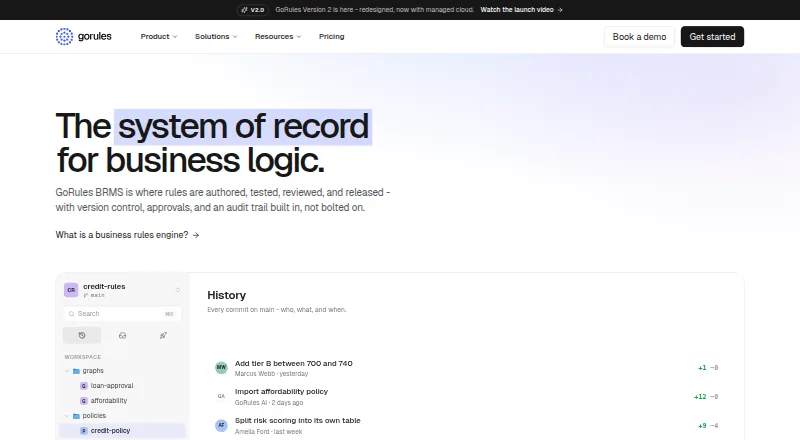
What GoRules BRMS is
GoRules BRMS helps teams create, test, review, and release business rules, with version control, approvals, and an audit trail. Decision models can combine decision tables, expressions, JavaScript functions, and switch nodes. Teams can check rules against sample data and scenario suites before release; the editor also surfaces type and syntax errors during editing. Drafts, history, visual diffs, branches, and commits make changes attributable to users. Releases are immutable, can progress unchanged from development through staging to production, and can be rolled back. GoRules AI can propose table and graph edits as reviewable drafts, create and run test suites, explain decisions, and draft policies, but it does not deploy releases. The ZEN Engine connects through SDKs for several programming languages or a REST API. Self-hosting is available with Docker and PostgreSQL on cloud platforms or Kubernetes. GoRules lists AES-256 encryption at rest, TLS 1.3 between components, and sandboxed rule execution. Its free plan includes two users, one project, and no deployment environments. Pro is $167 a month, billed annually.
Who it suits
GoRules BRMS suits teams that need to author, test, govern, and deploy business rules across environments. It also supports teams needing SDK or REST API integration, or a self-hosted deployment.
What it does well
- Supports decision tables, expressions, JavaScript, and switch nodes
- Tests rules with sample data and scenario suites
- Tracks changes with history, visual diffs, branches, and commits
- Supports immutable releases and rollback
- Offers SDK and REST API integration
What to know first
- Free plan has no deployment environments
- Pro costs $167 a month, billed annually
- Does not support DMN
Limits
The Free plan supports two users, one project, and 10 decision models per project, but includes no deployment environments. Pro is $167.00 per month billed annually and includes one deployment environment, five users, two projects, and 20 decision models per project.
Plans
| Plan | Billed and limits | Price |
|---|---|---|
| Pro | $2,000 billed annually · Save 17% · 5 users · 2 projects · 20 decision models per project · 1 deployment environment · $70 AI credits/month | $167 a month |
| Business | $6,000 billed annually · Save 17% · 20 users · 5 projects · 50 decision models per project · 2 deployment environments · audit logs · SOC 2 Type II report · standard SLA | $500 a month |
| Enterprise | Custom AI credits, environments, users, and projects · SSO (OIDC) · dedicated support · enterprise SLA | On request |
| Free | 2 users · 1 project · 10 decision models per project · no deployment environments · infinite evaluations via Agent or SDK · $10 AI credits/month | On request |
As gorules.io lists them, read 28 Sept 2026. The maker's own page has the final word.
Getting started
- Open the GoRules BRMS website.
- Choose the Free plan or a paid plan; Pro is billed annually.
- Use the web platform, or self-host with Docker and PostgreSQL on a supported cloud platform or Kubernetes.
- Connect the ZEN Engine through an SDK or REST API.
- Create decision models and test them with sample data or scenario suites before release.
GoRules BRMS is a business-rules platform for teams that need to build, test, review, and govern changing decision logic. It is best suited to teams that value controlled releases and flexible ways to integrate or self-host their rules. Its lifecycle controls are a clear strength, but the lack of DMN support rules it out for organizations that depend on that standard.
Overview
GoRules brings rule design, review, testing, and release management into a single workflow. Teams can assign changes to users, inspect how rules evolve, validate behavior before release, and roll back when needed. That combination makes it more compelling for governed decision logic than for users looking only for a lightweight rule editor.
Founded in 2023, GoRules also open-sourced its ZEN Engine under the MIT license that year. Execution can be integrated through SDKs or a REST API, and customers can run the BRMS on their own infrastructure. The breadth of these options is useful for teams with varied environments, though choosing self-hosting also means owning security controls and compliance posture.
Key features
Authoring and testing
Decision models can combine tables, expressions, JavaScript functions, and switch nodes. Drafts, history, branches, commits, and visual diffs make changes easier to review and attribute. Type and syntax errors surface during editing; sample data and scenario suites allow teams to check decisions before release. This is a substantial toolkit for teams that need to explain and validate logic, but organizations that require DMN should choose another product.
Release governance and AI
Immutable releases can be promoted unchanged from development to staging to production, then rolled back to an earlier release. That helps teams keep tested logic consistent across environments. GoRules AI can edit tables and graphs as reviewable drafts, write and run test suites, explain decisions, and draft policies from prompts. It assists with preparation, not operations: AI does not deploy releases.
Execution, data, and security
The ZEN Engine has SDKs for Node.js, Python, Go, Rust, Java, Kotlin, C#, and Swift, alongside REST API integration. For larger data workloads, GoRules offers native PySpark integration for Databricks, EMR, Dataproc, and self-managed Spark clusters, plus a Rust SDK for custom pipelines. Self-hosting is supported with Docker and PostgreSQL on AWS, Azure, Google Cloud, or Kubernetes.
GoRules states that it uses AES-256 encryption at rest, TLS 1.3 between components, and sandboxed rule execution without filesystem or network access. It says it has obtained a SOC 2 Type II report. Self-hosted customers, however, bring their own security controls and determine their own compliance posture. Business and Enterprise customers can submit support tickets; Enterprise adds a dedicated Slack or Microsoft Teams channel.
Pricing
The Free plan has 2 users, 1 project, 10 decision models per project, no deployment environments, infinite evaluations via Agent or SDK, and $10 AI credits/month. It is a practical way for a small team to author and evaluate rules, but the lack of deployment environments limits its use for a managed release workflow.
Pro is $167 a month, billed $2,000 billed annually · Save 17%. It includes 5 users, 2 projects, 20 decision models per project, 1 deployment environment, and $70 AI credits/month. This is the entry point for a team that needs a deployment environment, though the single environment offers little room for a multi-stage promotion path.
Business is $500 a month, billed $6,000 billed annually · Save 17%. Its 20 users, 5 projects, 50 decision models per project, 2 deployment environments, audit logs, SOC 2 Type II report, and standard SLA make it the more fitting tier for teams with broader governance and release needs.
Enterprise has custom pricing, with custom AI credits, environments, users, and projects, plus SSO (OIDC), dedicated support, and an enterprise SLA. It suits organizations that need those controls and scale rather than fixed quotas.
Platforms
GoRules BRMS supports API, Linux, macOS, self-hosted, web, and Windows. Hybrid deployment gives teams a choice between hosted access and running the BRMS on their own infrastructure, with corresponding responsibility for its security and compliance when self-hosted.
Who it's for
GoRules is a strong fit for teams whose business rules need a clear review trail, pre-release testing, and controlled promotion or rollback. Its SDK range, REST API, Spark integration, and self-hosting options also suit teams integrating rules into varied application and data environments. It is less suitable for DMN-dependent organizations, or for teams that need a free path to deployment environments.
Pros and cons
- Pros: Visual diffs, branches, commits, and user attribution support accountable rule changes.
- Pros: Scenario suites and editing-time errors help catch problems before immutable releases are promoted.
- Pros: Broad SDK support, REST API access, Spark integration, and self-hosting give teams several execution and deployment routes.
- Cons: No DMN support makes it a poor fit for organizations standardized on that notation.
- Cons: The Free plan has no deployment environments, while Pro includes only one.
- Cons: AI can draft and test changes but cannot deploy them, so release governance still depends on the team's own workflow.
Alternatives
For a broader shortlist, see Business Rules Management Software.
- DecisionRules is another freemium option, with a free trial and API, self-hosted, and web platforms. Its Free plan has 1 user, 1 project, 10 Business Rules & Flows, and 1,000 Solver API Calls; consider it if those published free-tier limits better match your needs.
- Nected offers a self-hosted free tier with unlimited rules and workflows, 1k daily invocations, and Docker, Helm charts, and Terraform scripts. It is worth considering if those self-hosted provisions suit your deployment needs.
- Decisions is a paid option with a free plan and Android, API, iOS, self-hosted, web, and Windows platforms; consider it if that platform range is a better match.
- FlexRule Open is a paid option with API, Linux, macOS, self-hosted, web, and Windows platforms; consider it if you want to explore another product in that category.
- InRule Decisioning is a paid option with Android, API, iOS, self-hosted, web, and Windows platforms; consider it if those platform options better suit your environment.
- OpenL Tablets is a free option supporting API, Linux, macOS, self-hosted, web, and Windows; consider it if you want to evaluate a free alternative.
- ACTICO Decision Management Platform is paid, has a free trial, and supports Linux, macOS, self-hosted, and Windows; consider it if those platforms and a trial fit your selection process.
- AI Rule Engine is a freemium option with a free plan and web platform; consider it as another web-based alternative.
Verdict
Choose GoRules BRMS if your team needs reviewable rule changes, pre-release testing, and a disciplined route from development through production, with the option to self-host or integrate through SDKs and an API. Its central advantage is that authoring, governance, and release control belong to one workflow. Look elsewhere if DMN is required or if you need deployment environments on a free plan.
Verdict
GoRules BRMS covers rule authoring, testing, change tracking, and controlled release, with cloud and self-hosted options. The free plan is limited to one project and has no deployment environments; Pro is $167 a month billed annually.
Questions
Is GoRules BRMS free?
Yes. The Free plan includes two users, one project, and 10 decision models per project. It also includes $10 in AI credits per month and no deployment environments.
How much does Pro cost?
Pro costs $167.00 per month, billed annually at $2,000 per year. It includes five users, two projects, 20 decision models per project, one deployment environment, and $70 in monthly AI credits.
Which platforms does GoRules BRMS support?
The listed platforms are API, Linux, macOS, self-hosted, web, and Windows.
Does GoRules support DMN?
No. DMN support is listed as unavailable.
Can GoRules BRMS be self-hosted?
Yes. The BRMS can be self-hosted with Docker and PostgreSQL on AWS, Azure, Google Cloud, or Kubernetes.
Who makes GoRules, and when was it founded?
GoRules was founded in 2023 and is headquartered in Čačak, Serbia. The company says it open-sourced the ZEN Engine under the MIT license that year.
Facts from GoRules BRMS's own pages
- AI
- GoRules AI can edit tables and graphs as reviewable drafts, write and run test suites, explain decisions, and draft policies from prompts; it does not deploy releases. · gorules.io, 28 Sept 2026
- Big data
- GoRules offers a native PySpark integration for Databricks, EMR, Dataproc, or self-managed Spark clusters, as well as a Rust SDK for custom pipelines. · gorules.io, 28 Sept 2026
- Company history
- GoRules says it was founded in 2023 and open-sourced the ZEN Engine under the MIT license that year. · gorules.io, 28 Sept 2026
- Compliance
- GoRules says it has obtained a SOC 2 Type II report, while noting that self-hosted customers bring their own security controls and determine their own compliance posture. · gorules.io, 28 Sept 2026
- Deployment lifecycle
- Immutable releases can be promoted from development to staging to production unchanged and rolled back to a previous release. · gorules.io, 28 Sept 2026
- Founded
- 2023 · gorules.io, 28 Sept 2026
- Headquarters
- Čačak, Serbia · gorules.io, 28 Sept 2026
- Integrations
- The ZEN Engine has SDKs for Node.js, Python, Go, Rust, Java, Kotlin, C#, and Swift, and the documentation describes integration through SDKs or a REST API. · docs.gorules.io, 28 Sept 2026
- Purpose
- GoRules BRMS is a platform for authoring, testing, reviewing, and releasing business rules with version control, approvals, and an audit trail. · gorules.io, 28 Sept 2026
- Rule authoring
- Decision models can use decision tables, expressions, JavaScript functions, and switch nodes. · gorules.io, 28 Sept 2026
- Security
- The security page states that GoRules uses AES-256 encryption at rest, TLS 1.3 between components, and sandboxed rule execution without filesystem or network access. · gorules.io, 28 Sept 2026
- Self-hosting
- The BRMS can be self-hosted with Docker and PostgreSQL on AWS, Azure, Google Cloud, or Kubernetes. · gorules.io, 28 Sept 2026
- Support
- The documentation says Business and Enterprise customers can submit support tickets, and Enterprise customers can access a dedicated Slack or Microsoft Teams channel. · docs.gorules.io, 28 Sept 2026
- Testing
- Users can run rules against sample data and scenario suites before release, while the editor surfaces type and syntax errors during editing. · gorules.io, 28 Sept 2026
- Versioning
- The platform provides drafts, history, visual diffs, branches, and commits, with changes attributable to users. · gorules.io, 28 Sept 2026