Freedom251 › Lecture Capture Software
GoCast
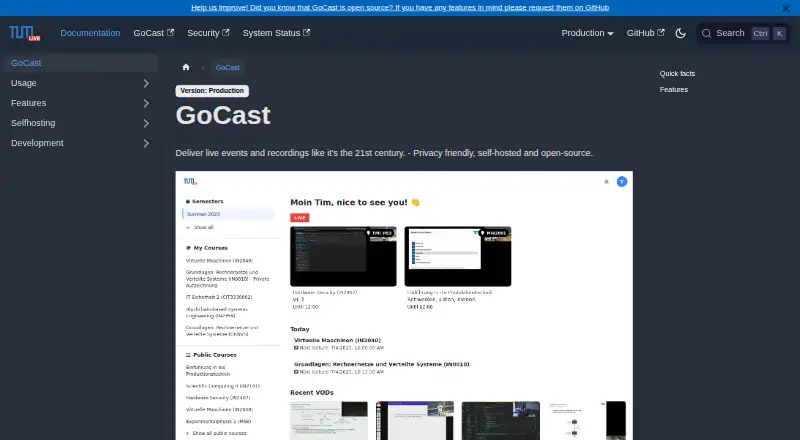
What GoCast is
GoCast is an open-source, self-hosted platform for live-streaming and recording lectures. Organizations run it on their own servers, where streaming data is processed and stored. It can stream auditorium lectures according to schedules, while lecturers can also stream with OBS, Zoom, or other streaming software. A self-service interface lets lecturers schedule and manage videos, and lectures and student enrollment can be imported from CAMPUSonline. GoCast records live streams automatically and supports video-on-demand uploads. Its post-processing can detect silence, create searchable transcripts, and generate thumbnails. During live sessions, listeners can submit questions and upvote them; lecturers can run polls and mark or hide questions. Courses can be public, limited to enrolled or invited users, or available to logged-in users with a LRZ ID. GoCast is listed as free under the MIT license. Deployments need worker or runner servers and shared storage accessible to relevant services. The documentation says the platform is used at the Technical University of Munich for more than 150 courses and 15,000 students.
Who it suits
GoCast suits educational organizations that want to host lecture streaming and recording on their own servers. Its deployment requirements and access arrangements make it a fit for organizations with a GoCast maintainer and the required infrastructure.
What it does well
- Automatic streaming can follow lecture schedules.
- CAMPUSonline can provide lectures and enrollment information.
- Live streams are recorded automatically.
- Transcripts can be searched after processing.
What to know first
- Deployment requires worker or runner servers and shared storage.
- Lecturers need their organization's maintainer for access.
- Self-streaming may be unreliable and recordings can be corrupted.
Limits
GoCast is free, but deployment requires your own servers, worker or runner servers, and shared storage. The self-streaming guide warns that streams may be unreliable and recordings can be corrupted; it recommends keeping a local copy.
Plans
| Plan | Billed and limits | Price |
|---|---|---|
| Self-hosted GoCast | MIT-licensed open-source software · requires your own servers and infrastructure | Free |
As docs.tum.live lists them, read 5 Oct 2026. The maker's own page has the final word.
Getting started
- Open the GoCast documentation website.
- Ask your organization's GoCast maintainer for lecturer access.
- If you represent an organization seeking maintainer access, contact the RBG.
- Deploy GoCast on your own servers with worker or runner servers and shared storage.
- Set course access, then schedule auditorium streams or self-stream using OBS, Zoom, or other streaming software.
GoCast is an open-source lecture capture platform for universities and other organizations that can operate their own servers. It suits institutions seeking scheduled auditorium streams, course-based access, and recordings with live interaction. Its strongest case is an end-to-end lecture workflow under local control; the cost is responsibility for deployment and reliable self-streaming.
Overview
GoCast supports lectures from scheduled auditorium streaming through recording and on-demand playback. Lecturers can also stream through software such as OBS or Zoom, while organizations can set courses to public, limit them to enrolled or invited users, or require login with an LRZ ID. Hosting on an organization’s own servers keeps streaming data processing and storage under its control.
The project is used at the Technical University of Munich for more than 150 courses and 15,000 students. That institutional use points to a fit for organized course delivery, rather than casual streaming. GoCast is MIT-licensed, but a working deployment requires worker or runner servers and shared storage accessible to the relevant services.
Key features
Scheduled capture and course workflow
GoCast can start auditorium streams according to lecture schedules, which can reduce the need for someone to initiate each capture. Lecturers manage schedules and videos through a self-service interface, and institutions can import lectures and student enrollment from CAMPUSonline. The import is useful for organizations already using that system; the workflow is less compelling for teams without compatible course data or the staff to manage deployment.
Recordings and interaction
Live streams are recorded automatically, and lecturers can upload video-on-demand content. Post-processing can detect silence, create searchable transcripts, and generate thumbnails, helping viewers locate material without relying solely on full-length playback. During live sessions, listeners can ask questions, lecturers can run polls, and audiences can upvote questions; lecturers can also mark or hide questions.
Self-streaming has an important reliability caveat: the guide warns that streams may fail and recordings may be corrupted. Keeping a local copy is prudent, especially when a lecture recording is important. Automatic auditorium capture and self-streaming therefore should not be treated as a substitute for an independent backup.
Pricing
| Plan | Price | What it includes | Best fit |
|---|---|---|---|
| Self-hosted GoCast | free | MIT-licensed open-source software; requires your own servers and infrastructure | Organizations able to provide and maintain the deployment |
The software has no charge, but it is not a hosted service: server and shared-storage requirements remain the organization’s responsibility. The free plan is therefore most useful to institutions that can supply the infrastructure and operational capacity, rather than groups seeking a turnkey platform.
Platforms
GoCast is available as self-hosted software with a web interface and on-premise deployment. Automatic captions, searchable transcripts, and live streaming are supported. Lecturers are directed to their organization’s GoCast maintainer for access; organizations seeking maintainer access can contact the RBG.
Who it's for
GoCast is a strong fit for universities and similar organizations that need scheduled lecture capture, course enrollment controls, recordings, and live question-and-poll workflows while keeping data on their own servers. It is a poor fit for organizations without staff or infrastructure to run worker or runner servers and shared storage, or for those that need self-streaming to be dependable without local backups.
Pros and cons
- Pros: Scheduled auditorium streaming and automatic recording cover recurring lecture capture with less manual initiation.
- Pros: CAMPUSonline imports, course access controls, and live polls and questions support an organized academic workflow.
- Pros: Self-hosting and the MIT license give organizations control over data location and the software they run.
- Cons: Deployments need worker or runner servers plus shared storage, so the zero-price software still requires infrastructure.
- Cons: Self-streaming can be unreliable and recordings can be corrupted; maintaining local copies adds a necessary safeguard.
Alternatives
Opencast is another free, self-hosted option, with demo instances that let prospective users try its administrative interface and video portal without installing it.
PuMuKIT is a free, self-hosted open-source video platform for organizations considering a different route to institutional video.
Presentations2Go is worth considering for readers seeking a freemium option with a free trial and support across mobile, desktop, web, and self-hosted platforms.
Planet eStream may suit buyers who prefer paid modular pricing based on required features and, for school groups, the number of schools; room capture has no per-room license cost.
YuJa Lumina Video Platform is a paid option for organizations prepared to request pricing from a sales specialist.
Galicaster-PRO may fit buyers seeking a solution usually sold pre-installed with a Galicaster unit, with software licensing available under certain conditions and education discounts.
Vbrick Enterprise Video Platform is a paid alternative for use cases priced around audience size, library size, and network topology.
Impartus Lecture Capture System is another paid option for readers who want to request a demo.
Browse more options in Lecture Capture Software.
Verdict
Choose GoCast if your institution can run its own infrastructure and wants scheduled lecture capture, course-aware access, and interactive live sessions in one system. Its combination of local data control and a full lecture workflow is the main reason to choose it. Look elsewhere if you need managed hosting or cannot accommodate the server, shared-storage, and backup responsibilities.
Verdict
GoCast combines scheduled lecture streaming, recordings, video uploads, and live interaction in a self-hosted system. Organizations should account for the server and shared-storage requirements, and keep a local copy when self-streaming.
Questions
How much does GoCast cost?
The listed plan is free. GoCast is open source under the MIT license.
Can an organization host GoCast itself?
Yes. Organizations can run it on their own servers and control where streaming data is processed and stored.
What infrastructure does deployment require?
A deployment needs worker or runner servers and shared storage accessible to the relevant services.
Which streaming and recording options does GoCast support?
Lecturers can stream with OBS, Zoom, or other streaming software. GoCast can automatically stream auditoriums by schedule, record live streams, and accept video-on-demand uploads.
Can listeners interact during a live stream?
Yes. Listeners can ask questions and upvote them, while lecturers can run polls and mark or hide questions.
How do lecturers get access?
Lecturers are directed to their organization's GoCast maintainer. Organizations seeking maintainer access are directed to contact the RBG.
Facts from GoCast's own pages
- Access and support
- Lecturers are directed to contact their organization's GoCast maintainer for access; organizations are directed to contact the RBG for maintainer access. · docs.tum.live, 4 Oct 2026
- Access controls
- Courses can be public, limited to enrolled or invited users, or available to logged-in users with a LRZ ID. · docs.tum.live, 5 Oct 2026
- Automatic streaming
- It can automatically stream auditorium lectures according to lecture schedules. · docs.tum.live, 5 Oct 2026
- Course integration
- GoCast can import lectures and student enrollment information from CAMPUSonline. · docs.tum.live, 5 Oct 2026
- Course management
- Lecturers can use a self-service interface to schedule and manage videos. · docs.tum.live, 5 Oct 2026
- Data control
- Organizations can run GoCast on their own servers and control their data. · docs.tum.live, 4 Oct 2026
- Deployment requirements
- A typical deployment needs an Edge server, at least one Worker or Runner VM, and shared storage for recordings and video files. · docs.tum.live, 5 Oct 2026
- Live chat
- Listeners can ask questions in live chat; lecturers can create polls, and listeners can upvote questions. · docs.tum.live, 4 Oct 2026
- Live interaction
- Live chat supports listener questions, lecturer polls, question upvotes, and marking or hiding questions. · docs.tum.live, 5 Oct 2026
- Open source
- GoCast is open source and licensed under the MIT license. · docs.tum.live, 5 Oct 2026
- Post-processing
- GoCast can detect silence, transcribe recordings for search, and generate thumbnails. · docs.tum.live, 4 Oct 2026
- Privacy and hosting
- Organizations can run GoCast on their own servers, where streaming data is processed and stored. · docs.tum.live, 5 Oct 2026
- Purpose
- GoCast is a self-hosted platform for live-streaming and recording lectures. · docs.tum.live, 5 Oct 2026
- Recording and playback
- GoCast automatically records live streams and supports video-on-demand uploads. · docs.tum.live, 5 Oct 2026
- Recording and video on demand
- GoCast automatically records live streams and supports video-on-demand uploads. · docs.tum.live, 4 Oct 2026
- Scheduled streaming
- GoCast can automatically stream from auditoriums based on lecture schedules. · docs.tum.live, 4 Oct 2026
- Self-streaming limitation
- The usage guide warns that self-streaming may be unreliable and recordings can be corrupted, so it recommends keeping a local copy. · docs.tum.live, 5 Oct 2026
- Streaming sources
- Lecturers can self-stream using software such as OBS or Zoom. · docs.tum.live, 4 Oct 2026
- Streaming tools
- Lecturers can self-stream using OBS, Zoom, or other streaming software. · docs.tum.live, 5 Oct 2026
- Support and access
- Lecturers are directed to their organization's GoCast maintainer for access, while organizations can contact the RBG for maintainer access. · docs.tum.live, 5 Oct 2026
- Use at TUM
- The documentation says GoCast is used at the Technical University of Munich for more than 150 courses and 15,000 students. · docs.tum.live, 4 Oct 2026
- Video processing
- Post-processing can detect silence, transcribe recordings for search, and generate thumbnails. · docs.tum.live, 5 Oct 2026
Where GoCast stands on Freedom251
- Lecture Capture Software#4 of 19