Freedom251 › Interactive Product Demo Software
GhostTour
What GhostTour is
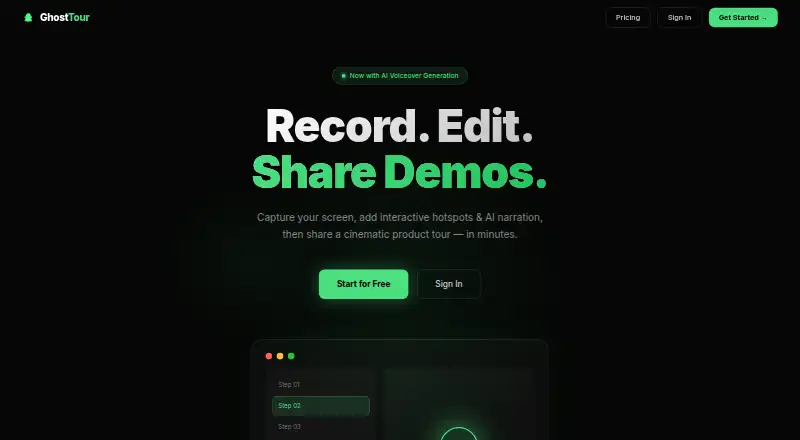
GhostTour turns product walkthrough recordings into interactive demos that can be shared or exported. Its workflow runs from recording a walkthrough in the desktop app to editing with hotspots, narration, annotations, and chapters, then publishing or exporting. Hotspots can provide click targets, tooltips, and navigation buttons; annotation tools include cropping, redaction, shapes, and text overlays. Text-to-speech creates per-slide narration in 10+ voices. Demos can be shared by link or embedded as an iframe, with MP4 and GIF exports also listed. GhostTour tracks views, engagement, and completion rates. It is available as an extension, on the web, and for Windows. The Free plan costs nothing and includes one demo, the full editor, and a public share link. Pro costs $19 a month and lists unlimited demos, HD exports, analytics, and AI voiceover. Business costs $70 a month and lists teams, custom branding, and priority support. The site names React, WordPress, Webflow, and plain HTML for iframe embedding.
Who it suits
GhostTour suits people who want to turn product walkthroughs into editable, shareable interactive demos. Teams that need custom branding or priority support can consider the listed Business plan.
What it does well
- Hotspots include click targets, tooltips, and navigation buttons
- Text-to-speech offers narration in 10+ voices
- Exports demos as MP4 or GIF
- Tracks views, engagement, and completion rates
- Free plan includes the full editor
What to know first
- Free plan is limited to one demo
- Pro costs $19 a month
- Business costs $70 a month
Limits
The Free plan includes one demo and a public share link. Pro costs $19 a month and includes unlimited demos, HD exports, analytics, and AI voiceover.
Plans
| Plan | Billed and limits | Price |
|---|---|---|
| Free | 1 demo · full editor · public share link | Free |
| Pro | $19/month · Unlimited demos · HD exports · analytics · AI voiceover | $19 a month |
| Business | $70/month · Teams · custom branding · priority support | $70 a month |
As ghosttourlabs.com lists them, read 8 Oct 2026. The maker's own page has the final word.
Getting started
- Visit https://ghosttourlabs.com/.
- Open the desktop app and walk through the product to record a demo.
- Edit the recording with hotspots, voiceover, annotations, and chapters.
- Choose a plan: Free, Pro at $19 a month, or Business at $70 a month.
- Publish with a share link or iframe, or export as MP4 or GIF.
GhostTour is a tool for turning screen recordings into interactive, narrated product demonstrations. It is a strong fit for marketers, sales teams, trainers, and educators who need viewers to explore a product rather than watch a fixed video. The main decision is whether its one-demo free allowance is enough or whether regular publishing justifies the paid tiers.
Overview
GhostTour records a product walkthrough through its desktop app, then turns that capture into a guided experience. The editor combines hotspots, chapters, annotations, AI narration, and cinematic transitions, so a demonstration can explain a workflow while letting viewers choose where to click. Sharing works through a public link or an iframe embed, and MP4 and GIF exports cover more conventional distribution.
Analytics report views, engagement, and completion rates. That makes the product more useful for onboarding, sales follow-up, or measuring whether a self-guided tour holds attention than a recording with no feedback loop. The Free plan is a practical way to learn the editor, but its single-demo ceiling is restrictive for anyone maintaining several products, campaigns, or versions.
Key features
Interactive walkthroughs
Hotspots can be click targets, tooltips, or navigation buttons. These controls let a viewer investigate an interface or follow a designed sequence instead of passively viewing a recording. Chapters provide structure when a tour covers multiple areas.
Editing and narration
Annotation tools include cropping, redaction, shapes, and text overlays, giving creators ways to remove sensitive material and call out important details. AI voiceover produces narration for each slide with more than 10 text-to-speech voices. That can reduce recording work, although teams that require a particular human voice should assess whether those available voices fit their brand.
Publishing, export, and measurement
A share link is suitable for sending a tour directly, while iframe embedding supports placement in a website or product resource. React, WordPress, Webflow, and plain HTML are named integration targets. MP4 and GIF export extends distribution beyond the interactive player. View, engagement, and completion metrics help identify whether a demo is being used and finished.
Pricing
| Plan | Price | Includes |
|---|---|---|
| Free | free | One demo, full editor, public share link |
| Pro | $19 a month, billed $19/month | Unlimited demos, HD exports, analytics, AI voiceover |
| Business | $70 a month, billed $70/month | Teams, custom branding, priority support |
Free suits a solo creator evaluating the workflow or publishing a single enduring tour. It gives up additional demos, so it is not a good long-term fit for a growing library. Pro is the sensible choice for frequent publishing: unlimited demos remove the key quota, while HD exports, analytics, and AI voiceover support a repeatable production process. Business is aimed at organizations that need team operation, branded presentation, and faster support; its higher monthly price is difficult to justify for an individual.
Platforms
GhostTour is offered as an extension, a web application, and a Windows product. Recording uses the desktop app, while demos can be embedded through the supported web integration formats.
Who it's for
Choose GhostTour for interactive product marketing, sales enablement, customer onboarding, or instructional material where hotspots and navigation improve on video alone. It also suits creators who want AI-generated slide narration and export options. Look elsewhere if you need more than one free published demo, or if your team does not need interactive guidance and would rather use a straightforward video tool.
Pros and cons
Pros
- Interactive controls: Hotspots, tooltips, and navigation buttons let viewers explore a product in context.
- Broad output: Public links, iframe embeds, MP4, and GIF support both web tours and video sharing.
- Useful measurement: View, engagement, and completion reporting gives demos an outcome metric.
- Practical Pro tier: Unlimited demos and HD exports remove the Free plan's main publishing constraint.
Cons
- Strict free cap: Free allows only one demo, limiting ongoing use without an upgrade.
- Business cost: Teams, branding, and priority support require $70 a month.
- Windows desktop capture: The stated desktop app platform may not suit creators who record primarily on other desktop systems.
Alternatives
Floik is worth choosing when you want extension, macOS, web, and Windows coverage, with a Starter allowance of five published Flos and ten created Flos; its Pro plan is $39 a month.
Flonnect Presentation Recorder fits users prioritizing recording utilities, with a free allowance of 20 lifetime videos, ten bug reports per month, five HTML/demo captures per month, and 1 GB storage.
Guideflow is a better match when an API and broader platform support matter; its $35.00 USD-per-month yearly-billed Solo plan includes unlimited guideflows, advanced analytics, AI demo content, video and GIF export, translation, and sensitive-element blurring.
Supademo is an option for a larger free allowance, including five guided interactive demos and 50 4K video recordings.
Arcade suits users seeking a free plan with one published demo, one published video, 200 AI credits monthly, and unlimited views.
Storylane offers a free one-seat, one-published-demo plan with unlimited views, AI content assistance, and voiceovers.
Arclet is a fit for extension-and-web users who need five free published demos and basic analytics.
DemoFast is an alternative for advanced rich-media annotations, full analytics, and white-label branding at its stated early-access price.
For a broader category comparison, see Interactive Product Demo Software.
Verdict
GhostTour is recommended for teams and solo creators who want guided, narrated demos with measurable viewer engagement and flexible publishing. Pro is the strongest general choice because unlimited demos and HD exports remove the Free plan's central restriction at $19 a month. Choose another product if you need a more generous free catalog, a non-Windows capture workflow, or capabilities outside GhostTour's interactive-demo focus.
Verdict
GhostTour provides recording, editing, sharing, exporting, and engagement tracking for interactive demos. The Free plan is limited to one demo; Pro and Business list higher usage and team features at their stated monthly prices.
Questions
How much does GhostTour cost?
The Free plan costs nothing. Pro is $19 a month, and Business is $70 a month.
What does the Free plan include?
It includes one demo, the full editor, and a public share link.
Which platforms is GhostTour available on?
It is listed for extension, web, and Windows.
Can GhostTour demos be embedded on a website?
Yes. Demos can be embedded as an iframe; the site lists React, WordPress, Webflow, and plain HTML.
What can I export?
The site says demos can be exported as MP4 or GIF.
What does the Business plan include?
It lists teams, custom branding, and priority support.
Facts from GhostTour's own pages
- AI voiceover
- It generates per-slide narration in 10+ voices using text-to-speech. · ghosttourlabs.com, 8 Oct 2026
- Analytics
- GhostTour tracks views, engagement, and completion rates. · ghosttourlabs.com, 8 Oct 2026
- Annotations
- Annotation tools include cropping, redaction, shapes, and text overlays. · ghosttourlabs.com, 8 Oct 2026
- Business tier
- The Business plan lists teams, custom branding, and priority support. · ghosttourlabs.com, 8 Oct 2026
- Desktop app
- The maker says users record by opening the desktop app and walking through their product. · ghosttourlabs.com, 8 Oct 2026
- Free tier limit
- The Free plan includes one demo, the full editor, and a public share link. · ghosttourlabs.com, 8 Oct 2026
- Hotspots
- Hotspots can include click targets, tooltips, and navigation buttons. · ghosttourlabs.com, 8 Oct 2026
- Integrations
- The site says demos can be embedded as an iframe and lists React, WordPress, Webflow, and plain HTML as supported. · ghosttourlabs.com, 8 Oct 2026
- Product
- GhostTour creates interactive product demos from screen recordings with hotspots, AI voiceover narration, and cinematic transitions. · ghosttourlabs.com, 8 Oct 2026
- Publishing and exports
- Demos can be shared by link or embedded as an iframe, and the site says users can export as MP4 or GIF. · ghosttourlabs.com, 8 Oct 2026
- Recording and editing
- The workflow is to record a product walkthrough, edit it with hotspots, voiceover, annotations, and chapters, then publish or export it. · ghosttourlabs.com, 8 Oct 2026
- Security and privacy
- The homepage says GhostTour collects account email, uploaded demo content, and basic usage analytics, does not sell personal data, and uses reasonable measures to protect data in transit and at rest. · ghosttourlabs.com, 8 Oct 2026
- Support
- The site provides [email protected] as its contact email. · ghosttourlabs.com, 8 Oct 2026