Freedom251 › Authenticator apps

Ghost Auth
by Ghost Auth
What Ghost Auth is
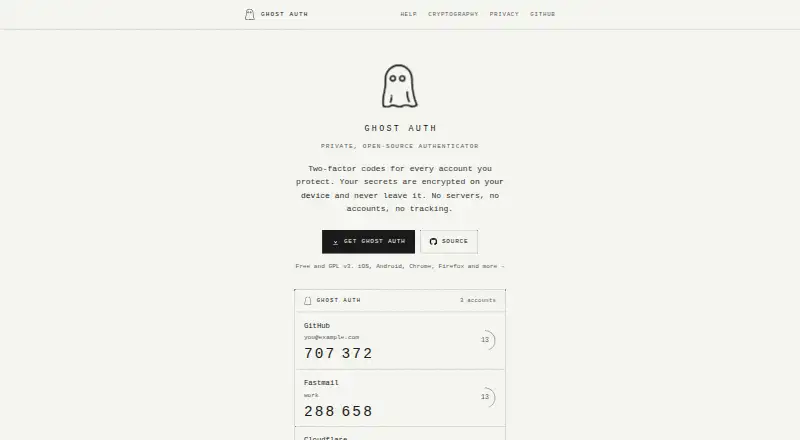
Ghost Auth is a free authenticator that generates two-factor codes for protected accounts. It supports RFC 6238 TOTP with SHA-1, SHA-256, and SHA-512. Accounts can be added by scanning QR codes or entering a secret or otpauth:// URI, and imports are documented for Google Authenticator, Aegis, 2FAS, and andOTP. The app supports iOS and Android, while Chrome and Firefox extensions can synchronize accounts from a phone or desktop app. Device synchronization uses end-to-end encryption and requires both devices on the same Wi-Fi network. The maker says account data uses AES-256-GCM encryption with keys in platform secure keystores. Local backups use AES-256-GCM with an Argon2id-derived key, and Apple users can synchronize an encrypted iCloud vault. Ghost Auth says it has no analytics, telemetry, advertising, or Ghost Auth servers; crash reporting is optional. It supports 79 languages, including right-to-left language support. Windows, macOS, and Linux desktop apps are listed as coming soon. The project is GPL v3.
Who it suits
Ghost Auth suits people wanting a free TOTP authenticator with encrypted storage, backups, and synchronization. It supports mobile users and Chrome or Firefox extension users.
What it does well
- Free TOTP authenticator
- Encrypted storage and local backups
- End-to-end device and extension sync
- Imports from four listed authenticator apps
- Supports 79 languages
What to know first
- Desktop apps are listed as coming soon
- Device sync requires the same Wi-Fi network
- No Windows, macOS, or Linux desktop app yet
Limits
Device-to-device synchronization requires both devices to be connected to the same Wi-Fi network. Native Windows, macOS, and Linux desktop apps are listed as coming soon.
Plans
| Plan | Billed and limits | Price |
|---|---|---|
| Free | TOTP authenticator · Encrypted storage · Encrypted backups · Device and browser-extension sync | Free |
| Ghost Auth | Free; GPL v3 | Free |
As ghostauth.org lists them, read 21 Sept 2026. The maker's own page has the final word.
Getting started
- Visit ghostauth.org
- Choose the iOS or Android app, or a Chrome or Firefox extension
- Install the selected app or extension
- Use the Free plan at no cost
- Add protected accounts by scanning a QR code or entering a secret
Verdict
Ghost Auth combines TOTP code generation with encrypted storage, backups, and synchronization across supported devices and extensions. Its current desktop availability is limited because Windows, macOS, and Linux apps are still forthcoming.
Questions
How much does Ghost Auth cost?
The Free plan costs nothing. It includes the TOTP authenticator, encrypted storage, encrypted backups, and device and browser-extension sync.
Which platforms does Ghost Auth support?
Ghost Auth supports iOS, Android, Chrome, and Firefox. Windows, macOS, and Linux desktop apps are listed as coming soon.
Can I import accounts from another authenticator?
The help page documents imports from Google Authenticator, Aegis, 2FAS, and andOTP.
How are accounts protected?
Account data uses AES-256-GCM encryption with keys held in platform secure keystores. Local backups also use AES-256-GCM with an Argon2id password-derived key.
Does Ghost Auth sync across devices?
Yes. Device sync and browser-extension sync use end-to-end encryption; device sync requires both devices to be on the same Wi-Fi network. Apple devices can also use encrypted iCloud vault synchronization.
Is Ghost Auth open source?
The listed Ghost Auth plan is GPL v3.
Facts from Ghost Auth's own pages
- Adding accounts
- Accounts can be added by scanning a QR code or entering a secret or otpauth:// URI. · ghostauth.org, 11 Oct 2026
- Backups
- Accounts can be exported to a local backup encrypted with AES-256-GCM using a password-derived Argon2id key. · ghostauth.org, 11 Oct 2026
- Browser extension sync
- The Chrome and Firefox extensions can sync accounts from the phone or desktop app using end-to-end encryption. · ghostauth.org, 11 Oct 2026
- Code type
- totp · ghostauth.org, 21 Sept 2026
- Desktop availability
- The site lists Windows, macOS, and Linux desktop apps as coming soon. · ghostauth.org, 11 Oct 2026
- Device sync
- Device sync transfers accounts over the local network with end-to-end encryption and requires both devices to be on the same Wi-Fi network. · ghostauth.org, 11 Oct 2026
- Encrypted backup
- Yes · ghostauth.org, 21 Sept 2026
- Encrypted storage
- The maker says account data is encrypted with AES-256-GCM and keys are held in platform secure keystores. · ghostauth.org, 11 Oct 2026
- Free plan
- Yes · ghostauth.org, 21 Sept 2026
- Headquarters
- Hafrsfjord, Norway · ghostauth.org, 28 Sept 2026
- iCloud
- Ghost Auth offers encrypted vault synchronization across Apple devices and says Apple sees only an opaque encrypted blob. · ghostauth.org, 11 Oct 2026
- Imports
- The help page documents imports from Google Authenticator, Aegis, 2FAS, and andOTP. · ghostauth.org, 11 Oct 2026
- Language support
- The product supports 79 languages, including right-to-left support for Arabic, Hebrew, Farsi, and Urdu. · ghostauth.org, 11 Oct 2026
- Multi-device sync
- Yes · ghostauth.org, 21 Sept 2026
- PIN and biometrics
- Users can lock the app with a 4–8 digit PIN and enable biometric unlock on iOS and Android. · ghostauth.org, 11 Oct 2026
- Privacy
- The maker says the app has no analytics, telemetry, advertising, or Ghost Auth servers, and optional crash reporting is opt-in. · ghostauth.org, 11 Oct 2026
- Purpose
- Ghost Auth generates two-factor authentication codes for accounts you protect. · ghostauth.org, 11 Oct 2026
- Support
- The maker lists [email protected] for support and GitHub issues for bug reports and feature requests. · ghostauth.org, 11 Oct 2026
- Supported platforms
- iOS,Android,Chrome,Firefox · ghostauth.org, 21 Sept 2026
- TOTP
- It supports RFC 6238 TOTP with SHA-1, SHA-256, and SHA-512. · ghostauth.org, 11 Oct 2026
Where Ghost Auth stands on Freedom251
- Authenticator apps#25 of 111