Genesis Framework
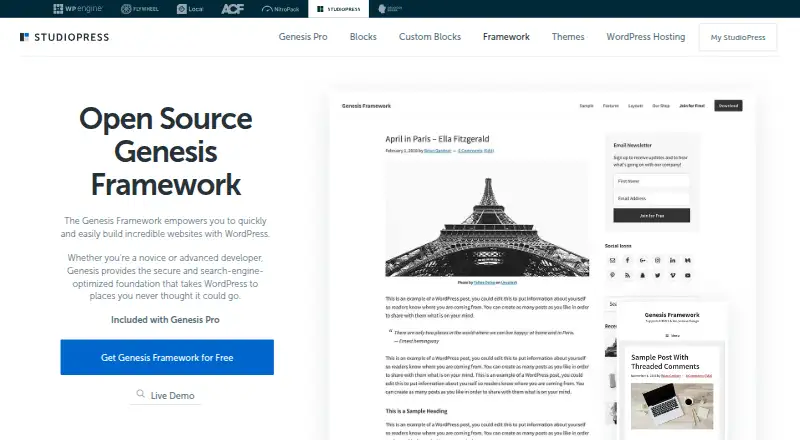
What Genesis Framework is
Genesis Framework is a WordPress foundation for building websites, with security and search-engine optimization as parts of its stated foundation. StudioPress presents it as suitable for novice and advanced developers. The framework supports the Gutenberg block editor, and Genesis Pro adds content blocks, sections, and page layouts. It is pre-styled for WooCommerce and supports child themes and responsive designs. StudioPress also says its themes work with WordPress Multilingual and can accommodate right-to-left languages. Genesis is labeled open source. The free framework download is requested through a form on the StudioPress site. Genesis Pro costs $360 per year and includes the framework, 10 StudioPress-made premium child themes, support, and the Genesis Pro plugin, blocks, and layouts. StudioPress says theme use is not limited by a specific number of sites or period. Installation requires a domain and WordPress on a web host; WordPress.com does not allow theme installation. Customers can use tutorials and submit support tickets for one-on-one help, but StudioPress does not provide custom design services.
Who it suits
Genesis Framework suits WordPress users building self-hosted sites, from novice developers to advanced developers. It may fit site owners who want Gutenberg support, WooCommerce styling, and child themes.
What it does well
- Supports the Gutenberg block editor.
- Pre-styled for WooCommerce.
- Themes support multilingual and right-to-left languages.
- Theme use has no stated site or time limit.
- Support tickets and tutorials are available.
What to know first
- Requires WordPress installed on a web host.
- WordPress.com does not allow theme installation.
- StudioPress does not provide custom design services.
Limits
The free plan is a framework download by request for self-hosted WordPress sites. Genesis Pro costs $360 per year and includes 10 premium child themes; StudioPress says theme use is not limited to a specific number of sites or period of time.
Plans
| Plan | Billed and limits | Price |
|---|---|---|
| Genesis Framework | Free download by request · WordPress.org self-hosted sites | Free |
| Genesis Pro | $360/year · Unlimited sites · Genesis Framework and 10 StudioPress-made premium child themes · Support · Genesis Pro plugin, blocks, and layouts | $360 a year |
As studiopress.com lists them, read 4 Oct 2026. The maker's own page has the final word.
Getting started
- Get a domain and install WordPress on a web host.
- Request the Genesis Framework zip file through the form on the StudioPress site.
- Install the framework on your self-hosted WordPress site.
- Use the Gutenberg block editor or add child themes as needed.
- Choose Genesis Pro for its premium child themes, plugin, blocks, layouts, and support.
Genesis Framework is a classic foundation for building self-hosted WordPress sites, aimed at both novice site owners and advanced developers. It is a strong fit if you want a reusable, open-source framework with block-editor and WooCommerce support, but its paid tier makes most sense when you also want StudioPress themes and added blocks and layouts.
Overview
Genesis provides a security- and SEO-oriented foundation for WordPress rather than a hosted site-building service. Its themes are responsive, accessibility ready, and support child themes, giving developers a base they can adapt across sites. The trade-off is practical: you need a domain and WordPress installed with a web host, and Genesis themes cannot be installed on WordPress.com.
The framework is open source and downloaded as a zip file requested through a StudioPress form. StudioPress says theme use is not restricted by site count or time, which makes the free framework useful for people building or maintaining multiple self-hosted sites.
Key features
Genesis supports the Gutenberg block editor, while Genesis Pro adds content blocks, sections, and page layouts. That distinction matters: the free framework provides the foundation, but the more extensive block and layout tools require the paid plan.
WooCommerce styling gives store owners a starting point for an online shop. StudioPress themes also adapt to mobile screens, accommodate right-to-left languages, and are compatible with WordPress Multilingual. Tutorials and one-on-one support tickets are available to StudioPress customers. However, StudioPress does not provide custom design services, so buyers needing bespoke theme design will need to handle that elsewhere.
Pricing
Genesis Framework: free. This is a free download by request for WordPress.org self-hosted sites. It includes the framework, with no stated site-count or time restriction on theme use. It suits developers and site owners who want the Genesis foundation without the premium theme and Pro tools.
Genesis Pro: $360 a year. Billed at $360/year, it includes unlimited sites, the framework, 10 StudioPress-made premium child themes, support, and the Genesis Pro plugin with blocks and layouts. It is best suited to people building several sites or those who specifically need the bundled StudioPress themes and expanded editor tools. The free plan gives up those premium themes, support, blocks, and layouts.
Platforms
Genesis is for self-hosted WordPress websites and the web. It requires a domain and a WordPress installation on a web host; it is not an option for WordPress.com sites that do not permit theme installation.
Who it's for
Genesis is a sensible choice for WordPress users who value a reusable foundation, want WooCommerce styling, or need themes that can support multilingual and right-to-left content. Its unlimited-site use also suits developers maintaining multiple installations. It is less suitable for people who want a hosted, ready-to-run website or custom design work included.
Pros and cons
- Free framework with no stated site or time limit: useful for building on multiple self-hosted WordPress sites without buying a license for each one.
- Commerce and editor foundations: WooCommerce styling and Gutenberg support give sites a base for stores and block-based editing.
- Premium bundle costs $360 per year: the recurring price is substantial if the buyer only needs the framework; its value depends on needing the 10 premium child themes, support, and Pro tools.
- Requires self-hosting: users on WordPress.com cannot install Genesis themes, and buyers must arrange a domain and web hosting separately.
- No custom design service: teams that need StudioPress to create a bespoke design should look elsewhere.
Alternatives
For a broader selection, browse WordPress Themes. Blocksy is another freemium self-hosted WordPress theme option if you want to compare its free theme and features. ColorMag offers a free tier and a paid yearly plan for readers comparing theme options. Neve is a freemium self-hosted WordPress theme to consider instead. OceanWP offers a free WordPress theme. Twenty Twenty-Five is a free WordPress theme. Zakra offers a free tier and an annual Pro plan. Astra is another freemium theme, with an annual Pro option for up to three websites. Responsive has a personal annual plan with three website licenses.
Verdict
Choose Genesis Framework if you want an open-source, reusable foundation for self-hosted WordPress sites, particularly when WooCommerce styling and broad site use matter. The free download is the clearest fit for the core framework; pay $360 per year for Genesis Pro when its premium themes, support, blocks, and layouts justify the cost. Look elsewhere if you need WordPress.com compatibility, hosted site building, or custom design services.
Verdict
Genesis Framework provides a self-hosted WordPress foundation with block-editor support and WooCommerce styling. The framework is free by request; Genesis Pro costs $360 per year and adds themes, support, blocks, and layouts.
Questions
Is Genesis Framework free?
Yes. The framework has a free download, requested as a zip file through a form on the StudioPress site.
How much does Genesis Pro cost?
Genesis Pro costs $360 per year, billed annually.
What does Genesis Pro include?
It includes the Genesis Framework, 10 StudioPress-made premium child themes, support, and the Genesis Pro plugin with blocks and layouts.
Which platforms does Genesis support?
Genesis is for self-hosted WordPress sites. StudioPress says WordPress.com does not allow theme installation.
Is Genesis open source?
Yes. StudioPress labels Genesis Framework open source.
Does Genesis support WooCommerce and multilingual sites?
Its themes are pre-styled for WooCommerce and compatible with WordPress Multilingual, including accommodation for right-to-left languages.
Facts from Genesis Framework's own pages
- Audience
- StudioPress describes Genesis as suitable for both novice and advanced developers. · studiopress.com, 4 Oct 2026
- Company
- WP Engine says it was founded in 2010 in Austin, Texas, and StudioPress pages carry WP Engine copyright. · wpengine.com, 4 Oct 2026
- Customization limits
- StudioPress says it does not provide custom design services for its themes. · studiopress.com, 4 Oct 2026
- Download
- The Genesis Framework is available as a zip file requested through a form on the StudioPress site. · studiopress.com, 4 Oct 2026
- eCommerce
- The framework is pre-styled for WooCommerce to support setting up an online store. · studiopress.com, 4 Oct 2026
- Editor
- Genesis supports the Gutenberg block editor, and Genesis Pro adds content blocks, sections, and page layouts. · studiopress.com, 4 Oct 2026
- Founded
- 2010 · studiopress.com, 28 Sept 2026
- Hosting requirement
- Genesis themes require a domain and WordPress installed on a web host; StudioPress says WordPress.com does not allow theme installation. · studiopress.com, 4 Oct 2026
- Integrations
- StudioPress says its themes are compatible with WordPress Multilingual and can accommodate right-to-left languages. · studiopress.com, 4 Oct 2026
- Open source
- StudioPress labels Genesis Framework open source. · studiopress.com, 4 Oct 2026
- Purpose
- Genesis Framework is a WordPress foundation for building websites, including a secure and search-engine-optimized foundation. · studiopress.com, 4 Oct 2026
- Responsive design
- StudioPress says its themes adapt to mobile devices and screens. · studiopress.com, 4 Oct 2026
- Security and SEO
- StudioPress describes Genesis as the basic security and SEO foundation for a WordPress site. · studiopress.com, 4 Oct 2026
- Support
- StudioPress customers can access tutorials and submit support tickets for one-on-one customer support. · studiopress.com, 4 Oct 2026
- Updates and sites
- StudioPress says theme use is not limited to a specific number of sites or a specific period of time. · studiopress.com, 4 Oct 2026
Where Genesis Framework stands on Freedom251
- WordPress Themes#7 of 34