Freedom251 › AI Video Analytics Software
Frigate
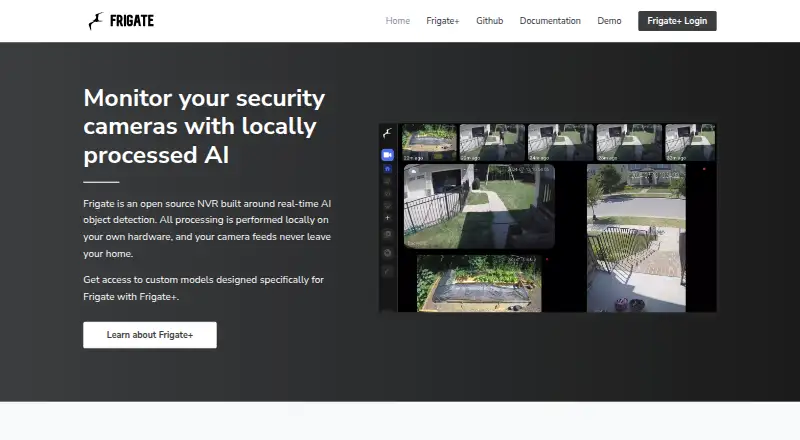
What Frigate is
Frigate is an open-source network video recorder for IP cameras that runs AI object detection locally on the user’s hardware. The maker says camera feeds stay within the home. With a supported AI accelerator, it can distinguish objects such as people and cars from motion; the site says it can process more than 100 detections per second with that hardware. It tracks objects in real time, allowing notifications to be refined by location. Recording options include 24/7 capture and retention settings tied to detected objects. Frigate runs in a Docker container on a Docker host, including as a Home Assistant App. The documentation recommends Docker Compose and says it runs best on bare-metal Debian-based distributions. It integrates with Home Assistant, OpenHab, NodeRed, and MQTT-compatible systems, and offers an HTTP API. A free open-source plan is available; Frigate+ costs $50 a year, billed annually. Windows is not officially supported, and native OIDC, SAML, and LDAP authentication are not implemented.
Who it suits
Frigate suits people who want local IP-camera recording and object detection, especially those using Home Assistant or other listed integrations. It is aimed at users able to run Docker on a supported host.
What it does well
- Local processing keeps camera feeds in the home.
- Supports continuous and detection-based video retention.
- Integrates with Home Assistant, OpenHab, NodeRed, and MQTT.
- Supported accelerators enable 100+ detections per second.
What to know first
- Windows is not officially supported.
- Native OIDC, SAML, and LDAP are unavailable.
- Frigate+ model training does not allow custom labels.
Limits
The free Frigate plan is an open-source NVR. Frigate+ costs $50 a year, billed annually, and its model training supports specific labels rather than custom labels.
Plans
| Plan | Billed and limits | Price |
|---|---|---|
| Frigate | Open-source NVR; runs as a Docker container on a Docker host | Free |
| Frigate+ Subscription | annually · Access to Frigate+ models · Up to 12 fine tuned models · AI suggested labels for uploads · Supports open source Frigate | $50 a year |
As frigate.video lists them, read 29 Sept 2026. The maker's own page has the final word.
Getting started
- Visit the Frigate website.
- Prepare a Docker host; the documentation recommends Docker Compose and bare-metal Debian-based distributions.
- Run Frigate as a Docker container, or use it as a Home Assistant App.
- Connect IP cameras and configure recording and detection zones.
- Use the free open-source plan or subscribe to Frigate+ for $50 a year.
Overview
Frigate is an open-source network video recorder for IP cameras that runs local AI object detection on your hardware. It is best suited to camera owners comfortable with self-hosting and Docker who want detection and recording without sending camera feeds outside the home. Its strongest case is local processing paired with fine-grained recording and alert controls; its main trade-offs are host setup and limited native enterprise authentication.
Key features
Frigate can record continuously or retain footage according to detected objects, so users can choose between a complete timeline and storage shaped around events. With a supported AI accelerator, object detection distinguishes people and cars from motion, helping reduce motion-triggered false positives. The maker says compatible hardware can process more than 100 detections per second; that performance depends on having a supported accelerator.
Real-time object tracking and zones let users refine notifications around specific locations, which is useful when alerts should depend on where something appears rather than motion alone. Frigate also supports real-time alerts and behavior and event detection. Integrations include Home Assistant, OpenHab, NodeRed and systems that support MQTT. The Home Assistant integration exposes camera, image, sensor, switch and binary sensor entities, and allows browsing snapshots and recordings.
An HTTP API covers cameras, classification, events, media and recordings, giving other systems a way to work with Frigate's data. User information is stored in Frigate's database, with passwords hashed using PBKDF2-SHA256 at 600,000 iterations. For organizations that require OIDC, SAML or LDAP, Frigate has no native support for those protocols; the documentation points to upstream authentication proxies instead.
Frigate+ adds access to models, up to 12 fine-tuned models and AI-suggested labels for uploads. Model training supports only specific labels, however, and does not yet permit custom labels. That makes the subscription less suitable for teams whose use case depends on a specialized label set.
Pricing
The Frigate plan costs nothing and provides the open-source NVR as a Docker container for a Docker host. It suits users who want the core recording and detection software and are prepared to supply and manage the host themselves.
Frigate+ Subscription costs $50 a year, billed annually. It adds Frigate+ models, up to 12 fine-tuned models and AI-suggested upload labels, while supporting open-source Frigate. The paid plan is for users who want those model capabilities; it does not remove the custom-label limitation.
Platforms
Frigate supports API, Linux, self-hosted and web environments. It runs in Docker on Docker hosts, including as a Home Assistant App. Documentation recommends Docker Compose and says it runs best with Docker on bare-metal Debian-based distributions. Windows is not officially supported, although some users have run it through WSL or VirtualBox. Windows users should treat that as an unofficial route rather than a supported platform.
Who it's for
Frigate is a strong fit for technically capable home users who want local camera processing, object-aware retention and location-refined notifications, particularly those already using Home Assistant or MQTT-compatible systems. Its API and integrations also suit setups that need to connect camera events to other software. It is a weaker fit for users seeking a turnkey Windows installation or organizations that require native directory or single sign-on protocols.
Pros and cons
- Pro: Local processing keeps camera feeds within the home, according to the maker, which suits privacy-conscious camera owners.
- Pro: Object-based retention, 24/7 recording and zone-refined notifications let users choose how footage is kept and which activity merits attention.
- Pro: Home Assistant, OpenHab, NodeRed, MQTT and a broad HTTP API support integration into existing automation systems.
- Con: Docker is central to installation, and the recommended setup is bare-metal Debian-based Linux, making it a poor match for users who want officially supported Windows hosting.
- Con: Detection above 100 per second and object-versus-motion filtering depend on a supported AI accelerator.
- Con: OIDC, SAML and LDAP require an upstream authentication proxy, while Frigate+ model training cannot use custom labels.
Alternatives
For a broader AI Video Analytics Software shortlist, compare options by deployment and pricing needs. Roboflow is a freemium alternative with Android, iOS, API, self-hosted and web platforms; its free tier includes 10 credits a month, enough to train about 30 models or run 80,000 inferences. It may suit readers focused on model training and inference quotas rather than a local camera NVR.
Amazon Rekognition Content Moderation is an API and web option with a free tier that lasts 12 months and includes 60 free video analysis minutes per month. Consider it when a time-limited hosted video analysis allowance better fits than self-hosting. Camio offers usage-based service levels matched to needs, with pricing available by contacting Camio or an approved partner; it is an option when a matched service level is preferable to managing a Docker host.
Scylla Command Center offers an enterprise plan with 100+ video wall displays, multi-site central management and redundancy with geo-failover, and requires contacting Scylla for pricing. It is more relevant when those enterprise management capabilities are priorities. Lumeo has a free plan and trial, and its Core plan starts at $99/mo with 10 streams, additional streams at $9.99/mo each and 30-day recording retention. Its stream-based plan may suit readers comparing managed stream capacity and retention.
Triya AI is another paid option. Vaidio AI Vision Platform offers a perpetual software license with annual software upgrade and maintenance fees of 15% and annual hardware warranty and maintenance fees of 5%; consider it when a perpetual license is preferred. Videonetics AI Video Analytics has a 30-day free trial and offers a demo, making it an option for readers who want a trial before choosing.
Verdict
Choose Frigate if you want an open-source camera NVR that processes feeds locally and can tie object detection, retention and zone-based alerts into a self-hosted setup. The combination of privacy-focused processing and automation integrations is its clearest advantage. Look elsewhere if you need officially supported Windows hosting, native OIDC, SAML or LDAP, or custom Frigate+ labels.
Verdict
Frigate combines local camera recording with real-time object detection and location-based notification refinement. Check host compatibility and authentication needs before choosing it.
Questions
Is Frigate free?
Yes. The Frigate plan is a free, open-source NVR.
What does Frigate+ cost?
The Frigate+ Subscription costs $50 a year, billed annually.
Where does Frigate process camera video?
Its maker says processing is local and camera feeds never leave the home.
Which platforms does Frigate support?
Listed platforms are API, Linux, self-hosted and web. Windows is not officially supported; some users have run it under WSL or VirtualBox, according to the documentation.
Which systems can Frigate integrate with?
Listed integrations include Home Assistant, OpenHab, NodeRed and systems with MQTT support.
Does Frigate provide native OIDC, SAML or LDAP?
No. The documentation says these protocols are not implemented natively; upstream authentication proxies can be used.
Facts from Frigate's own pages
- API
- Frigate provides an HTTP API with endpoints covering areas including cameras, classification, events, media and recordings. · docs.frigate.video, 29 Sept 2026
- Authentication
- Frigate stores user information in its database and hashes passwords with PBKDF2-SHA256 using 600,000 iterations. · docs.frigate.video, 29 Sept 2026
- Detection speed
- The site says Frigate can run 100+ object detections per second with a supported AI accelerator. · frigate.video, 29 Sept 2026
- False positives
- With a supported AI accelerator, Frigate uses object detection to distinguish objects such as people and cars from motion. · frigate.video, 29 Sept 2026
- Frigate+ limit
- Frigate+ model training supports only specific labels and does not yet allow custom labels. · frigate.video, 29 Sept 2026
- Home Assistant integration
- The integration provides camera, image, sensor, switch and binary sensor entities, plus browsing for snapshots and recordings. · docs.frigate.video, 29 Sept 2026
- Installation
- Frigate runs as a Docker container on Docker hosts, including as a Home Assistant App. · docs.frigate.video, 29 Sept 2026
- Integrations
- The maker lists Home Assistant, OpenHab, NodeRed and systems with MQTT support as integrations. · frigate.video, 29 Sept 2026
- Privacy
- The maker says all processing is local and camera feeds never leave the home. · frigate.video, 29 Sept 2026
- Purpose
- Frigate is an open source NVR for IP cameras that performs real-time AI object detection locally on the user’s hardware. · frigate.video, 29 Sept 2026
- Recommended setup
- The documentation recommends Docker Compose and says Frigate runs best with Docker on bare-metal Debian-based distributions. · docs.frigate.video, 29 Sept 2026
- Recording
- Frigate records video with retention settings based on detected objects and supports 24/7 recording. · github.com, 29 Sept 2026
- Security limit
- The documentation says Frigate does not implement OIDC, SAML or LDAP natively and can use upstream authentication proxies for those protocols. · docs.frigate.video, 29 Sept 2026
- Windows support
- Windows is not officially supported, though the documentation says some users have run Frigate under WSL or VirtualBox. · docs.frigate.video, 29 Sept 2026
- Zones
- Frigate tracks objects in real time and lets users refine notifications based on precise locations. · frigate.video, 29 Sept 2026
Where Frigate stands on Freedom251
- AI Video Analytics Software#1 of 23
- Video Surveillance Software#1 of 17
- Video Management#1 of 16