Freedom251 › AI Video Analytics Software
Google Cloud Video Intelligence
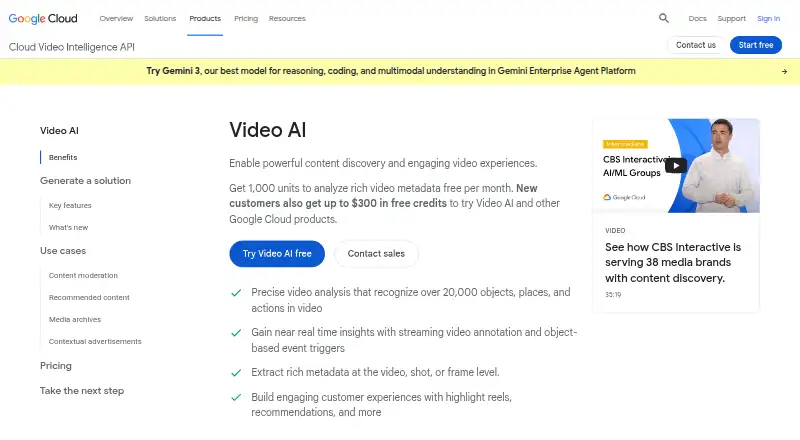
What Google Cloud Video Intelligence is
Google Cloud Video Intelligence is a cloud API that analyzes stored and streaming video and returns metadata for content discovery and video applications. Metadata can be extracted at video, shot, or frame level, and Google says its models recognize over 20,000 objects, places, and actions. Documented capabilities include label and shot-change detection, explicit-content detection, and face, logo, object, and person detection, along with speech and text recognition. Streaming annotation can provide near real-time insights and support object-based event triggers. Google lists content moderation, recommendations, searchable media archives, and contextual ad placement as use cases. Developers can interact with the API using client libraries or a command-line quickstart. Each listed feature has 1,000 free minutes per month for both stored and streaming annotation; partial minutes round up. Beyond that allowance, listed rates vary by feature and annotation type. The service is paid, with prices from $0.05, and a free trial is available. Other Google Cloud resources used by a project may incur separate charges. Celebrity recognition is a restricted-access feature.
Who it suits
The API suits developers building video applications or media workflows that need searchable metadata, moderation, recommendations, or streaming insights. It is intended for teams able to work with a cloud API and account for annotation and other Google Cloud resource charges.
What it does well
- Extracts metadata at video, shot, or frame level.
- Recognizes over 20,000 objects, places, and actions.
- Includes streaming annotation and object-based event triggers.
- Offers 1,000 free minutes per month for each listed feature.
- Client libraries and a command-line quickstart are available.
What to know first
- Partial minutes round up.
- Other Google Cloud resources may incur separate charges.
- Celebrity recognition requires restricted access.
- Rates vary by feature and annotation type.
Limits
Stored and streaming annotation each provide 1,000 free minutes per month for every listed feature, with partial minutes rounded up. Above that, per-minute charges vary by feature and annotation type; celebrity recognition requires restricted access.
Plans
| Plan | Billed and limits | Price |
|---|---|---|
| Video Intelligence API — stored video annotation | Per minute; partial minutes round up; first 1,000 minutes per month are free for each listed feature · Beyond 1,000 minutes/month: label detection $0.10/min · shot detection $0.05/min · explicit content detection $0.10/min · speech transcription $0.048/min · object tracking, text detection, and logo detection $0.15/min · face detection, person detection, and celebrity recognition $0.10/min | Free |
| Video Intelligence API — streaming video annotation | Per minute; partial minutes round up; first 1,000 minutes per month are free for each listed feature · Beyond 1,000 minutes/month: label detection $0.12/min · shot detection $0.07/min · explicit content detection $0.12/min · object tracking $0.17/min | Free |
As cloud.google.com lists them, read 7 Oct 2026. The maker's own page has the final word.
Getting started
- Open the Google Cloud Video Intelligence website.
- Review the API documentation and available annotation features.
- Use a client library or the command-line quickstart to access the API.
- Try the free trial or use the free monthly allowance for listed features.
Google Cloud Video Intelligence is a cloud API for annotating stored and streaming video. It is best for developers and media teams building video applications or searchable archives that need several types of recognition. Its range is a strength, but feature-based rates and separate cloud-resource charges make budgeting part of the implementation.
Overview
The API returns metadata at video, shot, or frame level, and Google says its models recognize more than 20,000 objects, places, and actions. That makes it useful for turning video into material that can be searched, moderated, recommended, or matched with contextual ads. It is an API building block, not a finished media library or video-management application.
Client libraries and a command-line quickstart support programmatic access. Deployment is cloud-based, and the service is available through API and web platforms. Other Google Cloud resources used by a project, such as Compute Engine or Cloud Storage, may add separate charges.
Key features
- Multiple annotation types: Label, shot-change, explicit-content, face, logo, object, person, speech, and text detection or recognition cover a broad mix of indexing and moderation work. Celebrity recognition is restricted-access, so it should not be counted as a standard option.
- Stored and streaming analysis: Stored-video annotation fits batch workflows. Streaming annotation can deliver near-real-time insights and support object-based event triggers, but its per-minute rates are higher for the features with published streaming prices.
- Flexible metadata detail: Video-, shot-, and frame-level output lets teams choose the granularity their application needs, rather than treating every clip as a single undifferentiated result.
- Compliance resources: Google Cloud undergoes independent verification and offers certifications, attestations, and audit reports to help demonstrate compliance. This can help organizations with compliance requirements, though it does not by itself establish that a particular workflow meets them.
Pricing
The pricing model is paid, with a stated starting point of $0.05. Both annotation plans show free for the first 1,000 minutes per month for each listed feature. Billing is per minute, and partial minutes round up, so short clips can consume a full billable minute. Beyond the allowance, charges depend on annotation type.
| Plan | Included and rates beyond the free allowance | Best fit |
|---|---|---|
| Video Intelligence API — stored video annotation | First 1,000 minutes per month are free for each listed feature. Beyond that: label detection $0.10/min; shot detection $0.05/min; explicit content detection $0.10/min; speech transcription $0.048/min. Object tracking is also listed, but no rate is included here. | Batch processing where stored-video analysis is sufficient and lower listed rates matter. |
| Video Intelligence API — streaming video annotation | First 1,000 minutes per month are free for each listed feature. Beyond that: label detection $0.12/min; shot detection $0.07/min; explicit content detection $0.12/min; object tracking $0.17/min. | Applications needing near-real-time annotation or object-based triggers. |
The free allowance is useful for evaluating specific tasks or running modest volumes, but it is feature-specific rather than a single pool across all annotation. Streaming costs more than stored analysis for the overlapping listed rates. Projects may also pay for other Google Cloud resources, and customers seeking annotations above 100,000 video minutes per month are advised to contact sales about discounts. The API has a free plan and free trial; the published plan rates are usage-based rather than seat-based.
Platforms
Google Cloud Video Intelligence runs in the cloud and is available via API and web. The client libraries and command-line quickstart make it a practical fit for software teams integrating annotation into their own products or workflows; it is less suited to buyers seeking a standalone desktop or mobile video-analysis app.
Who it's for
Choose it if you are building a video application, indexing a media archive, moderating content, or adding recognition to recommendation or ad-placement workflows. Its mix of annotation types and streaming support can reduce the need to assemble separate recognition services. It is a weaker fit for teams that want a turnkey video-management interface, need unrestricted celebrity recognition, or cannot forecast usage by feature and account for related cloud charges.
Pros and cons
- Pro: Broad detection and recognition options, from labels and objects to speech and text, support multiple video workflows through one API.
- Pro: Video-, shot-, and frame-level metadata and a streaming mode give developers choices in output detail and processing style.
- Pro: A monthly free allowance for each listed feature provides room to begin without annotation charges at low volumes.
- Con: Per-feature billing, rounded-up partial minutes, and potentially separate Google Cloud resource charges complicate cost estimates.
- Con: Streaming rates exceed stored-video rates for the overlapping published features, making real-time use more expensive.
- Con: Celebrity recognition is restricted-access, limiting its availability as a general-purpose capability.
Alternatives
Consider AI Video Analytics Software to compare more tools in the category. Frigate is a freemium, open-source NVR that runs as a Docker container on a Docker host, a different route for teams seeking self-hosted video infrastructure. Roboflow offers a free tier with 10 credits a month, enough to train about 30 models or run 80,000 inferences, and a $39 a month Core plan; consider it when that model-training and inference allowance better fits the project.
Amazon Rekognition Content Moderation has a free tier with 60 video analysis minutes per month, including Content Moderation, for 12 months from account creation; it may suit projects centered on moderation with a time-limited allowance. Slinai offers a free plan for one camera and one month with core analytics, making it an option for a camera-based trial. Spot AI has a dashboard-only free tier with limited analysis volume and no hardware or support. Camio offers usage-based service levels matched to needs. Scylla Command Center has an enterprise plan with multi-site management and redundancy features. Ambient Foundation is an enterprise AI-native VMS.
Verdict
Google Cloud Video Intelligence is a strong choice for developers and media teams that need varied stored-video annotation or near-real-time streaming analysis inside their own cloud-based workflows. Its breadth, granularity, and per-feature free minutes are the main reasons to choose it. Look elsewhere if you need a ready-to-use video-management product, broadly available celebrity recognition, or simpler cost planning than usage-based annotation and additional cloud charges allow.
Verdict
Video Intelligence covers a broad set of video annotation tasks, with both stored and streaming options. Review feature-specific rates and possible resource charges, and note that celebrity recognition is restricted-access.
Questions
Is Google Cloud Video Intelligence free?
The service has a free plan and a free trial. The first 1,000 minutes per month are free for each listed feature; additional use is charged at feature-specific rates.
How much does it cost?
The listed pricing starts from $0.05. Beyond the free monthly minutes, stored and streaming annotation have different rates by feature.
Which platforms does it support?
The listed platforms are API and web.
Can it analyze live or streaming video?
Yes. Streaming annotation can provide near real-time insights and support event triggers based on objects.
Can I use celebrity recognition?
Celebrity recognition is listed as a restricted-access feature.
How can developers access the API?
Google provides client libraries and a command-line quickstart for programmatic access.
Facts from Google Cloud Video Intelligence's own pages
- API access
- Google provides client libraries and a command-line quickstart for interacting with the API programmatically. · docs.cloud.google.com, 7 Oct 2026
- Cloud Storage costs
- Google notes that other Google Cloud resources used by a project, such as Compute Engine or Cloud Storage, may incur separate charges. · cloud.google.com, 7 Oct 2026
- Compliance
- Google Cloud says it undergoes independent verification and offers certifications, attestations, and audit reports to help demonstrate compliance. · cloud.google.com, 7 Oct 2026
- Features
- Documented features include label, shot change, explicit content, face, logo, object, person, speech, and text detection or recognition. · docs.cloud.google.com, 7 Oct 2026
- Metadata detail
- The service extracts metadata at the video, shot, or frame level. · cloud.google.com, 7 Oct 2026
- Purpose
- The API analyzes stored and streaming video and returns metadata for content discovery and video applications. · cloud.google.com, 7 Oct 2026
- Recognition
- Google says its models recognize over 20,000 objects, places, and actions in video. · cloud.google.com, 7 Oct 2026
- Restricted feature
- Celebrity recognition is listed under restricted-access features in the Video Intelligence API documentation. · docs.cloud.google.com, 7 Oct 2026
- Streaming
- Streaming video annotation can provide near real-time insights and support object-based event triggers. · cloud.google.com, 7 Oct 2026
- Support
- The documentation page links to Google Cloud support and community forums. · docs.cloud.google.com, 7 Oct 2026
- Use cases
- Google lists content moderation, recommendations, searchable media archives, and contextual ad placement as use cases. · cloud.google.com, 7 Oct 2026
- Volume pricing
- Google advises customers requesting annotations for more than 100,000 video minutes per month to contact sales about discounts. · cloud.google.com, 7 Oct 2026
Where Google Cloud Video Intelligence stands on Freedom251
- AI Video Analytics Software#4 of 23
- Content Moderation Tools Software#4 of 22