Freedom251 › PDF Compression Software
Free PDF Compressor
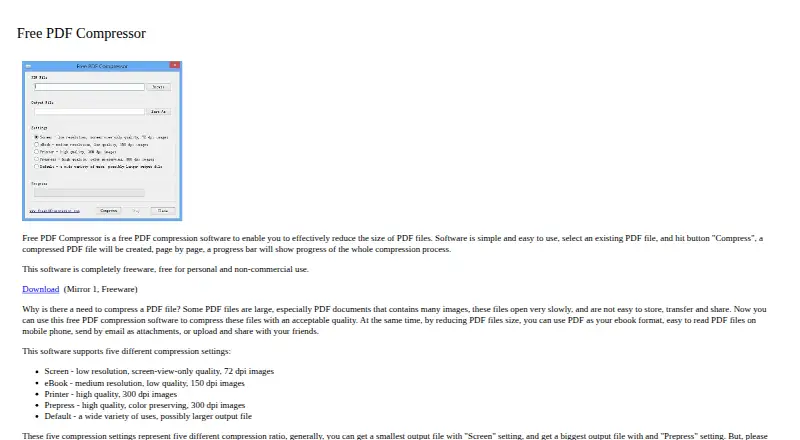
What Free PDF Compressor is
Free PDF Compressor is a Windows desktop app that reduces the size of PDF files. The workflow is to select an existing PDF and start compression; a progress bar shows the process. Users can choose Screen, eBook, Printer, Prepress, or Default settings. Screen uses 72 dpi images and is intended for screen viewing, while eBook uses 150 dpi images and is described as medium resolution with low quality. Printer and Prepress both use 300 dpi images; Printer is described as high quality, and Prepress also preserves color. The maker says Screen generally produces the smallest output and Prepress the largest, though results vary by PDF. Smaller files can be easier to store, transfer, share, email, and read on mobile phones. The software is freeware for personal and non-commercial use, with a listed price of $0. It is listed for Windows 11, 10, 8, 7, and Vista. Questions and suggestions can be sent to support (at) softsea.com.
Who it suits
It suits Windows users who need to reduce PDF file sizes and can choose among the available compression presets. Its stated license is limited to personal and non-commercial use.
What it does well
- Offers five compression settings, including Default.
- Progress bar shows compression activity.
- Preset options vary image resolution and quality.
- Available for Windows 11, 10, 8, 7, and Vista.
What to know first
- Licensed for personal and non-commercial use only.
- Screen and eBook presets use lower-resolution images.
Limits
The freeware license is for personal and non-commercial use. Screen and eBook presets trade image resolution and quality for smaller files, while Prepress generally produces larger output.
Plans
| Plan | Billed and limits | Price |
|---|---|---|
| Free PDF Compressor | Freeware · personal and non-commercial use | Free |
As freepdfcompressor.com lists them, read 5 Oct 2026. The maker's own page has the final word.
Getting started
- Open the Free PDF Compressor website.
- Install the Windows desktop application.
- Select an existing PDF file.
- Choose a compression preset.
- Press Compress and follow the progress bar.
Verdict
Free PDF Compressor provides a simple PDF-size reduction workflow with preset choices that trade image quality against output size. Check the use restriction and select a preset appropriate to the intended output.
Questions
What does Free PDF Compressor cost?
The Free PDF Compressor plan costs nothing and is freeware for personal and non-commercial use.
Which operating systems are supported?
It is available for Windows, including Windows 11, 10, 8, 7, and Vista.
What compression presets are available?
You can choose Screen, eBook, Printer, Prepress, or Default settings.
How do I compress a PDF?
Select an existing PDF, choose Compress, and monitor the progress bar as the compressed file is created.
How can I contact the maker?
Questions, comments, concerns, or suggestions can be emailed to support (at) softsea.com.
Facts from Free PDF Compressor's own pages
- Basic workflow
- Select an existing PDF and press Compress to create a compressed PDF, with a progress bar showing the process. · freepdfcompressor.com, 5 Oct 2026
- Compression presets
- It offers Screen, eBook, Printer, Prepress, and Default compression settings. · freepdfcompressor.com, 5 Oct 2026
- eBook preset
- eBook uses 150 dpi images and is described as medium resolution and low quality. · freepdfcompressor.com, 5 Oct 2026
- Intended use
- The maker describes smaller PDFs as easier to store, transfer, share, email, and read on mobile phones. · freepdfcompressor.com, 5 Oct 2026
- License limit
- The maker says the software is freeware for personal and non-commercial use. · freepdfcompressor.com, 5 Oct 2026
- Maker identity
- The contact address uses the softsea.com domain; the site does not state a company name, headquarters, or founding year on the pages reviewed. · freepdfcompressor.com, 5 Oct 2026
- Platform
- Softpedia lists the product for Windows, including Windows 11, 10, 8, 7, and Vista. · softpedia.com, 5 Oct 2026
- Prepress preset
- Prepress uses 300 dpi images and is described as high quality with color preservation. · freepdfcompressor.com, 5 Oct 2026
- Preset tradeoff
- The site says Screen generally produces the smallest output and Prepress the largest, though results can vary by PDF. · freepdfcompressor.com, 5 Oct 2026
- Printer preset
- Printer uses 300 dpi images and is described as high quality. · freepdfcompressor.com, 5 Oct 2026
- Purpose
- Free PDF Compressor reduces the size of PDF files. · freepdfcompressor.com, 5 Oct 2026
- Screen preset
- Screen uses 72 dpi images and is described as low-resolution, screen-view-only quality. · freepdfcompressor.com, 5 Oct 2026
- Support
- The contact page invites questions, comments, concerns, or suggestions by email at support (at) softsea.com. · freepdfcompressor.com, 5 Oct 2026
Where Free PDF Compressor stands on Freedom251
- PDF Compression Software#15 of 39