Freedom251 › Game Visual Scripting Software

Flowlab
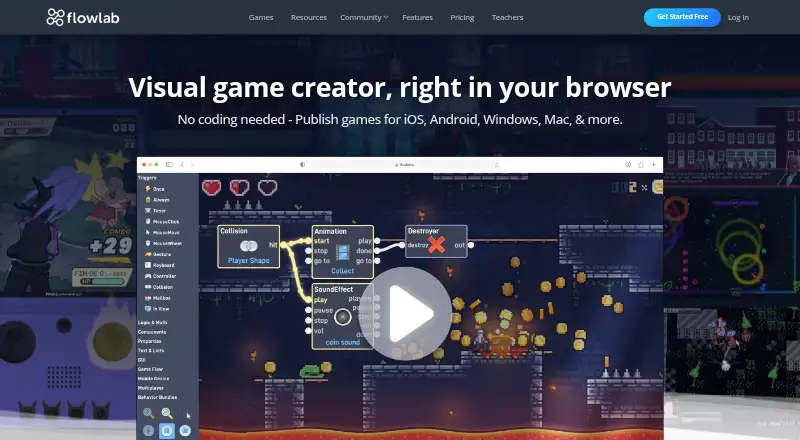
What Flowlab is
Flowlab is a browser-based platform for creating 2D games with visual, node-based behavior logic rather than written code. Its editor includes sprite editing, animation, physics, sound tools, shader effects, and visual debugging. Games run as HTML5 in a browser and get hosted pages that can be shared or embedded on other websites. The Free plan allows three games, five levels per game, and 50 game objects, but does not include exporting. Paid plans can export games for iOS, Android, Windows, and Mac through Flowlab’s build service. Online multiplayer is available for browser games only. Classroom integrations include Clever SSO and roster import, Google Classroom SSO and course import, and LTI for Canvas, Blackboard, and Moodle. Teachers can create student accounts without email addresses and set school-level visibility and community controls. Flowlab is available on Android, iOS, macOS, web, and Windows. Its Teacher plan is aimed at classrooms, camps, and clubs, while its tools also serve students and individual game developers.
Who it suits
Flowlab suits students and individual game developers who want to make 2D games using visual logic. Its classroom integrations and teacher controls may suit classrooms, camps, and clubs.
What it does well
- Visual editor includes animation and physics tools.
- Hosted HTML5 games can be shared or embedded.
- Classroom integrations include Google Classroom and Clever.
- Paid plans offer exports to four desktop and mobile targets.
What to know first
- Free plan limits games, levels, and objects.
- Free plan does not include exporting.
- Online multiplayer is limited to browser games.
- 3D game support is not included.
Limits
The Free plan allows three games, five levels per game, and 50 game objects, with no exporting. Online multiplayer is available for browser games only.
Plans
| Plan | Billed and limits | Price |
|---|---|---|
| Free | $0 / forever · 3 games · 5 levels per game · 50 game objects · no exporting | Free |
| Indie | $ / month; save 46% annually · Unlimited games and objects · all editor features · exports to all platforms · priority support | On request |
| Teacher | / month; save 50% annually · Let's chat! · 1 teacher account · 25 student accounts · enhanced privacy · unlimited games, objects, and exports · purchase via P.O. | On request |
As flowlab.io lists them, read 1 Oct 2026. The maker's own page has the final word.
Getting started
- Open flowlab.io in a browser.
- Choose the Free plan or review the Indie and Teacher plans.
- Create a game in the visual editor using its sprite, animation, physics, sound, and other tools.
- Publish the game as HTML5 to get a hosted page for sharing or embedding.
- Choose a paid plan if you need exports to iOS, Android, Windows, or Mac.
Flowlab is a browser-based 2D game-making environment built around node-based behavior logic. It fits students, educators, and solo developers who want a visual route into game programming, especially when browser distribution matters. The trade-off is clear: its free tier is useful for learning and small prototypes, while serious publishing and classroom administration require an upgrade.
Overview
Flowlab replaces a code-first workflow with connected visual nodes, so creators can assemble game behavior without writing conventional code. The platform is aimed at both individual developers and organized learning settings, with a Teacher offering specifically covering classrooms, camps, and clubs. Its browser foundation keeps creation and play accessible across supported devices, and its hosted pages make sharing straightforward.
This is a focused 2D tool, not a general-purpose engine. It can accommodate scripting and team work, but projects requiring 3D scenes should look elsewhere. Runtime licensing is royalty-free, which is useful when distributing finished games without a per-copy royalty obligation.
Key features
The editor combines sprite drawing, animation, physics, sound production, shader effects, and visual debugging. That is a substantial set of production tools for a visual editor: beginners can progress beyond static scenes, while debugging views can help explain how behaviors move through a game. Visual logic lowers the barrier to experimentation, although developers who prefer full code control may find the node-centered approach restrictive.
Every game can run as HTML5 in a browser and receive a hosted, shareable page. Pages can also be embedded in other websites, making demonstrations, school projects, and lightweight public releases easy to distribute. Browser-only online multiplayer is supported; multiplayer does not extend to exported native builds.
Paid subscriptions can export to iOS, Android, Windows, and Mac through Flowlab's build service. That broadens the audience beyond the web, but export is deliberately withheld from the free tier. Classroom connectivity includes Clever single sign-on and roster import, Google Classroom sign-on and course import, and LTI connections for Canvas, Blackboard, and Moodle. Teachers can create student accounts without email addresses and control school-level visibility and community settings. Flowlab states that it uses industry-standard safeguards, while acknowledging that no system can guarantee against loss, misuse, or insecure transmission. For children below the applicable age of consent, it requires permission from a parent, guardian, or authorized school official before collecting personal data.
Pricing
Free
The Free plan costs nothing, billed at $0 forever. It permits three games, up to five levels per game, and 50 game objects. There is no exporting, so it is best for learning the editor, classroom exercises, and browser prototypes rather than releasing apps on mobile or desktop.
Indie
Indie has custom pricing, billed monthly, with 46% savings when paid annually. It removes the core capacity limits with unlimited games and objects, includes every editor feature, exports to all supported platforms, and adds priority support. This is the practical choice for an individual developer who has outgrown the Free quotas or needs installable releases. The monthly-versus-annual saving favors creators prepared to commit for a year.
Teacher
Teacher also uses custom pricing, billed monthly, with 50% annual savings and purchase by purchase order. One teacher account includes 25 student accounts, enhanced privacy, and unlimited games, objects, and exports. It is tailored to a defined class, camp, or club rather than a solo creator; schools should weigh the single-teacher/25-student structure against their enrollment. Upgrades include priority support, reached through the help button.
Platforms
Flowlab supports Android, iOS, macOS, the web, and Windows. HTML5 browser play is available as the direct publishing route, while iOS, Android, Windows, and Mac exports require a paid plan and Flowlab's build service. It supports 2D games but not 3D.
Who it's for
Students and first-time creators benefit from visual logic and the Free plan's no-cost access. Teachers gain account creation without student email addresses, roster and course imports, learning-platform integration, and school-level controls. Independent developers should choose Indie when they need unlimited capacity, native exports, or the complete editor. Teams can collaborate, but the published Teacher allocation is one teacher and 25 students, so larger programs may need a different arrangement.
Pros and cons
Pros
- Visual node-based behavior lets learners explore programming concepts without making written code the entry point.
- Sprite, animation, physics, audio, shader, and debugging tools cover a broad 2D creation workflow.
- Hosted HTML5 pages and embedding simplify browser sharing.
- Paid exports reach iOS, Android, Windows, and Mac through one build service.
- Teacher integrations and email-free student accounts address practical school administration.
Cons
- The Free plan stops at three games, five levels per game, and 50 objects, with no export.
- There is no 3D support, limiting it to 2D projects.
- Online multiplayer is confined to browser games.
- Teacher is structured around one teacher and 25 students, which may not fit larger cohorts.
- Indie and Teacher prices are custom, making budgeting less transparent before contacting Flowlab.
Alternatives
Choose Game Visual Scripting Software for a broader directory of visual-logic tools. Armory3D is the better fit when an open-source Blender add-on and external SDK are priorities, with a free plan. Pick Construct 3 if you want all features unlocked under its personal license and the option to cancel at any time. GDevelop offers a free starting plan across desktop, mobile, and web platforms. Stencyl is worth considering for web/HTML5 publishing on its Starter plan or desktop publishing on its annual Indie plan. Clickteam Fusion 2.5 suits buyers seeking a one-time PC license, while its free edition has limited HTML5 export. Visionaire Studio is an alternative for freeware projects capped at 25 scenes or a one-time PRO license. CopperCube offers an open-source WebGL engine and free edition. GameMaker is another freemium 2D option, with its free plan restricted to non-commercial use and no console exports.
Verdict
Choose Flowlab for classroom-led learning or individual 2D development where visual logic and quick browser sharing matter most. Its editor, education integrations, and route to native exports give it a coherent path from lesson or prototype to release. Look elsewhere if you need 3D, transparent published pricing, unrestricted free exporting, or multiplayer beyond the browser.
Verdict
Flowlab combines a visual game editor with browser publishing and classroom tools. The Free plan has specific creation limits and no exporting; paid plans add exports to iOS, Android, Windows, and Mac.
Questions
Is Flowlab free?
Yes. Its Free plan costs $0 forever and allows three games, five levels per game, and 50 game objects.
Can I export games on the Free plan?
No. Exports are included with paid plans, which can export to iOS, Android, Windows, and Mac through Flowlab’s build service.
Which platforms does Flowlab support?
Flowlab is available on Android, iOS, macOS, web, and Windows. Games can run as HTML5 in a browser.
Does Flowlab work with classroom platforms?
It supports Clever SSO and roster import, Google Classroom SSO and course import, and LTI for Canvas, Blackboard, and Moodle.
What does the Teacher plan include?
It includes one teacher account, 25 student accounts, enhanced privacy, and unlimited games, objects, and exports. Purchases are via P.O.
Does Flowlab support 3D games?
No. Flowlab supports 2D games.
Facts from Flowlab's own pages
- Audience
- Flowlab describes its tools as serving students and individual game developers, and its Teacher plan is aimed at classrooms, camps, and clubs. · flowlab.io, 1 Oct 2026
- Children's privacy
- For users below the applicable age of consent, Flowlab says it requires consent from a parent, legal guardian, or authorized school official before collecting personal data. · flowlab.io, 1 Oct 2026
- Classroom privacy
- Teacher accounts can create student accounts without email addresses and set school-level visibility and community controls. · flowlab.io, 1 Oct 2026
- Company origin
- Founder Ken Railey says he created Flowlab to introduce programming concepts to his own children. · flowlab.io, 1 Oct 2026
- Editor tools
- The editor includes a sprite editor, animation, physics, sound tools, shader effects, and visual debugging modes. · flowlab.io, 1 Oct 2026
- Exports
- Paid plans can export games for iOS, Android, Windows, and Mac, with Flowlab's build service producing the apps. · flowlab.io, 1 Oct 2026
- Headquarters
- Gulf Breeze, Florida, United States · flowlab.io, 28 Sept 2026
- Integrations
- Classroom integrations include Clever SSO and roster import, Google Classroom SSO and course import, and LTI for Canvas, Blackboard, and Moodle. · flowlab.io, 1 Oct 2026
- Notable limit
- Online multiplayer is available for browser games only. · flowlab.io, 1 Oct 2026
- Product
- Flowlab is a browser-based game creation platform that uses visual, node-based behavior logic instead of requiring written code. · flowlab.io, 1 Oct 2026
- Security
- Flowlab says it uses industry-standard security measures and safeguards, while noting it cannot guarantee prevention of data loss, misuse, or insecure transmission. · flowlab.io, 1 Oct 2026
- Support
- The pricing page says all upgrades include priority support; upgraded users can access it through the help button. · flowlab.io, 1 Oct 2026
- Web publishing
- Games run as HTML5 in the browser, receive hosted shareable pages, and can be embedded on other websites. · flowlab.io, 1 Oct 2026
Where Flowlab stands on Freedom251
- Game Visual Scripting Software#5 of 26