Freedom251 › Website Templates

Flowbase
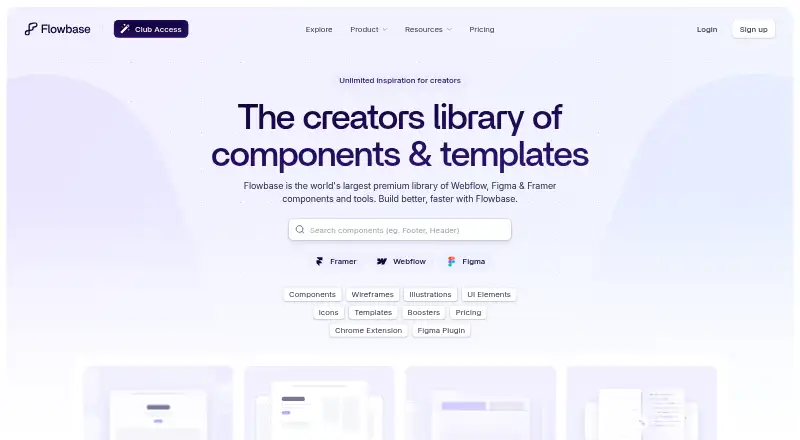
What Flowbase is
Flowbase is a component library for building websites with Webflow, Figma, and Framer. It offers components alongside illustrations, wireframes, icons, and Boosters, and advertises more than 3,500 components, 1,000 premium illustrations, and 15,000 premium icons. Users can copy components to a device clipboard in a format compatible with the selected platform for pasting into projects. Flowbase also offers a Figma Plugin, Webflow Chrome Extension, Webflow Boosters App, and Framer Plugin. Its free Starter plan includes 100+ free components, the listed tools, customer support, and a single-user license. Free components and products are available without payment, but the service does not offer a free trial. Pro+ adds premium components and assets, premium Boosters, and priority support; the pricing note lists it from $27/mo (annual). Copy and paste is supported in Chrome, Firefox, and Edge, but not Safari. Monthly accounts have a limit of 200 component copies, with resets available upon review.
Who it suits
Flowbase may suit people building websites in Webflow, Figma, or Framer who want reusable components and related design assets. Its client-work terms also make it relevant to people creating websites for clients.
What it does well
- Free Starter plan includes 100+ components
- Supports Webflow, Figma, and Framer
- Library advertises 3,500+ components
- Includes illustrations, wireframes, icons, and Boosters
- Components can be copied for direct pasting
What to know first
- No free trial
- Copy and paste is not supported in Safari
- Monthly accounts are limited to 200 component copies
Limits
The free Starter plan includes 100+ free components. Monthly accounts are limited to 200 component copies per month; resets are available upon review.
Plans
| Plan | Billed and limits | Price |
|---|---|---|
| Starter | Free Components 100+ · Chrome Extension · Webflow Boosters · Figma Plugin · Framer Plugin · Customer Support · Single User License | Free |
| Pro+ | $324.00 per year (= $27.00/month, billed annually) · Premium Components 3,500+ · Chalk Wireframes · Premium Illustrations 1,000+ · Premium Icons 15,000+ · Premium Boosters · Chrome Extension · Webflow Boosters · Figma Plugin · Framer Plugin · Priority Support · Discounts to Partner Tools | $324 a year |
| Pro+ | billed monthly · Premium Components 3,500+ · Chalk Wireframes · Premium Illustrations 1,000+ · Premium Icons 15,000+ · Premium Boosters · Chrome Extension · Webflow Boosters · Figma Plugin · Framer Plugin · Priority Support · Discounts to Partner Tools | $39 a month |
As flowbase.co lists them, read 1 Oct 2026. The maker's own page has the final word.
Getting started
- Visit https://www.flowbase.co/.
- Choose the free Starter plan or a paid plan.
- Use the Figma Plugin, Webflow Chrome Extension, Webflow Boosters App or Framer Plugin for your platform.
- Copy a component in Chrome, Firefox or Edge and paste it into a project.
Flowbase is a reusable website component and asset library for Webflow, Figma and Framer. It fits designers, agencies and businesses producing client sites in those tools, particularly when a shared source of components and visual assets can reduce repetitive work. The main trade-offs are a 200-copy monthly account limit, browser restrictions and premium access that starts at a paid subscription.
Overview
Flowbase puts platform-ready components on your device clipboard in the format required by the selected platform, so copying can lead directly to pasting into a project. That is a focused workflow for people already committed to Webflow, Figma or Framer, not a replacement for a general site builder or a standalone design application.
The advertised library contains more than 3,500 components, over 1,000 premium illustrations and over 15,000 premium icons. Wireframes and Boosters broaden it beyond page sections. Free components and products can be used without payment, giving prospective users a genuine way to evaluate the approach before subscribing.
Key features
Components and assets
Starter includes 100+ free components, while Pro+ adds the premium component collection, Chalk Wireframes, illustrations, icons and premium Boosters. The combination is useful when a project needs interface patterns and supporting visuals from one library; users seeking only a narrow component set may not need the larger catalogue.
Connected apps
Flowbase supplies a Figma Plugin, Webflow Chrome Extension, Webflow Boosters App and Framer Plugin. These integrations keep the copy-and-paste process close to the tools where work is built. Customer support is included on Starter, and Pro+ upgrades that to priority support; the Help Center covers extensions, plugins, Boosters, components, wireframes, assets, templates and billing.
Copying and limits
Copy and paste works in Chrome, Firefox and Edge, but not Safari. That exclusion matters to Safari-first users because the central workflow depends on browser support. Monthly accounts allow 200 component copies, with resets available upon review. High-volume production teams should check that quota against their normal reuse rate before choosing a subscription.
Pricing
| Plan | Price | What it includes |
|---|---|---|
| Starter | free | 100+ free components, Chrome Extension, Webflow Boosters, Figma Plugin, Framer Plugin, customer support and a single-user license. |
| Pro+ | $39 a month, billed monthly | 3,500+ premium components, Chalk Wireframes, 1,000+ premium illustrations, 15,000+ premium icons, premium Boosters, all listed apps, priority support and partner-tool discounts. |
The pricing note also states paid access from $27/mo when billed annually, while the listed Pro+ checkout price is $39.00 per month on monthly billing. Starter is the sensible choice for an individual exploring the workflow or needing only free materials; its single-user license and 100+ component cap make it less suitable for a team or a broad client pipeline. Pro+ is aimed at professionals who will use the premium assets and value priority support, but the monthly copy quota still applies. There is no free trial, so the free plan is the available route to assess fit. Flowbase says cancellation does not affect work already built because the service is on-demand.
Platforms
Flowbase supports Webflow, Figma and Framer through its extension, web and companion-plugin ecosystem. It also supports page-builder work, responsive templates and ecommerce templates. Browser-based copying is supported on Chrome, Firefox and Edge, not Safari.
Who it's for
Choose Flowbase if you design or deliver sites in Webflow, Figma or Framer and want reusable sections plus illustrations, wireframes, icons and Boosters. Its stated client-work use makes it relevant to freelancers, agencies and businesses building sites for customers. It is a weaker fit for users outside those platforms, Safari-only workflows or teams whose component-copy volume regularly exceeds 200 per month.
Pros and cons
- Pro: One library combines 3,500+ components with substantial illustration and icon collections, reducing the need to source each category separately.
- Pro: Platform-compatible clipboard copying and dedicated plugins keep reuse close to Webflow, Figma and Framer projects.
- Pro: A free Starter plan includes the core companion apps and 100+ components, with a single-user license.
- Con: Accounts are limited to 200 component copies per month, a constraint for high-output production.
- Con: Copy and paste excludes Safari, narrowing browser choice for that workflow.
- Con: There is no free trial, and premium collections require a paid plan.
Alternatives
Website Template Marketplaces are the broader starting point when you want to compare template sources rather than commit to Flowbase's platform-specific component workflow.
Pick Framer instead when you want a freemium site-building platform with a free plan, free trial, Framer domain, design pages and CMS collections across web and multiple device platforms.
Creative Tim Marketplace is an alternative for browsing and downloading free marketplace templates, with a $29.00 monthly Basic Access Pass.
Choose Drupal or Joomla when you need a free, GPL-based CMS rather than a paid component library; both require a different self-managed approach.
nopCommerce is the better direction for a free, open-source, self-hosted ecommerce platform.
BootstrapMade and TemplateFlip suit readers comparing downloadable web templates with free-license restrictions and optional paid purchases.
Webflow AI is the alternative when Webflow hosting features, AI tools, CMS limits and Webflow domains matter more than a cross-platform asset library.
Verdict
Flowbase is a strong choice for Webflow, Figma and Framer practitioners who want a large, reusable component catalogue with matching visual assets and integrated copying tools. Start with Starter if 100+ free components cover your needs; move to Pro+ when premium breadth and priority support justify the monthly cost. Look elsewhere if Safari support, unrestricted copy volume, a general-purpose CMS or a free trial is essential.
Verdict
Flowbase offers a free entry point and paid access to a larger component and asset library across three platforms. Check browser support and the monthly copy limit if those affect your workflow.
Questions
Is Flowbase free?
Yes. Its Starter plan is listed as free and includes 100+ free components. Free components and products are available without paying.
How much does paid access cost?
The pricing note says paid plans start at $27/mo when billed annually. Pro+ is listed at $39 a month when billed monthly.
Does Flowbase offer a free trial?
No, Flowbase does not offer a free trial.
Which platforms does Flowbase support?
Flowbase offers tools for Webflow, Figma and Framer. Copy and paste works in Chrome, Firefox and Edge, but not Safari.
What is included in Pro+?
Pro+ includes premium components, Chalk Wireframes, premium illustrations and icons, premium Boosters, priority support and discounts to partner tools.
Can I use Flowbase components for client websites?
Yes. Flowbase says its components can be used to create websites for clients.
Facts from Flowbase's own pages
- Apps
- Flowbase offers a Figma Plugin, Webflow Chrome Extension, Webflow Boosters App and Framer Plugin. · flowbase.co, 1 Oct 2026
- Assets
- The membership includes illustrations, wireframes, icons and Boosters in addition to components. · flowbase.co, 1 Oct 2026
- Browser support
- Copy and paste is supported on Chrome, Firefox and Edge but not Safari. · flowbase.co, 1 Oct 2026
- Cancellation
- Flowbase says cancelling a subscription has no impact on anything already built because the service is on-demand. · flowbase.co, 1 Oct 2026
- Client work
- Flowbase says its components can be used to create websites for clients and was built to help businesses get more clients. · flowbase.co, 1 Oct 2026
- Copy and paste
- Copied components are added to the device clipboard in a format compatible with the selected platform for direct pasting into projects. · flowbase.co, 1 Oct 2026
- Free access
- Flowbase provides free components and products that can be used without paying. · flowbase.co, 1 Oct 2026
- Headquarters
- Brisbane, Australia · flowbase.co, 28 Sept 2026
- Library size
- The site advertises 3,500+ components, 1,000+ premium illustrations and 15,000+ premium icons. · flowbase.co, 1 Oct 2026
- Monthly limit
- Monthly accounts are limited to 200 component copies per month, with resets available upon review. · flowbase.co, 1 Oct 2026
- Payment and services
- Flowbase accepts Stripe or credit-card payments and identifies Stripe, Google Analytics, Crisp Chat and Clarity as service providers or cookie partners. · flowbase.co, 1 Oct 2026
- Product
- Flowbase is a website component library with professionally built components for Webflow, Figma and Framer. · flowbase.co, 1 Oct 2026
- Security
- Flowbase says it implements industry-standard security measures to protect personal information, while noting that no online platform can guarantee complete security. · flowbase.co, 1 Oct 2026
- Support
- The Help Center provides support articles for the Chrome Extension, Figma Plugin, Boosters, components, wireframes, assets, templates and billing. · flowbase.co, 1 Oct 2026
- Trial policy
- Flowbase does not offer a free trial. · flowbase.co, 1 Oct 2026
Where Flowbase stands on Freedom251
- Website Templates#3 of 16
- Website Template Marketplaces#12 of 31